


- Posts: 6
- Thank you received: 0
3 Post Moderation Rule for New Boarders (25 Jan 2021)
New boarders will have their posts moderated - Don't worry if you cannot see your post immediately.
AVCHD and .MTS best workflow for no quality loss
- jeff.reetz
-
 Topic Author
- Offline
- New Member
-

Less
More
30 Dec 2015 06:17 #71817
by jeff.reetz
AVCHD and .MTS best workflow for no quality loss was created by jeff.reetz
Hello,
Just to have some background info, I'm a novice at recording and video editing. I read forums like these and have learned a lot. I do it for fun and mostly of family stuff. My son plays youth tackle football (ages 9 & 10) and last year I recorded all his games and edited/created a season highlight DVD of the season. Many people loved it and asked if I could do the older squad as well (ages 11 & 12). It's nothing fancy, but shows some of the hard work they put in and lots of highlights throughout. Great memento to have (wish I had stuff like this from my younger days). If you're interested, here's a link to it:
Now I'm doing the same thing this year but I didn't record the games. I'm getting recordings from a couple sources. Some in AVCHD and the rest in .MTS.
My question is, what is the best workflow to keep the file sizes down and edit the lengths of the games down to only the plays I may use.
For example, the games are fully recorded but are stopped in between each play. So recording starts about 7 seconds before the snap and lasts about 5 or so seconds after the tackle. So each game has about 25 minutes of footage (about 80 clips).
I'd like to bring these clips into FCPX and just do a rough edit of only the plays that I may use for the highlight video. Basically taking 25 minutes of video to about 3-5 minutes of footage that may be used all while organizing and tagging everything. I'd then want to have only these 3-5 minutes of each game stored somewhere so I can delete the full game footage freeing up some space. I'm just a novice and don't need to keep everything for long periods as I don't want to purchase lots of HDDs.
I don't want to lose any image quality. So would the best way be to import the files and not optimize, then do all the tagging and organizing and cutting the footage to all the plays that may be used? Then export this as ProRes 422 or H.264 (as this was the original video clips). These will later be all imported back into FCPX to be edited with all the effects (slo-mo, transitions, titles, etc).
I read here about consolidation. Is that another option where it would take whatever is in the timeline and create a new library of that video only (3-5 minutes). I'm not sure if this would work for me, as I have 10 games that I would be doing this with and eventually I'd want all 10 games and the 3-5 minute footage of each to be in 1 library for editing the project.
Or is there a better way that I don't know about.
Thanks for your time.
Jeff
Just to have some background info, I'm a novice at recording and video editing. I read forums like these and have learned a lot. I do it for fun and mostly of family stuff. My son plays youth tackle football (ages 9 & 10) and last year I recorded all his games and edited/created a season highlight DVD of the season. Many people loved it and asked if I could do the older squad as well (ages 11 & 12). It's nothing fancy, but shows some of the hard work they put in and lots of highlights throughout. Great memento to have (wish I had stuff like this from my younger days). If you're interested, here's a link to it:
Now I'm doing the same thing this year but I didn't record the games. I'm getting recordings from a couple sources. Some in AVCHD and the rest in .MTS.
My question is, what is the best workflow to keep the file sizes down and edit the lengths of the games down to only the plays I may use.
For example, the games are fully recorded but are stopped in between each play. So recording starts about 7 seconds before the snap and lasts about 5 or so seconds after the tackle. So each game has about 25 minutes of footage (about 80 clips).
I'd like to bring these clips into FCPX and just do a rough edit of only the plays that I may use for the highlight video. Basically taking 25 minutes of video to about 3-5 minutes of footage that may be used all while organizing and tagging everything. I'd then want to have only these 3-5 minutes of each game stored somewhere so I can delete the full game footage freeing up some space. I'm just a novice and don't need to keep everything for long periods as I don't want to purchase lots of HDDs.
I don't want to lose any image quality. So would the best way be to import the files and not optimize, then do all the tagging and organizing and cutting the footage to all the plays that may be used? Then export this as ProRes 422 or H.264 (as this was the original video clips). These will later be all imported back into FCPX to be edited with all the effects (slo-mo, transitions, titles, etc).
I read here about consolidation. Is that another option where it would take whatever is in the timeline and create a new library of that video only (3-5 minutes). I'm not sure if this would work for me, as I have 10 games that I would be doing this with and eventually I'd want all 10 games and the 3-5 minute footage of each to be in 1 library for editing the project.
Or is there a better way that I don't know about.
Thanks for your time.
Jeff
Please Log in to join the conversation.


31 Dec 2015 12:24 #71850
by joema
Replied by joema on topic AVCHD and .MTS best workflow for no quality loss
Jeff, I have several recommendations:
(1) Consider not making a DVD but rather uploading to an unlisted Youtube page. Increasingly people do not have devices that can play a DVD. Also DVD is standard def and you are shooting high def. Making a DVD throws away 5/6ths of the resolution.
(2) Re transcoding and quality, in general it is not necessary to transcode to optimized media. Just import with "leave files in place" option. This option may not be available for AVCHD, but you don't need to optimize the media.
(3) Disk space: transcoding to optimized media takes about 8x the space. If you don't want to buy more disk storage, that's another reason to not transcode to optimized media.
(4) The sample you showed could probably benefit from other shot angles. If you can get another shooter down closer that would allow mixing up wide and close up shots during editing. You can even intersperse still images. Those are easy to add to FCPX then you add those and do a "Ken Burns" pan/zoom. This is a visual changeup and can add more detail of specific events.
(5) If using multiple cameras it is helpful to sync them and do a multicam edit. FCPX can do a pretty good job of this via audio. However it works better if you name each camera in the metadata. Procedure:
(a) Import all clips
(b) In Event Browser at top left select List View (it's the button above the red X at left)
(c) In Event Browser, click on clip name to sort by name. All the clips from each camera should be grouped together.
(d) Select a group of clips from one camera (Click on 1st, go to last and Shift-click).
(e) In Inspector at upper right, click on Info button. If Inspector pane is not on, turn it on with Window>Show Inspector
(f) At bottom of Inspector Pane, click the drop-down box and select "General". This shows more details.
(g) In the Inspector Pane, enter a camera name. When you press Enter it will add that camera name to all the clips you have selected in a single step.
(h) Repeat step 4 and 7 for each camera.
(i) In Event Browser, select all clips from all the cameras you added camera name info to.
(j) Right-click on the selected group and select "New Multicam Clip", then set checkbox "use audio for synchronization"
See also MacBreak Studio on multicam editing:
(6) Re consolidating to another library, yes that can be done for only the used media.
Here is another MacBreak Studio discussing "used media ranges":
(1) Consider not making a DVD but rather uploading to an unlisted Youtube page. Increasingly people do not have devices that can play a DVD. Also DVD is standard def and you are shooting high def. Making a DVD throws away 5/6ths of the resolution.
(2) Re transcoding and quality, in general it is not necessary to transcode to optimized media. Just import with "leave files in place" option. This option may not be available for AVCHD, but you don't need to optimize the media.
(3) Disk space: transcoding to optimized media takes about 8x the space. If you don't want to buy more disk storage, that's another reason to not transcode to optimized media.
(4) The sample you showed could probably benefit from other shot angles. If you can get another shooter down closer that would allow mixing up wide and close up shots during editing. You can even intersperse still images. Those are easy to add to FCPX then you add those and do a "Ken Burns" pan/zoom. This is a visual changeup and can add more detail of specific events.
(5) If using multiple cameras it is helpful to sync them and do a multicam edit. FCPX can do a pretty good job of this via audio. However it works better if you name each camera in the metadata. Procedure:
(a) Import all clips
(b) In Event Browser at top left select List View (it's the button above the red X at left)
(c) In Event Browser, click on clip name to sort by name. All the clips from each camera should be grouped together.
(d) Select a group of clips from one camera (Click on 1st, go to last and Shift-click).
(e) In Inspector at upper right, click on Info button. If Inspector pane is not on, turn it on with Window>Show Inspector
(f) At bottom of Inspector Pane, click the drop-down box and select "General". This shows more details.
(g) In the Inspector Pane, enter a camera name. When you press Enter it will add that camera name to all the clips you have selected in a single step.
(h) Repeat step 4 and 7 for each camera.
(i) In Event Browser, select all clips from all the cameras you added camera name info to.
(j) Right-click on the selected group and select "New Multicam Clip", then set checkbox "use audio for synchronization"
See also MacBreak Studio on multicam editing:
(6) Re consolidating to another library, yes that can be done for only the used media.
Here is another MacBreak Studio discussing "used media ranges":
Please Log in to join the conversation.

31 Dec 2015 19:02 #71858
by BenB
Replied by BenB on topic AVCHD and .MTS best workflow for no quality loss
Or use Vimeo:
- Infinity better transcoding than YT.
- Free accounts available.
- Password protected videos, with feedback directly in the comments.
We use this weekly for client reviews and love it.
- Infinity better transcoding than YT.
- Free accounts available.
- Password protected videos, with feedback directly in the comments.
We use this weekly for client reviews and love it.
Please Log in to join the conversation.
- Karsten Schlüter
-

- Offline
- Moderator
-

Less
More
- Posts: 3790
- Thank you received: 718
01 Jan 2016 11:47 - 01 Jan 2016 11:56 #71868
by Karsten Schlüter
Replied by Karsten Schlüter on topic AVCHD and .MTS best workflow for no quality loss
.... reminds me of my beginnings of 'weekly soccer reports' ... 
in addendum what Joe and Ben told you:
concerning your workflow....
don't consider rough cut/export/re-import etc etc ... what if you need more handle? what if you need 'fillers', to hide cuts? Intercut material? And, what about your key-words, smart collections, favorites...:
You don't 'pre cut' in FCPX, you tag.
>> You instantly generate in the far left column several smartlists and keyword collections - using them, using the filters, you edit incredible fast your final report. No need to push gigabytes back'n forth.
... when I started recording my sons games, I used one camera only too, no edits, no graphics, no 'effects'.... last year, I had 4-6 unmanned plus me and my main cam, reduced that to actually 4 ... ok, my set-up is a bit ... swaggy:
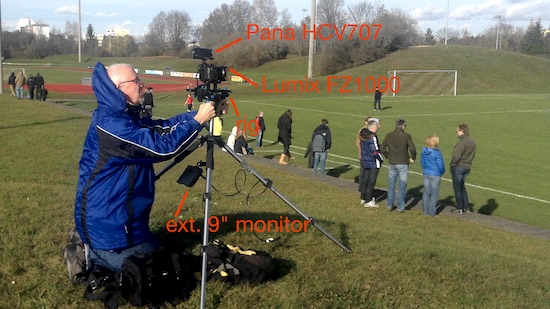
two cams on one rig
the camcorder records 'wide' uncut the game, my latest toy, a LumixFZ1k delivers slow-mos ...
plus two cams pointing at 'the box', and for special games two behind the goals on 5m high tripods....
in result, spending every godd'*** sunday editing, I deliver that >> click to YT
The highlights are seperately, mostly with music YT doesn't allow me to share (I can not watch your video, YT-Germany has cancel it), … ahh, this one used YT-music, made it on my chanel.- I deliver via drive.google or stick, and some grand-parents ask for DVDs - best possible quality = hard to recognize the players on the other side of the green! DVD is a 6th of actual fullHD, plus less color resolution etcetc ...
So, if you have any quality concerns - uncheck 'disks' from your workflow ... :lol:
sidenote: For football, I would ask for at last three manned cameras plus min. three unmanned :woohoo: :woohoo: :woohoo: (yep, we camera Dads are all crrrrazy)
in addendum what Joe and Ben told you:
- file size is no issue… shouldn't be no issue in video making, you get 1TB actually for 50-60€ .... at the end of a season, I'm trashing here 1.5TB of raw data - but only then!
- get familiar with FCPX' feature of managed/external media. Put your Lib on some ext. drive.
- FCPX imports all consumer formats, incl AVCHD - it does a re-wrapping only, no conversion, means .mts gets into a mov, but the internal h264 is kept untouched.
- 'orphaned' mts is a NoGo; mts are part of a AVCHD structure, which should be kept intact by all means; 'stripping off non needed' files can result in loss of valueable meta-data, green flashes, audio out-of-synch etc. Tell your [strike]soccer-moms[/strike] football-dads, you want the SDcard or the 'AVCHD' folder from that card....
- FCPX can handle orphaned mts... but you should avoid that
concerning your workflow....
don't consider rough cut/export/re-import etc etc ... what if you need more handle? what if you need 'fillers', to hide cuts? Intercut material? And, what about your key-words, smart collections, favorites...:
You don't 'pre cut' in FCPX, you tag.
- import everything (here: 6 cameras, 2x40min gameplay = ~60GBs raw)
- on import, check timestamps, cam angle, 'note' what game, what quarter, what ... ever
- concider MultiCam to synch everything (that's done in minutes!)
- first view: favorize scenes, fingers on J/K/L, "oh, nice", hit I, hit O (=setting roughly in and outs), hit F; don't miss: double hit J/L x2 speed, tripple hit x4. Meanwhile I let my son doing that, in less than 15min, he has tagged all scenes worth for a report. As a player he knows best, what to show (and what not).
- second view, watching only favs: key word 'slowmo', 'highlight', 'coach', 'my son'... whatever.
>> You instantly generate in the far left column several smartlists and keyword collections - using them, using the filters, you edit incredible fast your final report. No need to push gigabytes back'n forth.
... when I started recording my sons games, I used one camera only too, no edits, no graphics, no 'effects'.... last year, I had 4-6 unmanned plus me and my main cam, reduced that to actually 4 ... ok, my set-up is a bit ... swaggy:
two cams on one rig
the camcorder records 'wide' uncut the game, my latest toy, a LumixFZ1k delivers slow-mos ...
plus two cams pointing at 'the box', and for special games two behind the goals on 5m high tripods....
in result, spending every godd'*** sunday editing, I deliver that >> click to YT
The highlights are seperately, mostly with music YT doesn't allow me to share (I can not watch your video, YT-Germany has cancel it), … ahh, this one used YT-music, made it on my chanel.- I deliver via drive.google or stick, and some grand-parents ask for DVDs - best possible quality = hard to recognize the players on the other side of the green! DVD is a 6th of actual fullHD, plus less color resolution etcetc ...
So, if you have any quality concerns - uncheck 'disks' from your workflow ... :lol:
sidenote: For football, I would ask for at last three manned cameras plus min. three unmanned :woohoo: :woohoo: :woohoo: (yep, we camera Dads are all crrrrazy)
Last edit: 01 Jan 2016 11:56 by Karsten Schlüter.
Please Log in to join the conversation.
- jeff.reetz
-
Topic Author
- Offline
- New Member
-
Less
More
- Posts: 6
- Thank you received: 0
01 Jan 2016 22:17 #71879
by jeff.reetz
Replied by jeff.reetz on topic AVCHD and .MTS best workflow for no quality loss
Thanks everyone for the replies and all the information. Cool Videos Karsten. I'd love to have all the different camera angles you have. Really makes the game footage come alive with all the different shots you go between. And I agree, if I could have more cameras set up, especially down at the field level for some closeups, it would really help change up the pace for the highlights. I don't have that luxury though. There's only a couple Dads that have cameras willing to record. You'd be surprised how many people don't like recording. And the ones that are willing, well, the recordings aren't so great. Not that I'm such a great videographer, but shaky camera, or when there's a good play the camera starts floating away to the sky (cause they start watching the game with their eyes instead of through the camera, lol). This year, I couldn't record because I was coaching.
Joema:
(1) You're correct. I didn't just make DVD. I made a DVD and a Bluray for each parent that wanted one. You'd be surprised how many people still don't have a bluray player. The Bluray turned out nice. I'd love to just do a digital copy though where everyone could just watch on their TV (or any device). But it seems if they are still behind on Bluray players, then digital copies would be over their head as well.
(2/3) Yeah, for AVCHD you can't leave files in place. Have to copy to library. The libraries were getting up to 300GB. I probably had optimized on and didn't realize it. But whatever you put into the Timeline, will that automatically get optimized or transcoded??? I did buy a 2 TB thunderbolt external HD. But since I'll be recording many things of the family. Just wanted to find ways to reduce file sizes without losing any of the original image quality. But deleting all the original files after the project is finished is a good idea to free up space.
(4) Diff camera angles would be sweet. I only started this to make some videos for my son though. When I was practicing and putting some stuff out on FaceBook, a lot of the other parents really liked it and asked about highlights for the season of the team. So I kinda fell into it. I don't make any money, just asked enough to buy the materials (DVD n Bluray and case).
Intermixing photos is a good idea though, thanks, I will keep that in mind.
(5) Question about multicam. With football, the game footage is not recorded continuously. Since there is stoppage of play and at times can be long lengths between plays, the footage is stopped about 8 seconds after play and started about 5 seconds before the snap. So if you did have multiple cameras, how would you sync them up since they start and stop at diff times?? Would that have to be done manually then?
Thanks for all the videos. I'll have to check more of their stuff out. Very informative.
thanks very much.
Joema:
(1) You're correct. I didn't just make DVD. I made a DVD and a Bluray for each parent that wanted one. You'd be surprised how many people still don't have a bluray player. The Bluray turned out nice. I'd love to just do a digital copy though where everyone could just watch on their TV (or any device). But it seems if they are still behind on Bluray players, then digital copies would be over their head as well.
(2/3) Yeah, for AVCHD you can't leave files in place. Have to copy to library. The libraries were getting up to 300GB. I probably had optimized on and didn't realize it. But whatever you put into the Timeline, will that automatically get optimized or transcoded??? I did buy a 2 TB thunderbolt external HD. But since I'll be recording many things of the family. Just wanted to find ways to reduce file sizes without losing any of the original image quality. But deleting all the original files after the project is finished is a good idea to free up space.
(4) Diff camera angles would be sweet. I only started this to make some videos for my son though. When I was practicing and putting some stuff out on FaceBook, a lot of the other parents really liked it and asked about highlights for the season of the team. So I kinda fell into it. I don't make any money, just asked enough to buy the materials (DVD n Bluray and case).
Intermixing photos is a good idea though, thanks, I will keep that in mind.
(5) Question about multicam. With football, the game footage is not recorded continuously. Since there is stoppage of play and at times can be long lengths between plays, the footage is stopped about 8 seconds after play and started about 5 seconds before the snap. So if you did have multiple cameras, how would you sync them up since they start and stop at diff times?? Would that have to be done manually then?
Thanks for all the videos. I'll have to check more of their stuff out. Very informative.
thanks very much.
Please Log in to join the conversation.
01 Jan 2016 22:46 #71881
by joema
Jeff, if anyone has a GoPro or an iPhone they are willing to strap to a goal post, you can get interesting shots from those. There are all kinds of devices to mount small cameras with: joby.com/
If you could convince a referee to wear a GoPro chest mount that would provide some good shots:
shop.gopro.com/mounts/chesty-chest-harness/GCHM30-001.html
Re stop/start during the game, this is generally no problem. If you ensure each camera is named in the FCPX metadata (using previously described procedure), and if each camera has halfway decent audio, each clip will be automatically sync'd with respect to the others. For periods where some cameras were not running, there will just be blank regions in the timeline for those. The 3rd party product PluralEyes is superb at this: www.redgiant.com/products/pluraleyes/
However FCPX is pretty good at syncing via audio -- provided the cameras are named. I have sync'd 40 clips from three cameras using just FCPX. The "secret" trick is ensure the cameras are named in the metadata.
Replied by joema on topic AVCHD and .MTS best workflow for no quality loss
jeff.reetz wrote: ...if I could have more cameras set up, especially down at the field level for some closeups, it would really help change up the pace for the highlights...Diff camera angles would be sweet....Question about multicam. With football, the game footage is not recorded continuously. Since there is stoppage of play and at times can be long lengths between plays, the footage is stopped about 8 seconds after play and started about 5 seconds before the snap. So if you did have multiple cameras, how would you sync them up since they start and stop at diff times?? Would that have to be done manually then?....
Jeff, if anyone has a GoPro or an iPhone they are willing to strap to a goal post, you can get interesting shots from those. There are all kinds of devices to mount small cameras with: joby.com/
If you could convince a referee to wear a GoPro chest mount that would provide some good shots:
shop.gopro.com/mounts/chesty-chest-harness/GCHM30-001.html
Re stop/start during the game, this is generally no problem. If you ensure each camera is named in the FCPX metadata (using previously described procedure), and if each camera has halfway decent audio, each clip will be automatically sync'd with respect to the others. For periods where some cameras were not running, there will just be blank regions in the timeline for those. The 3rd party product PluralEyes is superb at this: www.redgiant.com/products/pluraleyes/
However FCPX is pretty good at syncing via audio -- provided the cameras are named. I have sync'd 40 clips from three cameras using just FCPX. The "secret" trick is ensure the cameras are named in the metadata.
Please Log in to join the conversation.
- Karsten Schlüter
-
- Offline
- Moderator
-
Less
More
- Posts: 3790
- Thank you received: 718
02 Jan 2016 08:01 - 02 Jan 2016 08:30 #71883
by Karsten Schlüter
Replied by Karsten Schlüter on topic AVCHD and .MTS best workflow for no quality loss
glad, Jeff, you found my lengthy reply helpful ...
try to be shorter now ...
BluRay:
most people don't know, their Playstation 3/4 is a full-flavored BRplayer (and some XBoxes) ... AND can playback mp4 too ... on this side of the pond, disks are for movie-afficionados only, streaming services get fancy more and more, amazon, netflix, ...
Optimized
not needed on an actual Mac + fast ext. HDD/SSD
Additional cam angles
All parents like such videos, all have smartphones, none is recording. Solved that with unmanned, fixed cams on tripods; switch on 5min before game, change batteries halftime (you have quarters? easy)
Advantage soccer: we play 'zones'; football plays players. So, I can point a fixed cam to the 16m-box - it will catch the action. In football, the action could be any time any where! Football demands manned cams (on tripods) ... anyhow, love all the 'toys' invented for football, spider-cam, or THIS **** machine…
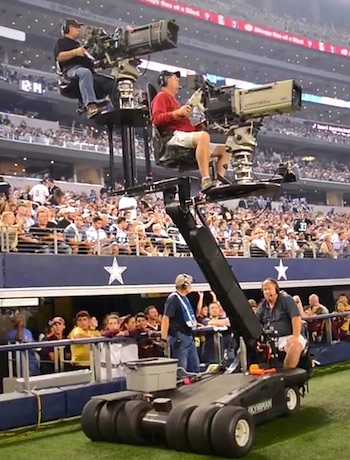
(want one!! )
Poor man solution: I have a here is a 'tripod dolly', you get <30$ at amazons. Not in use for soccer, but probably handy for football: you can 'shift' your position in seconds to be 'on the line' (sorry, no idea of your football-terms). OK, depends on location, you need a 'runway' all along the playfield....
@Joe: a referee cam? crazy idea, love it! ... shakey? plus, over here, §12 of soccer-rules doesn't allow to touch the ref, by player, coach or any other ... try to imagine the reaction, when I'd ask "may I attach this to your ..." :silly:
Synching/Start/Stop
in my beginnings using MultiCam/MC, I tried Audio Synch - you won't believe it: all this randomly yelling and noises work!! But there is a much faster way:
check for each cam-angle a 'generic' sign , here: whistle blow at beginning, but could be anything else while game! While in the Event browser, set a marker (hit M, blue dot). When creating the MC, check 'synch on first marker' - boom, done! My MCs are created in seconds (remember: 6 streams, 40min each) The synch is done by that marker plus the time stamps of each cam-angle, the timestamps don't have to be synch on all cams (!). My cams have diff. framerates additionally - no prob.
And: no need for continous recording, the timelime looks a bit tattered, but it works ...
No need for 3rd party products/Plural Eyes ......
For quit a while, I do have a website in the making, how I do my reports, not up yet ... should consider an English version.... (OMG!)
//shorter but still too much text .... :dry: :blink: :lol: //
try to be shorter now ...
BluRay:
most people don't know, their Playstation 3/4 is a full-flavored BRplayer (and some XBoxes) ... AND can playback mp4 too ... on this side of the pond, disks are for movie-afficionados only, streaming services get fancy more and more, amazon, netflix, ...
Optimized
not needed on an actual Mac + fast ext. HDD/SSD
Additional cam angles
All parents like such videos, all have smartphones, none is recording. Solved that with unmanned, fixed cams on tripods; switch on 5min before game, change batteries halftime (you have quarters? easy)
Advantage soccer: we play 'zones'; football plays players. So, I can point a fixed cam to the 16m-box - it will catch the action. In football, the action could be any time any where! Football demands manned cams (on tripods) ... anyhow, love all the 'toys' invented for football, spider-cam, or THIS **** machine…
(want one!!
)Poor man solution: I have a here is a 'tripod dolly', you get <30$ at amazons. Not in use for soccer, but probably handy for football: you can 'shift' your position in seconds to be 'on the line' (sorry, no idea of your football-terms). OK, depends on location, you need a 'runway' all along the playfield....
@Joe: a referee cam? crazy idea, love it! ... shakey? plus, over here, §12 of soccer-rules doesn't allow to touch the ref, by player, coach or any other ... try to imagine the reaction, when I'd ask "may I attach this to your ..." :silly:
Synching/Start/Stop
in my beginnings using MultiCam/MC, I tried Audio Synch - you won't believe it: all this randomly yelling and noises work!! But there is a much faster way:
check for each cam-angle a 'generic' sign , here: whistle blow at beginning, but could be anything else while game! While in the Event browser, set a marker (hit M, blue dot). When creating the MC, check 'synch on first marker' - boom, done! My MCs are created in seconds (remember: 6 streams, 40min each) The synch is done by that marker plus the time stamps of each cam-angle, the timestamps don't have to be synch on all cams (!). My cams have diff. framerates additionally - no prob.
And: no need for continous recording, the timelime looks a bit tattered, but it works ...
No need for 3rd party products/Plural Eyes ......
For quit a while, I do have a website in the making, how I do my reports, not up yet ... should consider an English version.... (OMG!)
//shorter but still too much text .... :dry: :blink: :lol: //
Last edit: 02 Jan 2016 08:30 by Karsten Schlüter.
Please Log in to join the conversation.
- jeff.reetz
-
Topic Author
- Offline
- New Member
-
Less
More
- Posts: 6
- Thank you received: 0
05 Jan 2016 01:26 #71940
by jeff.reetz
Replied by jeff.reetz on topic AVCHD and .MTS best workflow for no quality loss
Thanks Guys!!!
Love the GoPro on a referee idea. Lol, They'd never go for it though. Probably be afraid of being scrutinized for missing penalties. "Dude, it's right there on the GoPro cam, how did you miss that!!!"
I do have a Contour camera (it's just like a GoPro), records in high def and even a little smaller. Has a lot of diff ways to mount it. I always wanted to mount it inside my kids helmet to get those kind of shots. Be sweet. But for safety reasons, probably wouldn't allow that. So much worry about concussions in football, don't want to do any type of tampering with the helmets. I like the idea of using it as an unmanned camera. maybe attached to a goal post. My luck would be that no action would ever get to the end I place it, lol. I could use my iPhone as another camera for the other end. Great ideas.
But yeah, american football games have some sweet toys for recording the games, lol.
I practiced naming the cameras. How long does it take for 3 videos of about 30 minutes each where one is 4 clips, another like 90 clips and another as 1 clip? It was taking a while.
Karsten, when you get your website up, let me know, I'd love to check it out.
thanks for everything guys.
Jeff
Love the GoPro on a referee idea. Lol, They'd never go for it though. Probably be afraid of being scrutinized for missing penalties. "Dude, it's right there on the GoPro cam, how did you miss that!!!"
I do have a Contour camera (it's just like a GoPro), records in high def and even a little smaller. Has a lot of diff ways to mount it. I always wanted to mount it inside my kids helmet to get those kind of shots. Be sweet. But for safety reasons, probably wouldn't allow that. So much worry about concussions in football, don't want to do any type of tampering with the helmets. I like the idea of using it as an unmanned camera. maybe attached to a goal post. My luck would be that no action would ever get to the end I place it, lol. I could use my iPhone as another camera for the other end. Great ideas.
But yeah, american football games have some sweet toys for recording the games, lol.
I practiced naming the cameras. How long does it take for 3 videos of about 30 minutes each where one is 4 clips, another like 90 clips and another as 1 clip? It was taking a while.
Karsten, when you get your website up, let me know, I'd love to check it out.
thanks for everything guys.
Jeff
Please Log in to join the conversation.
- Karsten Schlüter
-
- Offline
- Moderator
-
Less
More
- Posts: 3790
- Thank you received: 718
05 Jan 2016 10:27 #71947
by Karsten Schlüter
about a second, or two? have a look:
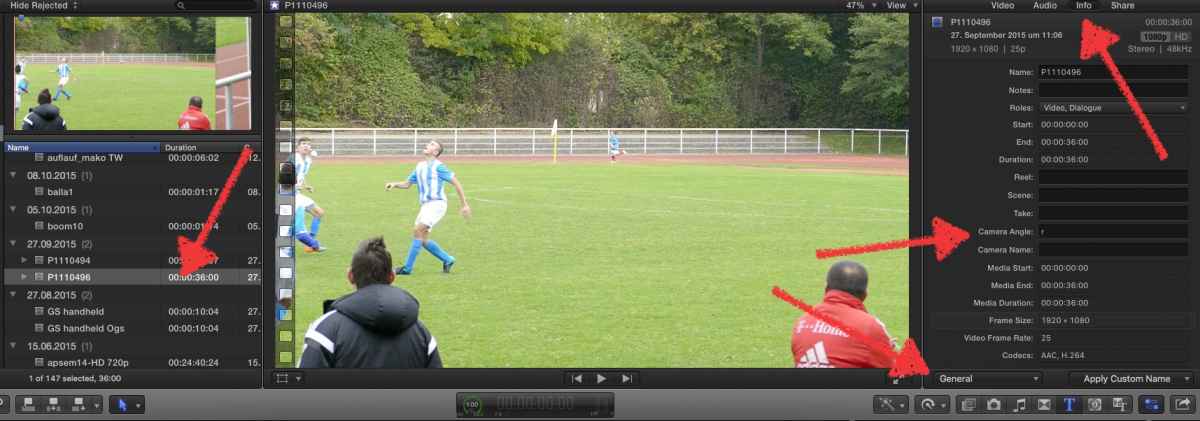
on the left, a camera import (you select several, not only one)
on the right, the Inspector, Tab Info, set to 'general' (bottom)
you're now alowed to give new names, and for MC more important, cam angles
here, in a hurry, the angle is named 'r' ....
what's handy, lower right 'Apply custom names', to rename clips on a batch ...
I'm using for example the Notes field to indicate 1st half, 2nd half.
when creating my MC, in the Events browser, set to list mode, I sort by Notes - presto! - all clips, all cams, from first halftime ...
Replied by Karsten Schlüter on topic AVCHD and .MTS best workflow for no quality loss
jeff.reetz wrote: T… How long does it take for 3 videos of about 30 minutes each where one is 4 clips, another like 90 clips and another as 1 clip? …
about a second, or two? have a look:
on the left, a camera import (you select several, not only one)
on the right, the Inspector, Tab Info, set to 'general' (bottom)
you're now alowed to give new names, and for MC more important, cam angles
here, in a hurry, the angle is named 'r' ....
what's handy, lower right 'Apply custom names', to rename clips on a batch ...
I'm using for example the Notes field to indicate 1st half, 2nd half.
when creating my MC, in the Events browser, set to list mode, I sort by Notes - presto! - all clips, all cams, from first halftime ...
Please Log in to join the conversation.
