


- Posts: 60
- Thank you received: 1
3 Post Moderation Rule for New Boarders (25 Jan 2021)
New boarders will have their posts moderated - Don't worry if you cannot see your post immediately.
Archive Footage into FCPX
21 Dec 2015 23:01 - 21 Dec 2015 23:05 #71673
by RickLFoy
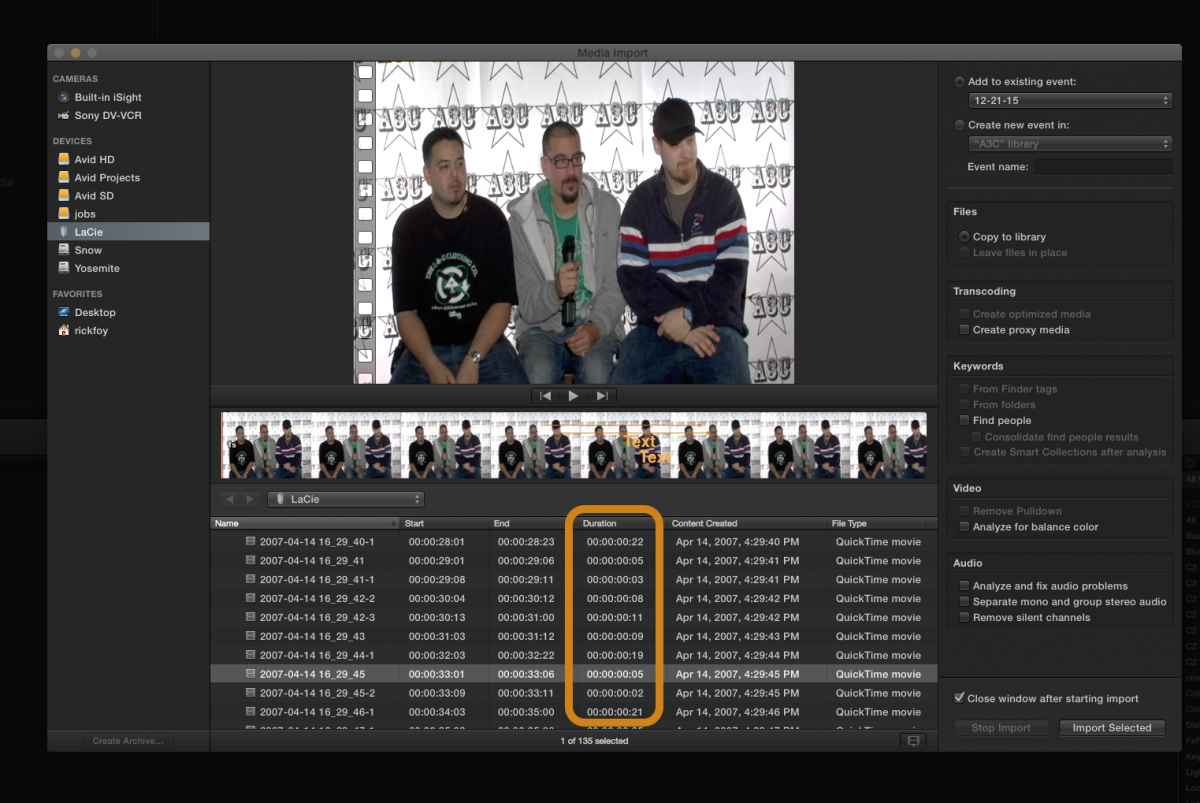
Can anyone please tell me why does FCPX archive footage in segments instead of one long media file? How can I get longer files into FCPX without cutting them short? Where is the feature located in the input phase? I am trying to archive old footage for later use in FCPX. Here is an example; look inside the GOLD outline.
Archive Footage into FCPX was created by RickLFoy
Can anyone please tell me why does FCPX archive footage in segments instead of one long media file? How can I get longer files into FCPX without cutting them short? Where is the feature located in the input phase? I am trying to archive old footage for later use in FCPX. Here is an example; look inside the GOLD outline.
Last edit: 21 Dec 2015 23:05 by RickLFoy.
Please Log in to join the conversation.


22 Dec 2015 02:02 #71674
by dgwvideo
Creating history....one edit at a time !
Replied by dgwvideo on topic Archive Footage into FCPX
It looks like a new clip is being created when the import encounters a timecode break. If you notice the stop and start times of each clip, the next clip advanced a few to several frames from the previous. I am guessing you are importing from the Sony DV-VCR device as shown in the import section. If that device has a TBC you can turn on or a setting to reference an internal clock sync rather than syncing off tape, you might be able to get a continuous recording.
So, likely this is not an issue with FCPX, but rather normal operation as it captures continuously as long as there is stable video present. Another option would be to run your Sony deck thru a DV converter that can provide a continuous stream for capture, such as any of the Grass Valley line of DV converters.
One more option would be to use Quicktime 7 or X and start a new movie recording. Start playback on your deck and then hit record in quicktime. Preset the quality you want for capture. Quicktime will ignore any timecode breaks, dropouts, etc. and record continuously until you stop it. Then in FCPX, import the quicktime file. If you don't want to duplicate the files, select to leave them in place when you import.
So, likely this is not an issue with FCPX, but rather normal operation as it captures continuously as long as there is stable video present. Another option would be to run your Sony deck thru a DV converter that can provide a continuous stream for capture, such as any of the Grass Valley line of DV converters.
One more option would be to use Quicktime 7 or X and start a new movie recording. Start playback on your deck and then hit record in quicktime. Preset the quality you want for capture. Quicktime will ignore any timecode breaks, dropouts, etc. and record continuously until you stop it. Then in FCPX, import the quicktime file. If you don't want to duplicate the files, select to leave them in place when you import.
Creating history....one edit at a time !
Please Log in to join the conversation.
22 Dec 2015 03:24 #71675
by RickLFoy
Replied by RickLFoy on topic Archive Footage into FCPX
Thank you for the detail information I am about to try it out to see if it works. I really do appreciate this. I am still learning FCPX. It is a little difficult coming from Avid but still I am determine to learn this application. Thanks again.
Please Log in to join the conversation.
24 Dec 2015 14:41 #71709
by RickLFoy
Replied by RickLFoy on topic Archive Footage into FCPX
I had to use quicktime 7 pro to get this footage encoded. Thanks again for that tip now I am getting a lot accomplished.
Please Log in to join the conversation.
