




- Posts: 291
- Thank you received: 8
3 Post Moderation Rule for New Boarders (25 Jan 2021)
New boarders will have their posts moderated - Don't worry if you cannot see your post immediately.
Cant fully use this media.....??????
20 Dec 2015 17:21 - 20 Dec 2015 18:36 #71639
by waternyc
Cant fully use this media.....?????? was created by waternyc
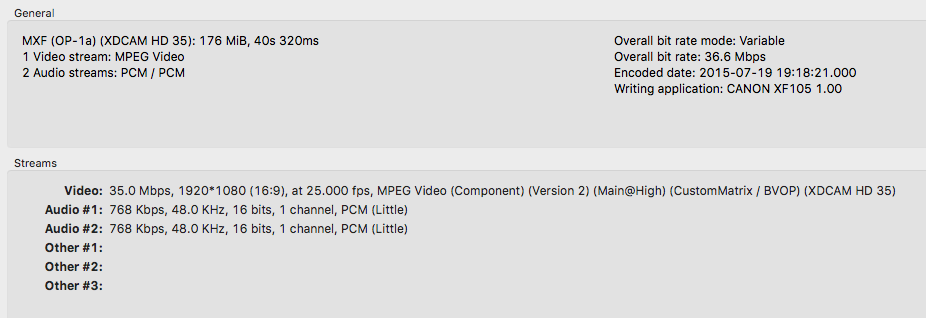
So a client gave me these files, just as they are, for me to edit them. They seem to be from a Canon XF105. (Tangent: While the specs are much like my Sony NX5u, the footage is craaaaap) But whatever the case may be, FCPX had some trouble importing the clips. Once I managed to do so by downloading some plugin from Canons site...the footage is now semi-compatible.
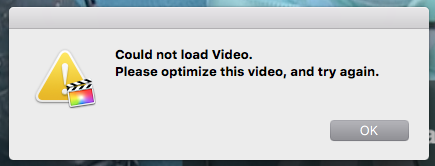
In a salvage attempt I have tried to stabilize the footage with core melt I get the message "optimize media". What does this mean? The media is optimized....(what do i need to do here?) #coremelt ???
If anyone has any luck with the direction of this....then think about sharing some solutions....otherwise Merry Christmas.
In a salvage attempt I have tried to stabilize the footage with core melt I get the message "optimize media". What does this mean? The media is optimized....(what do i need to do here?) #coremelt ???
If anyone has any luck with the direction of this....then think about sharing some solutions....otherwise Merry Christmas.
Last edit: 20 Dec 2015 18:36 by waternyc. Reason: more info
Please Log in to join the conversation.

21 Dec 2015 02:34 #71649
by ddixon
Replied by ddixon on topic Cant fully use this media.....??????
I have an XF100 (which by the way shoots pretty nice footage if you learn to set it up correctly but I now use a Sony X70).
Anyway, no, you can't import unless you have the XF plugin from Canon. However, as of the last time I did this a year ago, you cannot use FCPX to optimize the footage. You are forced to import and edit native. Optimize means of course to transcode to ProRes, but FCPX won't do that to these clips. I don't know why Coremelt is requiring you to use ProRes, but you may be limited to just using the built-in FCPX stabilizer.
I don't know if things like EditReady ($49) will convert this footage or not.
Anyway, no, you can't import unless you have the XF plugin from Canon. However, as of the last time I did this a year ago, you cannot use FCPX to optimize the footage. You are forced to import and edit native. Optimize means of course to transcode to ProRes, but FCPX won't do that to these clips. I don't know why Coremelt is requiring you to use ProRes, but you may be limited to just using the built-in FCPX stabilizer.
I don't know if things like EditReady ($49) will convert this footage or not.
Please Log in to join the conversation.
21 Dec 2015 06:22 #71655
by waternyc
Replied by waternyc on topic Cant fully use this media.....??????
@ddixon. Awesome. Thanks for the info.
Unfortunately, I didn't shoot this footage and although the bit rate is fairly high, this guy probably did not know how to set up the camera...
Has anyone tried EditReady? or should I just shell out the 49bucks???
Unfortunately, I didn't shoot this footage and although the bit rate is fairly high, this guy probably did not know how to set up the camera...
Has anyone tried EditReady? or should I just shell out the 49bucks???
Please Log in to join the conversation.


21 Dec 2015 13:49 #71660
by joema
Replied by joema on topic Cant fully use this media.....??????
I think EditReady should work. However if you point me to a modest-size downloadable sample of XF105 MXF material I'll be happy to test it with EditReady and several other converters.waternyc wrote: ...Has anyone tried EditReady? or should I just shell out the 49bucks???
Please Log in to join the conversation.
21 Dec 2015 14:07 #71661
by ddixon
Replied by ddixon on topic Cant fully use this media.....??????
Sorry I couldn't do this last night - I do have EditReady and just tried it.
It does work. It converts raw .mxf clips from my XF100 to ProRes. There is a trial you can check out:
www.divergentmedia.com/editready
I also just tried FCPX again, and like before, it still will not transcode these files. I have read somewhere that these MPEG-2 clips are already very edit-friendly so evidently Apple and Canon have decided they do not need transcoding. So that option is greyed out in the Import window. I'm still puzzled that Lock and Load is requiring "optimized" clips to work. Did you try the FCPX stabilizer? That would be the easiest if it will fit your needs.
Anyway, hope this helps and good luck.
It does work. It converts raw .mxf clips from my XF100 to ProRes. There is a trial you can check out:
www.divergentmedia.com/editready
I also just tried FCPX again, and like before, it still will not transcode these files. I have read somewhere that these MPEG-2 clips are already very edit-friendly so evidently Apple and Canon have decided they do not need transcoding. So that option is greyed out in the Import window. I'm still puzzled that Lock and Load is requiring "optimized" clips to work. Did you try the FCPX stabilizer? That would be the easiest if it will fit your needs.
Anyway, hope this helps and good luck.
Please Log in to join the conversation.
21 Dec 2015 14:42 #71663
by waternyc
Replied by waternyc on topic Cant fully use this media.....??????
Hey guys, thanks for all your help. Yes FCPX stabilizer does work and fortunately it was enough for this project. I'll give divergent media a go anyway.....
Please Log in to join the conversation.
21 Dec 2015 18:50 #71669
by Julian
Replied by Julian on topic Cant fully use this media.....??????
DaVinci Resolve Lite is free and usually does a good job transcoding media like this.
Please Log in to join the conversation.

23 Dec 2015 17:54 #71698
by dfphoto
Replied by dfphoto on topic Cant fully use this media.....??????
Hi I had the xf100 and editing right now using the RAW files from the camera, I think you need the pro camera update in os x. Anyway, if that doesn't work, get mpeg streamclip and convert to ProRes then import and cut as you need.
It's free....
It's free....
Please Log in to join the conversation.
24 Dec 2015 04:33 #71706
by ddixon
Replied by ddixon on topic Cant fully use this media.....??????
Have you actually done this? My copy of MPEG Streamclip can't open the native .mxf clips from the XF100, so of course can't convert them to anything at all.
Please Log in to join the conversation.
24 Dec 2015 05:22 #71707
by dfphoto
Replied by dfphoto on topic Cant fully use this media.....??????
Oh crap, you're right so sorry, I guess I used Pavtube 35.00 but I'm cutting a bunch of video now in fcpx 10.22 and I'm not converting or using the canon importer...
literally right this second, on my laptop.
literally right this second, on my laptop.
Please Log in to join the conversation.
