


- Posts: 19
- Thank you received: 0
3 Post Moderation Rule for New Boarders (25 Jan 2021)
New boarders will have their posts moderated - Don't worry if you cannot see your post immediately.
Hello and working on the laptop vs mac pro choice
- martinresi
-
 Topic Author
- Offline
- New Member
-

Less
More
17 Dec 2015 06:40 #71558
by martinresi
Hello and working on the laptop vs mac pro choice was created by martinresi
Hi,
I just found and joined fcp.co and wanted to say hello! I'm sorta new to video editing but couldn't believe how far I got with FCPX and a 2011 Macbook Pro. I'm researching on what to get next and deciding between macbook pro or mac pro. I'm guessing many of you have faced that same decision. If you know any good resources that can help clear it all up let me know.
Thanks!
Todd
I just found and joined fcp.co and wanted to say hello! I'm sorta new to video editing but couldn't believe how far I got with FCPX and a 2011 Macbook Pro. I'm researching on what to get next and deciding between macbook pro or mac pro. I'm guessing many of you have faced that same decision. If you know any good resources that can help clear it all up let me know.
Thanks!
Todd
Please Log in to join the conversation.
- Stereodesign
-
- Offline
- Junior Member
-

Less
More
- Posts: 32
- Thank you received: 1
17 Dec 2015 11:08 #71560
by Stereodesign
Replied by Stereodesign on topic Hello and working on the laptop vs mac pro choice
Horses for courses. All depends on what you do/intend to do.
I edit in a Macbook Pro with Thunderbolt monitor and a couple of TB RAIDs and find for my edits, which are Education, museum and a little bit of corporate, it works perfectly.
I shoot 4k now and edit in proxy, without noticing any slowdowns.
If your are a power user it might have to be a Mac Pro!
I edit in a Macbook Pro with Thunderbolt monitor and a couple of TB RAIDs and find for my edits, which are Education, museum and a little bit of corporate, it works perfectly.
I shoot 4k now and edit in proxy, without noticing any slowdowns.
If your are a power user it might have to be a Mac Pro!
Please Log in to join the conversation.


17 Dec 2015 11:12 - 17 Dec 2015 12:37 #71561
by joema
Replied by joema on topic Hello and working on the laptop vs mac pro choice
I have a 2013 and 2015 top-spec iMac 27, and a 2015 top-spec MBP. In general if you don't absolutely need portability an iMac or Mac Pro is a more comfortable, productive editing environment. There's nothing wrong with the MBP and you can hook it to a 27" Thunderbolt monitor but the fans spin up more frequently than an iMac, and it's not as fast as a top-spec 2015 iMac 27.
However you can do major editing on a MBP. Part of the Will Smith movie Focus was edited on MacBooks, and the recent documentary on Treeman of Venice Beach was edited on a MBP.
The current "new" Mac Pro design is two years old and likely getting close to a refresh. Nobody knows when or what form this will take.
The 2015 top-spec iMac 27 is very fast. In very rough terms it is about equal in many areas to an 8-core Mac Pro.
For serious editing you need to consider significant storage, and ideally two different backups for that. E.g, a Thunderbolt RAID array, another pretty fast disk of equal size to back it up continuously via Time Machine, then yet another disk or array for off-line Carbon Copy backup. So unfortunately the storage requirement (and cost) is about triple what you'd first think.
Assuming you have finite money, this is a factor in choosing a computer for video editing. Your overall budget must allow for sufficient storage and backup for everything.
With a Mac Pro you'd need to get a monitor plus this storage. With an iMac an excellent monitor comes built in.
If you are mainly working with H264 files and/or exporting final H264 material, the iMac's CPU has Quick Sync which is probably faster at export than a 12-core Mac Pro (which uses Xeon and doesn't have Quick Sync).
That said the Mac Pro is quieter and the D700 GPUs are faster for some effect-related tasks. An 8-12 core Mac Pro will be faster for some CPU-bound operations since it has so many cores. If you can afford an 8-12 core Mac Pro, 4k monitor and adequate storage and backup, that is the way to go. However for many video editing tasks (inc'l 4k) a top-spec iMac 27 will handle those very well.
However you can do major editing on a MBP. Part of the Will Smith movie Focus was edited on MacBooks, and the recent documentary on Treeman of Venice Beach was edited on a MBP.
The current "new" Mac Pro design is two years old and likely getting close to a refresh. Nobody knows when or what form this will take.
The 2015 top-spec iMac 27 is very fast. In very rough terms it is about equal in many areas to an 8-core Mac Pro.
For serious editing you need to consider significant storage, and ideally two different backups for that. E.g, a Thunderbolt RAID array, another pretty fast disk of equal size to back it up continuously via Time Machine, then yet another disk or array for off-line Carbon Copy backup. So unfortunately the storage requirement (and cost) is about triple what you'd first think.
Assuming you have finite money, this is a factor in choosing a computer for video editing. Your overall budget must allow for sufficient storage and backup for everything.
With a Mac Pro you'd need to get a monitor plus this storage. With an iMac an excellent monitor comes built in.
If you are mainly working with H264 files and/or exporting final H264 material, the iMac's CPU has Quick Sync which is probably faster at export than a 12-core Mac Pro (which uses Xeon and doesn't have Quick Sync).
That said the Mac Pro is quieter and the D700 GPUs are faster for some effect-related tasks. An 8-12 core Mac Pro will be faster for some CPU-bound operations since it has so many cores. If you can afford an 8-12 core Mac Pro, 4k monitor and adequate storage and backup, that is the way to go. However for many video editing tasks (inc'l 4k) a top-spec iMac 27 will handle those very well.
Last edit: 17 Dec 2015 12:37 by joema.
Please Log in to join the conversation.

17 Dec 2015 12:36 #71564
by BenB
Replied by BenB on topic Hello and working on the laptop vs mac pro choice
We're all waiting for a CPU/GPU combination to be released that would make the Mac Pro worth Apple's time to upgrade. They don't seem to be improving those components as fast as they used to. Where are our 4-6Ghz CPUs? 3Ghz range has been a top speed for years now.
Please Log in to join the conversation.
- cinemaloha
-
- Offline
- Elite Member
-

Less
More
- Posts: 163
- Thank you received: 36
17 Dec 2015 13:14 - 17 Dec 2015 13:23 #71567
by cinemaloha
Right!?!! So much for Moore's Law.
It all depends on your budget & projects (present & future).
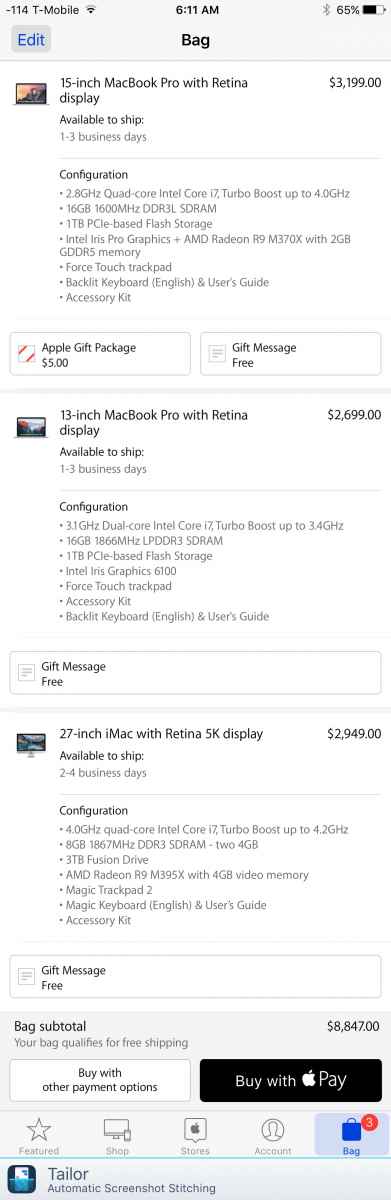
Here are some numbers for you. The MBPr are maxed out (not user upgrade-able). For the iMac, get OWC RAM or similar. Add $249 for AppleCare, if you opt for it.
Replied by cinemaloha on topic Hello and working on the laptop vs mac pro choice
BenB wrote: Where are our 4-6Ghz CPUs? 3Ghz range has been a top speed for years now.
Right!?!! So much for Moore's Law.
martinresi wrote: I'm researching on what to get next and deciding between macbook pro or mac pro. I'm guessing many of you have faced that same decision.
It all depends on your budget & projects (present & future).
Here are some numbers for you. The MBPr are maxed out (not user upgrade-able). For the iMac, get OWC RAM or similar. Add $249 for AppleCare, if you opt for it.
Last edit: 17 Dec 2015 13:23 by cinemaloha. Reason: AppleCare
Please Log in to join the conversation.
17 Dec 2015 13:17 - 17 Dec 2015 13:22 #71568
by joema
Unfortunately physics has reared its ugly head So-called "Dennard Scaling" plateaued around 2007:
en.wikipedia.org/wiki/Dennard_scaling There is no immediate solution to this.
Since then decreasing feature size has facilitated adding more cores, so the new Xeon E7-8890 v3 has 18 cores and can do nearly 3 teraflops. However the heat problem limits the base frequency to 2.5Ghz and turbo to 3.3Ghz. The recommended single-unit price for the chip is $7,700, so Apple probably won't be using that -- even with their discounts.
Also since around 2007 further optimization in IPC "Instructions Per Clock" have produced significantly faster CPUs at the same clock speed. The 4Ghz Skylake i7 in my iMac is 70% faster (GeekBench) than the 4Ghz Lynnfield i7 in my Windows PC.
Unfortunately they are approaching the limits of how much parallelism can be extracted from an instruction stream, and these improvements will likely diminish in future versions.
Even worse, the heat problem is starting to affect how much of the chip can stay powered on. This is called the "dark silicon" problem. Even though integration allows putting more systems on the chip they cannot all be used concurrently. A key paper was "Dark Silicon and the End of Multicore Scaling":
www.cc.gatech.edu/~hadi/doc/paper/2012-t...cks-dark_silicon.pdf
Fabrication itself is becoming much harder, recently forcing Intel to abandon their "tick tock" development cadence. Normally after a new micro-architecture (Skylake) the procedure would be doing a die shrink but this time the Skylake successor Kaby Lake will be a new micro-architecture on the same 14nm process.
Increasingly, performance improvements will come from heterogeneous processing features such as Quick Sync, AVX vector instructions, etc, which software must specifically access.
The GPU side is not quite as limited and there are significant future gains available from an architecture and fabrication standpoint. However that only helps if the highly parallel programming model can be leveraged. E.g, long-GOP encode/decode cannot be significantly accelerated via GPU techniques.
Replied by joema on topic Hello and working on the laptop vs mac pro choice
BenB wrote: ...They don't seem to be improving those components as fast as they used to. Where are our 4-6Ghz CPUs? 3Ghz range has been a top speed for years now.
Unfortunately physics has reared its ugly head
So-called "Dennard Scaling" plateaued around 2007:en.wikipedia.org/wiki/Dennard_scaling There is no immediate solution to this.
Since then decreasing feature size has facilitated adding more cores, so the new Xeon E7-8890 v3 has 18 cores and can do nearly 3 teraflops. However the heat problem limits the base frequency to 2.5Ghz and turbo to 3.3Ghz. The recommended single-unit price for the chip is $7,700, so Apple probably won't be using that -- even with their discounts.
Also since around 2007 further optimization in IPC "Instructions Per Clock" have produced significantly faster CPUs at the same clock speed. The 4Ghz Skylake i7 in my iMac is 70% faster (GeekBench) than the 4Ghz Lynnfield i7 in my Windows PC.
Unfortunately they are approaching the limits of how much parallelism can be extracted from an instruction stream, and these improvements will likely diminish in future versions.
Even worse, the heat problem is starting to affect how much of the chip can stay powered on. This is called the "dark silicon" problem. Even though integration allows putting more systems on the chip they cannot all be used concurrently. A key paper was "Dark Silicon and the End of Multicore Scaling":
www.cc.gatech.edu/~hadi/doc/paper/2012-t...cks-dark_silicon.pdf
Fabrication itself is becoming much harder, recently forcing Intel to abandon their "tick tock" development cadence. Normally after a new micro-architecture (Skylake) the procedure would be doing a die shrink but this time the Skylake successor Kaby Lake will be a new micro-architecture on the same 14nm process.
Increasingly, performance improvements will come from heterogeneous processing features such as Quick Sync, AVX vector instructions, etc, which software must specifically access.
The GPU side is not quite as limited and there are significant future gains available from an architecture and fabrication standpoint. However that only helps if the highly parallel programming model can be leveraged. E.g, long-GOP encode/decode cannot be significantly accelerated via GPU techniques.
Last edit: 17 Dec 2015 13:22 by joema.
Please Log in to join the conversation.
- cinemaloha
-
- Offline
- Elite Member
-
Less
More
- Posts: 163
- Thank you received: 36
17 Dec 2015 13:21 - 17 Dec 2015 13:26 #71569
by cinemaloha
Replied by cinemaloha on topic Hello and working on the laptop vs mac pro choice
I'm waiting on graphene processors to take over silicon chips.
Last edit: 17 Dec 2015 13:26 by cinemaloha. Reason: Silly Silicon
Please Log in to join the conversation.
- martinresi
-
Topic Author
- Offline
- New Member
-
Less
More
- Posts: 19
- Thank you received: 0
17 Dec 2015 21:00 #71586
by martinresi
Replied by martinresi on topic Hello and working on the laptop vs mac pro choice
Thanks all for your input!!!
Didn't realize the iMac was such a solid choice, now I'm deciding between iMac and Macbook pro but leaning towards the iMac because I don't really need portability and could use a good monitor. I also appreciate the input on storage drives, I have a lot to learn about that and workflow. RAID, arrays, SATA, PCIe, SSD, OWC RAM, Carbon Copy & Time Machine are all foreign to me. I have a lot of research to do!
Correct me if I'm wrong, but if I go with a 2015 iMac 27, are these important upgrades? 4GHZ vs 3.3GHz? OWC RAM? 3TB instead of 2TB Fusion drive? Which is SSD drive right? Is this what I'll be installing OSX and final cut onto? Is this good enough as it is, or is this something that needs to be upgraded? the thunderbolt RAID Array would be the external media drive? Then what should the other 2 backup drives be? 7200 rpm thunderbolt connected externals? SATA? 3.5" Should all the drives be connected using thunderbolt 2? or should some be usb3? Sorry if I'm way off here, currently I have osx and fcpx on laptop drive, then i use 1 media drive 7200rpm connected by thunderbolt 1. When drive gets close to filled, I buy another one and create a new library. This is my own novice way of doing things which i Know can be greatly improved. If anyone feels like rambling about their hardware setups or workflow go for it i'm listening.
One more thing. Is this correct?
The speed of drives:
fastest to slowest - RAID, SSD, SATA, 3.5"
Hard drive connections:
fastest to slowest - Internal/PCIe, External Thunderbolt 2, USB 3.0, firewire, USB
Thanks again for the advice!
Didn't realize the iMac was such a solid choice, now I'm deciding between iMac and Macbook pro but leaning towards the iMac because I don't really need portability and could use a good monitor. I also appreciate the input on storage drives, I have a lot to learn about that and workflow. RAID, arrays, SATA, PCIe, SSD, OWC RAM, Carbon Copy & Time Machine are all foreign to me. I have a lot of research to do!
Correct me if I'm wrong, but if I go with a 2015 iMac 27, are these important upgrades? 4GHZ vs 3.3GHz? OWC RAM? 3TB instead of 2TB Fusion drive? Which is SSD drive right? Is this what I'll be installing OSX and final cut onto? Is this good enough as it is, or is this something that needs to be upgraded? the thunderbolt RAID Array would be the external media drive? Then what should the other 2 backup drives be? 7200 rpm thunderbolt connected externals? SATA? 3.5" Should all the drives be connected using thunderbolt 2? or should some be usb3? Sorry if I'm way off here, currently I have osx and fcpx on laptop drive, then i use 1 media drive 7200rpm connected by thunderbolt 1. When drive gets close to filled, I buy another one and create a new library. This is my own novice way of doing things which i Know can be greatly improved. If anyone feels like rambling about their hardware setups or workflow go for it i'm listening.
One more thing. Is this correct?
The speed of drives:
fastest to slowest - RAID, SSD, SATA, 3.5"
Hard drive connections:
fastest to slowest - Internal/PCIe, External Thunderbolt 2, USB 3.0, firewire, USB
Thanks again for the advice!
Please Log in to join the conversation.
18 Dec 2015 04:44 #71590
by BenB
Replied by BenB on topic Hello and working on the laptop vs mac pro choice
Where's my telepathic interface, and flying car?
Please Log in to join the conversation.
18 Dec 2015 15:40 #71602
by joema
You can get by with less but video editing is very CPU and GPU intensive. If you ever use optimized media it takes lots of space and can become I/O intensive. There are still some refurbished 2013 top-spec iMac 27s kicking around, and they are pretty good editing machines at a lower price. However the retina display on the 2015 models is very nice and sharp.
There are various Thunderbolt RAID arrays, including Promise Pegasus series, OWC Thunderbay 4, G-Tech and CalDigit. For a modest-size (say around 8TB) a 4-drive RAID-5 array works out well.
Yes the RAID array (and your system drive) should be backed up. That normally requires at least that much storage. A less-expensive way to back it up is a two-drive RAID-0 array like a G-Tech G-Raid, or similar. Ideally I would recommend two different backups -- a continuously-connected drive for Time Machine and an intermittently-connected drive for disk cloning, e.g, Carbon Copy or SuperDuper.
I usually have four copies of active project content: original camera files on portable USB hard drives, primary RAID-5 array, Time Machine backup on continuously-connected Time Machine RAID-0 array, Carbon Copy backup on intermittently-connected RAID-0 array. After the project is completed, keep the original camera files and finished library files on (one or more) portable hard drives. Larger installations may use LTO tape for this.
Re FCPX space consumption, it is easy for this to chew up a lot of space for temporary and render files. An easy way to keep track of this and delete non-essential temp files is Final Cut Library File Manager:
www.arcticwhiteness.com/finalcutlibrarymanager/
Replied by joema on topic Hello and working on the laptop vs mac pro choice
In general I'd recommend a max'd out iMac 27, which means 4Ghz i7, M395X GPU and 32GB. Re 2/3TB Fusion Drive vs SSD, it doesn't matter that much since your media will be external. However in general I'd recommend SSD, either 512GB or 1TB. OWC RAM is OK.martinresi wrote: ...if I go with a 2015 iMac 27, are these important upgrades? 4GHZ vs 3.3GHz? OWC RAM? 3TB instead of 2TB Fusion drive? Which is SSD drive right....the thunderbolt RAID Array would be the external media drive? Then what should the other 2 backup drives be?...
You can get by with less but video editing is very CPU and GPU intensive. If you ever use optimized media it takes lots of space and can become I/O intensive. There are still some refurbished 2013 top-spec iMac 27s kicking around, and they are pretty good editing machines at a lower price. However the retina display on the 2015 models is very nice and sharp.
There are various Thunderbolt RAID arrays, including Promise Pegasus series, OWC Thunderbay 4, G-Tech and CalDigit. For a modest-size (say around 8TB) a 4-drive RAID-5 array works out well.
Yes the RAID array (and your system drive) should be backed up. That normally requires at least that much storage. A less-expensive way to back it up is a two-drive RAID-0 array like a G-Tech G-Raid, or similar. Ideally I would recommend two different backups -- a continuously-connected drive for Time Machine and an intermittently-connected drive for disk cloning, e.g, Carbon Copy or SuperDuper.
I usually have four copies of active project content: original camera files on portable USB hard drives, primary RAID-5 array, Time Machine backup on continuously-connected Time Machine RAID-0 array, Carbon Copy backup on intermittently-connected RAID-0 array. After the project is completed, keep the original camera files and finished library files on (one or more) portable hard drives. Larger installations may use LTO tape for this.
Re FCPX space consumption, it is easy for this to chew up a lot of space for temporary and render files. An easy way to keep track of this and delete non-essential temp files is Final Cut Library File Manager:
www.arcticwhiteness.com/finalcutlibrarymanager/
Please Log in to join the conversation.
18 Dec 2015 16:59 #71606
by VidGreg
Replied by VidGreg on topic Hello and working on the laptop vs mac pro choice
Hi Todd, welcome to the forums.
Personally, I think the place to start in deciding what configuration of system(computer, external storage and more) you need, is what type of video will you be editing now and in the future.
If you only edit single camera, Standard Def(SD) or even High Def 1080 (HD) your requirements will be much lower than if you edit multi-cam with lots of effects or 4K and higher resolution. So I suggest you start with the question "What will I be editing".
Here is a pretty good article by Larry Jordan on "Configuring Your System" … www.larryjordan.biz/app_bin/wordpress/archives/2559
Larry also manages to answer most of your questions re:relative speeds of interfaces. He leaves out a couple of newer developments, namely PCIe and USB3 (3.1 gen 1 vs 2) and USAP.
Concerning RAID, first determine if you need it. It may or may not be faster than say a single ssd. Read Larry's article. RAIDs can be great if you really need the speed, but come with some potential issues.
I do not recommend using RAID as part of a back-up strategy and prefer simple large capacity hdds (2 at least) and USB3 w/UASP is fine. The bus is faster than the drive(s) even if you use ssd. Others will strongly disagree with me here, but all configuration of RAIDS are subject to user error and don't provide the incremental back-up you really need.
BareFeats has many good articles comparing different systems and configurations… barefeats.com/index.html
If you decide to go with a new iMac, here is one article on BF comparing iMac 5K retinas… barefeats.com/imac5k16.html
Gotta to love the 27" Retina screen. I would definitely recommend the 27" oner the 21" for lots of reasons including user replaceable RAM and screen real estate.
There are other good sites out there as well.
Happy Editing
Hope this helps, Greg
Personally, I think the place to start in deciding what configuration of system(computer, external storage and more) you need, is what type of video will you be editing now and in the future.
If you only edit single camera, Standard Def(SD) or even High Def 1080 (HD) your requirements will be much lower than if you edit multi-cam with lots of effects or 4K and higher resolution. So I suggest you start with the question "What will I be editing".
Here is a pretty good article by Larry Jordan on "Configuring Your System" … www.larryjordan.biz/app_bin/wordpress/archives/2559
Larry also manages to answer most of your questions re:relative speeds of interfaces. He leaves out a couple of newer developments, namely PCIe and USB3 (3.1 gen 1 vs 2) and USAP.
Concerning RAID, first determine if you need it. It may or may not be faster than say a single ssd. Read Larry's article. RAIDs can be great if you really need the speed, but come with some potential issues.
I do not recommend using RAID as part of a back-up strategy and prefer simple large capacity hdds (2 at least) and USB3 w/UASP is fine. The bus is faster than the drive(s) even if you use ssd. Others will strongly disagree with me here, but all configuration of RAIDS are subject to user error and don't provide the incremental back-up you really need.
BareFeats has many good articles comparing different systems and configurations… barefeats.com/index.html
If you decide to go with a new iMac, here is one article on BF comparing iMac 5K retinas… barefeats.com/imac5k16.html
Gotta to love the 27" Retina screen. I would definitely recommend the 27" oner the 21" for lots of reasons including user replaceable RAM and screen real estate.
There are other good sites out there as well.
Happy Editing
Hope this helps, Greg
Please Log in to join the conversation.
- martinresi
-
Topic Author
- Offline
- New Member
-
Less
More
- Posts: 19
- Thank you received: 0
18 Dec 2015 20:42 #71615
by martinresi
Replied by martinresi on topic Hello and working on the laptop vs mac pro choice
Thanks for all that!!
and that Larry Jordan article is great for understanding the hardware!
Right now I'm just burning blu rays, 1080p using 1 or 2 camera shoots, effects on most every clip, but usually just typical color correction, exposure, dissolves, titles, etc. I would like to get my feet wet with 4K before the system is obsolete.
If I can afford the iMac setup I'll get it, but I can see how the upgrades & externals can run the price through the roof. I won't be disappointed if I end up with a 15" Macbook Pro, I'm so impressed with the performance I'm getting with the one I have now from 2011. If I go with macbook, I'll do the internal SSD upgrade to HD and have thunderbolt 2 for my media drive, it will certainly be sufficient, both of which i don't have now with my 2011 Macbook.
and that Larry Jordan article is great for understanding the hardware!
Right now I'm just burning blu rays, 1080p using 1 or 2 camera shoots, effects on most every clip, but usually just typical color correction, exposure, dissolves, titles, etc. I would like to get my feet wet with 4K before the system is obsolete.
If I can afford the iMac setup I'll get it, but I can see how the upgrades & externals can run the price through the roof. I won't be disappointed if I end up with a 15" Macbook Pro, I'm so impressed with the performance I'm getting with the one I have now from 2011. If I go with macbook, I'll do the internal SSD upgrade to HD and have thunderbolt 2 for my media drive, it will certainly be sufficient, both of which i don't have now with my 2011 Macbook.
Please Log in to join the conversation.
- cinemaloha
-
- Offline
- Elite Member
-
Less
More
- Posts: 163
- Thank you received: 36
19 Dec 2015 17:22 #71630
by cinemaloha
If you want to save, you can upgrade your current MBP.
I have a 17" Early-2011 MBP 2.2GHz i7 for 1080p work. I've extend its service life for video work with an upgraded to 16GB RAM, system HD to Crucial M4 SSD, removed Optical Drive for a Hybrid SSD, and I have Thunderbolt 1 RAID. If I do 4k, I'll work with proxy.
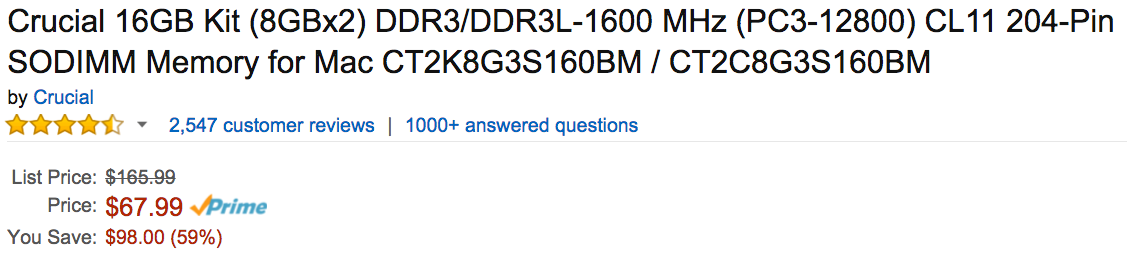
16GB RAM $68
amzn.com/B008LTBJFW
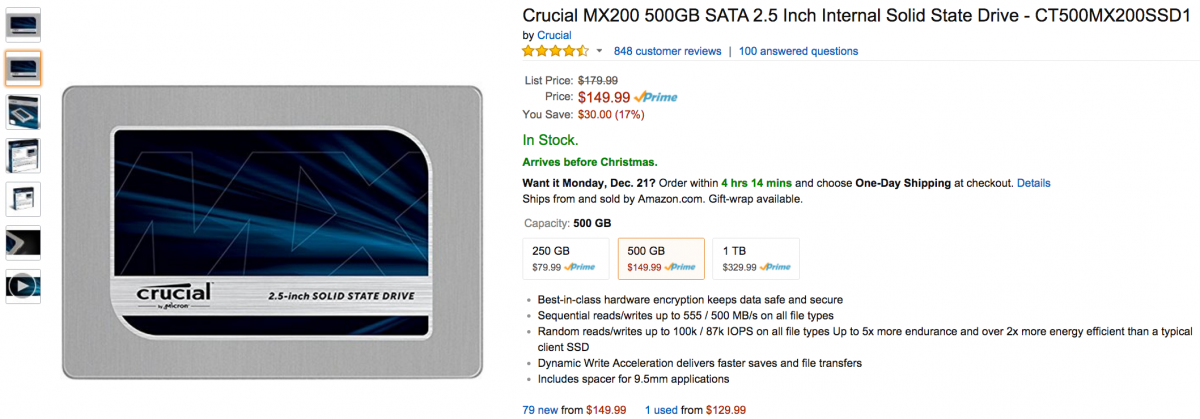
500GB SSD $150
amzn.com/B00RQA6E20
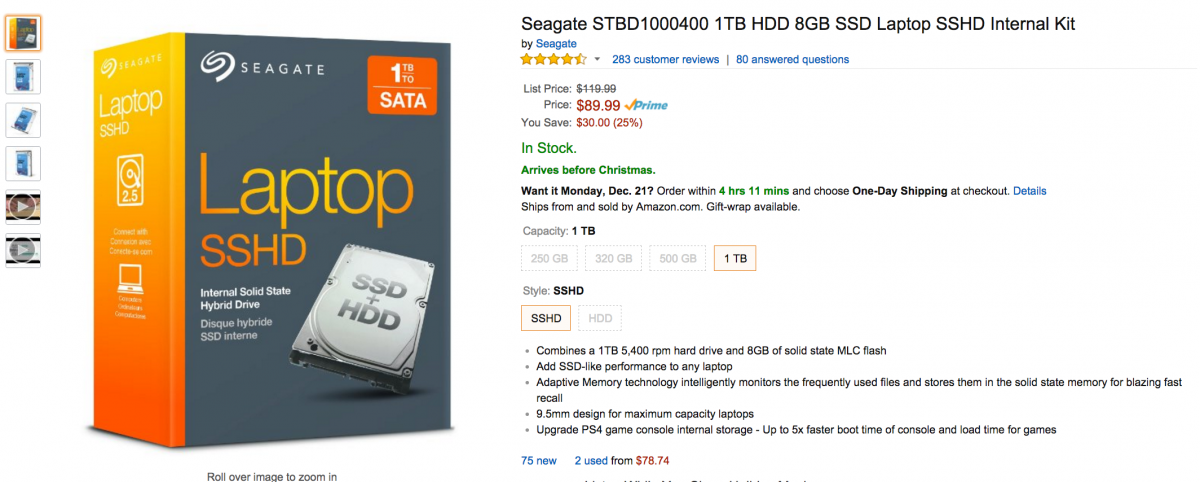
1TB HybridSSD $90
amzn.com/B00BSH3CCC
Hard Drive Caddy Tray $8
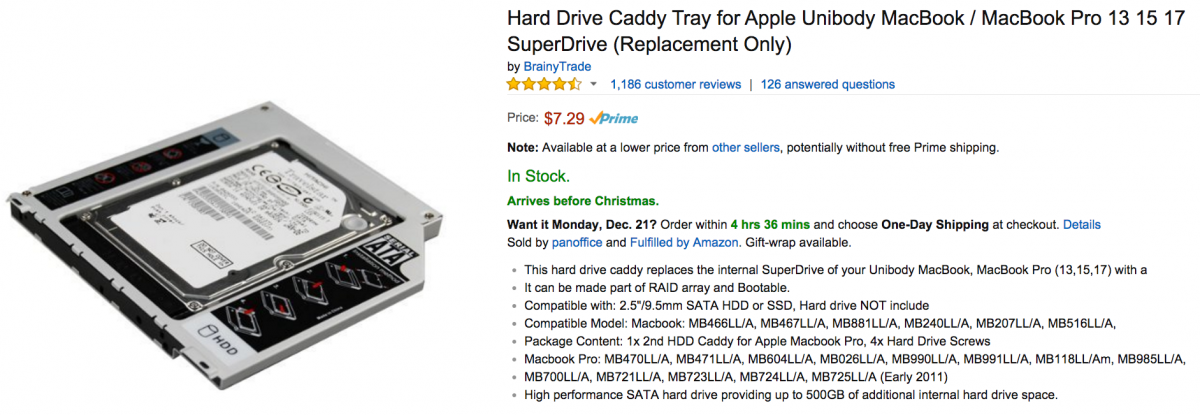
amzn.com/B0058AH2US
Total: ~$316
If you want to add a used Thunderbolt 1 RAID, you can get this Promise Pegasus R6 for $915 shipped:
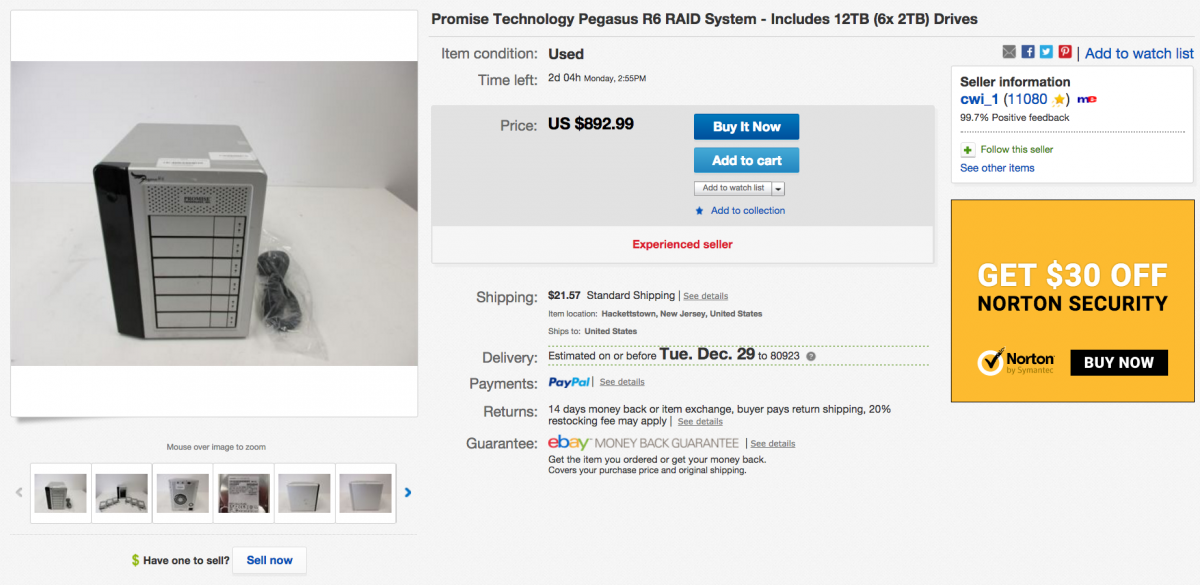
goo.gl/ePZ29z
Total: ~$1,231
If you're impressed with your current performance, you'll be pleasantly surprised with just the $316 upgrade.
Replied by cinemaloha on topic Hello and working on the laptop vs mac pro choice
martinresi wrote:
Right now I'm just burning blu rays, 1080p using 1 or 2 camera shoots, effects on most every clip, but usually just typical color correction, exposure, dissolves, titles, etc. I would like to get my feet wet with 4K before the system is obsolete.
If I can afford the iMac setup I'll get it, but I can see how the upgrades & externals can run the price through the roof. I won't be disappointed if I end up with a 15" Macbook Pro, I'm so impressed with the performance I'm getting with the one I have now from 2011. If I go with macbook, I'll do the internal SSD upgrade to HD and have thunderbolt 2 for my media drive, it will certainly be sufficient, both of which i don't have now with my 2011 Macbook.
If you want to save, you can upgrade your current MBP.
I have a 17" Early-2011 MBP 2.2GHz i7 for 1080p work. I've extend its service life for video work with an upgraded to 16GB RAM, system HD to Crucial M4 SSD, removed Optical Drive for a Hybrid SSD, and I have Thunderbolt 1 RAID. If I do 4k, I'll work with proxy.
16GB RAM $68
amzn.com/B008LTBJFW
500GB SSD $150
amzn.com/B00RQA6E20
1TB HybridSSD $90
amzn.com/B00BSH3CCC
Hard Drive Caddy Tray $8
amzn.com/B0058AH2US
Total: ~$316
If you want to add a used Thunderbolt 1 RAID, you can get this Promise Pegasus R6 for $915 shipped:
goo.gl/ePZ29z
Total: ~$1,231
If you're impressed with your current performance, you'll be pleasantly surprised with just the $316 upgrade.
Please Log in to join the conversation.
- cinemaloha
-
- Offline
- Elite Member
-
Less
More
- Posts: 163
- Thank you received: 36
19 Dec 2015 17:29 #71631
by cinemaloha
Flying car, not yet. But telepathic interface...

emotiv.com/
Imagine editing with this
Replied by cinemaloha on topic Hello and working on the laptop vs mac pro choice
BenB wrote: Where's my telepathic interface, and flying car?
Flying car, not yet. But telepathic interface...
emotiv.com/
Imagine editing with this
Please Log in to join the conversation.
20 Dec 2015 15:32 #71636
by VidGreg
Replied by VidGreg on topic Hello and working on the laptop vs mac pro choice
OWC recently published an interactive comparison between certain models using a couple of test. Far from comprehensive, but interesting.
Using interactive tabs it is possible to see how RAM effects the test results. You can also get an idea of the differences between i7, i5, and different GPUs.
Includes some legacy towers, but not any MBPs.
Just thought I'd add the info to the discussion.
OWC link… eshop.macsales.com/shop/apple/memory/iMa...s-Mac-Pro-Speed-Test
Hope this helps, Greg
Using interactive tabs it is possible to see how RAM effects the test results. You can also get an idea of the differences between i7, i5, and different GPUs.
Includes some legacy towers, but not any MBPs.
Just thought I'd add the info to the discussion.
OWC link… eshop.macsales.com/shop/apple/memory/iMa...s-Mac-Pro-Speed-Test
Hope this helps, Greg
Please Log in to join the conversation.
21 Dec 2015 20:25 #71671
by davechap
Replied by davechap on topic Hello and working on the laptop vs mac pro choice
This BareFeats test actually tests the latest MacBook Pro, 27" retina iMac and quad-core Mac Pro:
barefeats.com/imac5k10.html
It really depends on how mobile you want to be. I went with this MacBook Pro (the week it came out) and it's been great for me. I do have an external monitor I connect to when I need it. If I was planning on having a computer stay in my home office and that's where I spent all my time, the iMac would have been a no brainier. I suspect the next updates to the iMac will bring the flash storage up to speed with the MacBook Pro (this is where it beats it out currently). I don't think I'd ever go back to a Mac Pro, unless it was an 8-core or higher and I needed to render all the time. In fact, I may get the next update to the 27" iMac to work in my office on for editing, or even rendering and keep my laptop for mobile editing or work while the other machine is busy. When rendering/waiting, I always like a second machine to jump to so I don't slow down my work or my render. But I also have many projects going simultaneously.
barefeats.com/imac5k10.html
It really depends on how mobile you want to be. I went with this MacBook Pro (the week it came out) and it's been great for me. I do have an external monitor I connect to when I need it. If I was planning on having a computer stay in my home office and that's where I spent all my time, the iMac would have been a no brainier. I suspect the next updates to the iMac will bring the flash storage up to speed with the MacBook Pro (this is where it beats it out currently). I don't think I'd ever go back to a Mac Pro, unless it was an 8-core or higher and I needed to render all the time. In fact, I may get the next update to the 27" iMac to work in my office on for editing, or even rendering and keep my laptop for mobile editing or work while the other machine is busy. When rendering/waiting, I always like a second machine to jump to so I don't slow down my work or my render. But I also have many projects going simultaneously.
Please Log in to join the conversation.
22 Dec 2015 04:25 #71677
by ddixon
Replied by ddixon on topic Hello and working on the laptop vs mac pro choice
Yes, that Barefeats test uses last year's iMac 5K. The late 2015 model has a faster CPU plus the faster flash. My 2013 top spec iMac (with 1TB fusion drive, 24gb RAM, but only the 2GB video card) ran the infamous BruceX test in 60 seconds, but my 2015 (512gb SSD, 32 gb RAM, and 4GB GPU) runs it in 19 seconds. What a beautiful machine!
Please Log in to join the conversation.
- martinresi
-
Topic Author
- Offline
- New Member
-
Less
More
- Posts: 19
- Thank you received: 0
28 Jan 2016 02:12 #72674
by martinresi
Replied by martinresi on topic Hello and working on the laptop vs mac pro choice
Well all, I decided to go with the iMac and my new 2015 iMac has arrived!!! :silly: I went with a late 2015 5K, 4GHz Core i7, 4GB video, 2T Fusion. I only got 8GB ram knowing I could upgrade that easily later. All i have to say is oh my god what a machine! I'm in awe!!! I also have to add how well my 2011 MacBook Pro has handled all my previous projects, especially the earlier ones considering I didn't know what I was doing and was using a very slow drive
I didn't get a new external drive yet but I'm planning on it.
Some interesting performance data using Blackmagic disk speed test when comparing drives:
1. My newest existing external drive 3TB Lacie (thunderbolt)- Read: 164MB/s, Write: 164MB/s
2. Another existing external drive Lacie 3TB (USB 1 or 2) - Read: 40MB/s, Write: 37MB/s
3. Mini Seagate backup drive 500GB (USB 1 or 2) - Read: 41MB/s, Write: 40MB/s
4. iMac 2TB internal Fusion drive Read: 700-1800MB/s, Write: 660MB/s
I'm guessing the Fusion drive slowly climbs to 1800 as it reads from the same spot repeatedly and the data gets placed on the fast portion of the drive.
Question: Most of my existing projects were done using drive #1 (3TB Lacie), with a few earlier ones on drives #2 and #3. I'm planning on getting the Pegasus R6 RAID system eventually when I can afford it. Is there an external drive out there that's cheaper and has decent speed/reliability that I could use in the meantime for less serious projects until I pick up the Pegasus?
2nd question: would drive #1 above (3TB Lacie using thunderbolt) be an ideal backup drive?
Thanks again for all your feedback and advice!
Todd
I didn't get a new external drive yet but I'm planning on it.
Some interesting performance data using Blackmagic disk speed test when comparing drives:
1. My newest existing external drive 3TB Lacie (thunderbolt)- Read: 164MB/s, Write: 164MB/s
2. Another existing external drive Lacie 3TB (USB 1 or 2) - Read: 40MB/s, Write: 37MB/s
3. Mini Seagate backup drive 500GB (USB 1 or 2) - Read: 41MB/s, Write: 40MB/s
4. iMac 2TB internal Fusion drive Read: 700-1800MB/s, Write: 660MB/s
I'm guessing the Fusion drive slowly climbs to 1800 as it reads from the same spot repeatedly and the data gets placed on the fast portion of the drive.
Question: Most of my existing projects were done using drive #1 (3TB Lacie), with a few earlier ones on drives #2 and #3. I'm planning on getting the Pegasus R6 RAID system eventually when I can afford it. Is there an external drive out there that's cheaper and has decent speed/reliability that I could use in the meantime for less serious projects until I pick up the Pegasus?
2nd question: would drive #1 above (3TB Lacie using thunderbolt) be an ideal backup drive?
Thanks again for all your feedback and advice!
Todd
Please Log in to join the conversation.
28 Jan 2016 02:44 #72675
by VidGreg
Replied by VidGreg on topic Hello and working on the laptop vs mac pro choice
Hey Todd
Congratulations on the new iMac
Many happy years editing on it.
Always fun to get new gear.
As to additional drives, any modern single spinning hard drive on USB3 should provide about the same speed as you are seeing on your 3TB Lacie TB drive. Modern spinning platters give about those results for sequential R/Ws.
If you wanted more speed for a single drive get an ssd drive and bus through USB3 or TB. That should give you around 400MB/s more or less. Again for a single drive the thru-put will be the same between USB3 or TB. As stated previously get a USB3 drive with UASP enabled.
The USB2 drives speed is the limitation of the bus, That's all Folks!, petal is to the metal there for USB2. Not really suitable for a working media drive, but you could use as a back-up drive(s).
Enjoy, Greg
Congratulations on the new iMac
Many happy years editing on it.
Always fun to get new gear.
As to additional drives, any modern single spinning hard drive on USB3 should provide about the same speed as you are seeing on your 3TB Lacie TB drive. Modern spinning platters give about those results for sequential R/Ws.
If you wanted more speed for a single drive get an ssd drive and bus through USB3 or TB. That should give you around 400MB/s more or less. Again for a single drive the thru-put will be the same between USB3 or TB. As stated previously get a USB3 drive with UASP enabled.
The USB2 drives speed is the limitation of the bus, That's all Folks!, petal is to the metal there for USB2. Not really suitable for a working media drive, but you could use as a back-up drive(s).
Enjoy, Greg
Please Log in to join the conversation.
