


- Posts: 321
- Thank you received: 6
3 Post Moderation Rule for New Boarders (25 Jan 2021)
New boarders will have their posts moderated - Don't worry if you cannot see your post immediately.
What is your FCPX Window Setup
14 Dec 2015 20:38 #71480
by AppleGuru
What is your FCPX Window Setup was created by AppleGuru
Out of sportsmanship and curiosity.
I would to share and see how you guys use the window layout best for FCPX?
At the moment I have the Viewers on the Primary screen (left) and my Events on my Secondary Monitor (Right).
This puts all the adjusting windows in the center of the workspace.
Inspector and Libraries are all centralized fro quick access with the mouse.
How is your setup and why?
Oh yeah I had to turn off the "Display have Separate Spaces", great for single window application like Photoshop then NLE.
I hope Apple will release the option to link two spaces to each other in there next OS X, if they are interested to develop for Professionals.
I would to share and see how you guys use the window layout best for FCPX?
At the moment I have the Viewers on the Primary screen (left) and my Events on my Secondary Monitor (Right).
This puts all the adjusting windows in the center of the workspace.
Inspector and Libraries are all centralized fro quick access with the mouse.
How is your setup and why?
Oh yeah I had to turn off the "Display have Separate Spaces", great for single window application like Photoshop then NLE.
I hope Apple will release the option to link two spaces to each other in there next OS X, if they are interested to develop for Professionals.
Please Log in to join the conversation.

14 Dec 2015 21:29 - 15 Dec 2015 00:08 #71487
by BenB
Replied by BenB on topic What is your FCPX Window Setup
Single, large monitor. Works for me.
Edit; I used to also have an FSI broadcast monitor, but the work I've done the past two years, it is overkill. Selling it off, and replacing with an HDTV for reviewing with.
Edit; I used to also have an FSI broadcast monitor, but the work I've done the past two years, it is overkill. Selling it off, and replacing with an HDTV for reviewing with.
Last edit: 15 Dec 2015 00:08 by BenB.
Please Log in to join the conversation.

14 Dec 2015 21:48 #71491
by FernKraft
Replied by FernKraft on topic What is your FCPX Window Setup
1 Cinema display connected to a 27" iMac, plus a black magic ultra studio mini monitor connected to a home theatre for client viewings.
On the iMac I always have scopes up showing Luma, vector and RGB parade.
I keep my events on the cinema display, (to my slight left) and only use the BMUSMM/theatre when clients are over or while colour correcting. (this is to my extreme right about 6 meters away). Sometimes I'll reconfigure so they can see a mirror of the timeline/events.
On the iMac I always have scopes up showing Luma, vector and RGB parade.
I keep my events on the cinema display, (to my slight left) and only use the BMUSMM/theatre when clients are over or while colour correcting. (this is to my extreme right about 6 meters away). Sometimes I'll reconfigure so they can see a mirror of the timeline/events.
Please Log in to join the conversation.
14 Dec 2015 22:08 #71495
by Julian
Replied by Julian on topic What is your FCPX Window Setup
15" rMBP, when I need the extra space I put my viewers on my iPad Air 2 with Duet Display, it's great!
Please Log in to join the conversation.
15 Dec 2015 00:53 - 15 Dec 2015 14:54 #71501
by davechap
Replied by davechap on topic What is your FCPX Window Setup
I have a 15" retina MacBook Pro that I connect to a 27" Thunderbolt Display when doing my main edits, but just the MBP when doing quick jobs on the go.
So 1 window. It just depends on how much screen real estate I need.
So 1 window. It just depends on how much screen real estate I need.
Last edit: 15 Dec 2015 14:54 by davechap.
Please Log in to join the conversation.
15 Dec 2015 10:09 #71520
by AppleGuru
Replied by AppleGuru on topic What is your FCPX Window Setup
What about the Window layout???
Please Log in to join the conversation.
- cinemaloha
-

- Offline
- Elite Member
-

Less
More
- Posts: 163
- Thank you received: 36
15 Dec 2015 23:54 - 16 Dec 2015 00:02 #71536
by cinemaloha
Replied by cinemaloha on topic What is your FCPX Window Setup
My window setup:
Late-2012 27" iMac 3.4Ghz i7
During Keywording & Rough Cuts:
Browser is expanded to the right at 70/30 ratio with the Viewer.
Timeline window is reduced all the way with 'Clip Appearance' set at Labels only ("pills").
Inspector window is closed.
Audio Level is closed.
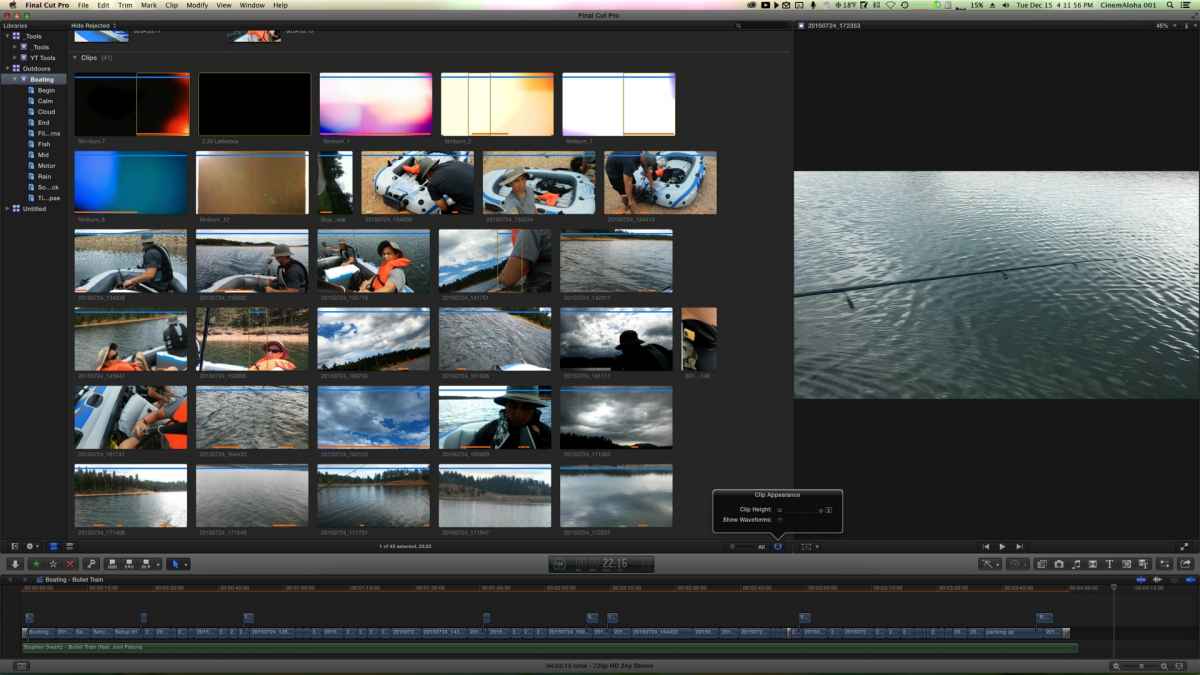
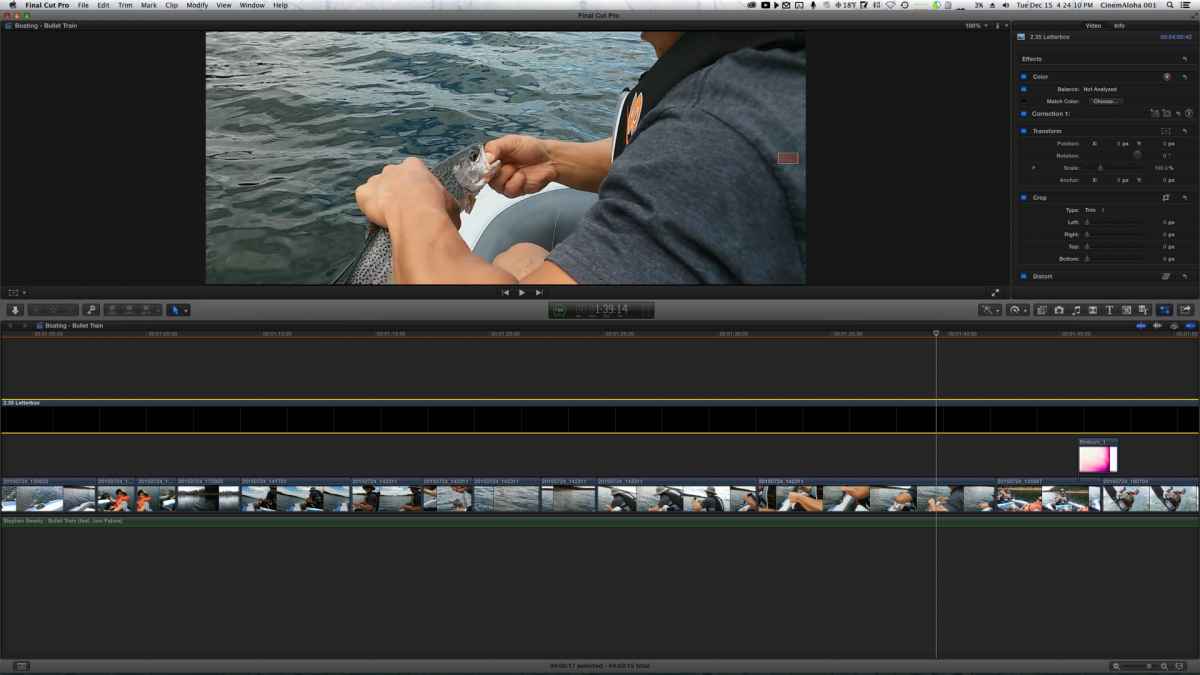
Creating the Story / Fine Cuts:
I show/hide the Library & Browser unless I need to add more clips to the Timeline to eliminate distractions for better focus & increase screen real estate. I often show/hide the Inspector as needed during this stage. Filmstrip view only & clip height set to taste.
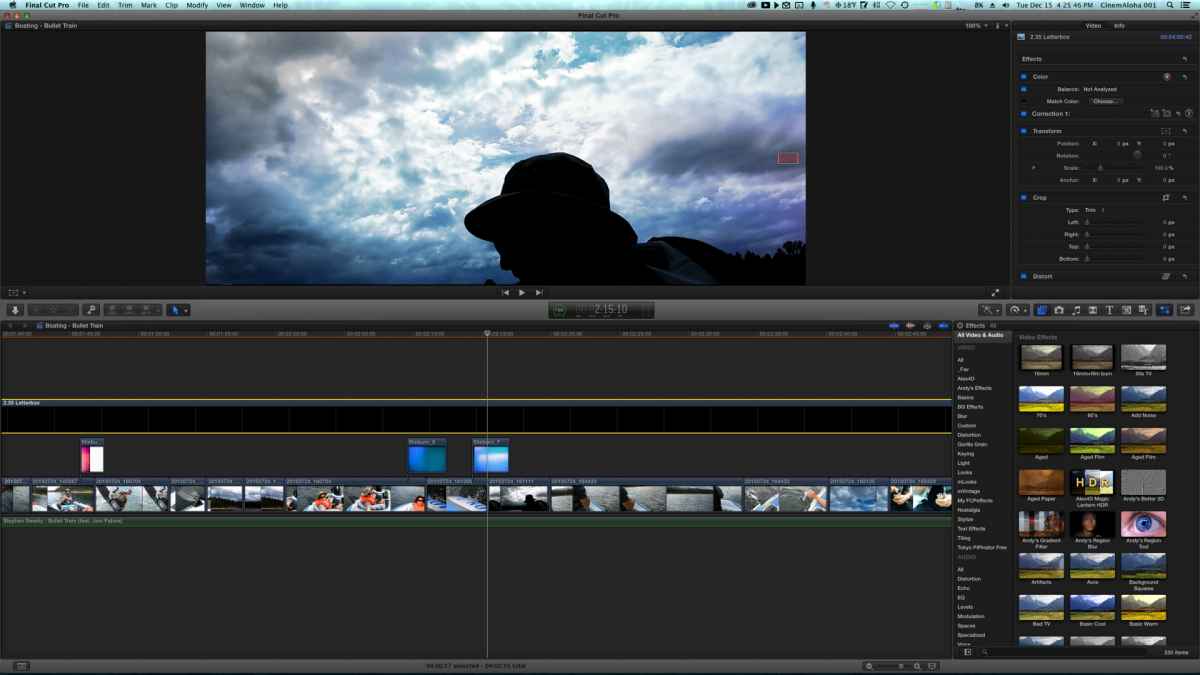
Adding VFX / Filters / Plugins / Etc
I hide/show the Effects Browser here but mostly it stays open. Easier to drag/drop or double click on the effect needed.
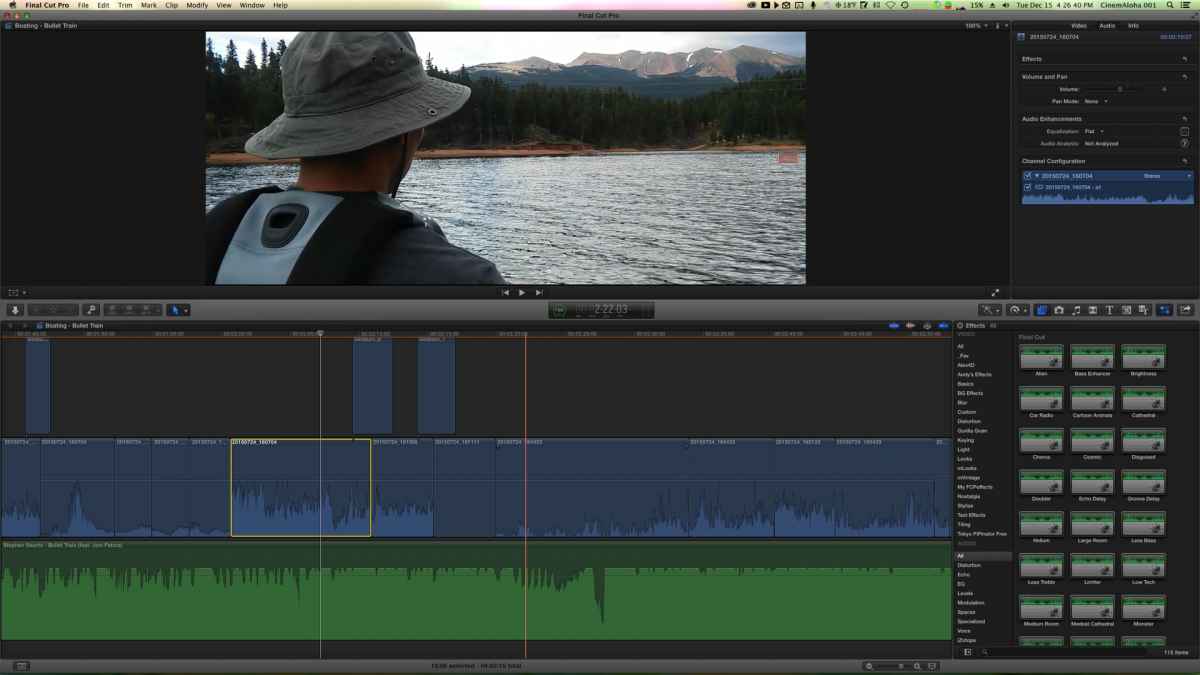
During Soundtrack / Audio Sweetening or Keyframing / SFX / Etc
Clip Appearance set only to waveform or large waveform with small filmstrip. Audio FX open. Levels open (not shown in ss).
Finally, my fav part is coloring (correction or grading) - because I know I'm almost finished
Clip Appearance set to Clip Labels Only to make room for Viewer & Scopes. Timeline minimized.
I'm still 10.1.3 on my iMac because I'm mid-project but my MBP is on v10.2 so I have all the needed scopes.
I'll start from right to left in the Adjustments window in the Inspector - from Exposure to Saturation to Color.
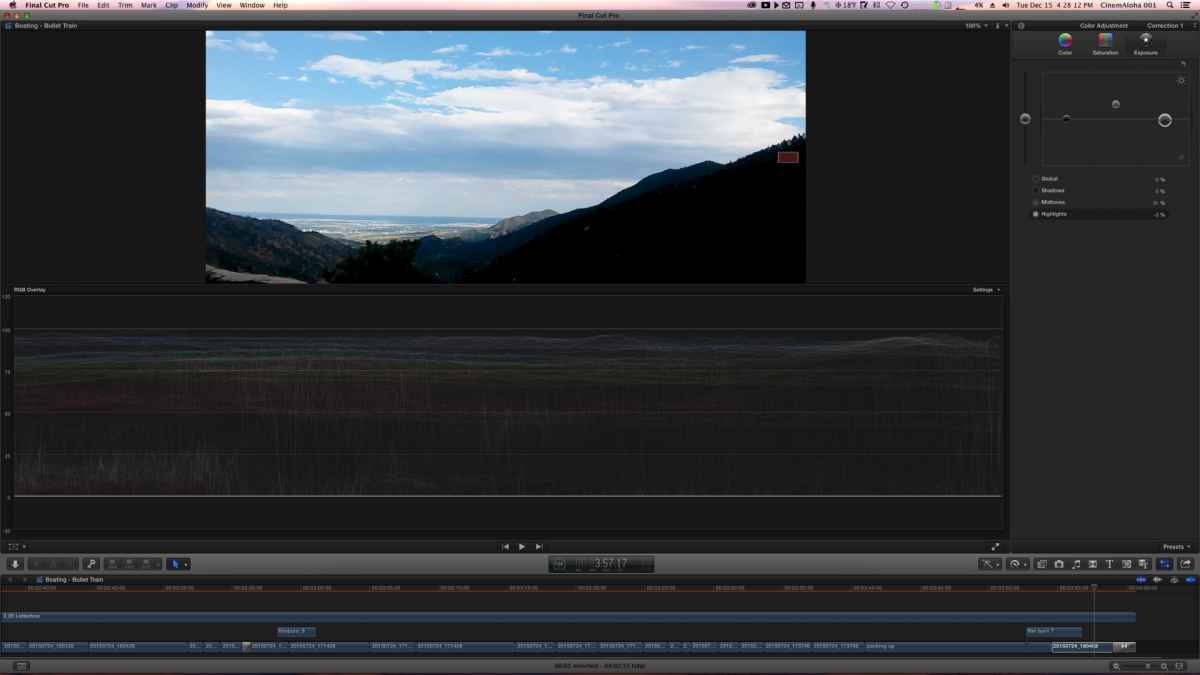
I like being efficient & wish FCPX had presets for each stage of my workflow. Sadly, it's not here yet.
Late-2012 27" iMac 3.4Ghz i7
During Keywording & Rough Cuts:
Browser is expanded to the right at 70/30 ratio with the Viewer.
Timeline window is reduced all the way with 'Clip Appearance' set at Labels only ("pills").
Inspector window is closed.
Audio Level is closed.
Creating the Story / Fine Cuts:
I show/hide the Library & Browser unless I need to add more clips to the Timeline to eliminate distractions for better focus & increase screen real estate. I often show/hide the Inspector as needed during this stage. Filmstrip view only & clip height set to taste.
Adding VFX / Filters / Plugins / Etc
I hide/show the Effects Browser here but mostly it stays open. Easier to drag/drop or double click on the effect needed.
During Soundtrack / Audio Sweetening or Keyframing / SFX / Etc
Clip Appearance set only to waveform or large waveform with small filmstrip. Audio FX open. Levels open (not shown in ss).
Finally, my fav part is coloring (correction or grading) - because I know I'm almost finished
Clip Appearance set to Clip Labels Only to make room for Viewer & Scopes. Timeline minimized.
I'm still 10.1.3 on my iMac because I'm mid-project but my MBP is on v10.2 so I have all the needed scopes.
I'll start from right to left in the Adjustments window in the Inspector - from Exposure to Saturation to Color.
I like being efficient & wish FCPX had presets for each stage of my workflow. Sadly, it's not here yet.
Last edit: 16 Dec 2015 00:02 by cinemaloha. Reason: Screenshots not appearing
Please Log in to join the conversation.
16 Dec 2015 04:46 #71539
by plysat
Can't sleep? Try this: fcpxpert.net ;-)
Replied by plysat on topic What is your FCPX Window Setup
Same as yours, but reversed. iMac with Libraries on the left, The timeline is on the second monitor, a widescreen LG. Works quite nicely. 
Can't sleep? Try this: fcpxpert.net ;-)
Please Log in to join the conversation.
- cinemaloha
-
- Offline
- Elite Member
-
Less
More
- Posts: 163
- Thank you received: 36
16 Dec 2015 17:40 #71552
by cinemaloha
Replied by cinemaloha on topic What is your FCPX Window Setup
I had a triple monitor setup in the past with the iMac as my viewer & timeline stretched between the other two monitors (using Matrox DualHead2Go box) but I didn't like moving my head between monitors. Then I switched to a dual monitor setup & it was the same. With just the iMac, I find myself more focused & just my eyes instead of my head moving.
Please Log in to join the conversation.
16 Dec 2015 17:43 #71553
by VidGreg
Replied by VidGreg on topic What is your FCPX Window Setup
Can I just take the opportunity to ask everyone to send in "Feature Request (Enhancement)" to Apple for the ability in FCPX to create "user defined Window Layouts" that can be saved? I also use multiple monitors and different layouts when in different phases of editing. Having to manually configure changes each time is a drag.
Wouldn't mind a more flexible window arrangement like the ability to peel off and move more elements to different locations/monitors, as long as I'm dreaming
There is a "Send Feedback to Apple" in FCPX or use this link… www.apple.com/feedback/finalcutpro.html
Thanks, Greg
Wouldn't mind a more flexible window arrangement like the ability to peel off and move more elements to different locations/monitors, as long as I'm dreaming
There is a "Send Feedback to Apple" in FCPX or use this link… www.apple.com/feedback/finalcutpro.html
Thanks, Greg
Please Log in to join the conversation.

17 Dec 2015 03:15 #71556
by Shane M
Ben, what model HDTV's are you looking at for this?
Replied by Shane M on topic What is your FCPX Window Setup
BenB wrote: Single, large monitor. Works for me.
Edit; I used to also have an FSI broadcast monitor, but the work I've done the past two years, it is overkill. Selling it off, and replacing with an HDTV for reviewing with.
Ben, what model HDTV's are you looking at for this?
Please Log in to join the conversation.
17 Dec 2015 12:32 #71563
by BenB
Replied by BenB on topic What is your FCPX Window Setup
I have a nice one left over from a digital signage installation. We were heavily supporting this one business, and they shut down, and they couldn't pay off the equipment, so we sold most of it off. I kept this one nice one for myself. Insignia or something like that, 27". I have the VESA wall mount to go on the wall above my Apple Thunderbolt display. Some minor color adjustment to it, and it should fill my personal needs. We rarely use the FSI broadcast monitor any longer. I'm finding most of the broadcast facilities I visit now are using them less and less. Philip Hoggets has a very strong argument against broadcast monitors in most (not all) facilities. The FSI is old enough to need recalibration, and that costs a pretty penny. So personally I'm just going to plug in (HDMI) this HDTV as a preview monitor, and be happy. I've scaled my studio back so much over the past few months. Most of that extra hardware we needed a few years ago seems obsolete now.
Please Log in to join the conversation.
- cinemaloha
-
- Offline
- Elite Member
-
Less
More
- Posts: 163
- Thank you received: 36
17 Dec 2015 12:49 #71565
by cinemaloha
Replied by cinemaloha on topic What is your FCPX Window Setup
I wish Apple Santa will grant me this Christmas Wish
Please add a button next to the "Tools" button with the same style drop-down menu for Window Arrangements & Presets.
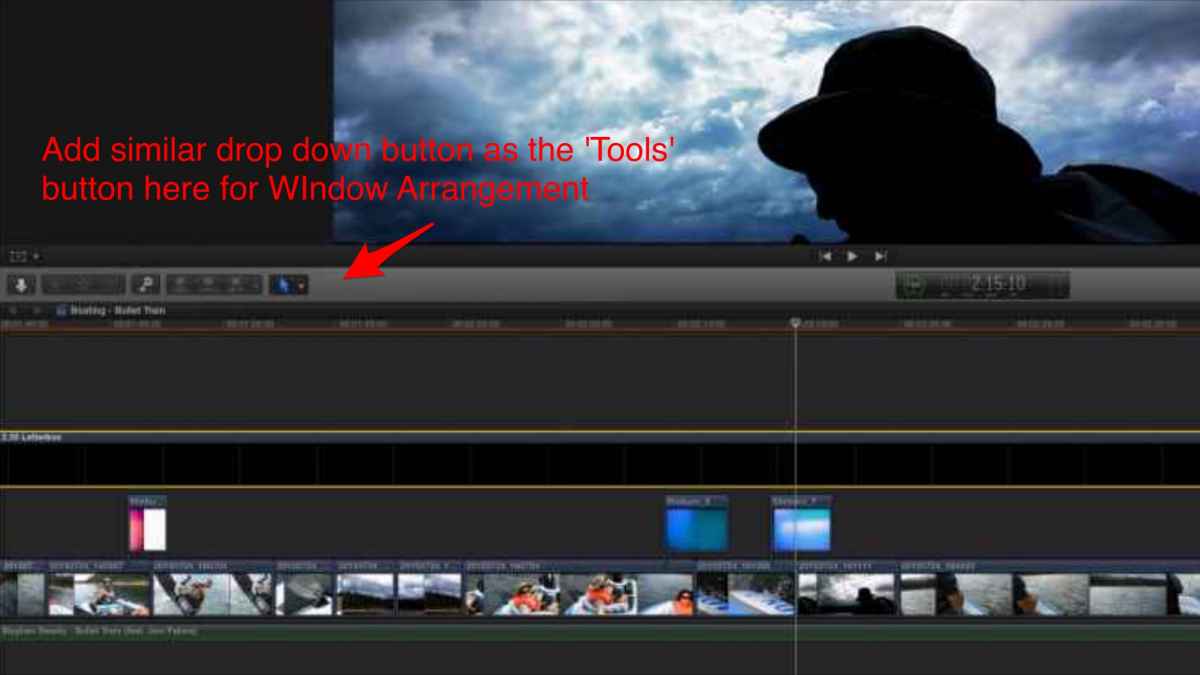
Please add a button next to the "Tools" button with the same style drop-down menu for Window Arrangements & Presets.
Please Log in to join the conversation.
- Karsten Schlüter
-

- Offline
- Moderator
-

Less
More
- Posts: 3790
- Thank you received: 718
19 Dec 2015 07:09 #71623
by Karsten Schlüter
I'm doing this frequently .... LOL :woohoo:
I even digged (I'm no programmer!) thru some pref files, in hope to find the one which 'marks' the last open (and save that, create a new layout, swap with other version...) - no chance.... hoped, the guys from 'Event Manager' come up with some 5$ solution ... not.
On my Top5 wishlist of features, to have customizable layout-sets for importing, tagging, editing, cc .... can't be sooo difficult, does it??
Replied by Karsten Schlüter on topic What is your FCPX Window Setup
VidGreg wrote: Can I just take the opportunity to ask everyone to send in "Feature Request (Enhancement)" to Apple for the ability in FCPX to create "user defined Window Layouts" that can be saved?…
I'm doing this frequently .... LOL :woohoo:
I even digged (I'm no programmer!) thru some pref files, in hope to find the one which 'marks' the last open (and save that, create a new layout, swap with other version...) - no chance.... hoped, the guys from 'Event Manager' come up with some 5$ solution ... not.
On my Top5 wishlist of features, to have customizable layout-sets for importing, tagging, editing, cc .... can't be sooo difficult, does it??
Please Log in to join the conversation.
