


- Posts: 1
- Thank you received: 0
3 Post Moderation Rule for New Boarders (25 Jan 2021)
New boarders will have their posts moderated - Don't worry if you cannot see your post immediately.
Unable to share video
- rien.claes
-
 Topic Author
- Offline
- New Member
-

Less
More
13 Dec 2015 23:16 #71419
by rien.claes
Unable to share video was created by rien.claes
Hello,
I've been editing this video and I would like to share it as a master file, but the option to share the video as master file, youtube,... have all turned gray. I've got no idea what I did wrong because my other projects i can share like always.
I've added a screenshot of the problem to make it more clear, since my English is not so good.
Thanks already!
I've been editing this video and I would like to share it as a master file, but the option to share the video as master file, youtube,... have all turned gray. I've got no idea what I did wrong because my other projects i can share like always.
I've added a screenshot of the problem to make it more clear, since my English is not so good.
Thanks already!
Please Log in to join the conversation.

14 Dec 2015 15:29 #71442
by BenB
Replied by BenB on topic Unable to share video
Be sure your screen shot is a JPEG file.
Please Log in to join the conversation.
- Karsten Schlüter
-

- Offline
- Moderator
-

Less
More
- Posts: 3790
- Thank you received: 718
15 Dec 2015 10:00 #71519
by Karsten Schlüter
Replied by Karsten Schlüter on topic Unable to share video
You can publish only Projects, not Events, not Compounds, not sub-timelines...
be sure, in the upper left theres just a project icon…
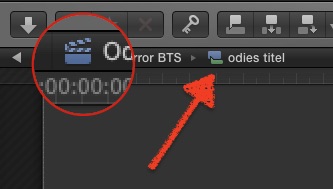
no other nor additional icon.
be sure, in the upper left theres just a project icon…
no other nor additional icon.
Please Log in to join the conversation.
15 Dec 2015 12:17 - 15 Dec 2015 12:23 #71524
by BenB
Replied by BenB on topic Unable to share video
Correction; you can export any "content" that is either opened in the Timeline pane, or is listed in the Browser.
I demo this in classes all the time to show the two different types of containers in FCPX; Timeline vs Organizational.
Content meaning it can be opened into its own Timeline. All content inside of an Event are nothing but "Timeline containers" (my term).
In your example, Karsten, you have a compound opened in the Timeline pane, which will export just fine.
You can not export Libraries or Events as a video file, because they are not timelines, they are "Organizational containers" (my term again).
So the OP is having some other type of issue, I'd think.
1- Be sure what you're exporting is opened in the Timeline pane.
2- Cmd-2 to be sure the Timeline pane is the active pane.
3- Export.
I demo this in classes all the time to show the two different types of containers in FCPX; Timeline vs Organizational.
Content meaning it can be opened into its own Timeline. All content inside of an Event are nothing but "Timeline containers" (my term).
In your example, Karsten, you have a compound opened in the Timeline pane, which will export just fine.
You can not export Libraries or Events as a video file, because they are not timelines, they are "Organizational containers" (my term again).
So the OP is having some other type of issue, I'd think.
1- Be sure what you're exporting is opened in the Timeline pane.
2- Cmd-2 to be sure the Timeline pane is the active pane.
3- Export.
Last edit: 15 Dec 2015 12:23 by BenB.
Please Log in to join the conversation.
