


- Posts: 33
- Thank you received: 0
3 Post Moderation Rule for New Boarders (25 Jan 2021)
New boarders will have their posts moderated - Don't worry if you cannot see your post immediately.
Closed Captioning options in FCPX?
11 Dec 2015 00:00 #71336
by DigiGal
Closed Captioning options in FCPX? was created by DigiGal
What options are available for CC closed captioning with FCPX?
Please Log in to join the conversation.
- Andreas Kiel
-

- Offline
- Platinum Member
-

Less
More
- Posts: 1077
- Thank you received: 189
11 Dec 2015 05:20 #71337
by Andreas Kiel
Replied by Andreas Kiel on topic Closed Captioning options in FCPX?
Inside FCPX there are no options!
You can use 3rd party apps to create first .srt and then .scc files.
Or You can use Adobe Premiere :lol: :lol:
But there is no way to prove the .mxf file on Mac - you have to use a Windows machine. So another reason to move away from Apple :huh:
-Andreas
You can use 3rd party apps to create first .srt and then .scc files.
Or You can use Adobe Premiere :lol: :lol:
But there is no way to prove the .mxf file on Mac - you have to use a Windows machine. So another reason to move away from Apple :huh:
-Andreas
Please Log in to join the conversation.
11 Dec 2015 12:41 - 11 Dec 2015 13:46 #71346
by chipgallo
Replied by chipgallo on topic Closed Captioning options in FCPX?
Depending on your delivery format, this company can develop a transcript (if needed) and conform the captions or subtitles in many different formats. They were reasonably priced compared to outfits like CaptionMax, who do a lot of broadcast and real-time work. They have basic tutorials on the web site and, back when I used them more regularly, replied to e-mail inquiries pretty quickly. Their entire workflow is accessible via the web site by the way.
www.automaticsync.com/captionsync/
www.automaticsync.com/captionsync/
Last edit: 11 Dec 2015 13:46 by chipgallo. Reason: add workflow comment
Please Log in to join the conversation.

11 Dec 2015 12:47 - 11 Dec 2015 12:52 #71349
by BenB
Replied by BenB on topic Closed Captioning options in FCPX?
The professional standard used by broadcasters on the Mac is Telestream's MacCaption. Super powerful and flexible. But "inside" of FCPX, as stated, nothing yet, if you ignore Compressor.
But with Compressor in the mix it's super easy. Many companies can create CC text files. For our current TV show, we use Aberdeen Broadcast Services to create .scc files for us. Then we use Compressor to embed that into our final delivery file. Works like a charm. And Aberdeen positions the text on the screen according to our specs, too.
Then again, MacCaption does all of this, and can automate much of it, also.
But with Compressor in the mix it's super easy. Many companies can create CC text files. For our current TV show, we use Aberdeen Broadcast Services to create .scc files for us. Then we use Compressor to embed that into our final delivery file. Works like a charm. And Aberdeen positions the text on the screen according to our specs, too.
Then again, MacCaption does all of this, and can automate much of it, also.
Last edit: 11 Dec 2015 12:52 by BenB.
Please Log in to join the conversation.
- Andreas Kiel
-
- Offline
- Platinum Member
-
Less
More
- Posts: 1077
- Thank you received: 189
11 Dec 2015 13:38 - 11 Dec 2015 13:47 #71352
by Andreas Kiel
Replied by Andreas Kiel on topic Closed Captioning options in FCPX?
Both Chip and Ben are correct - if you are located in North America, some regions of North Mexico or parts of japan.
These countries use .scc, the rest of the world uses EBU .stl.
MacCaption is for sure the market leader in North America (for the rest of the world it's useless) - but it's pricy. It start with 1100 USD without any needed options.
So you if you are in the US and closed captioning is not your daily lob you should follow Chip's advice.
Some US stations meanwhile accept EBU DFXP/TTML. In Europe it's true for most commercial stations.
This format is XML and way easier to handle.
- Andreas
These countries use .scc, the rest of the world uses EBU .stl.
MacCaption is for sure the market leader in North America (for the rest of the world it's useless) - but it's pricy. It start with 1100 USD without any needed options.
So you if you are in the US and closed captioning is not your daily lob you should follow Chip's advice.
Some US stations meanwhile accept EBU DFXP/TTML. In Europe it's true for most commercial stations.
This format is XML and way easier to handle.
- Andreas
Last edit: 11 Dec 2015 13:47 by Andreas Kiel.
Please Log in to join the conversation.
11 Dec 2015 15:25 #71356
by DigiGal
Replied by DigiGal on topic Closed Captioning options in FCPX?
Thanks for the replies, I'm in the USA where the FCC now requires broadcast content to be closed captioned. It'd be ideal to have the capability in FCPX as the content is edited. This would seem a more important feature than 3D text in a pro application.
I understand Adobe CC has the ability but it is not very user friendly even for short content.
Telestream's MacCaption looks interesting but sure is expensive and farming out to a closed captioning service is not an ideal situation.
I do have Compressor but am not familiar with embedding closed caption using it.
I understand Adobe CC has the ability but it is not very user friendly even for short content.
Telestream's MacCaption looks interesting but sure is expensive and farming out to a closed captioning service is not an ideal situation.
I do have Compressor but am not familiar with embedding closed caption using it.
Please Log in to join the conversation.
11 Dec 2015 15:52 - 11 Dec 2015 20:58 #71357
by BenB
Replied by BenB on topic Closed Captioning options in FCPX?
Adobe's CC support is very buggy, for sure.
MacCaption is for those who do this on a regular basis, not for the occasional user.
Since you mention you are specifically in the U.S, first you need to get the video transcribed. No way around that. Several companies in the U.S. do that. It isn't very expensive. Like the company I mentioned. Then using Compressor, do a Send To Compressor from FCPX. There's a place to add in the .scc file.
You don't do the transcribing until the edit is locked, or you'd be wasting tons of time re-transcribing and recoding the .scc file. Again, we're doing a reality TV show, and this workflow is inexpensive and easy for our situation.
help.apple.com/compressor/mac/4.1/#cpsr9a2e9329
In the image below, after you select the Compressor "job" (not a target) you see the button to click to import the .scc file. The broadcaster doesn't care what file format you use, because this is a data stream embedded into the final video file. When playing back in Compressor, the "CC" button turns the closed caption stream on and off for previewing it.
Position is important, as you don't want your CC text to be on top of important content, or content that could obscure the text. Positioning is done by the service/person who creates the .scc file. So your transcriber needs a proxy quality video clip with both audio and video. Again, for us, very easy, inexpensive, professional, quick.
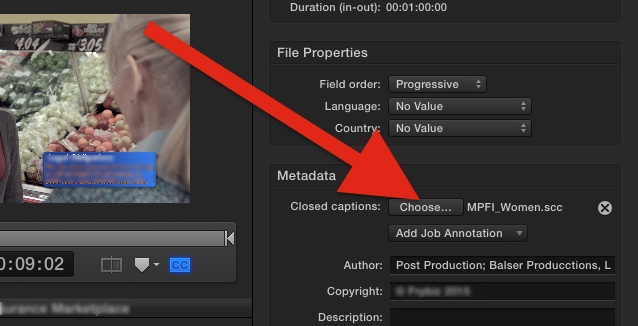
P.S. We are with an international cable network, so this CC workflow is international, not U.S. only.
MacCaption is for those who do this on a regular basis, not for the occasional user.
Since you mention you are specifically in the U.S, first you need to get the video transcribed. No way around that. Several companies in the U.S. do that. It isn't very expensive. Like the company I mentioned. Then using Compressor, do a Send To Compressor from FCPX. There's a place to add in the .scc file.
You don't do the transcribing until the edit is locked, or you'd be wasting tons of time re-transcribing and recoding the .scc file. Again, we're doing a reality TV show, and this workflow is inexpensive and easy for our situation.
help.apple.com/compressor/mac/4.1/#cpsr9a2e9329
In the image below, after you select the Compressor "job" (not a target) you see the button to click to import the .scc file. The broadcaster doesn't care what file format you use, because this is a data stream embedded into the final video file. When playing back in Compressor, the "CC" button turns the closed caption stream on and off for previewing it.
Position is important, as you don't want your CC text to be on top of important content, or content that could obscure the text. Positioning is done by the service/person who creates the .scc file. So your transcriber needs a proxy quality video clip with both audio and video. Again, for us, very easy, inexpensive, professional, quick.
P.S. We are with an international cable network, so this CC workflow is international, not U.S. only.
Last edit: 11 Dec 2015 20:58 by BenB.
Please Log in to join the conversation.
- rogersuski
-
- Offline
- New Member
-

Less
More
- Posts: 14
- Thank you received: 0
11 Dec 2015 18:19 - 11 Dec 2015 18:22 #71362
by rogersuski
Replied by rogersuski on topic Closed Captioning options in FCPX?
Telestream also makes Switch which *does* allow a user to proof an MXF file with CC.
PremiereCC is buggy -- when "proofing" a file things looked fine, yet when played back, the captions had "residue" some times which was frustrating.
SCC files generally describe captioning in the 608 spec. Some players need 708, and some need both.
The suggestions for MacCaption will be the "cadillac" option giving users the most flexibility to meet any provider's spec. The Compressor option will work in *some* instances, and will most likely require another step at a provider to get a completely "transmission ready" file -- devices look for the caption data in different places -- even though it is still "embedded" into the file. Compressor will only work if you are creating a QT or MPEG2 ES/TS files. Many places are requiring MXF AS-0x these days, so the above workflow will not in fact work.
A quick and dirty application called MediaInfo will allow a user to see what tracks are present (video at what codec, audio -- number of tracks at what codec, caption data tracks, etc) -- if they have a known working file from the provider, this can provide a roadmap to see what works at a given location.
PremiereCC is buggy -- when "proofing" a file things looked fine, yet when played back, the captions had "residue" some times which was frustrating.
SCC files generally describe captioning in the 608 spec. Some players need 708, and some need both.
The suggestions for MacCaption will be the "cadillac" option giving users the most flexibility to meet any provider's spec. The Compressor option will work in *some* instances, and will most likely require another step at a provider to get a completely "transmission ready" file -- devices look for the caption data in different places -- even though it is still "embedded" into the file. Compressor will only work if you are creating a QT or MPEG2 ES/TS files. Many places are requiring MXF AS-0x these days, so the above workflow will not in fact work.
A quick and dirty application called MediaInfo will allow a user to see what tracks are present (video at what codec, audio -- number of tracks at what codec, caption data tracks, etc) -- if they have a known working file from the provider, this can provide a roadmap to see what works at a given location.
Last edit: 11 Dec 2015 18:22 by rogersuski.
Please Log in to join the conversation.

11 Dec 2015 18:22 #71363
by Emmanuel
Replied by Emmanuel on topic Closed Captioning options in FCPX?
What about SugarFX subtitles ? Doesn't do the job ?
Andrea, did you give you on your apps ? I know it was too much work for the money it was brining, just curious.
Andrea, did you give you on your apps ? I know it was too much work for the money it was brining, just curious.
Please Log in to join the conversation.
11 Dec 2015 20:59 #71367
by BenB
Replied by BenB on topic Closed Captioning options in FCPX?
She states that she is in America, where MPEG streams are used, and the Compressor option works just fine. Not so in other countries, but in the U.S. it is a very fine option.
Please Log in to join the conversation.
- rogersuski
-
- Offline
- New Member
-
Less
More
- Posts: 14
- Thank you received: 0
11 Dec 2015 23:23 #71368
by rogersuski
Replied by rogersuski on topic Closed Captioning options in FCPX?
Didn't say it absolutely wouldn't work, I am saying that depending on the playout house, embedding the data in a QT file and washing hands might not be the QnD answer. Trust me, I spent a lot of time trying to get a workflow set up in my broadcast shop in the US.
Please Log in to join the conversation.
12 Dec 2015 00:21 #71369
by BenB
Replied by BenB on topic Closed Captioning options in FCPX?
Our workflow works for us.
Please Log in to join the conversation.
12 Dec 2015 03:19 #71371
by DigiGal
Replied by DigiGal on topic Closed Captioning options in FCPX?
Thanks again for the replies, fwiw I submitted a request for Apple to add the function if it is at all within their ability to add this.
Please Log in to join the conversation.
- Andreas Kiel
-
- Offline
- Platinum Member
-
Less
More
- Posts: 1077
- Thank you received: 189
12 Dec 2015 05:47 #71375
by Andreas Kiel
Replied by Andreas Kiel on topic Closed Captioning options in FCPX?
Sharon,
Good luck with your feature request. Even though it's Christmas time I don't think Apple will fulfill your wishes
Since more than a decade only a few people are asking for that - nothing happened.
It's not that Apple couldn't do it, but in their priority list it's even not in the top 1000. But maybe with TTML/DFXP things will change.
@Manoucho:
I'm still on with my X-Title. A few days ago I released a new version of the Importer app. I hope the XTE release will follow early next year when my TTML export is certified.
- Andreas
Good luck with your feature request. Even though it's Christmas time I don't think Apple will fulfill your wishes
Since more than a decade only a few people are asking for that - nothing happened.
It's not that Apple couldn't do it, but in their priority list it's even not in the top 1000. But maybe with TTML/DFXP things will change.
@Manoucho:
I'm still on with my X-Title. A few days ago I released a new version of the Importer app. I hope the XTE release will follow early next year when my TTML export is certified.
- Andreas
Please Log in to join the conversation.
- sperezrleon
-
- Offline
- Junior Member
-

- No hay mucho que decir... ni siquiera tengo cita favorita :)
Less
More
- Posts: 35
- Thank you received: 1
12 Dec 2015 19:51 - 12 Dec 2015 19:55 #71384
by sperezrleon
Replied by sperezrleon on topic Closed Captioning options in FCPX?
Sorry Andreas, but you cana actually create the MFX file with the embed CC in compresor as well as in Media Encoder  so no need to go away from mac. Oh! an I just moved to an app cold Annotation and is the most versatile software for subtitles and CC that i have ever found, is not expensive but is not cheap either.
Last edit: 12 Dec 2015 19:55 by sperezrleon.
Please Log in to join the conversation.
- Andreas Kiel
-
- Offline
- Platinum Member
-
Less
More
- Posts: 1077
- Thank you received: 189
12 Dec 2015 21:27 #71393
by Andreas Kiel
Replied by Andreas Kiel on topic Closed Captioning options in FCPX?
Santiago,
I never said that you cant't go the "Compressor route".
As Roger said it may work or may not work with the broadcast station.
With Compressor only video and audio is MXF not CC - even though it's one MXF file. With buggy Premiere everything is MXF. I know what I'm talking about - I worked with and for the original developer of the Apple MXF decoder/encoder.
For non US people it still would be better to have EBU STL for local national broadcast.
But as Ben said - you can send an .scc version (either fully muxed or not) to any broadcaster here. They will demux it and create a transcription out of the .scc and replace the language and/or match it their rules.
For closed captions or open captions there are way more rules, not just technical things.
As Ben mentioned for example position, character count, length (reading speed), speaker colors etc.
A timed transcription alone wont make it alone to follow the rules, you need a good "transcription translator" to make it fit the caption rules. You may need versions for for hearing impaired and people who have problems with the local language and so on.
Roger mentioned a lot of good points.
As said a move of Apple towards TTML would be a big and good step in direction to modern broadcasting.
Adobe did this step a short while ago -t as everything with Premiere it is a bit buggy. Also here I know what I'm talking about, Half a year before FCPX was released Adobe contacted me cause they heard I will be workless latest somewhen of that year.
I knew that till September before D-Day when I heard from the XML team of FCP that all will move to other jobs inside Apple.
I took the job and were a consultant for FCP XML and subtitles. After 1.5 or 2 years I gave up on that cause I had different thoughts about being professional than Adobe.
Lot of fun both with Apple and Adobe that time and current days - and with users as well.
Don't take this all too serious.
- Andreas
I never said that you cant't go the "Compressor route".
As Roger said it may work or may not work with the broadcast station.
With Compressor only video and audio is MXF not CC - even though it's one MXF file. With buggy Premiere everything is MXF. I know what I'm talking about - I worked with and for the original developer of the Apple MXF decoder/encoder.
For non US people it still would be better to have EBU STL for local national broadcast.
But as Ben said - you can send an .scc version (either fully muxed or not) to any broadcaster here. They will demux it and create a transcription out of the .scc and replace the language and/or match it their rules.
For closed captions or open captions there are way more rules, not just technical things.
As Ben mentioned for example position, character count, length (reading speed), speaker colors etc.
A timed transcription alone wont make it alone to follow the rules, you need a good "transcription translator" to make it fit the caption rules. You may need versions for for hearing impaired and people who have problems with the local language and so on.
Roger mentioned a lot of good points.
As said a move of Apple towards TTML would be a big and good step in direction to modern broadcasting.
Adobe did this step a short while ago -t as everything with Premiere it is a bit buggy. Also here I know what I'm talking about, Half a year before FCPX was released Adobe contacted me cause they heard I will be workless latest somewhen of that year.
I knew that till September before D-Day when I heard from the XML team of FCP that all will move to other jobs inside Apple.
I took the job and were a consultant for FCP XML and subtitles. After 1.5 or 2 years I gave up on that cause I had different thoughts about being professional than Adobe.
Lot of fun both with Apple and Adobe that time and current days - and with users as well.
Don't take this all too serious.
- Andreas
Please Log in to join the conversation.
- sperezrleon
-
- Offline
- Junior Member
-
- No hay mucho que decir... ni siquiera tengo cita favorita :)
Less
More
- Posts: 35
- Thank you received: 1
12 Dec 2015 21:53 #71394
by sperezrleon
Replied by sperezrleon on topic Closed Captioning options in FCPX?
Thanks for the clarification  you know I'm a big fan of your work and will and actually have, paid for it because is top notch
I read all the other answers after i posted my so now i feel a little ashamed :blush:
But you should take a look at that app I motioned, it has worked grate for me but is not perfect (Annotation)
you know I'm a big fan of your work and will and actually have, paid for it because is top notch I read all the other answers after i posted my so now i feel a little ashamed :blush:
But you should take a look at that app I motioned, it has worked grate for me but is not perfect
(Annotation) Please Log in to join the conversation.
- Andreas Kiel
-
- Offline
- Platinum Member
-
Less
More
- Posts: 1077
- Thank you received: 189
12 Dec 2015 23:04 #71396
by Andreas Kiel
Replied by Andreas Kiel on topic Closed Captioning options in FCPX?
Hi Santiago,
As said in my reply: Don't take this all too serious.
I didn't want to offend anybody here nor I didn't won't to say someone is wrong - there are a lot of options and workflows which might fit or not.
I know the Zeitanker apps. They are very good. In the their beginning they tried to convince me to work with (better for) them.
Finally all good Apple apps come from Germany: formerly DVDSP, still there - Logic and last not least the MXF components. So what would be the Apple world without Germans :lol:

For the rest of the Apple users Toast was a big seller.
Another good example is Vimeo. In former times you were able to upload styled WebVTT. 3Play Media was a free community based service for creating subtitles. They asked me whether I could help with my TitleExchange and ideas. I was happy to help to create web-based free tools and help for this.
Vimeo discovered that could a business and "took over" this free services - they just disappeared. Now to upload WebVTT the file has to be certified by the 3Play Media partner - for some fee.
Seems funny to me that I know have pay for the service I formerly have created.
Keep up your humor, say all software is buggy and any app creator only wants my money. :lol:
- Andreas
As said in my reply: Don't take this all too serious.
I didn't want to offend anybody here nor I didn't won't to say someone is wrong - there are a lot of options and workflows which might fit or not.
I know the Zeitanker apps. They are very good. In the their beginning they tried to convince me to work with (better for) them.
Finally all good Apple apps come from Germany: formerly DVDSP, still there - Logic and last not least the MXF components. So what would be the Apple world without Germans :lol:
For the rest of the Apple users Toast was a big seller.
Another good example is Vimeo. In former times you were able to upload styled WebVTT. 3Play Media was a free community based service for creating subtitles. They asked me whether I could help with my TitleExchange and ideas. I was happy to help to create web-based free tools and help for this.
Vimeo discovered that could a business and "took over" this free services - they just disappeared. Now to upload WebVTT the file has to be certified by the 3Play Media partner - for some fee.
Seems funny to me that I know have pay for the service I formerly have created.
Keep up your humor, say all software is buggy and any app creator only wants my money. :lol:
- Andreas
Please Log in to join the conversation.
- sperezrleon
-
- Offline
- Junior Member
-
- No hay mucho que decir... ni siquiera tengo cita favorita :)
Less
More
- Posts: 35
- Thank you received: 1
13 Dec 2015 02:07 #71401
by sperezrleon
Replied by sperezrleon on topic Closed Captioning options in FCPX?
I will say all software is buggy je je je je and thanks for always being so polite in your answers. And just to close, I don't take it too seriously, sorry if my words came the wrong way.
oh! And being Mexican, believe me, we owe a lot to the germans je je je je je.
and thanks for always being so polite in your answers. And just to close, I don't take it too seriously, sorry if my words came the wrong way.oh! And being Mexican, believe me, we owe a lot to the germans je je je je je.
Please Log in to join the conversation.
