


- Posts: 3
- Thank you received: 0
3 Post Moderation Rule for New Boarders (25 Jan 2021)
New boarders will have their posts moderated - Don't worry if you cannot see your post immediately.
Hazy look after primary color correction. Help!
- jamesbbaird@gmail.com
-
 Topic Author
- Offline
- New Member
-

Less
More
10 Dec 2015 14:03 - 11 Dec 2015 13:18 #71323
by jamesbbaird@gmail.com
New to video editing, this may be a beginner mistake- if son I apologize upfront. I'm using FCPX10.2 & color correcting with Color Finale V 1.0.18. First I adjusted exposure (lift no less than 0, gain no more than 100 and gamma in between using luma waveform), next I attempted to balance color using rgb parade and rgb overlay. a
close balance was achieved in rgb parade/overlay but image has a hazy look to it that I cannot eliminate. Screen shot included . Any and all suggestions are welcome, even negative ones.
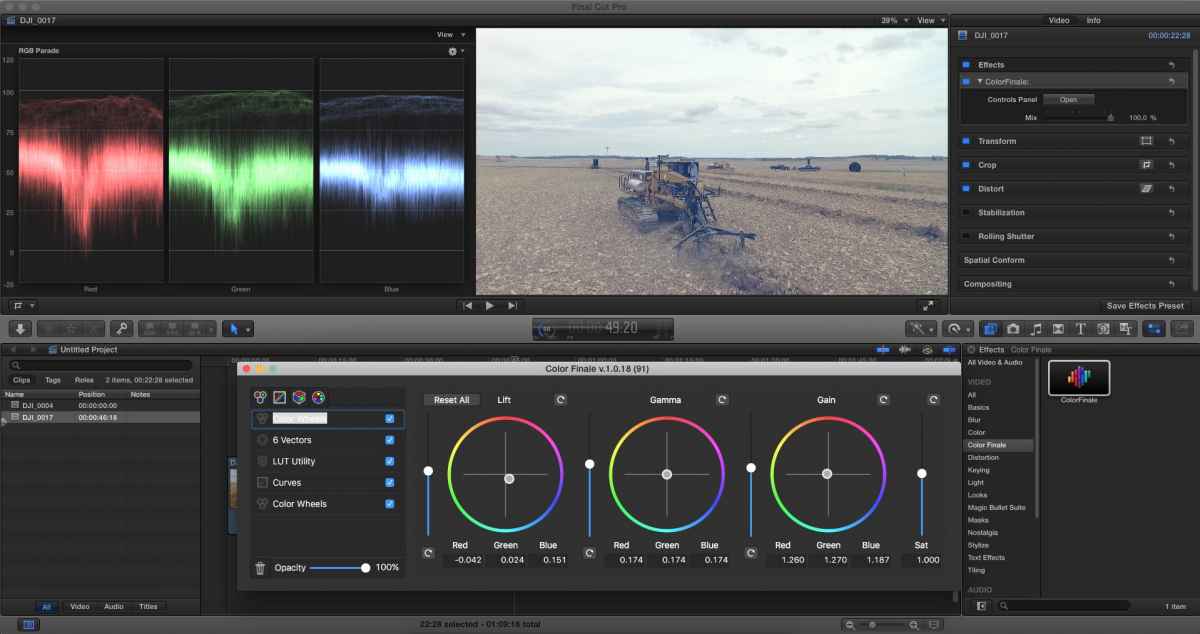
Side note- I have the same trouble weather I use color finale or built in color corrector, I also have Magic Bulled Colorista III but have no clue how to use it.
God bless all of you and just remember forgiveness is only one prayer away no matter how much evil we have done in our life.
Thanks,
Brandon Baird
close balance was achieved in rgb parade/overlay but image has a hazy look to it that I cannot eliminate. Screen shot included . Any and all suggestions are welcome, even negative ones.
Side note- I have the same trouble weather I use color finale or built in color corrector, I also have Magic Bulled Colorista III but have no clue how to use it.
God bless all of you and just remember forgiveness is only one prayer away no matter how much evil we have done in our life.
Thanks,
Brandon Baird
Last edit: 11 Dec 2015 13:18 by jamesbbaird@gmail.com. Reason: All caps in title changed.
Please Log in to join the conversation.

11 Dec 2015 12:54 - 11 Dec 2015 12:54 #71350
by BenB
Replied by BenB on topic HAZY LOOK AFTER PRIMARY COLOR CORRECTION. HELP!!
Get on over to ColorGradingCentral.com and check out Denver Riddle's lessons on color grading. Could save you a ton of time and headaches.
Side note; typing in all caps is considered poor etiquette.
Side note; typing in all caps is considered poor etiquette.
Last edit: 11 Dec 2015 12:54 by BenB.
Please Log in to join the conversation.
- jamesbbaird@gmail.com
-
Topic Author
- Offline
- New Member
-
Less
More
- Posts: 3
- Thank you received: 0
11 Dec 2015 13:07 #71351
by jamesbbaird@gmail.com
Replied by jamesbbaird@gmail.com on topic HAZY LOOK AFTER PRIMARY COLOR CORRECTION. HELP!!
Thank you for the advice, not only on the topic but the etiquette as well.
I will be sure to check out your recommendations. I have started playing around with LUTs in hopes that they may give me a starting point.
I am looking for a thread that describes how to make the screen playback one half edited and the other half original with a white line dividing the clips. I would go to google but I can't seem to find the "term" for it. I see it used on YouTube all the time to compare original to edited footage.
Thanks again for the help.
I will be sure to check out your recommendations. I have started playing around with LUTs in hopes that they may give me a starting point.
I am looking for a thread that describes how to make the screen playback one half edited and the other half original with a white line dividing the clips. I would go to google but I can't seem to find the "term" for it. I see it used on YouTube all the time to compare original to edited footage.
Thanks again for the help.
Please Log in to join the conversation.

11 Dec 2015 14:34 #71354
by Seamusvfx
Replied by Seamusvfx on topic Hazy look after primary color correction. Help!
Your shadows are too high, which is giving the hazy look. If you don't like that look bring the shadows down, you can then balance the mids so you're not clipping the bottom end. This is sometimes better done with curves using an 'S' curve. There's plenty of articles about using s curves around.
Remember theres no hard and fast rules around not clipping the highlights and shadows, generally its not recommended to throw away data, but for some looks clipping is necessary.
Remember theres no hard and fast rules around not clipping the highlights and shadows, generally its not recommended to throw away data, but for some looks clipping is necessary.
Please Log in to join the conversation.
- Karsten Schlüter
-

- Offline
- Moderator
-

Less
More
- Posts: 3790
- Thank you received: 718
12 Dec 2015 07:25 #71377
by Karsten Schlüter
Replied by Karsten Schlüter on topic Hazy look after primary color correction. Help!
what seamus says ....
lower shadows, tweak a lil' midtones, ... and, at last the screenshot, has a blue tint, consider raising saturation...
moving four pucks in FCPX (I don't dare to use Finale.. :ohmy: )
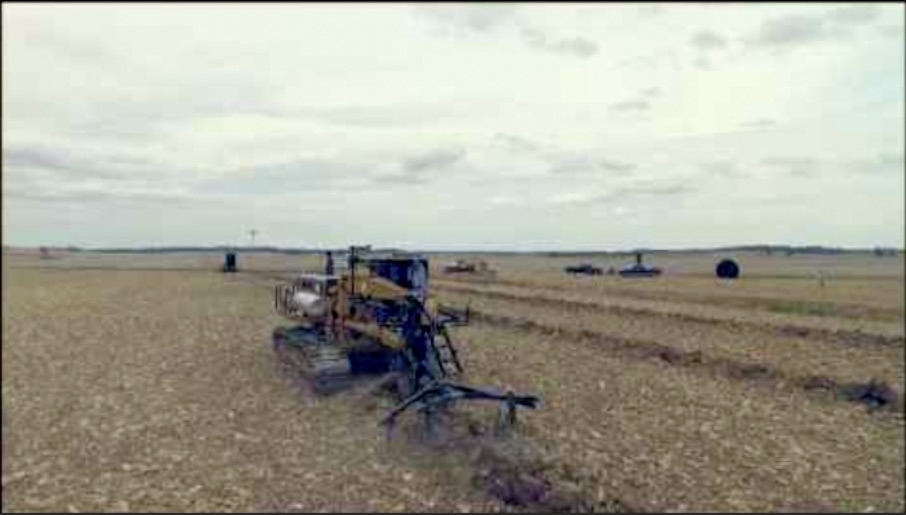
The sky is 'burned out', but that's due screengrabs, jpg, recompression etc ...
lower shadows, tweak a lil' midtones, ... and, at last the screenshot, has a blue tint, consider raising saturation...
moving four pucks in FCPX (I don't dare to use Finale.. :ohmy: )
The sky is 'burned out', but that's due screengrabs, jpg, recompression etc ...
Please Log in to join the conversation.
12 Dec 2015 15:51 #71382
by BenB
Replied by BenB on topic Hazy look after primary color correction. Help!
I'd agree with Karsten, if you're new to color grading, ONLY use the FCPX color effect. Once you understand that, move on to the more advanced tools.
Please Log in to join the conversation.
- Karsten Schlüter
-
- Offline
- Moderator
-
Less
More
- Posts: 3790
- Thank you received: 718
13 Dec 2015 07:37 #71403
by Karsten Schlüter
… and for a start, color master-mind Denver Riddle still offers his 16 Grading With FCPX tutorials for free
www.colorgradingcentral.com/tutorials/
90minutes, and keeps me busy for a year ..... :lol:
Color Finale is an awesome tool, but it doesn't automatically makes good pictures ; for a first run. to understand the basics, FCPX alone has lot to play with...
Replied by Karsten Schlüter on topic Hazy look after primary color correction. Help!
BenB wrote: I'd agree with Karsten, if you're new to color grading, ONLY use the FCPX color effect. Once you understand that, move on to the more advanced tools.
… and for a start, color master-mind Denver Riddle still offers his 16 Grading With FCPX tutorials for free
www.colorgradingcentral.com/tutorials/
90minutes, and keeps me busy for a year ..... :lol:
Color Finale is an awesome tool, but it doesn't automatically makes good pictures ; for a first run. to understand the basics, FCPX alone has lot to play with...
Please Log in to join the conversation.
- simon.a.billington
-
- Offline
- Elite Member
-

Less
More
- Posts: 179
- Thank you received: 10
17 Dec 2015 08:20 - 17 Dec 2015 08:24 #71559
by simon.a.billington
Replied by simon.a.billington on topic Hazy look after primary color correction. Help!
After mastering FCPX's Color tools, I think the next step is a curves type tool, since FCPX lacks one and it opens a bunch of possibilities. There are a few of these out there, Color Finale, Colorista III, I'm pretty sure there are a couple available via the FXFactory.
If you look at what Denver seen to do over at ColorGrading central, is that he first balances his whites and blacks using the the lift, gamma gain tools. Then he moves on to fix contrast and color issues with the curves. It's one way of working.
Once the whites and blacks are set, you don't really want then colors moving around on you both towards white and black. This is because it will change your nice whites and blacks to something else again, usually this is undesirable until comes to color grading itself.
By using a curves tool you can change the color balance towards the middle of the image without destroying your nice whites and blacks. You don't have to use a curves tool, but can make life a whole lot easy on you in this respect. They're also useful for creating S-curves as others have suggested.
If you look at what Denver seen to do over at ColorGrading central, is that he first balances his whites and blacks using the the lift, gamma gain tools. Then he moves on to fix contrast and color issues with the curves. It's one way of working.
Once the whites and blacks are set, you don't really want then colors moving around on you both towards white and black. This is because it will change your nice whites and blacks to something else again, usually this is undesirable until comes to color grading itself.
By using a curves tool you can change the color balance towards the middle of the image without destroying your nice whites and blacks. You don't have to use a curves tool, but can make life a whole lot easy on you in this respect. They're also useful for creating S-curves as others have suggested.
Last edit: 17 Dec 2015 08:24 by simon.a.billington.
Please Log in to join the conversation.

17 Dec 2015 15:17 #71571
by VidGreg
Replied by VidGreg on topic Hazy look after primary color correction. Help!
Hi James, Welcome to the forums and FCPX
Getting good at color grading takes time and experimentation.
I suggest you start within FCPX and learn the basics using the color board.
LUTS should not be applied until after you get all other color correcting done. It is really about "Look" not correction.
Given just the screen shot above, might I also suggest you add a "Shape mask" on the top sky part of the clip? Then apply CC inside the shape mask to bring out the cloud detail, add some mood. This will change the overall feel of the clip. It will also allow you to treat the 2 halves separately.
As pointed out before, you can crush the blacks, but I would try working on the mids more.
Have fun and happy editing
Hope this helps, Greg
Getting good at color grading takes time and experimentation.
I suggest you start within FCPX and learn the basics using the color board.
LUTS should not be applied until after you get all other color correcting done. It is really about "Look" not correction.
Given just the screen shot above, might I also suggest you add a "Shape mask" on the top sky part of the clip? Then apply CC inside the shape mask to bring out the cloud detail, add some mood. This will change the overall feel of the clip. It will also allow you to treat the 2 halves separately.
As pointed out before, you can crush the blacks, but I would try working on the mids more.
Have fun and happy editing
Hope this helps, Greg
Please Log in to join the conversation.
17 Dec 2015 19:07 #71579
by Seamusvfx
Sorry to call you out Greg, but this is wrong - particularly the second sentence
The primary point of a LUT is to convert between camera space - commonly a flat look - to monitor space - srgb or rec709 usually. You cant, or at least shouldn't, use a 3 way corrector while monitoring camera space as you'll really struggle to get gamma to behave properly - which is what is happening in this shot. It looks like this shot is coming from a gopro on protune or similar which is not going to have correct gamma for an srgb monitor. While it may be advantageous - particularly when working with vfx shots - to have the LUT as the last operation in the chain it should still be active during correction, even with film emulation luts, which are designed to provide a monitor corrected base from which to begin your grade.
I realize this is complicated by the fact that you can get 'look' LUTs which are designed to go from a neutral primary in monitor space to a 'look'. These are very blunt instruments, but if you use them, they should go on after primary correction like your saying. However that's never going to work for this guy as he's not in monitor space yet and he can't really get there with a three way colour corrector because the gamma adjustment required is more subtle than what fcp's default tools offer.
The steps should be these to make this shot look good -
- EITHER Colour space conversion LUT (Either from the camera manufacturer or something like filmconvert) or manual curves adjustment
- 3 way primary corrections in FCP
- Look LUT (if you really must)
- Secondary corrections.
Unfortunately its a bit of a learning curve, which is why unless you have time to play round with footage shoot in Rec. 709!
Replied by Seamusvfx on topic Hazy look after primary color correction. Help!
VidGreg wrote:
LUTS should not be applied until after you get all other color correcting done. It is really about "Look" not correction.
Sorry to call you out Greg, but this is wrong - particularly the second sentence
The primary point of a LUT is to convert between camera space - commonly a flat look - to monitor space - srgb or rec709 usually. You cant, or at least shouldn't, use a 3 way corrector while monitoring camera space as you'll really struggle to get gamma to behave properly - which is what is happening in this shot. It looks like this shot is coming from a gopro on protune or similar which is not going to have correct gamma for an srgb monitor. While it may be advantageous - particularly when working with vfx shots - to have the LUT as the last operation in the chain it should still be active during correction, even with film emulation luts, which are designed to provide a monitor corrected base from which to begin your grade.
I realize this is complicated by the fact that you can get 'look' LUTs which are designed to go from a neutral primary in monitor space to a 'look'. These are very blunt instruments, but if you use them, they should go on after primary correction like your saying. However that's never going to work for this guy as he's not in monitor space yet and he can't really get there with a three way colour corrector because the gamma adjustment required is more subtle than what fcp's default tools offer.
The steps should be these to make this shot look good -
- EITHER Colour space conversion LUT (Either from the camera manufacturer or something like filmconvert) or manual curves adjustment
- 3 way primary corrections in FCP
- Look LUT (if you really must)
- Secondary corrections.
Unfortunately its a bit of a learning curve, which is why unless you have time to play round with footage shoot in Rec. 709!
Please Log in to join the conversation.
17 Dec 2015 22:40 #71588
by davechap
Replied by davechap on topic Hazy look after primary color correction. Help!
I believe the LUT mentioned was a stylistic LUT and not a colorspace LUT for a flat profile or getting into Red 709.
As far as the LUT correction to get from, let's say the BMD Flat to Rec 709, I've heard various reasons why the last node in Resolve should be the LUT and not the first node. As far as FCPX is concerned, the LUT for getting back to a contrasted image is applied first, then color correction happens (because you can't change the order of when it gets applied). I will throw in here that I hardly use any of the Rec 709 LUTs in FCPX and do my own contrast/saturation adjustments as a color board correction.
To mimic the node setup in Resolve, this is what I do (and what Denver Riddle does in FCPX):
1. Make a primary color correction to add contrast, saturation and balance out the color
2. Make a secondary correction to adjust things further based on style or tone
3. Make a third correction with any extreme stylistic adjustments
Of course, this is all concerning color corrections on a single clip. More advanced techniques involve duplicating the clip on top of itself and changing the blend mode and transparency.
As far as the LUT correction to get from, let's say the BMD Flat to Rec 709, I've heard various reasons why the last node in Resolve should be the LUT and not the first node. As far as FCPX is concerned, the LUT for getting back to a contrasted image is applied first, then color correction happens (because you can't change the order of when it gets applied). I will throw in here that I hardly use any of the Rec 709 LUTs in FCPX and do my own contrast/saturation adjustments as a color board correction.
To mimic the node setup in Resolve, this is what I do (and what Denver Riddle does in FCPX):
1. Make a primary color correction to add contrast, saturation and balance out the color
2. Make a secondary correction to adjust things further based on style or tone
3. Make a third correction with any extreme stylistic adjustments
Of course, this is all concerning color corrections on a single clip. More advanced techniques involve duplicating the clip on top of itself and changing the blend mode and transparency.
Please Log in to join the conversation.
- simon.a.billington
-
- Offline
- Elite Member
-
Less
More
- Posts: 179
- Thank you received: 10
18 Dec 2015 02:27 #71589
by simon.a.billington
Replied by simon.a.billington on topic Hazy look after primary color correction. Help!
While I was aware of the different types of LUTs... There's still some info here that I wasn't yet aware of the gamma behaviour issues.
Nice tip.
Nice tip.
Please Log in to join the conversation.
- jamesbbaird@gmail.com
-
Topic Author
- Offline
- New Member
-
Less
More
- Posts: 3
- Thank you received: 0
21 Dec 2015 02:58 #71650
by jamesbbaird@gmail.com
Replied by jamesbbaird@gmail.com on topic Hazy look after primary color correction. Help!
I appreciate the advice. I will take it and apply it to my workflow. I am actually shooting with a DJI Phantom 3 Advanced camera- very similar to the gopro. You are exactly right, I am looking for a LUT to help bring the flat Log image to life then I will color correct more from there, if such a thing exists.
Please Log in to join the conversation.
