


- Posts: 3
- Thank you received: 0
3 Post Moderation Rule for New Boarders (25 Jan 2021)
New boarders will have their posts moderated - Don't worry if you cannot see your post immediately.
DTD Validation Failed
07 Dec 2015 16:21 - 10 Mar 2023 06:38 #71225
by Kamalion
DTD Validation Failed was created by Kamalion
Hello,
I exported an XML and when importing it I got this message:
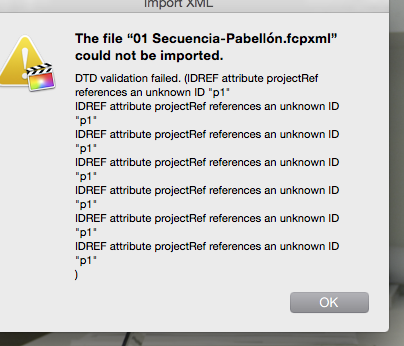
DTD validation failed. (IDREF attribute projectRef references an unknown ID "p1".
Does anyone have any idea on how to fix this? I'm only getting this message with certain projects in my library, not all.
Thank you,
//Please avoid double posts. The Grumpy Janitor //
I exported an XML and when importing it I got this message:
DTD validation failed. (IDREF attribute projectRef references an unknown ID "p1".
Does anyone have any idea on how to fix this? I'm only getting this message with certain projects in my library, not all.
Thank you,
//Please avoid double posts. The Grumpy Janitor //
Last edit: 10 Mar 2023 06:38 by Karsten Schlüter.
Please Log in to join the conversation.
- Andreas Kiel
-

- Offline
- Platinum Member
-

Less
More
- Posts: 1077
- Thank you received: 189
08 Dec 2015 11:55 #71244
by Andreas Kiel
Replied by Andreas Kiel on topic DTD Validation Failed
First have a look whether the XML version is compatible with your FCPX version.
In case it is open the XML in a text editor and search for "p1" including the quotes.
Then try to figure out what belongs to it - this 7these are the trouble makers.
- Andreas
In case it is open the XML in a text editor and search for "p1" including the quotes.
Then try to figure out what belongs to it - this 7these are the trouble makers.
- Andreas
Please Log in to join the conversation.
11 Dec 2015 12:29 #71344
by Kamalion
Replied by Kamalion on topic DTD Validation Failed
Thank you very much, Andreas.
I'm not having any compatibility issues, I'm running the latest version of FCPX.
I erased all the references to this p1 element from the XML text and then it worked perfectly. I also got an error with a p2 element and I fixed it the same way.
I also identified the trouble making files. These are compound clips generated in FCPX. The thing is that I received those from another editor who worked on them from the original media, and I don't know exactly how she did it or how she managed the media.
But I keep getting the error and have to do the process of fixing the XML every time. Do you know what that p1 and p2 are? What makes them and why are they "unknown" to FCPX?
Thanks again!
I'm not having any compatibility issues, I'm running the latest version of FCPX.
I erased all the references to this p1 element from the XML text and then it worked perfectly. I also got an error with a p2 element and I fixed it the same way.
I also identified the trouble making files. These are compound clips generated in FCPX. The thing is that I received those from another editor who worked on them from the original media, and I don't know exactly how she did it or how she managed the media.
But I keep getting the error and have to do the process of fixing the XML every time. Do you know what that p1 and p2 are? What makes them and why are they "unknown" to FCPX?
Thanks again!
Please Log in to join the conversation.

14 Dec 2015 12:40 - 14 Dec 2015 12:41 #71433
by chrisb
Replied by chrisb on topic DTD Validation Failed
So yeah.. have had that error myself just now and fixed it.
There are clips on your timeline that are not represented in your browser/event.
- export xml
- open the xml in textedit
- search for "p1"
- you will find something like this:

- in fcpx, in the timeline index, search for the name in the "name="XXXX"" where XXXX is what it says in your xml
- on the highlighted clip(s) in your timeline, press shift+f (reveal in browser)
- a "new" clip should appear in the event, since this error seems to occur when there is a clip on the timeline that is not represented in the browser.
This worked for me, so I can now get my xml to open without DTD validation errors.
There are clips on your timeline that are not represented in your browser/event.
- export xml
- open the xml in textedit
- search for "p1"
- you will find something like this:
- in fcpx, in the timeline index, search for the name in the "name="XXXX"" where XXXX is what it says in your xml
- on the highlighted clip(s) in your timeline, press shift+f (reveal in browser)
- a "new" clip should appear in the event, since this error seems to occur when there is a clip on the timeline that is not represented in the browser.
This worked for me, so I can now get my xml to open without DTD validation errors.
Last edit: 14 Dec 2015 12:41 by chrisb.
Please Log in to join the conversation.
14 Dec 2015 12:40 #71435
by chrisb
Replied by chrisb on topic DTD Validation Failed
And it should maybe be said, that you don't really need to fix the XML. You should maybe be fixing the FCPX project instead
Please Log in to join the conversation.
22 Dec 2015 16:24 #71681
by Kamalion
Replied by Kamalion on topic DTD Validation Failed
Thank you, Chris.
You were correct, I did exactly that in FCPX and then I had no problems with the XML. It's still a pain to do that, I wonder what's making the error in the first place. But thank you very much for the tip, much better than going into the XML every time.
You were correct, I did exactly that in FCPX and then I had no problems with the XML. It's still a pain to do that, I wonder what's making the error in the first place. But thank you very much for the tip, much better than going into the XML every time.
Please Log in to join the conversation.
17 Oct 2016 15:45 #80857
by qbe
Replied by qbe on topic DTD Validation Failed
I dont want to revive this old thread, but maybe this helps someone.
So I had this problem too but when looking at the problem shots in XML, I already had them in Library, but in different Event and adding didnt help and match frame took me to different Event inside this Library.
Way faster solution for me, was to copy the Project to a new Library and exporting XML from the new Library.
So I had this problem too but when looking at the problem shots in XML, I already had them in Library, but in different Event and adding didnt help and match frame took me to different Event inside this Library.
Way faster solution for me, was to copy the Project to a new Library and exporting XML from the new Library.
Please Log in to join the conversation.
02 Dec 2016 21:25 #83586
by wealthy23
Replied by wealthy23 on topic DTD Validation Failed
I know this is very late but i just had this problem today. The solutions in the post didnt work. My solution works if the other person has the footage which should be so if your sending an xml. To create a new library copy the project over but what i did was instead having the media inside the Library what i did was consolidate the footage to another part of the hard drive so the Library would just reference it.
This helps lower the size of the library file if you need it to be smaller.
Go to finder right clicked on the library & click show packages look for analyzed thats usually the stabilize footage or the optical flow footage i deleted those. If need to make even more smaller you can delete the render render files.
After that just Zip the Library then send it all they have to do is relink and rerender the footage and done.
This helps lower the size of the library file if you need it to be smaller.
Go to finder right clicked on the library & click show packages look for analyzed thats usually the stabilize footage or the optical flow footage i deleted those. If need to make even more smaller you can delete the render render files.
After that just Zip the Library then send it all they have to do is relink and rerender the footage and done.
Please Log in to join the conversation.

02 Nov 2021 12:01 #117131
by LEIGHP
Replied by LEIGHP on topic DTD Validation Failed
Hi guys.
I've just run into this issue. I've opened an XML from Adobe CC in send to X. DTD validation failed. The data could not be read because it isn't in the correct format is now showing up. It will not allow me to open the XML in FCPX. I don't really understand the thread above. Is there an easier way to fix this? ANy assistance would be great. Thanks.
I've just run into this issue. I've opened an XML from Adobe CC in send to X. DTD validation failed. The data could not be read because it isn't in the correct format is now showing up. It will not allow me to open the XML in FCPX. I don't really understand the thread above. Is there an easier way to fix this? ANy assistance would be great. Thanks.
Please Log in to join the conversation.
- Andreas Kiel
-
- Offline
- Platinum Member
-
Less
More
- Posts: 1077
- Thank you received: 189
02 Nov 2021 13:02 #117134
by Andreas Kiel
Replied by Andreas Kiel on topic DTD Validation Failed
If you’re running 10.6 and a non English system switch to language/region English/UK, US, AUS.
Please Log in to join the conversation.
02 Nov 2021 13:32 #117135
by LEIGHP
Replied by LEIGHP on topic DTD Validation Failed
NO WAYS! Can't believe something as simple as that can solve the issue! Thank you so much for your assistance. It works!
Please Log in to join the conversation.

11 Nov 2022 16:15 #122830
by Kenny973
Replied by Kenny973 on topic DTD validation failed
Hi Martijn,
Did you ever find a solution to this? I'm getting the exact same error message. Thanks.
Did you ever find a solution to this? I'm getting the exact same error message. Thanks.
Please Log in to join the conversation.

25 Nov 2022 18:49 #123057
by reesdale
Replied by reesdale on topic DTD validation failed
Now all of a sudden I am having huge issues with this exact thing. Was working a few weeks ago now everything I export cannot be read and imported (by me or other users). Help!
Please Log in to join the conversation.
25 Nov 2022 19:35 #123061
by Kenny973
Replied by Kenny973 on topic DTD validation failed
I thought I had posted my solution here recently, but I guess it didn't take.
I tried removing different types of clips from my sequence (HD footage, graphics, stills) and nothing was solved until I removed all the text that I had created within FCPX. Once those were gone I was able to export a clean error-free-upon-import XML file.
I had a bunch of text clips that were just notes to myself. Only two of the clips were meant to be part of the final product and they were easily recreated. I got off easy, I think. Good luck.
I tried removing different types of clips from my sequence (HD footage, graphics, stills) and nothing was solved until I removed all the text that I had created within FCPX. Once those were gone I was able to export a clean error-free-upon-import XML file.
I had a bunch of text clips that were just notes to myself. Only two of the clips were meant to be part of the final product and they were easily recreated. I got off easy, I think. Good luck.
Please Log in to join the conversation.
02 Mar 2023 19:59 #124426
by paulo
Replied by paulo on topic DTD Validation Failed
TI am also having this problem.I'm from Brazil, I already changed the language, region and other settings to USA, and it didn't work!I have 2 macs with Ventura and FCP 10.6.5 and the xml between them occasionally gives this problem.

Please Log in to join the conversation.
02 Mar 2023 20:32 #124428
by paulo
Replied by paulo on topic DTD validation failed
I'm also crazy here with this problem. FCP's great advantage is stability, and now, it's not having something so simple.
Please Log in to join the conversation.
