


- Posts: 1
- Thank you received: 0
3 Post Moderation Rule for New Boarders (25 Jan 2021)
New boarders will have their posts moderated - Don't worry if you cannot see your post immediately.
Final cut pro transitions help
- danny.seals
-
 Topic Author
- Offline
- New Member
-

Less
More
04 Dec 2015 10:48 #71160
by danny.seals
Final cut pro transitions help was created by danny.seals
Hi all,
first off wow i love this forums made my life so much easier for editting in fcp however i still have a issue
am editting 100gig of route 66 fottage from my gopro and i cant for the lfe of me find out how to have a soft merge between scenes.
best way i can discribe what am after is on the gopro studio if once you create the story line you click a plus between two clips what that does is fade one clip out while bringing in the next one. so they is no black screen in the merge etc.
at the moment when my story move from one click to the other it very rough feeling like a stop start no soft merge.
hope that makes sense
so with that in need how do i get this to happen?
thnaks
Danny
first off wow i love this forums made my life so much easier for editting in fcp however i still have a issue
am editting 100gig of route 66 fottage from my gopro and i cant for the lfe of me find out how to have a soft merge between scenes.
best way i can discribe what am after is on the gopro studio if once you create the story line you click a plus between two clips what that does is fade one clip out while bringing in the next one. so they is no black screen in the merge etc.
at the moment when my story move from one click to the other it very rough feeling like a stop start no soft merge.
hope that makes sense
so with that in need how do i get this to happen?
thnaks
Danny
Please Log in to join the conversation.

06 Dec 2015 13:10 #71195
by VidGreg
Replied by VidGreg on topic Final cut pro transitions help
Hi Danny
Welcome to the forums.
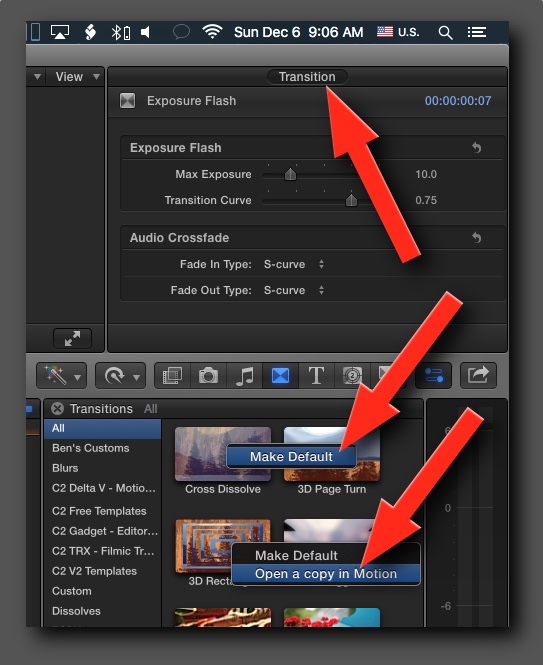
This is a simple cross dissolve available in Transitions Effects. Sounds like you want to customize it.
If you want you can create a custom cross fade transition, change the total duration, manipulate the fade handles and curves and save as a preset. You can adjust all these parameters in the info pane. You can also double click the Transition itself. Then make it the default transition and then use keyboard shortcut cmmd+T to apply.
If you have attached audio, it applies an automatic cross fade as well.
Here is Apple's take on this… support.apple.com/kb/PH12592?locale=en_US
Finally, you can do even more by right clicking the Cross Dissolve transition and "Open a copy in Motion" where you can get even more creative. Assuming you have Motion installed.
Hope this helps, Greg
Welcome to the forums.
This is a simple cross dissolve available in Transitions Effects. Sounds like you want to customize it.
If you want you can create a custom cross fade transition, change the total duration, manipulate the fade handles and curves and save as a preset. You can adjust all these parameters in the info pane. You can also double click the Transition itself. Then make it the default transition and then use keyboard shortcut cmmd+T to apply.
If you have attached audio, it applies an automatic cross fade as well.
Here is Apple's take on this… support.apple.com/kb/PH12592?locale=en_US
Finally, you can do even more by right clicking the Cross Dissolve transition and "Open a copy in Motion" where you can get even more creative. Assuming you have Motion installed.
Hope this helps, Greg
Please Log in to join the conversation.

06 Dec 2015 15:15 #71197
by BenB
Replied by BenB on topic Final cut pro transitions help
It is the Transition parameters in the Inspector, not the Info pane. Yes, I'm being way too picky, sorry, still waiting for coffee this morning...
Please Log in to join the conversation.
