


- Posts: 4
- Thank you received: 0
3 Post Moderation Rule for New Boarders (25 Jan 2021)
New boarders will have their posts moderated - Don't worry if you cannot see your post immediately.
Create a timeline with custom frame rates
- BauerOutage
-
 Topic Author
- Offline
- New Member
-

Less
More
30 Nov 2015 05:01 #71025
by BauerOutage
Create a timeline with custom frame rates was created by BauerOutage
I have an Edgertronic camera that shoots in variable frame rates at variable resolutions. I have recently filmed events at 494 frames per second with a 1280x1024 resolution. I want to play this footage back at "real time" speed.
I know that I can create a 30p timeline and apply a retime of 1646.66% to my clip. The clip will now play back in 30 frames per second. However, it will not play all 494 frames that I recorded. Approximately 16 frames will be skipped for every frame that is played. I do not want this to happen or I wouldn't have bothered spending $8,000 on a camera and lens.
My question is this:
Is there a way to retime my footage without skipping frames? The only workaround I have been able to think of is to somehow create a 494p custom timeline instead of the stock 30p, 60p, etc. options fcpx offers. This way, when I drop my clip into the timeline it will play in "real time" while preserving all of the frames.
I am well aware that the human eye cannot perceive frame rates this high and blah blah blah. However, I still need all of the information to be preserved.
I know that I can create a 30p timeline and apply a retime of 1646.66% to my clip. The clip will now play back in 30 frames per second. However, it will not play all 494 frames that I recorded. Approximately 16 frames will be skipped for every frame that is played. I do not want this to happen or I wouldn't have bothered spending $8,000 on a camera and lens.
My question is this:
Is there a way to retime my footage without skipping frames? The only workaround I have been able to think of is to somehow create a 494p custom timeline instead of the stock 30p, 60p, etc. options fcpx offers. This way, when I drop my clip into the timeline it will play in "real time" while preserving all of the frames.
I am well aware that the human eye cannot perceive frame rates this high and blah blah blah. However, I still need all of the information to be preserved.
Please Log in to join the conversation.
- Tom Wolsky
-

- Offline
- Moderator
-

30 Nov 2015 13:35 #71036
by Tom Wolsky
Replied by Tom Wolsky on topic Create a timeline with custom frame rates
Rather than retiming try using the automatic speed function.
Please Log in to join the conversation.
- BauerOutage
-
Topic Author
- Offline
- New Member
-
Less
More
- Posts: 4
- Thank you received: 0
30 Nov 2015 20:41 #71048
by BauerOutage
Replied by BauerOutage on topic Create a timeline with custom frame rates
I have tried this as well. It still skips frames and the maximum frame rate i can end up with is 60 if I create a 60p timeline.
Please Log in to join the conversation.
- BauerOutage
-
Topic Author
- Offline
- New Member
-
Less
More
- Posts: 4
- Thank you received: 0
01 Dec 2015 07:48 #71064
by BauerOutage
Replied by BauerOutage on topic Create a timeline with custom frame rates
I have tried that. It still skips frames to get the footage to play at real time instead of increasing the number of frames displayed per second to get the footage to play in real time.
Please Log in to join the conversation.
- Tom Wolsky
-
- Offline
- Moderator
-
01 Dec 2015 14:33 #71072
by Tom Wolsky
Replied by Tom Wolsky on topic Create a timeline with custom frame rates
If you used automatic speed you should get slomo in the timeline, which is the point of shooting high frame rate media.
Or are you trying to make a high frame rate project? Why? What's going to play it back?
I've never tried this but you could open the high frane rate clip into the timeline and edit other material into it. No idea if it will work for output or what result you'll get,
Or are you trying to make a high frame rate project? Why? What's going to play it back?
I've never tried this but you could open the high frane rate clip into the timeline and edit other material into it. No idea if it will work for output or what result you'll get,
Please Log in to join the conversation.
- BauerOutage
-
Topic Author
- Offline
- New Member
-
Less
More
- Posts: 4
- Thank you received: 0
03 Dec 2015 07:07 #71137
by BauerOutage
Replied by BauerOutage on topic Create a timeline with custom frame rates
Right. If I use automatic speed I get slow mo. I'm trying to get rid of the slow mo and play the clip at full speed but not skip frames to do this. I tried creating a quicktime movie with a custom frame rate of 494 frames per second and the custom resolution of my video. I then opened that clip into the timeline. Then I dumped my clip into the timeline. It appeared to have worked as when I zoomed in on the timeline I could see 494 frames before the timecode read 1 second. If i scrolled with the playhead I could see each frame but as soon as I tried using the arrow key to advance to the next frame it skipped about 8 frames. To me that indicated that the timeline was still stuck at 60 frames per second as 494/60 is 8.23. Is fcpx not able to make a timeline of greater than 60p?
Please Log in to join the conversation.
- Tom Wolsky
-
- Offline
- Moderator
-
03 Dec 2015 07:29 #71141
by Tom Wolsky
Replied by Tom Wolsky on topic Create a timeline with custom frame rates
FCP can only create projects in standardized frame rates used for video distribution. I assume the clip plays correctly when you play it in the browser. I assume it plays correctly when you play it opened into the timeline. You cannot make a 494fps project. What are you going to do with a 494fps project?
Please Log in to join the conversation.
- Karsten Schlüter
-

- Offline
- Moderator
-
Less
More
- Posts: 3790
- Thank you received: 718
03 Dec 2015 10:33 #71147
by Karsten Schlüter
… a movie for flies?
SCNR!!! :woohoo:
<creeping back under my stone>
Replied by Karsten Schlüter on topic Create a timeline with custom frame rates
Tom Wolsky wrote: .... What are you going to do with a 494fps project?
… a movie for flies?
SCNR!!! :woohoo:
<creeping back under my stone>
Please Log in to join the conversation.


04 Dec 2015 14:28 - 04 Dec 2015 14:33 #71165
by alex4D
Replied by alex4D on topic Create a timeline with custom frame rates
Your method is correct - editing a high frame rate movie in its timeline works for me.
I just opened a 1500 frames per second clip in its timeline and added a title at frame 139.
Although the left and right keys don't move frame by frame, you can add clips and other content at actual frame boundaries.
Moving clips and edit points using < and > works at frame precision.
When the frame rate is very high, you can use 'move subframe left and right' keyboard shortcuts: Command-Left and Command-Right. In my 1500fps timeline, pressing Command-Left twice moves me to the next frame.
@Alex4D
PS:
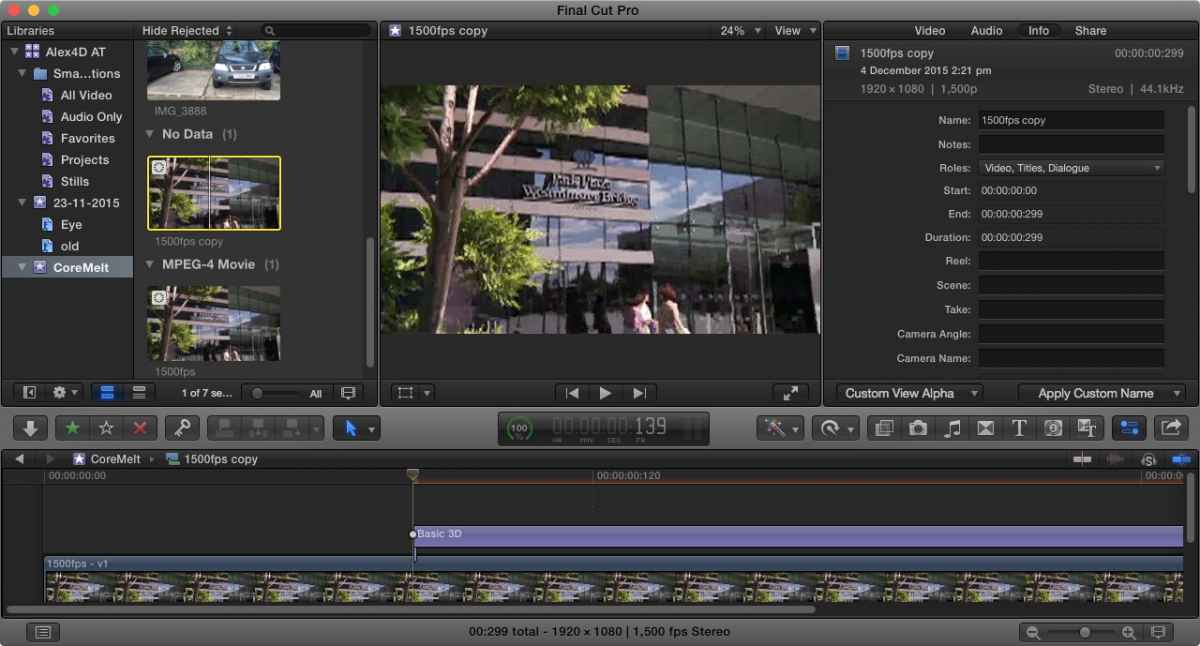
I just opened a 1500 frames per second clip in its timeline and added a title at frame 139.
Although the left and right keys don't move frame by frame, you can add clips and other content at actual frame boundaries.
Moving clips and edit points using < and > works at frame precision.
When the frame rate is very high, you can use 'move subframe left and right' keyboard shortcuts: Command-Left and Command-Right. In my 1500fps timeline, pressing Command-Left twice moves me to the next frame.
@Alex4D
PS:
Last edit: 04 Dec 2015 14:33 by alex4D.
Please Log in to join the conversation.
