


- Posts: 14
- Thank you received: 0
3 Post Moderation Rule for New Boarders (25 Jan 2021)
New boarders will have their posts moderated - Don't worry if you cannot see your post immediately.
Clip Selection

- Tom Wolsky
-

- Offline
- Moderator
-

30 Nov 2015 07:33 #71027
by Tom Wolsky
Replied by Tom Wolsky on topic Clip Selection
What are clip selections? Do you mean like paste attributes?
Please Log in to join the conversation.
30 Nov 2015 18:44 #71044
by Vuk
Replied by Vuk on topic Clip Selection
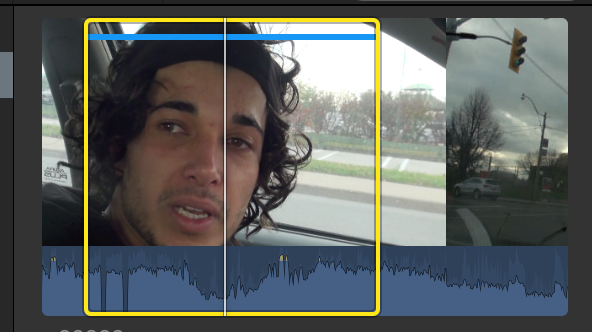
No I mean when you select part of the clip in browser that you may use it, like this
Please Log in to join the conversation.
- Tom Wolsky
-
- Offline
- Moderator
-
30 Nov 2015 23:01 #71053
by Tom Wolsky
Replied by Tom Wolsky on topic Clip Selection
Paste it to another clip? Do you mean the duration or the specific timecode values from one clip to another? Teh duration you can do, but the timecode values.
Please Log in to join the conversation.
- Karsten Schlüter
-

- Offline
- Moderator
-
Less
More
- Posts: 3790
- Thank you received: 718
01 Dec 2015 13:15 #71067
by Karsten Schlüter
Replied by Karsten Schlüter on topic Clip Selection
need for 'same same' I see only for a replacement edit, is that what you want to accomplish?
if you like to replace an existing clip in your timeline by some other, new content, but want to keep the timing, make a selection in the browser, select the clip in the timeline and hit opt-R
for finer adjustment inside the range then, use the trim-tool (T) ....
you get the full potential of FCPX only by shortcuts ...
if you like to replace an existing clip in your timeline by some other, new content, but want to keep the timing, make a selection in the browser, select the clip in the timeline and hit opt-R
for finer adjustment inside the range then, use the trim-tool (T) ....
you get the full potential of FCPX only by shortcuts ...
Please Log in to join the conversation.
