


- Posts: 213
- Thank you received: 30
3 Post Moderation Rule for New Boarders (25 Jan 2021)
New boarders will have their posts moderated - Don't worry if you cannot see your post immediately.
Transfer times - Archive function vs. Finder
27 Nov 2015 02:38 - 27 Nov 2015 02:46 #70981
by FernKraft
Transfer times - Archive function vs. Finder was created by FernKraft
Hey Gang,
After reading/watching the latest homepage article, i'm finally curious enough to post about something that has bothered me for a few months now.
I've noticed that Finder is faster at copying information off a card faster than FCPX can Archive that same card. Why is that? What is it about the Archive function that is slower than finder, or even "ShotPut pro".
Mark Spencer had mentioned "multithreading" is FCPX not capable of multithreading?
Thanks!
P.s. I have attached
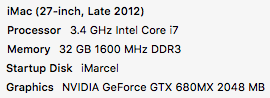
my system specs, as i understand that may be the factor...
After reading/watching the latest homepage article, i'm finally curious enough to post about something that has bothered me for a few months now.
I've noticed that Finder is faster at copying information off a card faster than FCPX can Archive that same card. Why is that? What is it about the Archive function that is slower than finder, or even "ShotPut pro".
Mark Spencer had mentioned "multithreading" is FCPX not capable of multithreading?
Thanks!
P.s. I have attached
my system specs, as i understand that may be the factor...
Last edit: 27 Nov 2015 02:46 by FernKraft. Reason: attached my system specs...
Please Log in to join the conversation.


27 Nov 2015 18:55 #70990
by joema
Obtaining the full I/O potential of a device often requires issuing overlapped or multiple async I/O commands. This way a single thread can dispatch multiple outstanding I/Os, the device works on fulfilling those and notifies or "calls back" via some mechanism to the issuing thread when each one completes. In POSIX the API is AIO and in Windows it is passing the flag FILE_FLAG_OVERLAPPED when the file is created with CreateFile(). If this isn't done there is a potential to underutilize the device bandwidth or else use up a lot of threads (hence overhead) on synchronous I/O calls.
If in fact FCP X is slower at copying data than Finder, this could be due to different I/O handling or maybe FCP X is simply doing more work than first appears.
The depth of the I/O queue is one indicator of how fully the device is utilized. In general you want a non-zero but modest I/O queue.
From the OS X Terminal it is possible to examine the I/O queue histogram. The command is bitesize.d. E.g, "sudo iopending", and "sudo bitesize.d". Google for more details. Always exercise caution when using Terminal.
On Windows the disk queue length can be examined graphically for each device using Performance Monitor.
Replied by joema on topic Transfer times - Archive function vs. Finder
I don't know a definitive answer and have not tested this. However yes FCP X is heavily multitheaded. I just checked Activity Monitor and on my iMac FCP X has 42 threads in use.FernKraft wrote: ...I've noticed that Finder is faster at copying information off a card faster than FCPX can Archive that same card. Why is that?...Mark Spencer had mentioned "multithreading" is FCPX not capable of multithreading?...
Obtaining the full I/O potential of a device often requires issuing overlapped or multiple async I/O commands. This way a single thread can dispatch multiple outstanding I/Os, the device works on fulfilling those and notifies or "calls back" via some mechanism to the issuing thread when each one completes. In POSIX the API is AIO and in Windows it is passing the flag FILE_FLAG_OVERLAPPED when the file is created with CreateFile(). If this isn't done there is a potential to underutilize the device bandwidth or else use up a lot of threads (hence overhead) on synchronous I/O calls.
If in fact FCP X is slower at copying data than Finder, this could be due to different I/O handling or maybe FCP X is simply doing more work than first appears.
The depth of the I/O queue is one indicator of how fully the device is utilized. In general you want a non-zero but modest I/O queue.
From the OS X Terminal it is possible to examine the I/O queue histogram. The command is bitesize.d. E.g, "sudo iopending", and "sudo bitesize.d". Google for more details. Always exercise caution when using Terminal.
On Windows the disk queue length can be examined graphically for each device using Performance Monitor.
Please Log in to join the conversation.
