




- Posts: 170
- Thank you received: 2
3 Post Moderation Rule for New Boarders (25 Jan 2021)
New boarders will have their posts moderated - Don't worry if you cannot see your post immediately.
Breaking apart compound clip items
20 Nov 2015 15:29 #70818
by PhilCF
Breaking apart compound clip items was created by PhilCF
Hi Guys,
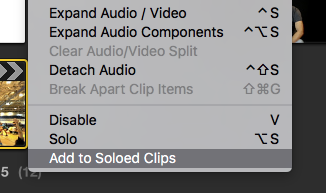
I'm working with a compound clip. It won't break apart when I click Command Shift G. When I go to "clip" and break clip apart, it is greyed out.
When I click into the clip, all the elements are there.
Can anyone diagnose this problem.
Why won't it let me break into the clip?
Phil
I'm working with a compound clip. It won't break apart when I click Command Shift G. When I go to "clip" and break clip apart, it is greyed out.
When I click into the clip, all the elements are there.
Can anyone diagnose this problem.
Why won't it let me break into the clip?
Phil
Please Log in to join the conversation.
- Jonathan Levin
-

- Offline
- Platinum Member
-

Less
More
- Posts: 786
- Thank you received: 21
20 Nov 2015 16:57 #70819
by Jonathan Levin
Replied by Jonathan Levin on topic Breaking apart compound clip items
Phil.
I think others can expand on this further than me no pun intended. But I'll give it a shot. It looks like you are trying to do two different things. If you double click on the CC in the timeline, it will reveal it's contents. If you chose to break apart the items, it literally breaks those items apart, making it no longer a CC, but you can see the contents. As far as I can tell, there is no way to "re-connect" a broken apart clip, whereas with the first method, you just click the back arrow (can't remember what that is called) at the top left of the timeline/project.
I'll let everyone else clean up the mess of my explanation.
Jonathan
I think others can expand on this further than me no pun intended. But I'll give it a shot. It looks like you are trying to do two different things. If you double click on the CC in the timeline, it will reveal it's contents. If you chose to break apart the items, it literally breaks those items apart, making it no longer a CC, but you can see the contents. As far as I can tell, there is no way to "re-connect" a broken apart clip, whereas with the first method, you just click the back arrow (can't remember what that is called) at the top left of the timeline/project.
I'll let everyone else clean up the mess of my explanation.
Jonathan
Please Log in to join the conversation.

20 Nov 2015 17:12 #70822
by lichinho
Replied by lichinho on topic Breaking apart compound clip items
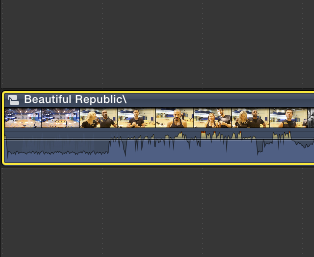
In your first screenshot, as far as I can tell, you have a project selected, not the compound clip you show in the second screenshot.
Make sure you select the compound clip in the timeline - as shown in the second screenshot - and it is still selected (showing in yellow) when you drop down the menu.
Make sure you select the compound clip in the timeline - as shown in the second screenshot - and it is still selected (showing in yellow) when you drop down the menu.
Please Log in to join the conversation.

20 Nov 2015 18:29 #70827
by BenB
Replied by BenB on topic Breaking apart compound clip items
Yes, first screen shot, there's a Project selected in the Browser (bright yellow outline).
Please Log in to join the conversation.
22 Nov 2015 08:30 #70864
by PhilCF
Replied by PhilCF on topic Breaking apart compound clip items
Hi There,
I believe that highlight was just for the screenshot. I have made the clip highlighted (yellow border) and the option to break apart the clip simply doesn't appear. The keyboard shortcut also doesn't work.
The clip is compound - The icon is in top left and when I double click into the clip, it shows all the elements of the entire compound. I click the back arrow to get back to the timeline, but the software won't let me break the clip apart.
Could this be an El Capitain bug?
Thanks,
Phil
I believe that highlight was just for the screenshot. I have made the clip highlighted (yellow border) and the option to break apart the clip simply doesn't appear. The keyboard shortcut also doesn't work.
The clip is compound - The icon is in top left and when I double click into the clip, it shows all the elements of the entire compound. I click the back arrow to get back to the timeline, but the software won't let me break the clip apart.
Could this be an El Capitain bug?
Thanks,
Phil
Please Log in to join the conversation.
- ronny courtens
-

- Offline
- Moderator
-

Less
More
- Posts: 4455
- Thank you received: 962
22 Nov 2015 09:31 #70865
by ronny courtens
Replied by ronny courtens on topic Breaking apart compound clip items
Hi Phil,
Have any of the clips inside the CC been retimes, or has the CC been retimed?
- Ronny
Have any of the clips inside the CC been retimes, or has the CC been retimed?
- Ronny
Please Log in to join the conversation.
22 Nov 2015 11:32 #70866
by Makki
Replied by Makki on topic Breaking apart compound clip items
I have had this issue. Try this, delete the compound clip in timeline and insert the compound clip from browser. Now you should be able to brake apart items. That workde for me.
Please Log in to join the conversation.
22 Nov 2015 12:00 #70867
by BenB
Replied by BenB on topic Breaking apart compound clip items
If the CC is only partially used (only a range of it) and has other connected clips in an unused area, it won't break apart. I find this consistently and it drives me nuts, that I can't break apart just the used segment.
Please Log in to join the conversation.
- Jonathan Levin
-
- Offline
- Platinum Member
-
Less
More
- Posts: 786
- Thank you received: 21
22 Nov 2015 16:51 #70870
by Jonathan Levin
Replied by Jonathan Levin on topic Breaking apart compound clip items
Hi all.
So let me ask this: once you break apart a compound clip, can it then be put back together? I know that "expanding" is a different thing, but with breaking apart it seems the only way to reconnect everything is through find/replace method
So let me ask this: once you break apart a compound clip, can it then be put back together? I know that "expanding" is a different thing, but with breaking apart it seems the only way to reconnect everything is through find/replace method
Please Log in to join the conversation.
22 Nov 2015 16:54 #70871
by Makki
Replied by Makki on topic Breaking apart compound clip items
You just create a new CC
Please Log in to join the conversation.
23 Nov 2015 02:12 #70875
by BenB
Replied by BenB on topic Breaking apart compound clip items
Actually easier than that. When you create a Compound Clip, the parent lives in the Event. The children (copies) live in Project and other Timelines. When you break one apart, you're doing that inside the Timeline. That has no effect on the Parent, which is still in-tact in the Event Browser. So just go back to the Event Browser, and drop the parent back into the Timeline where you want it.
Why would you want to create a duplicate of what you already have?
Why would you want to create a duplicate of what you already have?
Please Log in to join the conversation.

29 Feb 2016 06:14 #73859
by Riqiv
Replied by Riqiv on topic Breaking apart compound clip items
Excuse me for answering an old thread but I was having the same issue.
I have little Intros and Outros I have saved as compound clips that I believe I used to be able to break apart previously.
Either way, the workaround is to double-click to open the compound clip and Select All, and copy everything.
Push the back arrow to go back to the timeline and simply paste everthing in and delete the compound clip(s) which I borrowed from another event.
Nothing you all probably haven't figured out already, but I thought I'd share just in case.
I have little Intros and Outros I have saved as compound clips that I believe I used to be able to break apart previously.
Either way, the workaround is to double-click to open the compound clip and Select All, and copy everything.
Push the back arrow to go back to the timeline and simply paste everthing in and delete the compound clip(s) which I borrowed from another event.
Nothing you all probably haven't figured out already, but I thought I'd share just in case.
Please Log in to join the conversation.
29 Feb 2016 09:26 #73866
by BenB
Replied by BenB on topic Breaking apart compound clip items
What's wrong with breaking apart the compound where it already is?
Please Log in to join the conversation.
29 Feb 2016 17:29 #73885
by Riqiv
Replied by Riqiv on topic Breaking apart compound clip items
Hi Ben,
Nothing really . . . it all depends on how you like to work.
I'm integrating certain components from the CC and deleting the rest, so it's easier to work this out in the timeline, rather then switching back and forth.
Nothing really . . . it all depends on how you like to work.
I'm integrating certain components from the CC and deleting the rest, so it's easier to work this out in the timeline, rather then switching back and forth.
Please Log in to join the conversation.
01 Mar 2016 04:41 #73899
by BenB
Replied by BenB on topic Breaking apart compound clip items
If you break apart the CC right there in the timeline, then just delete what you don't want. You don't have to switch to anything else.
Clip menu, Break Apart Clip Items. I guess I'm not understanding how that doesn't do the trick.
Clip menu, Break Apart Clip Items. I guess I'm not understanding how that doesn't do the trick.
Please Log in to join the conversation.
01 Mar 2016 05:24 #73901
by Riqiv
Replied by Riqiv on topic Breaking apart compound clip items
Ahhh . . . that explains things!
if you look at the very first post in this thread is reads:
"Hi Guys, I'm working with a compound clip. It won't break apart when I click Command Shift G."
I have the same issue with some of my older CC's and was searching the internet for "can't break compound clip in FCPX".
My advice is only for people having this issue. It's not ground-breaking advice, but sometimes I can't see the simple solution.
Plus, people on this site have helped me so generously I thought I'd pipe in
if you look at the very first post in this thread is reads:
"Hi Guys, I'm working with a compound clip. It won't break apart when I click Command Shift G."
I have the same issue with some of my older CC's and was searching the internet for "can't break compound clip in FCPX".
My advice is only for people having this issue. It's not ground-breaking advice, but sometimes I can't see the simple solution.
Plus, people on this site have helped me so generously I thought I'd pipe in
Please Log in to join the conversation.
01 Mar 2016 05:29 #73902
by Riqiv
Replied by Riqiv on topic Breaking apart compound clip items
Also Ben,
What do you mean by "and has other connected clips in an unused area" in this post of yours:
If the CC is only partially used (only a range of it) and has other connected clips in an unused area, it won't break apart. I find this consistently and it drives me nuts, that I can't break apart just the used segment.
What do you mean by "and has other connected clips in an unused area" in this post of yours:
If the CC is only partially used (only a range of it) and has other connected clips in an unused area, it won't break apart. I find this consistently and it drives me nuts, that I can't break apart just the used segment.
Please Log in to join the conversation.
- Tom Wolsky
-

- Offline
- Moderator
-
01 Mar 2016 14:59 #73912
by Tom Wolsky
Replied by Tom Wolsky on topic Breaking apart compound clip items
There is something else going on, because there is no reason why this wouldn't break apart, and I cannot reproduce the problem as you described it. Is this specific to older compounds? You would happen to know which version they originated in? Thanks.
Please Log in to join the conversation.
01 Mar 2016 17:24 #73916
by Riqiv
Replied by Riqiv on topic Breaking apart compound clip items
Hi Tom,
All the CC's I have are old, but not that old. It's more like I've done so many things to them that they're polluted.
After I create them in a specific timeline I copy and paste them to an Event I created called "Intros & Outros".
Then later, in a new Project, I copy & paste them and use what I need and delete the rest. This CC may contain a Subscribe button, playout music and background I use, while the main clip I won't use, along with other items.
So a brand new CC in it's respective timeline works fine, but I am using these specific CC's not as FCP intended.
(I sometimes create a CC within another CC, but that seems to work fine.)
Thx for asking!
All the CC's I have are old, but not that old. It's more like I've done so many things to them that they're polluted.
After I create them in a specific timeline I copy and paste them to an Event I created called "Intros & Outros".
Then later, in a new Project, I copy & paste them and use what I need and delete the rest. This CC may contain a Subscribe button, playout music and background I use, while the main clip I won't use, along with other items.
So a brand new CC in it's respective timeline works fine, but I am using these specific CC's not as FCP intended.
(I sometimes create a CC within another CC, but that seems to work fine.)
Thx for asking!
Please Log in to join the conversation.
