


- Posts: 60
- Thank you received: 1
3 Post Moderation Rule for New Boarders (25 Jan 2021)
New boarders will have their posts moderated - Don't worry if you cannot see your post immediately.
Connected clips issue
19 Nov 2015 22:41 #70798
by RickLFoy
Connected clips issue was created by RickLFoy
Hi ladies & gents, I am still learning FCPX; I am mainly an Avid editor but I am loving this NLE the more I learn how to use it. I am having an issue I hope someone here can explain to me.
I am so use to jumping all around when building my edits in Avid and carried this habit over to FCPX. I started in the middle of my project and now I want to go back earlier in it to build something, but this black media is connected to what I have build and I am having issues getting it out of the way so that I can put my build media on it (storyline). The reason being is because I want to do some tracking. I would just say the hell with it if I did not need to do any thing extra but since that is not the case here I am.
Here is a screenshot of what is on my timeline. What is the easiest way moving the built media onto the storyline while keeping everything in sync. It is a music video and I want to re-connect it to the music underneath the storyline. Help please and thanks in advance.
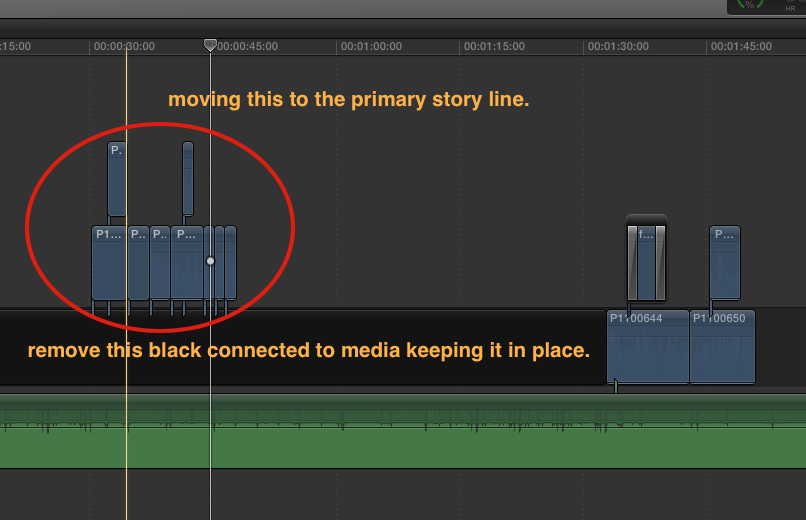
I am so use to jumping all around when building my edits in Avid and carried this habit over to FCPX. I started in the middle of my project and now I want to go back earlier in it to build something, but this black media is connected to what I have build and I am having issues getting it out of the way so that I can put my build media on it (storyline). The reason being is because I want to do some tracking. I would just say the hell with it if I did not need to do any thing extra but since that is not the case here I am.
Here is a screenshot of what is on my timeline. What is the easiest way moving the built media onto the storyline while keeping everything in sync. It is a music video and I want to re-connect it to the music underneath the storyline. Help please and thanks in advance.
Please Log in to join the conversation.
- Tom Wolsky
-

- Offline
- Moderator
-

19 Nov 2015 22:46 #70800
by Tom Wolsky
Replied by Tom Wolsky on topic Connected clips issue
Select the lower layer of connected clips and press Opt-Cmd-down arrow.
Please Log in to join the conversation.
- cmpfireman
-

- Offline
- New Member
-

Less
More
- Posts: 10
- Thank you received: 1
19 Nov 2015 22:56 #70801
by cmpfireman
Replied by cmpfireman on topic Connected clips issue
Because FCPX uses a "magnetic" timeline, you must keep the Gap in place to maintain the location of your clips further down the storyline. The easiest way to solve your issue is to blade the Gap (black bar) exactly on either side of your clips that you want to move down. Select all the clips and drag them in to the primary storyline in the left (earlier) edit in the Gap. Your storyline will be out of sync. Then delete the bladed gap to the right of your clips and everything should snap back in to place.
Please Log in to join the conversation.
- cmpfireman
-
- Offline
- New Member
-
Less
More
- Posts: 10
- Thank you received: 1
19 Nov 2015 22:57 #70802
by cmpfireman
Replied by cmpfireman on topic Connected clips issue
Ok, so Tom's answer was easier than mine. 
Please Log in to join the conversation.
19 Nov 2015 23:01 #70804
by RickLFoy
Replied by RickLFoy on topic Connected clips issue
Thank you so very much ... it is the same as using TrackX. I am having brain farts over here. I think I will take a break then come back with a renewed mindset and fresh eyes. Thanks again it worked.
Please Log in to join the conversation.

20 Nov 2015 00:03 #70805
by BenB
Replied by BenB on topic Connected clips issue
Tip; When doing music videos, place the music in the Primary Storyline, as it never changes. Then build your story around that.
Please Log in to join the conversation.
20 Nov 2015 04:27 #70809
by RickLFoy
Replied by RickLFoy on topic Connected clips issue
Yeah, good tip. I am still use to editing on a track base NLE but that is a good idea. I should be able to switch it around now.
Please Log in to join the conversation.
20 Nov 2015 04:40 #70810
by RickLFoy
Replied by RickLFoy on topic Connected clips issue
oh yeah, I just remembered why I am not editing it on the storyline ... I am using trackX to do some motion tracking and FCPX w/ TrackX need it to be on the storyline. That is for all I know ... like I said, I am still learning this NLE. If you have any other ideas I am open.
Please Log in to join the conversation.
20 Nov 2015 12:43 #70815
by BenB
Replied by BenB on topic Connected clips issue
Ah, right.
Please Log in to join the conversation.

20 Nov 2015 17:11 - 20 Nov 2015 17:12 #70821
by Overturf
Replied by Overturf on topic Connected clips issue
If you can't put the music in the primary it is helpful to put just one frame of slug at the very beginning using Opt-W. Connect your music clip to this frame and it will stay in place. You can edit the connection point holding down Shift+Cmd while clicking on the connected clip.
Last edit: 20 Nov 2015 17:12 by Overturf.
Please Log in to join the conversation.
