


- Posts: 582
- Thank you received: 5
3 Post Moderation Rule for New Boarders (25 Jan 2021)
New boarders will have their posts moderated - Don't worry if you cannot see your post immediately.
Walk through wall-effect
17 Nov 2015 07:01 #70728
by Neguah
Walk through wall-effect was created by Neguah
I'm making a movie about a pirate who is trapped in the kindergarten. The pirate wants to talk to the kids, but when he reveals himself the kids run and hide. But this pirate is friendly, so he's persistent to talk the kids, so he simply just walks through the door.
I have seen some effect. This one:
And I have seen the effect done on AE with masking, but I want to avoid this because of my slow computer.
I tried one myself by stacking clips and crop the top clip so you get the idea of the pirate walking through the door seen from the side.
Karsten: I laughed by your post in the other post. I have done some weird stuff and I can easily picture the neighbour thinking; "what the h...?!"
Saw your link, btw. And I think I understand the method.
I have seen some effect. This one:
And I have seen the effect done on AE with masking, but I want to avoid this because of my slow computer.
I tried one myself by stacking clips and crop the top clip so you get the idea of the pirate walking through the door seen from the side.
Karsten: I laughed by your post in the other post. I have done some weird stuff and I can easily picture the neighbour thinking; "what the h...?!"
Saw your link, btw. And I think I understand the method.
Please Log in to join the conversation.
- Karsten Schlüter
-

- Offline
- Moderator
-

Less
More
- Posts: 3790
- Thank you received: 718
17 Nov 2015 08:10 #70730
by Karsten Schlüter
There's some unknown Murphy's Law, saying:
The nice, older lady next door comes along exactly when you're doing… weird stuff.
For the walk-thru tutorial, I'll record in a part of my garden, she can not look in… hopefully! gimme a few hours, I'll upload when done… did I say three methods...? ... what was the third...? <scratching head> hmmm.
:lol: :woohoo: :lol:
Replied by Karsten Schlüter on topic Walk through wall-effect
Karsten: I laughed by your post in the other post. I have done some weird stuff and I can easily picture the neighbour thinking; "what the h...?!"
There's some unknown Murphy's Law, saying:
The nice, older lady next door comes along exactly when you're doing… weird stuff.
For the walk-thru tutorial, I'll record in a part of my garden, she can not look in… hopefully! gimme a few hours, I'll upload when done… did I say three methods...? ... what was the third...? <scratching head> hmmm.
:lol: :woohoo: :lol:
Please Log in to join the conversation.
17 Nov 2015 21:41 #70751
by Neguah
Replied by Neguah on topic Walk through wall-effect
Take your time, Karsten. I'm not in a hurry 
When recording the green screen part with the morphsuit, some kids and their grandmother was walking by the window. I really hope the noticed the camera, but considering their age I'm pretty sure they didn't have a clue of what was going on in there
You said three. The two methods you have is probably good enough for my production
When recording the green screen part with the morphsuit, some kids and their grandmother was walking by the window. I really hope the noticed the camera, but considering their age I'm pretty sure they didn't have a clue of what was going on in there
You said three. The two methods you have is probably good enough for my production
Please Log in to join the conversation.
- MarkNelsonMovies
-

- Offline
- Elite Member
-

Less
More
- Posts: 256
- Thank you received: 48
18 Nov 2015 18:56 #70764
by MarkNelsonMovies
Replied by MarkNelsonMovies on topic Walk through wall-effect
you can also check out the video film riot did, they use AE and Premiere but the idea is the same
Please Log in to join the conversation.
- Karsten Schlüter
-
- Offline
- Moderator
-
Less
More
- Posts: 3790
- Thank you received: 718
19 Nov 2015 10:42 #70774
by Karsten Schlüter
Replied by Karsten Schlüter on topic Walk through wall-effect
oops, took a li' longer than expected
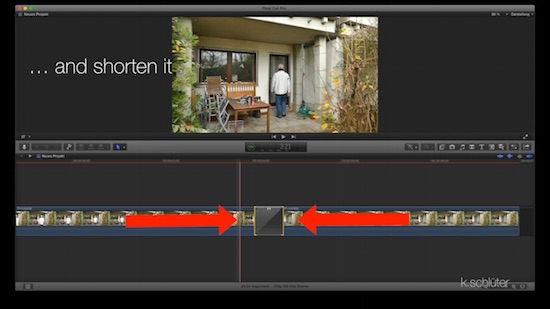
two and a half methods to walk thru a door... ehm wall, just FCPX, no third party apps nor plugins
The first is this 'fast dissolve'-trick, which works nicely, if you don't hesitate to hit the wall ....
Second is simple cropping - but asks for a door/hole in the wall.
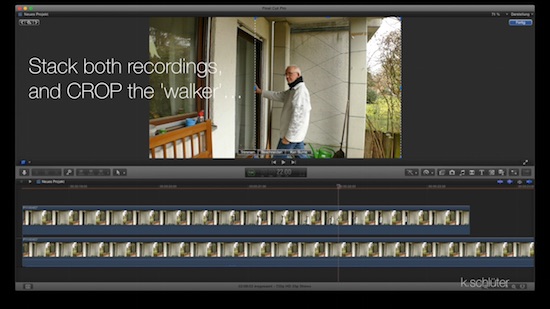
2b is the variation, if there's no hole ... but asks for some green screen.
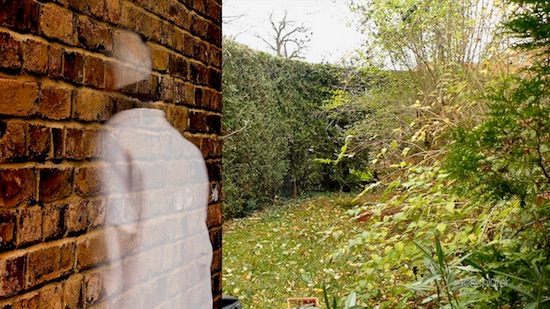
The third method, I had in mind, creates an illusion of 'diffusing' thru the wall, which looks impressives, but a) asks for green screening again (and a huge green screen), and b) asks for manipulating a mask, which, afaik, can only be accomplished in Motion.
Maybe the other day I can record the green part with our school kids, ... then I add here the 3rd/Diffusion trick ...
enjoy movie making!
(and don't try to explain your neighbors, what you're doing there ... :woohoo: )
two and a half methods to walk thru a door... ehm wall, just FCPX, no third party apps nor plugins
The first is this 'fast dissolve'-trick, which works nicely, if you don't hesitate to hit the wall ....
Second is simple cropping - but asks for a door/hole in the wall.
2b is the variation, if there's no hole ... but asks for some green screen.
The third method, I had in mind, creates an illusion of 'diffusing' thru the wall, which looks impressives, but a) asks for green screening again (and a huge green screen), and b) asks for manipulating a mask, which, afaik, can only be accomplished in Motion.
Maybe the other day I can record the green part with our school kids, ... then I add here the 3rd/Diffusion trick ...
enjoy movie making!
(and don't try to explain your neighbors, what you're doing there ... :woohoo: )
Please Log in to join the conversation.

19 Nov 2015 14:27 #70781
by BenB
Replied by BenB on topic Walk through wall-effect
You can do that masking in FCPX. It has the masking tools for that.
Please Log in to join the conversation.
- Karsten Schlüter
-
- Offline
- Moderator
-
Less
More
- Posts: 3790
- Thank you received: 718
20 Nov 2015 05:53 - 20 Nov 2015 06:08 #70811
by Karsten Schlüter
FCPX has lots of phantastic masking and keying tools, no doubt. But for the 'Diffusion Effect' I'd like to show Neguah, I'd need morphing masks ... hard to explain, … hmm… look: we all know this famous portrait from Anne Leibovitz of Hollywood legend Whoopie Goldberg ...

see it as a mask with z-depth ... (using Ms Goldberg as a mask, ... pheww :silly: )
the surface of the milk defines a layer in z-axis. What's behind is, is masked, what's near to camera is shown ... you can simulate that, quiet easy (but less perfect), and for a few frames of 'effect' worth a try.

I've done it before, in a few projects (unfortunately I'm not allowed to post …), ... I basically 'shrink' a luma-key. Manually. No real depth-info, just some imagination, as with the player above: his left food is back, his right hand is front - easy...
so the recipe is: green screen, transform into a b/w silhouette, animate to shrink parts of it, use as mask in final project ..... for moving objects/masks, it asks for rotoscoping, for sure.
I try to fetch some raw material over the weekend to play with and demo what I mean.
..... uffff, reaching the limits of my English skills here, notable :lol:
Replied by Karsten Schlüter on topic Walk through wall-effect
BenB wrote: You can do that masking in FCPX. It has the masking tools for that.
FCPX has lots of phantastic masking and keying tools, no doubt. But for the 'Diffusion Effect' I'd like to show Neguah, I'd need morphing masks ... hard to explain, … hmm… look: we all know this famous portrait from Anne Leibovitz of Hollywood legend Whoopie Goldberg ...
see it as a mask with z-depth ... (using Ms Goldberg as a mask, ... pheww :silly: )
the surface of the milk defines a layer in z-axis. What's behind is, is masked, what's near to camera is shown ... you can simulate that, quiet easy (but less perfect), and for a few frames of 'effect' worth a try.
I've done it before, in a few projects (unfortunately I'm not allowed to post …), ... I basically 'shrink' a luma-key. Manually. No real depth-info, just some imagination, as with the player above: his left food is back, his right hand is front - easy...
so the recipe is: green screen, transform into a b/w silhouette, animate to shrink parts of it, use as mask in final project ..... for moving objects/masks, it asks for rotoscoping, for sure.
I try to fetch some raw material over the weekend to play with and demo what I mean.
..... uffff, reaching the limits of my English skills here, notable :lol:
Last edit: 20 Nov 2015 06:08 by Karsten Schlüter.
Please Log in to join the conversation.
28 Nov 2015 14:44 #70999
by Neguah
Replied by Neguah on topic Walk through wall-effect
I really, really like your methods, and I'm super happy for your contribution here, Karsten. Don't know what to say, or how to thank you! Give me your address so I can send you some brunost (brown cheese) from Norway
I liked the green screen. I'll take a look at ebay and see what I can find. Green screen is fun and really nice to work with (of course If you know what you are doing...which isn't always the the case when I'm working...) when doing projects at work.
But the dissolve trick might to the...trick in this project.
Thanks again, Karsten!
I liked the green screen. I'll take a look at ebay and see what I can find. Green screen is fun and really nice to work with (of course If you know what you are doing...which isn't always the the case when I'm working...) when doing projects at work.
But the dissolve trick might to the...trick in this project.
Thanks again, Karsten!
Please Log in to join the conversation.
28 Nov 2015 14:45 #71000
by Neguah
I know, but FCPX works so slowly when I start masking. I have to wait until I get my new Mac. That's why Karsten is showing me all this neat tricks
Replied by Neguah on topic Walk through wall-effect
BenB wrote: You can do that masking in FCPX. It has the masking tools for that.
I know, but FCPX works so slowly when I start masking. I have to wait until I get my new Mac. That's why Karsten is showing me all this neat tricks
Please Log in to join the conversation.
28 Nov 2015 14:46 #71001
by Neguah
I will check it out, Mark! Thank you!
Replied by Neguah on topic Walk through wall-effect
MarkNelsonMovies wrote: you can also check out the video film riot did, they use AE and Premiere but the idea is the same
I will check it out, Mark! Thank you!
Please Log in to join the conversation.
- Karsten Schlüter
-
- Offline
- Moderator
-
Less
More
- Posts: 3790
- Thank you received: 718
28 Nov 2015 14:58 #71002
by Karsten Schlüter
… I guess, that will kiil the ddrug control K9s at the EU border ....
No, you owe me a beer, that simple. ok, likelihood, I'm travling to Norway in this life tends to zero, but this obligation is inheritable, so maybe my son, one day ... and I do know, beer is REALLY expensive in Scandinavia, taxes and so on. … I'm serious with beer depts, no kidding, Sir!!!
Glad you like it ... and don't worry, most of this stuff I'm using at school for my film-kiddies ...
happy movie making :silly:
Replied by Karsten Schlüter on topic Walk through wall-effect
Neguah wrote: ..... Don't know what to say, or how to thank you! Give me your address so I can send you some brunost (brown cheese) from Norway
..
… I guess, that will kiil the ddrug control K9s at the EU border ....
No, you owe me a beer, that simple. ok, likelihood, I'm travling to Norway in this life tends to zero, but this obligation is inheritable, so maybe my son, one day ... and I do know, beer is REALLY expensive in Scandinavia, taxes and so on. … I'm serious with beer depts, no kidding, Sir!!!
Glad you like it ... and don't worry, most of this stuff I'm using at school for my film-kiddies ...
happy movie making :silly:
Please Log in to join the conversation.
