




- Posts: 34
- Thank you received: 3
3 Post Moderation Rule for New Boarders (25 Jan 2021)
New boarders will have their posts moderated - Don't worry if you cannot see your post immediately.
Media library window is too small – how to enlarge?
16 Nov 2015 13:30 #70703
by Nico_D
Media library window is too small – how to enlarge? was created by Nico_D
Hey there.
For organising the footage of long interviews I like it very much to tag with (almost) the whole sentence of what the person says (instead of just one word about the general topic she or he is talking about). The problem: The media library is too tight to show the whole sentences – see screenshot. Is there a way to enlarge it as much as I like? How? Any other ideas?
Thanks & cheers!
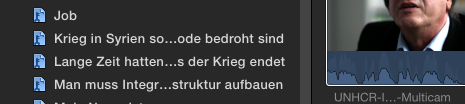
For organising the footage of long interviews I like it very much to tag with (almost) the whole sentence of what the person says (instead of just one word about the general topic she or he is talking about). The problem: The media library is too tight to show the whole sentences – see screenshot. Is there a way to enlarge it as much as I like? How? Any other ideas?
Thanks & cheers!
Please Log in to join the conversation.


16 Nov 2015 19:00 #70710
by lichinho
Replied by lichinho on topic Media library window is too small – how to enlarge?
I am afraid there is no way to enlarge past this size.
Time to provide feadback and make a request: Final Cut Pro->Provide Final Cut Pro Feedback...
Time to provide feadback and make a request: Final Cut Pro->Provide Final Cut Pro Feedback...
Please Log in to join the conversation.
16 Nov 2015 20:44 #70711
by Nico_D
Replied by Nico_D on topic Media library window is too small – how to enlarge?
Thanks lichinho. So I may look for another workflow.
Please Log in to join the conversation.

16 Nov 2015 20:49 - 16 Nov 2015 20:50 #70712
by BenB
Replied by BenB on topic Media library window is too small – how to enlarge?
I use keywords to sort how who's being interviewed, and sometimes subject matter or topic if it varies over the interview. Then I use the Notes field to put in dialog like you're doing. They're easy to search, sort, by word, notes, duration, etc, which can't be done with Keyword Collections. And I can make the field much wider than the Libraries pane.
Just a thought.
Just a thought.
Last edit: 16 Nov 2015 20:50 by BenB.
Please Log in to join the conversation.
- ronny courtens
-

- Offline
- Moderator
-

Less
More
- Posts: 4455
- Thank you received: 962
16 Nov 2015 21:25 #70714
by ronny courtens
Replied by ronny courtens on topic Media library window is too small – how to enlarge?
I agree with Ben.
Keyword collections are meant to provide information about groups of clips. Our advice is to always keep the keywords short and precise because long keyword names make visual searching more difficult.
Of course you can submit a feature request to make the clip browser larger, but I don't think there are many people who want this.
So I honestly think it's better to organize your dialogue using the Notes field. That's what everyone does, and it's much more flexible.
There are many third-party solutions that can automize this process. In fact there is an article on the Home page about such an app right now.
- Ronny
Keyword collections are meant to provide information about groups of clips. Our advice is to always keep the keywords short and precise because long keyword names make visual searching more difficult.
Of course you can submit a feature request to make the clip browser larger, but I don't think there are many people who want this.
So I honestly think it's better to organize your dialogue using the Notes field. That's what everyone does, and it's much more flexible.
There are many third-party solutions that can automize this process. In fact there is an article on the Home page about such an app right now.
- Ronny
Please Log in to join the conversation.
16 Nov 2015 21:51 #70715
by Nico_D
Replied by Nico_D on topic Media library window is too small – how to enlarge?
Thank you Ben and Ronny!
Actually I was also looking for something else and was successful. Here it is:
To keep the tags short (I agree, that makes searching much easier) I added markers with full sentences inside the browser. You can read the whole sentences inside the browser and they are seen in the timeline index and you can check the storyline by just reading it – like a text. What do you think about that?
But now I would like to know a short cut/short click like in Motion 5 where you can „option+click“ on the little triangle and all layers open. For the FCP browser it would mean: first clicking on a tag, seeing (e.g.) six clips, then clicking on just one triangle and all markers with the full sentences would appear. Do you know such a short cut?
I also work with meta data but when I add something it's for the actual file not for chosen parts of the same file. Am I wrong? If so: How does it work to change meta data for different (tagged) parts of the same file? And what's the best when it comes to a multicam clip?
Thank you so much!
Actually I was also looking for something else and was successful. Here it is:
To keep the tags short (I agree, that makes searching much easier) I added markers with full sentences inside the browser. You can read the whole sentences inside the browser and they are seen in the timeline index and you can check the storyline by just reading it – like a text. What do you think about that?
But now I would like to know a short cut/short click like in Motion 5 where you can „option+click“ on the little triangle and all layers open. For the FCP browser it would mean: first clicking on a tag, seeing (e.g.) six clips, then clicking on just one triangle and all markers with the full sentences would appear. Do you know such a short cut?
I also work with meta data but when I add something it's for the actual file not for chosen parts of the same file. Am I wrong? If so: How does it work to change meta data for different (tagged) parts of the same file? And what's the best when it comes to a multicam clip?
Thank you so much!
Please Log in to join the conversation.
17 Nov 2015 02:20 #70723
by BenB
Replied by BenB on topic Media library window is too small – how to enlarge?
Markers work, too. But I don't think they're as searchable or as easily organized. Note will do the same thing in the Timeline Index, also.
Option-click is an OS X thing, not a Motion thing. Most apps work with it. It does work in the Browser, opening or closing all of the sub-groups of the top level you're working on. Thus, if I am looking at an Event in the Browser (top level container), which is closed, and Option-Click the "Clips" heading, all clips show with disclosure triangles open.
But if I'm looking at a Keyword collection, there's no top level container in the Browser to do that with.
As for metadata, what metadata specifically are you talking about?
Option-click is an OS X thing, not a Motion thing. Most apps work with it. It does work in the Browser, opening or closing all of the sub-groups of the top level you're working on. Thus, if I am looking at an Event in the Browser (top level container), which is closed, and Option-Click the "Clips" heading, all clips show with disclosure triangles open.
But if I'm looking at a Keyword collection, there's no top level container in the Browser to do that with.
As for metadata, what metadata specifically are you talking about?
Please Log in to join the conversation.
19 Nov 2015 10:28 #70773
by Nico_D
Replied by Nico_D on topic Media library window is too small – how to enlarge?
You are right Ben, they are not good for searching, that shouldn't be the purpose of markers.
Obivously I just clicked „somehow“ (?) wrong so that option-click didn't do what I wanted. Thank you.
Talking about metadata I think of the section in the attached screenshot. That seems to be the crux for me here. Yes, I can add notes, yes, I can see them in the timeline index, but: I cannot change metadata for different clips (choosed via i/o) from the same file, can I?
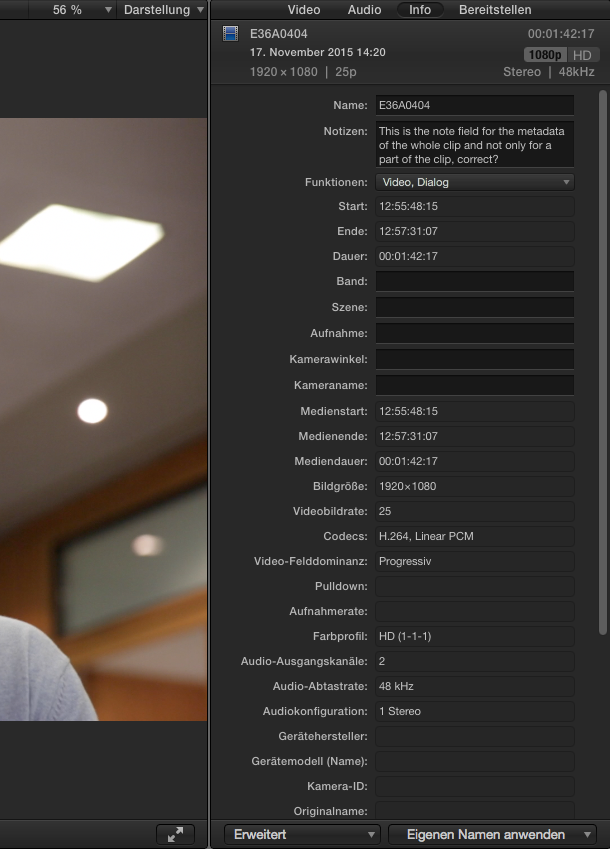
Obivously I just clicked „somehow“ (?) wrong so that option-click didn't do what I wanted. Thank you.
Talking about metadata I think of the section in the attached screenshot. That seems to be the crux for me here. Yes, I can add notes, yes, I can see them in the timeline index, but: I cannot change metadata for different clips (choosed via i/o) from the same file, can I?
Please Log in to join the conversation.
19 Nov 2015 14:29 #70782
by BenB
Replied by BenB on topic Media library window is too small – how to enlarge?
Yes, you can. Use Keywords or Ratings on a "range". The in the Browser, those ranges have their own notes, and "Favorite" or "Rejected" can actually be renamed, also.
To clarify, I meant Markers can't be searched for in the Browser, but are very searchable in the Timeline Index.
To clarify, I meant Markers can't be searched for in the Browser, but are very searchable in the Timeline Index.
Please Log in to join the conversation.
24 Nov 2015 08:56 - 24 Nov 2015 08:57 #70916
by Nico_D
Replied by Nico_D on topic Media library window is too small – how to enlarge?
Thanks a lot again, Ben. Also, I read the article about Annotation Transcriber which sounds very handy. Still I would like to figure out how to set notes for ranges of clips manually – where I am still stuck . Every time I choose a range and type a note it's set for the whole clip. I would be grateful if you could describe the exact steps how to do this (as far as just choosing the range and typing a note doesn't work).
Last edit: 24 Nov 2015 08:57 by Nico_D.
Please Log in to join the conversation.
- Karsten Schlüter
-

- Offline
- Moderator
-
Less
More
- Posts: 3790
- Thank you received: 718
24 Nov 2015 11:09 #70917
by Karsten Schlüter
Replied by Karsten Schlüter on topic Media library window is too small – how to enlarge?
nobody reads the front page ... ? 
www.fcp.co/final-cut-pro/articles/1755-c...notation-transcriber
mentions a tool, which looks to me very handy for organising lengthy interviews...:
www.zeitanker.com/content/tools/zeitanke...notation_transcriber
www.fcp.co/final-cut-pro/articles/1755-c...notation-transcriber
mentions a tool, which looks to me very handy for organising lengthy interviews...:
www.zeitanker.com/content/tools/zeitanke...notation_transcriber
Please Log in to join the conversation.
24 Nov 2015 11:13 #70918
by Overturf
Replied by Overturf on topic Media library window is too small – how to enlarge?
Moin Nico,
this is slightly off-topic but might be interesting for your work. Once it's set up, it's a simple and powerful tool.
www.fcp.co/final-cut-pro/articles/1692-d...t-pro-x-with-fcpxtra
this is slightly off-topic but might be interesting for your work. Once it's set up, it's a simple and powerful tool.
www.fcp.co/final-cut-pro/articles/1692-d...t-pro-x-with-fcpxtra
Please Log in to join the conversation.
24 Nov 2015 11:49 - 24 Nov 2015 11:51 #70919
by Nico_D
Replied by Nico_D on topic Media library window is too small – how to enlarge?
hey both!
Thanks, Sebastian, as far as this post was already going „off topic“ – better saying: coming closer to a solution for my problem, the article was helpful! Jan Willem den Bok who invented FCPXtra shows how to add notes to a range of a clip manually. That's what I wanted!
Thank you for the link, Karsten, seems you didn't read the posts before
Thanks, Sebastian, as far as this post was already going „off topic“ – better saying: coming closer to a solution for my problem, the article was helpful! Jan Willem den Bok who invented FCPXtra shows how to add notes to a range of a clip manually. That's what I wanted!
Thank you for the link, Karsten, seems you didn't read the posts before
Last edit: 24 Nov 2015 11:51 by Nico_D.
Please Log in to join the conversation.
24 Nov 2015 13:34 - 24 Nov 2015 13:36 #70922
by BenB
Replied by BenB on topic Media library window is too small – how to enlarge?
Direct response, no, you can't set a range for only a note. You have to set a range for a keyword or rating first, then add the note to that range. I'm going to bet you don't ever use, or hardly use the Rejected rating. Use that for Notes, then. Don't get hung up on the name "Rejected", it is just a Red Range, and can represent anything you want it to.
OR, what I'd do, if you simply want to search Notes in ranges, make a Keyword collection called "NOTES!" Assign that to the ranges you want to add notes to. Then you have one collection of ONLY NOTE RANGES to access and search quickly. That's what I'd do. Keep it clean, easy, simple, useful.
OR, what I'd do, if you simply want to search Notes in ranges, make a Keyword collection called "NOTES!" Assign that to the ranges you want to add notes to. Then you have one collection of ONLY NOTE RANGES to access and search quickly. That's what I'd do. Keep it clean, easy, simple, useful.
Last edit: 24 Nov 2015 13:36 by BenB.
Please Log in to join the conversation.
24 Nov 2015 16:52 #70925
by Nico_D
Replied by Nico_D on topic Media library window is too small – how to enlarge?
Thanks, Ben!
Please Log in to join the conversation.
24 Nov 2015 17:35 #70926
by Overturf
Replied by Overturf on topic Media library window is too small – how to enlarge?
Yeah, I thought I had seen that information in Jan Willem's explanation back then but wasn't sure, Nico. Maybe you can share - how does one actually add a note to a range of a clip manually? Can you explain in one sentence? Thanks!
Please Log in to join the conversation.

24 Nov 2015 21:14 #70929
by anickt
Replied by anickt on topic Media library window is too small – how to enlarge?
@Overturf
Select clip in browser, use JKL or space bar to play, hit I and O to select range, hit F to favorite, tab twice to notes column, enter note, hit return, press space bar or JKL to play etc.
You can do this without stopping if your selects are not too close together.
Is this what you mean by "manually"?
Select clip in browser, use JKL or space bar to play, hit I and O to select range, hit F to favorite, tab twice to notes column, enter note, hit return, press space bar or JKL to play etc.
You can do this without stopping if your selects are not too close together.
Is this what you mean by "manually"?
Please Log in to join the conversation.
24 Nov 2015 21:28 #70930
by Overturf
Replied by Overturf on topic Media library window is too small – how to enlarge?
Ah. So the difference is that if I select a range and type something into the notes field, the note is valid for the whole clip, not only the selected range. But if I turn the range into a favorite and write a note in that favorite's notes field, the note is only valid for the selected range (i.e. the favorite) and not the whole clip?
Will check out asap. I always had my trouble with the notes field when using longer clips that required more than one note! Thanks!
Will check out asap. I always had my trouble with the notes field when using longer clips that required more than one note! Thanks!
Please Log in to join the conversation.
25 Nov 2015 04:33 #70936
by BenB
Replied by BenB on topic Media library window is too small – how to enlarge?
That's what I've been saying.
Look at the list view of the Browser, each range, be it tag (favorite or rejected) or keyword has its own Notes field.
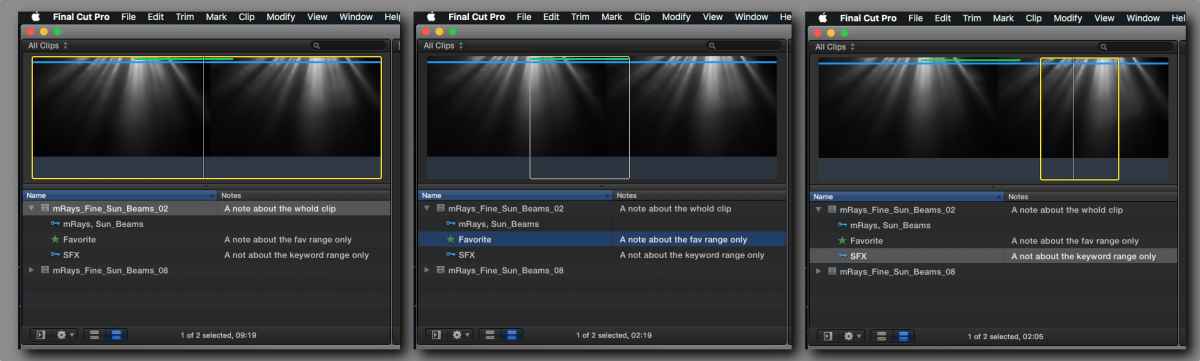
Look at the list view of the Browser, each range, be it tag (favorite or rejected) or keyword has its own Notes field.
Please Log in to join the conversation.
25 Nov 2015 07:24 #70938
by Nico_D
Replied by Nico_D on topic Media library window is too small – how to enlarge?
What bothers (me) is: The notes from the notes field in the browser wont be shown in the timeline index. In comparison: the metadata note field in the upper right window is also listed in the timeline index.
Please Log in to join the conversation.
