


- Posts: 254
- Thank you received: 9
3 Post Moderation Rule for New Boarders (25 Jan 2021)
New boarders will have their posts moderated - Don't worry if you cannot see your post immediately.
Keyboard Shortcut Question
13 Nov 2015 15:15 - 13 Nov 2015 15:16 #70609
by screendor
Keyboard Shortcut Question was created by screendor
Hey folks. Quick questions regarding keyboard shortcuts to assign roles.
So I have created sub roles within the three main categories. For examples, EFFECTS>Crowds. etc.
There is a keyboard short cut to assign to a main roles category but is there a way to keyboard shortcut to a sub role? Otherwise, I have to use the drop down menu tab in Modify.
Thanks!
So I have created sub roles within the three main categories. For examples, EFFECTS>Crowds. etc.
There is a keyboard short cut to assign to a main roles category but is there a way to keyboard shortcut to a sub role? Otherwise, I have to use the drop down menu tab in Modify.
Thanks!
Last edit: 13 Nov 2015 15:16 by screendor.
Please Log in to join the conversation.


16 Nov 2015 22:00 #70716
by Nico_D
Replied by Nico_D on topic Keyboard Shortcut Question
How about choosing all files in the browser you want to assign to a sub role and then add it from the drop down menu – then it's just two clicks for all clips.
If you have a multichannel audio then it might be more complicated. I do not know if there is a way to assign (sub) roles to single channels inside the browser.
If you have a multichannel audio then it might be more complicated. I do not know if there is a way to assign (sub) roles to single channels inside the browser.
Please Log in to join the conversation.


16 Nov 2015 23:12 #70718
by alex4D
Replied by alex4D on topic Keyboard Shortcut Question
Tip: Assign keyboard shortcuts to video and audio subroles
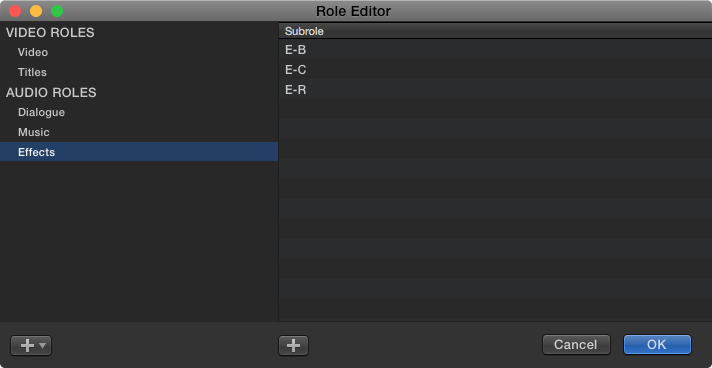
1. Go to 'System Preferences' in the Apple menu, choose 'Keyboard'
2. Choose the 'Shortcuts' tab
3. Select 'App Shortcuts' from the left-hand list
4. Select 'All Applications' from the right-hand list
5. Click the + to add a shortcut
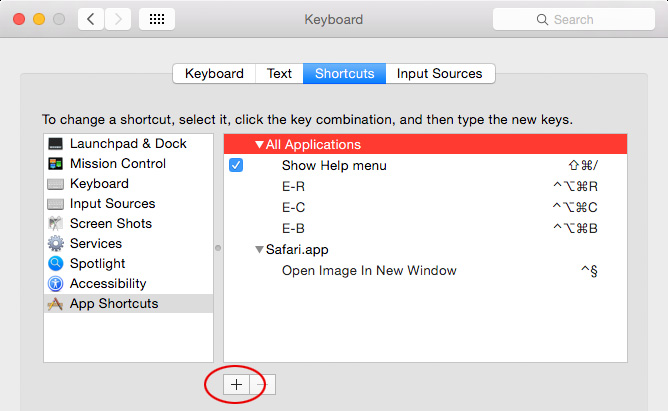
6. Type in the exact name of your subrole
7. Choose a keyboard shortcut
Now you can subroles to individual audio components using a keyboard shortcut:
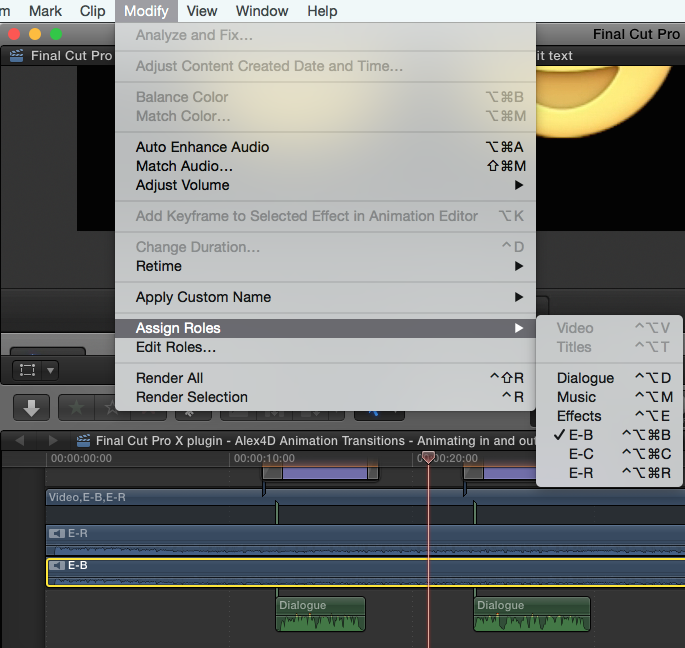
1. Go to 'System Preferences' in the Apple menu, choose 'Keyboard'
2. Choose the 'Shortcuts' tab
3. Select 'App Shortcuts' from the left-hand list
4. Select 'All Applications' from the right-hand list
5. Click the + to add a shortcut
6. Type in the exact name of your subrole
7. Choose a keyboard shortcut
Now you can subroles to individual audio components using a keyboard shortcut:
Please Log in to join the conversation.
16 Nov 2015 23:16 #70719
by screendor
Replied by screendor on topic Keyboard Shortcut Question
Thanks, Alex. You are a true FCPX hero! (BTW, I use your plugs all the time).
Please Log in to join the conversation.

16 Nov 2015 23:51 #70722
by anickt
Replied by anickt on topic Keyboard Shortcut Question
That's a great tip alex4D. Just make sure you document those shortcuts because upgrades to FCP X or OSX may nuke them and you will have to re-enter. (From experience :lol: )
Please Log in to join the conversation.
