


- Posts: 65
- Thank you received: 1
3 Post Moderation Rule for New Boarders (25 Jan 2021)
New boarders will have their posts moderated - Don't worry if you cannot see your post immediately.
Batch-apply roles to single audio-channels?
04 Nov 2015 16:03 #70222
by Michi
Batch-apply roles to single audio-channels? was created by Michi
Hi fcp.co-community
So I have this media to edit with where the ambient-microphone is on channel 1 and the radio-macrophone on channel 2. As always, first thing I do is change all files from stereo to dual mono, but I wondered if I could also batch-apply a role to each of those channels. I know how to do that file by file in the timeline, but is there a way to do the same for all the files in the media-browser? Or could/should I have done that when importing the files?
So I have this media to edit with where the ambient-microphone is on channel 1 and the radio-macrophone on channel 2. As always, first thing I do is change all files from stereo to dual mono, but I wondered if I could also batch-apply a role to each of those channels. I know how to do that file by file in the timeline, but is there a way to do the same for all the files in the media-browser? Or could/should I have done that when importing the files?
Please Log in to join the conversation.

04 Nov 2015 16:14 #70223
by plysat
Can't sleep? Try this: fcpxpert.net ;-)
Replied by plysat on topic Batch-apply roles to single audio-channels?
If you open the clip(s) in a timeline after changing the config to dual mono, and they show as 2 components, you can use my free
Role-O-Matic
app. If it's an interleaved file (it shows in a timeline as one component) it won't work unfortunately.
Can't sleep? Try this: fcpxpert.net ;-)
Please Log in to join the conversation.
04 Nov 2015 17:32 #70224
by Michi
Replied by Michi on topic Batch-apply roles to single audio-channels?
Thanks plysat for your reply! It seems I'm out of luck. And also I'm a little confused now as FCPX indeed shows my Audio as one interleaved file. What is it doing there, mixing both mono-channels into one single channel? Is that a bug or a feature? And can I change that somehow?
Please Log in to join the conversation.
- ronny courtens
-

- Offline
- Moderator
-

Less
More
- Posts: 4455
- Thank you received: 962
04 Nov 2015 18:38 #70225
by ronny courtens
Replied by ronny courtens on topic Batch-apply roles to single audio-channels?
You can do this at the importing stage. When you import your footage, check the "Separate mono and group stereo audio" checkbox. This should import the audio as two discrete mono channels.
- Ronny
- Ronny
Please Log in to join the conversation.
04 Nov 2015 20:06 - 04 Nov 2015 20:08 #70229
by Michi
Replied by Michi on topic Batch-apply roles to single audio-channels?
Can't confirm that, Ronny. Tried it two times now but even with that Box checked the audio appears as Stereo in FCPX. Might have to do with how I prepare the files before importing to FCPX: I convert all my AVCHD files from the C100 to ProRes with ClipWrap...? Can there really be a difference wether I switch to Duaol-Mono before or after importing?
The problem that makes my files not work with Role-O-Matic is (if I understood that right) that no matter if Audio is set to Dual-Mono or to Stereo, when i right-click on it and choose "Open in Timeline", there is only one Audio-Track (and no way to expand Audio-Components). Seems as FCPX takes those two Mono-Channels and puts them into one mono-channel (only in this specific scenario "Open in Timeline"). For me that does not make any sense at all...
The problem that makes my files not work with Role-O-Matic is (if I understood that right) that no matter if Audio is set to Dual-Mono or to Stereo, when i right-click on it and choose "Open in Timeline", there is only one Audio-Track (and no way to expand Audio-Components). Seems as FCPX takes those two Mono-Channels and puts them into one mono-channel (only in this specific scenario "Open in Timeline"). For me that does not make any sense at all...
Last edit: 04 Nov 2015 20:08 by Michi.
Please Log in to join the conversation.
- ronny courtens
-
- Offline
- Moderator
-
Less
More
- Posts: 4455
- Thank you received: 962
04 Nov 2015 20:16 #70230
by ronny courtens
Replied by ronny courtens on topic Batch-apply roles to single audio-channels?
Can there really be a difference wether I switch to Dual-Mono before or after importing?
When the audio has been recorded as discrete channels in te camera, yes. When the audio has been recorded as stereo, no.
When i right-click on it and choose "Open in Timeline", there is only one Audio-Track (and no way to expand Audio-Components).
When you open the audio clip in its own timeline, select the clip and press SHIFT+CMD+G. This should spilt up the stereo channel into two discrete mono channels.
- Ronny
When the audio has been recorded as discrete channels in te camera, yes. When the audio has been recorded as stereo, no.
When i right-click on it and choose "Open in Timeline", there is only one Audio-Track (and no way to expand Audio-Components).
When you open the audio clip in its own timeline, select the clip and press SHIFT+CMD+G. This should spilt up the stereo channel into two discrete mono channels.
- Ronny
Please Log in to join the conversation.
04 Nov 2015 21:39 #70232
by Michi
So my Videos were recorded like this: Mic 1 on Channel 1 / Mic 2 on Channel 2. Does that mean discrete channels (sorry, my english is rather poor)? I imported some original .mts-files to see if FCPX does "conform" them to dual-mono by itself (what didn't work with the converted ProRes-Files). From the 4-5 .mts-files I imported, one actually was dual-mono in FCPX, the rest still stereo... Don't know if I make something wrong or if that's just the regular inconsistency in FCPX when dealing with .mts-files...
Replied by Michi on topic Batch-apply roles to single audio-channels?
That worked, thank you! What kind of short cut is that? Never seen, never used before... And correct me if I'm wrong, but that does not change the fact that I can't use Role-O-Matic with my Files...? Or do you know another way to batch-apply Roles to Audio-Channels?ronny courtens wrote: When you open the audio clip in its own timeline, select the clip and press SHIFT+CMD+G. This should spilt up the stereo channel into two discrete mono channels.
ronny courtens wrote: Can there really be a difference wether I switch to Dual-Mono before or after importing?
When the audio has been recorded as discrete channels in te camera, yes. When the audio has been recorded as stereo, no.
So my Videos were recorded like this: Mic 1 on Channel 1 / Mic 2 on Channel 2. Does that mean discrete channels (sorry, my english is rather poor)? I imported some original .mts-files to see if FCPX does "conform" them to dual-mono by itself (what didn't work with the converted ProRes-Files). From the 4-5 .mts-files I imported, one actually was dual-mono in FCPX, the rest still stereo... Don't know if I make something wrong or if that's just the regular inconsistency in FCPX when dealing with .mts-files...
Please Log in to join the conversation.
- ronny courtens
-
- Offline
- Moderator
-
Less
More
- Posts: 4455
- Thank you received: 962
04 Nov 2015 22:31 #70234
by ronny courtens
Replied by ronny courtens on topic Batch-apply roles to single audio-channels?
That shortcut is called Break Apart Clip Items. It can also be used to break apart a compound clip.
Doing this allows you to apply Roles to the different channels of an audio file with the clip opened in the timeline. This is not a method for batch-assigning Roles, nor will it change the fact that you cannot use Role-O-Matic with your files. (Role- O-Matic is an amazing utility BTW).
Does that mean discrete channels
Depends on the type of camera. Professional broadcast cameras will always record different channels as discrete mono, some camcorders will record 2 different channels as a stereo file. I don't think using ClipWrap will make any difference with this.
If you want me to test one of your original .mts clips to see how the audio was recorded, you can send it to me: ronnycourtens@mac.com
I am not aware of any inconsistency in FCP X dealing with .mts files. When you import from the complete AVCHD card structure that contains the files, you should have no problems whatsoever with these media. There is, however, a big inconsistency between different flavors of AVCHD created by different camera manufacturers. That's why AVCHD is a real pain to work with in any NLE.
- Ronny
Doing this allows you to apply Roles to the different channels of an audio file with the clip opened in the timeline. This is not a method for batch-assigning Roles, nor will it change the fact that you cannot use Role-O-Matic with your files. (Role- O-Matic is an amazing utility BTW).
Does that mean discrete channels
Depends on the type of camera. Professional broadcast cameras will always record different channels as discrete mono, some camcorders will record 2 different channels as a stereo file. I don't think using ClipWrap will make any difference with this.
If you want me to test one of your original .mts clips to see how the audio was recorded, you can send it to me: ronnycourtens@mac.com
I am not aware of any inconsistency in FCP X dealing with .mts files. When you import from the complete AVCHD card structure that contains the files, you should have no problems whatsoever with these media. There is, however, a big inconsistency between different flavors of AVCHD created by different camera manufacturers. That's why AVCHD is a real pain to work with in any NLE.
- Ronny
Please Log in to join the conversation.
04 Nov 2015 23:31 - 04 Nov 2015 23:39 #70237
by Michi
Replied by Michi on topic Batch-apply roles to single audio-channels?
I had trouble with the 25PFS files from the C100 being recognized falsely as 50i. The change to 25p in FCPX sometimes didn't stick. Next time you opened FCPX some files were 50i again... But that was some versions ago, haven't tried it with 10.2.2. My 2011 MacBook tends to get very hot working with h.264-files.
Anyway, seems as it's not possible to apply roles to specific audio-channels (edit: to a batch of files) in FCPX - and with my C100-files sadly not even through Role-O-Matic.
But thanks Ronny, glad you took the time to help. And thanks plysat for your app, good to have that in the toolbox.
Anyway, seems as it's not possible to apply roles to specific audio-channels (edit: to a batch of files) in FCPX - and with my C100-files sadly not even through Role-O-Matic.
But thanks Ronny, glad you took the time to help. And thanks plysat for your app, good to have that in the toolbox.
Last edit: 04 Nov 2015 23:39 by Michi.
Please Log in to join the conversation.
- ronny courtens
-
- Offline
- Moderator
-
Less
More
- Posts: 4455
- Thank you received: 962
05 Nov 2015 07:48 - 05 Nov 2015 08:00 #70242
by ronny courtens
Replied by ronny courtens on topic Batch-apply roles to single audio-channels?
I had trouble with the 25PFS files from the C100 being recognized falsely as 50i.
This is a known problem with Canon.
The Canon C100 only records progressive in 23.98 fps (24P) mode. The other framerates (30PFS, 25PFS) are recorded in an interlaced PsF wrapper. This is a major flaw in this camera because Canon's PsF mode is what we call "benign" PsF, which means it does not include the correct flags to tell external applications that this should be recognized as progressive video. That's why such files often get recognized as interlaced.
This will not change in any version of FCPX, simply because it's not an FCPX problem. We have the same issues with this format in Avid. It's up to Canon to finally get their act together and provide cameras that shoot real progressive frames instead of faked ones, or at least have their PsF wrappers contain the correct information so external applications can recognize it.
Anyway, seems as it's not possible to apply roles to specific audio-channels (edit: to a batch of files) in FCPX
That's not entirely correct. If you apply your Roles after the edit, in the Project timeline, you can group-select your clips and press CTRL+ALT+S. This will expand the audio channels for all the selected clips at once. Then group-select the audio channel for every clip to which you want to apply a Role and just set the Role in the Inspector > Info tab. The Role will be set for every clip that is selected.
I just tried this with the MTS clip you have sent me, works perfectly:
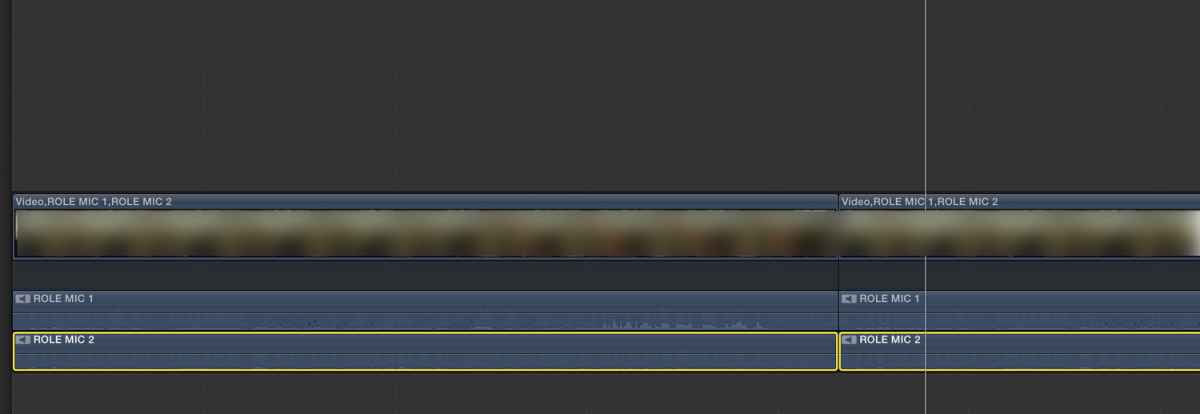
BTW I have analyzed the clip: the C100 always records stereo, even if there are two different mics connected to each input.
- Ronny
This is a known problem with Canon.
The Canon C100 only records progressive in 23.98 fps (24P) mode. The other framerates (30PFS, 25PFS) are recorded in an interlaced PsF wrapper. This is a major flaw in this camera because Canon's PsF mode is what we call "benign" PsF, which means it does not include the correct flags to tell external applications that this should be recognized as progressive video. That's why such files often get recognized as interlaced.
This will not change in any version of FCPX, simply because it's not an FCPX problem. We have the same issues with this format in Avid. It's up to Canon to finally get their act together and provide cameras that shoot real progressive frames instead of faked ones, or at least have their PsF wrappers contain the correct information so external applications can recognize it.
Anyway, seems as it's not possible to apply roles to specific audio-channels (edit: to a batch of files) in FCPX
That's not entirely correct. If you apply your Roles after the edit, in the Project timeline, you can group-select your clips and press CTRL+ALT+S. This will expand the audio channels for all the selected clips at once. Then group-select the audio channel for every clip to which you want to apply a Role and just set the Role in the Inspector > Info tab. The Role will be set for every clip that is selected.
I just tried this with the MTS clip you have sent me, works perfectly:
BTW I have analyzed the clip: the C100 always records stereo, even if there are two different mics connected to each input.
- Ronny
Last edit: 05 Nov 2015 08:00 by ronny courtens.
Please Log in to join the conversation.
05 Nov 2015 10:50 #70244
by Michi
Ok. So ClipWrap won't be retired any time soon over here. For those who don't know that App: it fixes the "benign" mts-files and also transcodes them to ProRes very fast.
Yes, but that of course affects only the files in that specific Project. You can't do it in the Media-Browser. Time to fill out Apples feedback form...
Again, thanks very much Ronny for your help and support. FCPX is not just a magnificent App, it also has a magnificent community... I'd invite you to a beer if you weren't... uh... wherever you are located Cheers
Replied by Michi on topic Batch-apply roles to single audio-channels?
ronny courtens wrote: This will not change in any version of FCPX, simply because it's not an FCPX problem. We have the same issues with this format in Avid. It's up to Canon to finally get their act together and provide cameras that shoot real progressive frames instead of faked ones, or at least have their PsF wrappers contain the correct information so external applications can recognize it.
Ok. So ClipWrap won't be retired any time soon over here. For those who don't know that App: it fixes the "benign" mts-files and also transcodes them to ProRes very fast.
If you apply your Roles after the edit, in the Project timeline, you can group-select your clips and press CTRL+ALT+S. This will expand the audio channels for all the selected clips at once. Then group-select the audio channel for every clip to which you want to apply a Role and just set the Role in the Inspector > Info tab. The Role will be set for every clip that is selected.
Yes, but that of course affects only the files in that specific Project. You can't do it in the Media-Browser. Time to fill out Apples feedback form...
Again, thanks very much Ronny for your help and support. FCPX is not just a magnificent App, it also has a magnificent community... I'd invite you to a beer if you weren't... uh... wherever you are located
Cheers Please Log in to join the conversation.
- Squamish ed
-

- Offline
- Elite Member
-

Less
More
- Posts: 238
- Thank you received: 20
06 Nov 2015 18:27 #70296
by Squamish ed
Ed
Replied by Squamish ed on topic Batch-apply roles to single audio-channels?
Michi,
I've not come across this problem with my C100 (Mk II). Is that the same version of the camera you're dealing with? Also, does Clipwrap deal with this issue?
I've not come across this problem with my C100 (Mk II). Is that the same version of the camera you're dealing with? Also, does Clipwrap deal with this issue?
Ed
Please Log in to join the conversation.
06 Nov 2015 23:12 #70317
by Michi
I have the C100 Mk I. Don't know if Canon fixed that Issue with the Mk II or if you just had luck, never worked with that Camera so far...
But I can say that ClipWrap fixes that 50i/25p issue. Don't know what exactly it does with the files (it also optimizes them for FCPX, Premiere or Avid), but I never had any issues when I rewrapped or transcoded the AVCHD-Files with ClipWrap.
It costs about 50 bucks, but It's also pretty fast when transcoding to ProRes and recognizes spanned clips as one take if you load the files directly from the SD-Card. The only reason I don't use it to import SD-Cards directly is that It names the files "Clip 1", "Clip 2", "Clip 3" etc. whereas Canons Data Import Utility creates unique File-Names based on date and timecode of the shot.
So to get C100 files into FCPX I go this route: import with Data Import Utility, transcode those ACHD-Filesto ProRes in ClipWrap, import the ProRes-Files to FCPX. Very time consuming but I haven't found a better workflow yet...
Replied by Michi on topic Batch-apply roles to single audio-channels?
Squamish ed wrote: I've not come across this problem with my C100 (Mk II). Is that the same version of the camera you're dealing with? Also, does Clipwrap deal with this issue?
I have the C100 Mk I. Don't know if Canon fixed that Issue with the Mk II or if you just had luck, never worked with that Camera so far...
But I can say that ClipWrap fixes that 50i/25p issue. Don't know what exactly it does with the files (it also optimizes them for FCPX, Premiere or Avid), but I never had any issues when I rewrapped or transcoded the AVCHD-Files with ClipWrap.
It costs about 50 bucks, but It's also pretty fast when transcoding to ProRes and recognizes spanned clips as one take if you load the files directly from the SD-Card. The only reason I don't use it to import SD-Cards directly is that It names the files "Clip 1", "Clip 2", "Clip 3" etc. whereas Canons Data Import Utility creates unique File-Names based on date and timecode of the shot.
So to get C100 files into FCPX I go this route: import with Data Import Utility, transcode those ACHD-Filesto ProRes in ClipWrap, import the ProRes-Files to FCPX. Very time consuming but I haven't found a better workflow yet...
Please Log in to join the conversation.
