


- Posts: 5
- Thank you received: 0
3 Post Moderation Rule for New Boarders (25 Jan 2021)
New boarders will have their posts moderated - Don't worry if you cannot see your post immediately.
DOUBLE AUDIO TRACK
- artuar.rovero
-
 Topic Author
- Offline
- New Member
-

Less
More
01 Nov 2015 23:01 - 02 Nov 2015 16:51 #70120
by artuar.rovero
DOUBLE AUDIO TRACK was created by artuar.rovero
High there. I'mot sure if posting the right way adding new topic, however this is my first post.
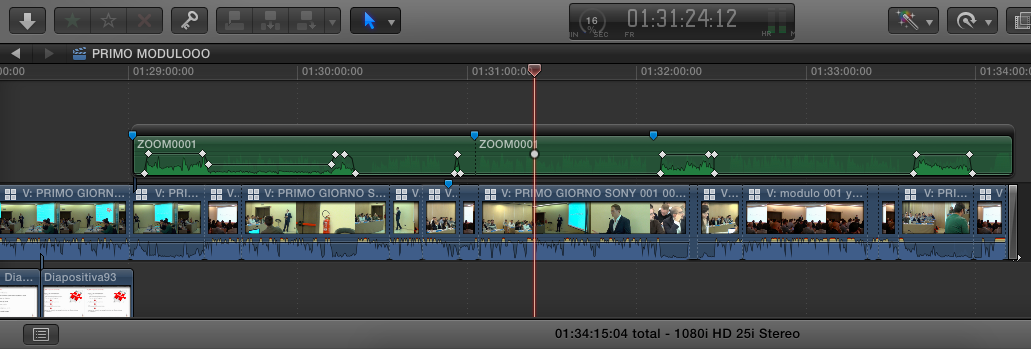
Wandering how to switch in a multicam project, when to "activate one specific audio track whne i have TWO audio tracks" when the one is "speaker" and the other an "ambient" track registerd among the people that talk in the conference room.
Hope to have done the right question. (see pic may help)
Wandering how to switch in a multicam project, when to "activate one specific audio track whne i have TWO audio tracks" when the one is "speaker" and the other an "ambient" track registerd among the people that talk in the conference room.
Hope to have done the right question. (see pic may help)
Last edit: 02 Nov 2015 16:51 by artuar.rovero. Reason: question was not quite clear.
Please Log in to join the conversation.

02 Nov 2015 11:44 #70141
by lichinho
Replied by lichinho on topic DOUBLE AUDIO TRACK
Add the multicam clip to a project. Then in the Angle Viewer, use the little buttons at the top to determine whether your switch applies to audio, video, or both.
Please Log in to join the conversation.

02 Nov 2015 12:18 #70144
by BenB
Replied by BenB on topic DOUBLE AUDIO TRACK
Lots of info in the user manual, too.
help.apple.com/finalcutpro/mac/10.2/#/ver10e087fd
And tips.
help.apple.com/finalcutpro/mac/10.2/#/verb1160b2d
help.apple.com/finalcutpro/mac/10.2/#/ver10e087fd
And tips.
help.apple.com/finalcutpro/mac/10.2/#/verb1160b2d
Please Log in to join the conversation.
Less
More
- Posts: 971
- Thank you received: 46
02 Nov 2015 16:08 #70155
by MsJustine
Replied by MsJustine on topic DOUBLE AUDIO TRACK
I am confused, or maybe misunderstood the question, but I thought he was asking could you switch video angles and audio angles in the same multi-cam setup. If this is the case, great question....can you switch audio from audio 1 to audio 2 and from cam1 to cam2 at the same time?
Please Log in to join the conversation.
- artuar.rovero
-
Topic Author
- Offline
- New Member
-
Less
More
- Posts: 5
- Thank you received: 0
02 Nov 2015 16:49 #70156
by artuar.rovero
Replied by artuar.rovero on topic DOUBLE AUDIO TRACK
you got to the point. I haven't found that answer in any online manual as above (thankyou lichinho and BenB) It seems this Multicam features can manage in my case only one "GOOD" audio track. But I have TWO, as said avoiding cameras audios, I sometimes want to listen (and pump) with keyframes as well, the ambient audio recorded among the public. My Main audio is always the lavalier microphone of the speaker.
This is how I've turned it over: manually took out the timeline of the multicam that part of ambient audio I wanted, and sinced manually there where I needed. :ohmy:
This is how I've turned it over: manually took out the timeline of the multicam that part of ambient audio I wanted, and sinced manually there where I needed. :ohmy:
Please Log in to join the conversation.

02 Nov 2015 17:54 #70157
by canelson
--
Matias Canelson
www.canelson.us
Replied by canelson on topic DOUBLE AUDIO TRACK
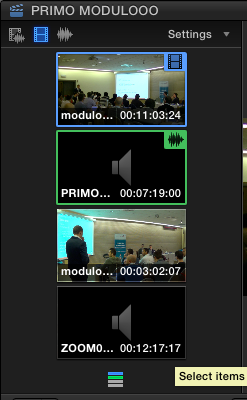
You can, as seen on the screenshot on the top left corner, those icons mean (from left to right):
1) Switch audio and video together.
2) Switch video only.
3) Switch audio only.
The most common situation is to have one audio, 2 or more videos and switch video only. But you have more options depending on the files you get from production.
1) Switch audio and video together.
2) Switch video only.
3) Switch audio only.
The most common situation is to have one audio, 2 or more videos and switch video only. But you have more options depending on the files you get from production.
--
Matias Canelson
www.canelson.us
Please Log in to join the conversation.
Less
More
- Posts: 971
- Thank you received: 46
02 Nov 2015 18:59 #70158
by MsJustine
Replied by MsJustine on topic DOUBLE AUDIO TRACK
Thanks for the reply, I have tried with a mulit-cam in 10.2.2, and you can switch from clip to clip, that is not the problem, you can switch only video so for example in the original post here, he wants to switch to a 2nd camera and a 2nd audio source, but you cannot.
If you select video only, you have pre-select the correct audio, if you choose audio only then you have to fix the correct camera and have free selection of the audio. If you choose both, then you have all audio from all sources.
In this case, I would have to do the mulitcam with video only, then connect the correct audio as a 2nd edit after the mulitcam is edited.
UM, just thinking, the problem is the audio, as it is audio, not video as an audio only file, FCPX treats it differently, a possible solution would be to "bake" in video ie video black or a slug, then it is a video/audio track, cut to the audio, the video would show the black/slug, then just mark this as a range, and replace the video after expanding video and audio as a 2nd audio...A workaround.
I guess a feedback to Apple to have free control over switching both video and audio, or maybe have audio options, with or without video black/slug. Ideas? Thoughts??
If you select video only, you have pre-select the correct audio, if you choose audio only then you have to fix the correct camera and have free selection of the audio. If you choose both, then you have all audio from all sources.
In this case, I would have to do the mulitcam with video only, then connect the correct audio as a 2nd edit after the mulitcam is edited.
UM, just thinking, the problem is the audio, as it is audio, not video as an audio only file, FCPX treats it differently, a possible solution would be to "bake" in video ie video black or a slug, then it is a video/audio track, cut to the audio, the video would show the black/slug, then just mark this as a range, and replace the video after expanding video and audio as a 2nd audio...A workaround.
I guess a feedback to Apple to have free control over switching both video and audio, or maybe have audio options, with or without video black/slug. Ideas? Thoughts??
Please Log in to join the conversation.
02 Nov 2015 19:20 #70159
by lichinho
If that was the question, the answer is YES. And quite easy to do, too.
Click the video icon (blue), click the cam you want; click the audio button (green), click the audio you want.
This can be done at the same frame location, no problem.
So yes, you can choose to change both video and audio at the same time, even if they are to come from different angles.
(I can't see how one would do this "live", ie. while playing back the clip, obviously)
Replied by lichinho on topic DOUBLE AUDIO TRACK
MsJustine wrote: I am confused, or maybe misunderstood the question, but I thought he was asking could you switch video angles and audio angles in the same multi-cam setup. If this is the case, great question....can you switch audio from audio 1 to audio 2 and from cam1 to cam2 at the same time?
If that was the question, the answer is YES. And quite easy to do, too.
Click the video icon (blue), click the cam you want; click the audio button (green), click the audio you want.
This can be done at the same frame location, no problem.
So yes, you can choose to change both video and audio at the same time, even if they are to come from different angles.
(I can't see how one would do this "live", ie. while playing back the clip, obviously)
Please Log in to join the conversation.
02 Nov 2015 19:47 - 02 Nov 2015 19:47 #70160
by BenB
Replied by BenB on topic DOUBLE AUDIO TRACK
"If you choose both, then you have all audio from all sources."
No, you switch to the video/audio of the active angle only, not "all sources".
I just edited four multicams today, and can confirm that is so.
No, you switch to the video/audio of the active angle only, not "all sources".
I just edited four multicams today, and can confirm that is so.
Last edit: 02 Nov 2015 19:47 by BenB.
Please Log in to join the conversation.
Less
More
- Posts: 971
- Thank you received: 46
03 Nov 2015 08:28 - 03 Nov 2015 08:33 #70179
by MsJustine
Replied by MsJustine on topic DOUBLE AUDIO TRACK
Hi Ben,
I was not explaining myself, or I used wrong terms, I have been trying techniques in multi-cam editing, the mission I wanted to achieve was this, set 2 video with audio and 2 audio only clips into a multicam, 4 angles in total.
I wanted to cut from angle 1 to angle 2, both video+audio, no problem, and cut to angle 3 and 4, those are audio only, no problem.
Ah,ha.. I see a weakness or a Please Apple Sir may have this... It is this... You cannot at present switch when in video only mode to an angle that has video and audio, the audio from that 2nd angle is ignored, as it should be without using a hotkey sequence, the audio has to be selected before using either Video/Audio or audio... There is no hot key to override this option, to ignore the video only and when you press the video/audio angle it obeys the hot key and switches to the angle with video/audio.
Why would you want this??? That would be a great question, and honestly I don't have a good answer, maybe if you have a music bed, and you need to cut in video with a reaction sound which will be audio mixed later, it would be a benefit to multi-cam editing.
I am learning the software, pushing the limits to find what I can and cannot do, and if I cannot do, why cannot it do what I want.. Self interest, and this is a limit of final cut pro x.
A pointless feature really, sorry, was just testing fcpx...no harm!!!
I was not explaining myself, or I used wrong terms, I have been trying techniques in multi-cam editing, the mission I wanted to achieve was this, set 2 video with audio and 2 audio only clips into a multicam, 4 angles in total.
I wanted to cut from angle 1 to angle 2, both video+audio, no problem, and cut to angle 3 and 4, those are audio only, no problem.
Ah,ha.. I see a weakness or a Please Apple Sir may have this... It is this... You cannot at present switch when in video only mode to an angle that has video and audio, the audio from that 2nd angle is ignored, as it should be without using a hotkey sequence, the audio has to be selected before using either Video/Audio or audio... There is no hot key to override this option, to ignore the video only and when you press the video/audio angle it obeys the hot key and switches to the angle with video/audio.
Why would you want this??? That would be a great question, and honestly I don't have a good answer, maybe if you have a music bed, and you need to cut in video with a reaction sound which will be audio mixed later, it would be a benefit to multi-cam editing.
I am learning the software, pushing the limits to find what I can and cannot do, and if I cannot do, why cannot it do what I want.. Self interest, and this is a limit of final cut pro x.
A pointless feature really, sorry, was just testing fcpx...no harm!!!
Last edit: 03 Nov 2015 08:33 by MsJustine.
Please Log in to join the conversation.
03 Nov 2015 11:46 #70185
by lichinho
In a multicam clip you can access audio from different angles at the same time.
That is what "Expand Audio Components" is for. I don't have direct experience with it, but you can look up in the manual or on the web and find lots of info.
Here is a MacBreak Studio episode on this:
Replied by lichinho on topic DOUBLE AUDIO TRACK
artuar.rovero wrote: you got to the point. I haven't found that answer in any online manual as above (thankyou lichinho and BenB) It seems this Multicam features can manage in my case only one "GOOD" audio track. But I have TWO, as said avoiding cameras audios, I sometimes want to listen (and pump) with keyframes as well, the ambient audio recorded among the public. My Main audio is always the lavalier microphone of the speaker.
This is how I've turned it over: manually took out the timeline of the multicam that part of ambient audio I wanted, and sinced manually there where I needed. :ohmy:
In a multicam clip you can access audio from different angles at the same time.
That is what "Expand Audio Components" is for. I don't have direct experience with it, but you can look up in the manual or on the web and find lots of info.
Here is a MacBreak Studio episode on this:
Please Log in to join the conversation.
Less
More
- Posts: 971
- Thank you received: 46
03 Nov 2015 11:56 #70186
by MsJustine
Replied by MsJustine on topic DOUBLE AUDIO TRACK
OMG, apart from the blast from the past...ancient macbreak studio...That is perfect...Well ask and learn, glad I asked, this is brilliant...who knew??? :oops:
Again FCP.co comes to the rescue...
Thanks lichinho [aka legend]
Again FCP.co comes to the rescue...
Thanks lichinho [aka legend]
Please Log in to join the conversation.
