


- Posts: 654
- Thank you received: 42
3 Post Moderation Rule for New Boarders (25 Jan 2021)
New boarders will have their posts moderated - Don't worry if you cannot see your post immediately.
Moving Library, Project & Events to new hard disk
- simonpwood
-
 Topic Author
- Offline
- Platinum Member
-

Less
More
28 Oct 2015 12:33 #69935
by simonpwood
Moving Library, Project & Events to new hard disk was created by simonpwood
So I am running out of space on 1 hard drive that has a number of different projects.
The current project is rapidly expanding so I want to move this one to a new blank hard disk.
So I figured I could just drag and drop the 2 items: Library and Projects & Events over to the new hard disk and continue from there. Clearly that does not work because FCPX does not see the project on the new hard drive?
Is there a way to redirect it, or do I have to do this from within the app?
Thanks!
The current project is rapidly expanding so I want to move this one to a new blank hard disk.
So I figured I could just drag and drop the 2 items: Library and Projects & Events over to the new hard disk and continue from there. Clearly that does not work because FCPX does not see the project on the new hard drive?
Is there a way to redirect it, or do I have to do this from within the app?
Thanks!
Please Log in to join the conversation.
- ronny courtens
-

- Offline
- Moderator
-

Less
More
- Posts: 4455
- Thank you received: 962
28 Oct 2015 12:39 #69936
by ronny courtens
Replied by ronny courtens on topic Moving Library, Project & Events to new hard disk
Hi Simon,
Is this a self-contained Library (all media and other files contained inside the Library)?
- Ronny
Is this a self-contained Library (all media and other files contained inside the Library)?
- Ronny
Please Log in to join the conversation.
- simonpwood
-
Topic Author
- Offline
- Platinum Member
-
Less
More
- Posts: 654
- Thank you received: 42
28 Oct 2015 12:47 #69938
by simonpwood
Replied by simonpwood on topic Moving Library, Project & Events to new hard disk
Hi Ronny,
Yes I believe all the imports were done with the copy to library option.
Thanks,
Simon
Yes I believe all the imports were done with the copy to library option.
Thanks,
Simon
Please Log in to join the conversation.
- ronny courtens
-
- Offline
- Moderator
-
Less
More
- Posts: 4455
- Thank you received: 962
28 Oct 2015 13:02 #69939
by ronny courtens
Replied by ronny courtens on topic Moving Library, Project & Events to new hard disk
In that case it is easy.
First, make sure that all the media you need are really inside the Library. To do this:
1. Launch FCP X and select the Library in the browser.
2. In the Inspector, make sure that the Storage Locations for Media and for Cache are set to "Library".
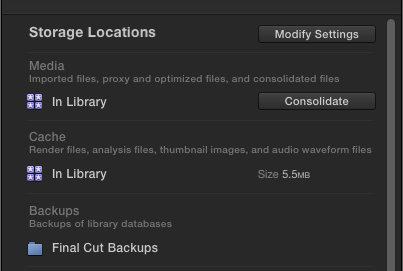
- If the settings are correct, proceed to step 3.
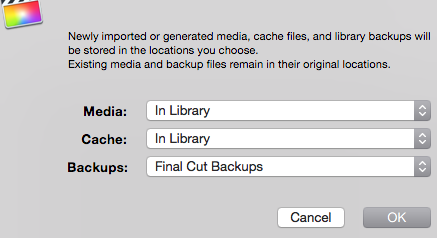
- If the media and cache locations are not set to "Library", click the Modify Settings button and change the settings in the Settings window, then press OK and proceed to step 3.
3. Click the Consolidate button in the Inspector.
- If there any media that are not stored inside the Library, FCP X will start moving these media into the Library. Wait until the process is done.
- If all your media are in the correct place, you will get a message that there is nothing to consolidate. This means everything is okay.
4. Close FCP X, open a Finder window and move the Library container from the current hard drive onto the new drive. Then double-click the Library container on the new drive to open it in FCP X.
- Ronny
First, make sure that all the media you need are really inside the Library. To do this:
1. Launch FCP X and select the Library in the browser.
2. In the Inspector, make sure that the Storage Locations for Media and for Cache are set to "Library".
- If the settings are correct, proceed to step 3.
- If the media and cache locations are not set to "Library", click the Modify Settings button and change the settings in the Settings window, then press OK and proceed to step 3.
3. Click the Consolidate button in the Inspector.
- If there any media that are not stored inside the Library, FCP X will start moving these media into the Library. Wait until the process is done.
- If all your media are in the correct place, you will get a message that there is nothing to consolidate. This means everything is okay.
4. Close FCP X, open a Finder window and move the Library container from the current hard drive onto the new drive. Then double-click the Library container on the new drive to open it in FCP X.
- Ronny
Please Log in to join the conversation.
- simonpwood
-
Topic Author
- Offline
- Platinum Member
-
Less
More
- Posts: 654
- Thank you received: 42
28 Oct 2015 13:23 #69940
by simonpwood
Replied by simonpwood on topic Moving Library, Project & Events to new hard disk
Thanks Ronny, that did the trick! Project has opened on the new disk.
I followed your instructions and it said that there was nothing to consolidate.
One more thing; I had copied over another file as well (Projects and Events). Is this redundant to the main Library that I need (KLA INK)?
i901.photobucket.com/albums/ac215/simonp...9.04_zpskge3utgp.png
[img][URL=http://s901.photobucket.com/user/simonpwood/media/Screen%20Shot%202015-10-28%20at%2015.59.04_zpskge3utgp.png.html][IMG]http://i901.photobucket.com/albums/ac215/simonpwood/Screen%20Shot%202015-10-28%20at%2015.59.04_zpskge3utgp.png[/img][/URL][/img]
I followed your instructions and it said that there was nothing to consolidate.
One more thing; I had copied over another file as well (Projects and Events). Is this redundant to the main Library that I need (KLA INK)?
i901.photobucket.com/albums/ac215/simonp...9.04_zpskge3utgp.png
[img][URL=http://s901.photobucket.com/user/simonpwood/media/Screen%20Shot%202015-10-28%20at%2015.59.04_zpskge3utgp.png.html][IMG]http://i901.photobucket.com/albums/ac215/simonpwood/Screen%20Shot%202015-10-28%20at%2015.59.04_zpskge3utgp.png[/img][/URL][/img]
Please Log in to join the conversation.
- ronny courtens
-
- Offline
- Moderator
-
Less
More
- Posts: 4455
- Thank you received: 962
28 Oct 2015 13:31 #69941
by ronny courtens
Replied by ronny courtens on topic Moving Library, Project & Events to new hard disk
The "LaCie2's projects and events" file is also an FCP X Library.
Your "KLA INK" Library is fully self-contained, so you don't need the "LaCie2's projects and events" Library to work with the "KLA INK" Library.
To know what's inside the "LaCie2's projects and events" Library you should open the Library in FCP X. Then you can see what projects and media er inside it and decide wether you need to keep it or not.
- Ronny
Your "KLA INK" Library is fully self-contained, so you don't need the "LaCie2's projects and events" Library to work with the "KLA INK" Library.
To know what's inside the "LaCie2's projects and events" Library you should open the Library in FCP X. Then you can see what projects and media er inside it and decide wether you need to keep it or not.
- Ronny
Please Log in to join the conversation.
- simonpwood
-
Topic Author
- Offline
- Platinum Member
-
Less
More
- Posts: 654
- Thank you received: 42
28 Oct 2015 15:33 #69944
by simonpwood
Replied by simonpwood on topic Moving Library, Project & Events to new hard disk
Aha, great thanks!
Please Log in to join the conversation.
