


- Posts: 3
- Thank you received: 0
3 Post Moderation Rule for New Boarders (25 Jan 2021)
New boarders will have their posts moderated - Don't worry if you cannot see your post immediately.
Why is my Library growing so fast the more I edit?
28 Oct 2015 03:15 #69906
by powellran
Why is my Library growing so fast the more I edit? was created by powellran
I'm currently working on my first FCPX project. I was using iMovie for my drum lesson videos and now I finally was able to purchase FCPX! Woo Hoo!
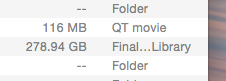
I am using a MacBook Pro with a 1TB storage size, and my Final Cut library is growing out of hand just on 1, 12 minute 3 angle multi-cam lesson video. I guess I should make a duplicate to another drive, but I'd rather not be tethered to an external hard drive ever time I want to edit video. What is taking up so much space? Render files?
Like I said, this is my first project with this program and the Library is already 275 gig! Also, I made a color correction mistake. By making my angle cuts first, I'm having to color correct each cut individually! Ugh! A lot of copy and (shift,command,V)!
Let me know if you have any helpful tips.
Thanks,
Powell
I am using a MacBook Pro with a 1TB storage size, and my Final Cut library is growing out of hand just on 1, 12 minute 3 angle multi-cam lesson video. I guess I should make a duplicate to another drive, but I'd rather not be tethered to an external hard drive ever time I want to edit video. What is taking up so much space? Render files?
Like I said, this is my first project with this program and the Library is already 275 gig! Also, I made a color correction mistake. By making my angle cuts first, I'm having to color correct each cut individually! Ugh! A lot of copy and (shift,command,V)!
Let me know if you have any helpful tips.
Thanks,
Powell
Please Log in to join the conversation.
- ronny courtens
-

- Offline
- Moderator
-

Less
More
- Posts: 4455
- Thank you received: 962
28 Oct 2015 10:08 - 28 Oct 2015 11:58 #69921
by ronny courtens
Replied by ronny courtens on topic Why is my Library growing so fast the more I edit?
Hi Powell, welcome to the forum.
Libraries can grow quickly when you keep everything inside them. This can be due to render files, creating optimized media, optical flow cache files etc...
That's why it is absolutely required to use a fast and beefy external drive for all your FCP X work. Not only will it give you all the space you wish, your system will also run much faster by not storing your media on your system drive. 275 GB is not really that big, many people work on projects that exceed multiple TB
You don't need to color correct each cut on the timeline and copy/paste the corrections. Just open the multicam clip in the Angle Editor and there you can color correct the entire angles separately. When you go back to your edited multicam clip on the timeline, the color corrections you made on the angles will be reflected in every cut. Of course, if you have already started correcting the cuts on the timeline, it's best to remove these before correcting the entire angles. Otherwise you get double corrections.
- Ronny
Libraries can grow quickly when you keep everything inside them. This can be due to render files, creating optimized media, optical flow cache files etc...
That's why it is absolutely required to use a fast and beefy external drive for all your FCP X work. Not only will it give you all the space you wish, your system will also run much faster by not storing your media on your system drive. 275 GB is not really that big, many people work on projects that exceed multiple TB
You don't need to color correct each cut on the timeline and copy/paste the corrections. Just open the multicam clip in the Angle Editor and there you can color correct the entire angles separately. When you go back to your edited multicam clip on the timeline, the color corrections you made on the angles will be reflected in every cut. Of course, if you have already started correcting the cuts on the timeline, it's best to remove these before correcting the entire angles. Otherwise you get double corrections.
- Ronny
Last edit: 28 Oct 2015 11:58 by ronny courtens.
Please Log in to join the conversation.

28 Oct 2015 11:41 #69930
by BenB
Replied by BenB on topic Why is my Library growing so fast the more I edit?
Think you meant GB, not TB.
Please Log in to join the conversation.
- ronny courtens
-
- Offline
- Moderator
-
Less
More
- Posts: 4455
- Thank you received: 962
28 Oct 2015 11:59 #69933
by ronny courtens
Replied by ronny courtens on topic Why is my Library growing so fast the more I edit?
Yes, LOL. 275 TB would be really big  Edited my post.
- Ronny
Edited my post.- Ronny
Please Log in to join the conversation.
28 Oct 2015 13:37 #69942
by powellran
Replied by powellran on topic Why is my Library growing so fast the more I edit?
Ronny,
Thanks so much for your welcome to the forum and your quick answers to my questions! I like to edit on the go so I was wondering if my BlackBox Glyph usb 3.0 drive would work. I imagine it would drop frames with a multi-cam clip. I'm not sure if it's a fast enough drive. In Logic Pro X, I'm used to save a project and naming a location for that project. Final Cut Pro X is set up way different without the save function and the way it handles where everything goes. What's the best way to move my project/library? I'm not sure if I just move the project or create a new library on a different drive and what to delete on my MacBook that doesn't mess up the system. Maybe someone can link me to a good file managing tutorial. I appreciate the help, and yes, 275 TB is pretty big I knew you meant gig:-)
Thanks so much for your welcome to the forum and your quick answers to my questions! I like to edit on the go so I was wondering if my BlackBox Glyph usb 3.0 drive would work. I imagine it would drop frames with a multi-cam clip. I'm not sure if it's a fast enough drive. In Logic Pro X, I'm used to save a project and naming a location for that project. Final Cut Pro X is set up way different without the save function and the way it handles where everything goes. What's the best way to move my project/library? I'm not sure if I just move the project or create a new library on a different drive and what to delete on my MacBook that doesn't mess up the system. Maybe someone can link me to a good file managing tutorial. I appreciate the help, and yes, 275 TB is pretty big
I knew you meant gig:-) Please Log in to join the conversation.
- ronny courtens
-
- Offline
- Moderator
-
Less
More
- Posts: 4455
- Thank you received: 962
28 Oct 2015 16:25 #69947
by ronny courtens
Replied by ronny courtens on topic Why is my Library growing so fast the more I edit?
The Glyph is a decent drive for backups, but it will be a bit slow for multicam editing.
As your projects are not too long you might consider working in Proxy mode, which this drive should be able to handle.
If your Libraries are self-contained (i.e. all the media are imported into the Library), then you simply can move the Library from your system drive onto your external drive.
This is easy to test: connect your external drive, open a Finder window and drag the Library from your system drive onto the external drive. Make sure that the Library gets copied, i.e. that you see a green little circle with a + sign while you drag. This way you still will have everything on your system drive. When the Library is copied, open the Library from the external drive in FCP X and if all works well you can safely delete the original Library from your system drive.
- Ronny
As your projects are not too long you might consider working in Proxy mode, which this drive should be able to handle.
If your Libraries are self-contained (i.e. all the media are imported into the Library), then you simply can move the Library from your system drive onto your external drive.
This is easy to test: connect your external drive, open a Finder window and drag the Library from your system drive onto the external drive. Make sure that the Library gets copied, i.e. that you see a green little circle with a + sign while you drag. This way you still will have everything on your system drive. When the Library is copied, open the Library from the external drive in FCP X and if all works well you can safely delete the original Library from your system drive.
- Ronny
Please Log in to join the conversation.
28 Oct 2015 17:09 #69955
by powellran
Replied by powellran on topic Why is my Library growing so fast the more I edit?
Great! Thanks again!
-Powell
-Powell
Please Log in to join the conversation.
- Karsten Schlüter
-

- Offline
- Moderator
-
Less
More
- Posts: 3790
- Thank you received: 718
28 Oct 2015 20:34 #69968
by Karsten Schlüter
Replied by Karsten Schlüter on topic Why is my Library growing so fast the more I edit?
Recommendation from the no-budget corner:
Multicam gets easy with seperate platters per stream/angle.
You get 1TB/usb3 for ~60-70€, so for three sources your investment is ~200€ and you instantly hanfdle 1080 without lengthy proxy conversions...
Spread OS, cache, project and clips on as much different drives as possible. Or consider 21st cent technology, ext SSDs - awesome! Using here a 250gb workhorse ... Grrrreat!
Multicam gets easy with seperate platters per stream/angle.
You get 1TB/usb3 for ~60-70€, so for three sources your investment is ~200€ and you instantly hanfdle 1080 without lengthy proxy conversions...
Spread OS, cache, project and clips on as much different drives as possible. Or consider 21st cent technology, ext SSDs - awesome! Using here a 250gb workhorse ... Grrrreat!
Please Log in to join the conversation.
