


- Posts: 3
- Thank you received: 0
3 Post Moderation Rule for New Boarders (25 Jan 2021)
New boarders will have their posts moderated - Don't worry if you cannot see your post immediately.
Remove space for audio in timeline?
- eatChocolate
-
 Topic Author
- Offline
- New Member
-

Less
More
25 Oct 2015 15:57 #69810
by eatChocolate
Remove space for audio in timeline? was created by eatChocolate
Hi all,
I'm all new here and discovered this forum when searching for a way to use proxies only. No original media.
Anyway, hi all!
Basically my new project requires me to only use one music track and no other audio at all. So I would like to make space at the bottom of my timeline and get rif of the space usually reserved for audio
In the picture attached, I want to lower the main part selected in yellow so that i dont have all this blank space underneath my audio track as I won't be using this space!
Any ideas?
Thanks!
I'm all new here and discovered this forum when searching for a way to use proxies only. No original media.
Anyway, hi all!
Basically my new project requires me to only use one music track and no other audio at all. So I would like to make space at the bottom of my timeline and get rif of the space usually reserved for audio
In the picture attached, I want to lower the main part selected in yellow so that i dont have all this blank space underneath my audio track as I won't be using this space!
Any ideas?
Thanks!

Please Log in to join the conversation.
- Tom Wolsky
-

- Offline
- Moderator
-

26 Oct 2015 01:43 #69831
by Tom Wolsky
Replied by Tom Wolsky on topic Remove space for audio in timeline?
First, it may be easier to edit the audio onto the primary storyline rather than have a gap clip that fills it. Second, the timeline panel can be scrolled vertically up and down.Iif you have a scrolling mouse, you can move it with that.
Please Log in to join the conversation.
- eatChocolate
-
Topic Author
- Offline
- New Member
-
Less
More
- Posts: 3
- Thank you received: 0
01 Nov 2015 16:15 #70113
by eatChocolate
Replied by eatChocolate on topic Remove space for audio in timeline?
Hey Tom,
Thanks for your input but the question was how to get rid of that extra space. I know I can scroll up and down. I was hoping for FCPX to not be able to scroll down past the audio track.
Thanks for your input but the question was how to get rid of that extra space. I know I can scroll up and down. I was hoping for FCPX to not be able to scroll down past the audio track.
Please Log in to join the conversation.


03 Nov 2015 15:21 #70192
by dgwvideo
Creating history....one edit at a time !
Replied by dgwvideo on topic Remove space for audio in timeline?
The project timeline area is neither dedicated to audio or video. It is simply a workspace for any media your project uses. If you want to shrink it, drag beneath the viewer to give more space above making the viewer larger and less space in the timeline. I don't believe the scrolling ever gets eliminated but the relationships of the upper and lower areas will change.
Creating history....one edit at a time !
Please Log in to join the conversation.
- Karsten Schlüter
-

- Offline
- Moderator
-
Less
More
- Posts: 3790
- Thank you received: 718
04 Nov 2015 06:24 #70204
by Karsten Schlüter
Replied by Karsten Schlüter on topic Remove space for audio in timeline?
just reduce the size of the timeline 'window':
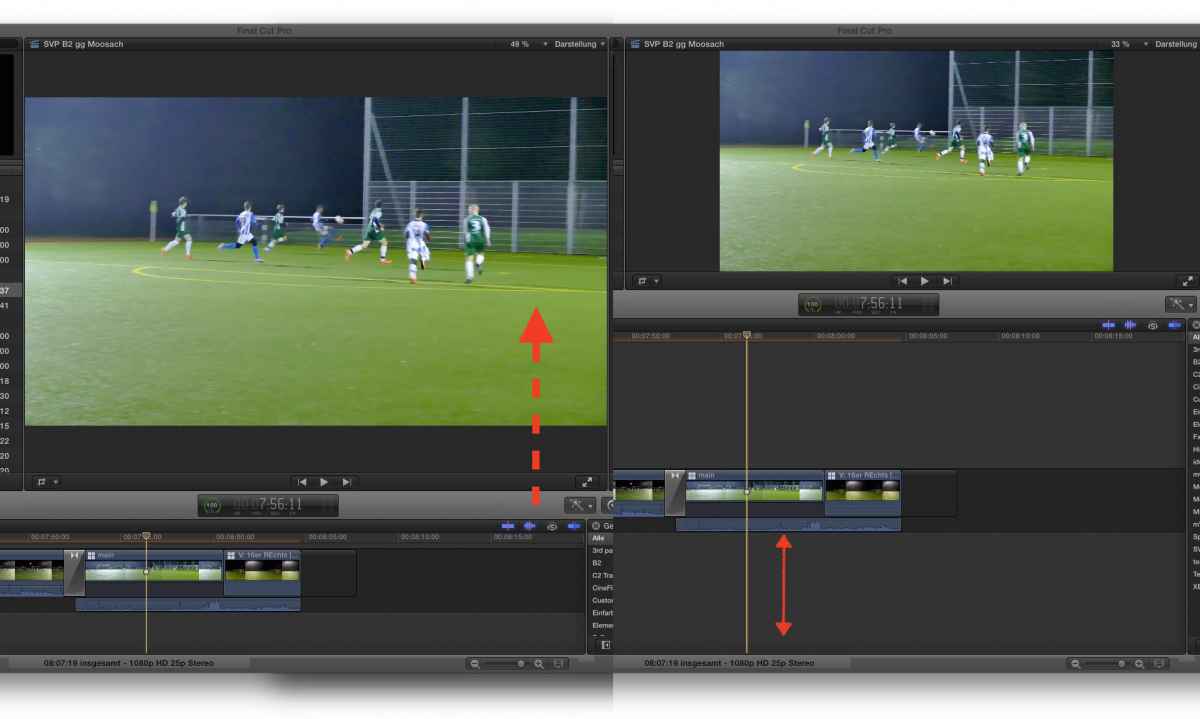
grab into the grey bar and push it up/down to your needs......
grab into the grey bar and push it up/down to your needs......
Please Log in to join the conversation.

04 Nov 2015 12:00 - 04 Nov 2015 12:01 #70211
by BenB
Replied by BenB on topic Remove space for audio in timeline?
Thank you, Karsten! Exactly! Plus resizing the clips, & changing the clip view. That's what it is all there for.
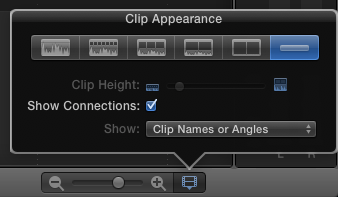
Last edit: 04 Nov 2015 12:01 by BenB.
Please Log in to join the conversation.
- eatChocolate
-
Topic Author
- Offline
- New Member
-
Less
More
- Posts: 3
- Thank you received: 0
04 Nov 2015 23:43 #70239
by eatChocolate
Replied by eatChocolate on topic Remove space for audio in timeline?
Thanks everyone but I do know all the tips shared here already. Maybe I should rephrase my question:
Is there a way for the timeline not to scroll below the primary storyline (the dark grey section in the middle of your timeline)?
I've got a fast scroll and quite often scroll too far down and need to scroll back up again to view the media. I have maybe 3 - 4 layers of videos one on top of the other so I do not want to shrink down the size of the whole window.
That also means It needs to be large so I do not want to change the clip height under the clip appearance and height as I need to have them as specific way.
If the timeline didn't allow me to scroll below the primary storyline, then with the current settings I have for the clip appearance, height and window size of the timeline, it would mean it will all fit within the window getting rid of the option to scroll ABOVE the 4 layers of videos and BELOW the primary story line.
Hope I'm making sense cause I'm almost confusing my self here haha
Basically yeah, is there a way to define the primary story line (dark grey area) as the bottom part of the timeline (stopping you from adding clips underneath it - therefore stopping you from scrolling past it) ?
Is there a way for the timeline not to scroll below the primary storyline (the dark grey section in the middle of your timeline)?
I've got a fast scroll and quite often scroll too far down and need to scroll back up again to view the media. I have maybe 3 - 4 layers of videos one on top of the other so I do not want to shrink down the size of the whole window.
That also means It needs to be large so I do not want to change the clip height under the clip appearance and height as I need to have them as specific way.
If the timeline didn't allow me to scroll below the primary storyline, then with the current settings I have for the clip appearance, height and window size of the timeline, it would mean it will all fit within the window getting rid of the option to scroll ABOVE the 4 layers of videos and BELOW the primary story line.
Hope I'm making sense cause I'm almost confusing my self here haha
Basically yeah, is there a way to define the primary story line (dark grey area) as the bottom part of the timeline (stopping you from adding clips underneath it - therefore stopping you from scrolling past it) ?
Please Log in to join the conversation.
05 Nov 2015 14:03 - 05 Nov 2015 14:04 #70249
by dgwvideo
Creating history....one edit at a time !
Replied by dgwvideo on topic Remove space for audio in timeline?
As I mentioned earlier in this thread, FCPX doesn't have an option to disable scrolling as far as I know. You may be able to accomplish what you are asking by disabling scrolling within OSX. You might have to go into the universal access preferences to do this, or possibly thru the terminal. If you google the topic, you'll find many tips for disabling scrolling in OSX for various types of mice and trackpads and procedures for various OS versions.
Updated : meant OSX above not FCPX - typo corrected.
Updated : meant OSX above not FCPX - typo corrected.
Creating history....one edit at a time !
Last edit: 05 Nov 2015 14:04 by dgwvideo.
Please Log in to join the conversation.
05 Nov 2015 17:01 #70254
by VidGreg
Hi eatChocolate
Welcome to the forums.
AFAIK the space you want to change is coded in and cannot be eliminated. Here I am assuming you mean the vertical space that FCPX creates for addition clips to be added above/below the timeline.
As you add more and more clips vertically, FCPX will change the total vertical real estate to accommodate them. There is always blank space. This may be due to the Magnetic Timeline also.
As you already know, you can change the vertical size of the clips, and you can also to a certain extent change the overall vertical size in your display for the timeline/clip window space by dragging between the spaces (viewer, browser).
Hope this helps, Greg
Welcome to the forums.
AFAIK the space you want to change is coded in and cannot be eliminated. Here I am assuming you mean the vertical space that FCPX creates for addition clips to be added above/below the timeline.
As you add more and more clips vertically, FCPX will change the total vertical real estate to accommodate them. There is always blank space. This may be due to the Magnetic Timeline also.
As you already know, you can change the vertical size of the clips, and you can also to a certain extent change the overall vertical size in your display for the timeline/clip window space by dragging between the spaces (viewer, browser).
Hope this helps, Greg
Please Log in to join the conversation.
