


- Posts: 4455
- Thank you received: 962
3 Post Moderation Rule for New Boarders (25 Jan 2021)
New boarders will have their posts moderated - Don't worry if you cannot see your post immediately.
What is this transition?
- ronny courtens
-
 Topic Author
- Offline
- Moderator
-

Less
More
26 Oct 2015 08:37 #69836
by ronny courtens
What is this transition? was created by ronny courtens
The effect you see is an light leak overlay. Just google "light leak transition" and you will find thousands of them (some free, most paid). It may take a lot of searching to find this exact one, or you can just pick a similar one.
Mist of these light leak transitions are just video files that you put on top of your clips on the timeline, centered on the cut between two clips. Then you select the light leak clip and in the Inspector > Video tab under Compositing you set the blend Mode to "Overlay" to make the effect clip blend with the clips underneath.
- Ronny
Mist of these light leak transitions are just video files that you put on top of your clips on the timeline, centered on the cut between two clips. Then you select the light leak clip and in the Inspector > Video tab under Compositing you set the blend Mode to "Overlay" to make the effect clip blend with the clips underneath.
- Ronny
Please Log in to join the conversation.

27 Oct 2015 13:54 #69879
by Aar0n
Replied by Aar0n on topic What is this transition?
I cannot find the blue flash. I have thousands of light leaks and film burns. I think this was done within a programme
Please Log in to join the conversation.
- MarkNelsonMovies
-

- Offline
- Elite Member
-

Less
More
- Posts: 256
- Thank you received: 48
30 Oct 2015 20:22 #70048
by MarkNelsonMovies
Replied by MarkNelsonMovies on topic What is this transition?
If you want to make it manually you'll have to go into motion, make a new FCPX transition, create a shape and then start messing with scale keyframes, shape keyframes, glow, color, and blur filters to get the look you want.
Please Log in to join the conversation.
- Karsten Schlüter
-

- Offline
- Moderator
-
Less
More
- Posts: 3790
- Thank you received: 718
31 Oct 2015 06:56 - 31 Oct 2015 07:22 #70062
by Karsten Schlüter
Replied by Karsten Schlüter on topic What is this transition?
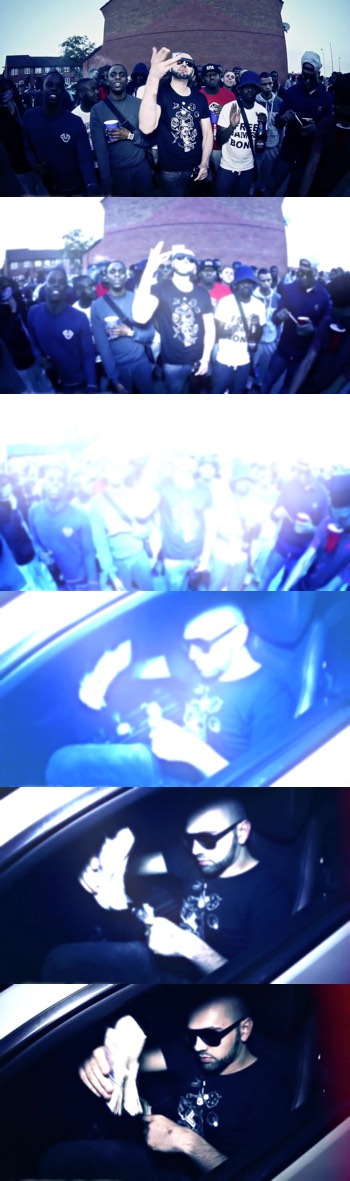
at 00:42 no light leaks involved, imho ....
within the first 4 frames, clip#1 gets blurred and highly over-exposured
clip#2 comes in as a clean cut, no fade, blurred/overexposured and then within 4 frames back to normal
should be manageable to reenact that in Motion5 ......
or, 'manually' in FCPX ... if the color board allows values so high off ......
addendum
works like charme:
animated Gauss blurr, within 4 frames to 50%
drag a copy upon it, exposure 'correction' +70%, animate opacity from 0-100% within 4 frames ....
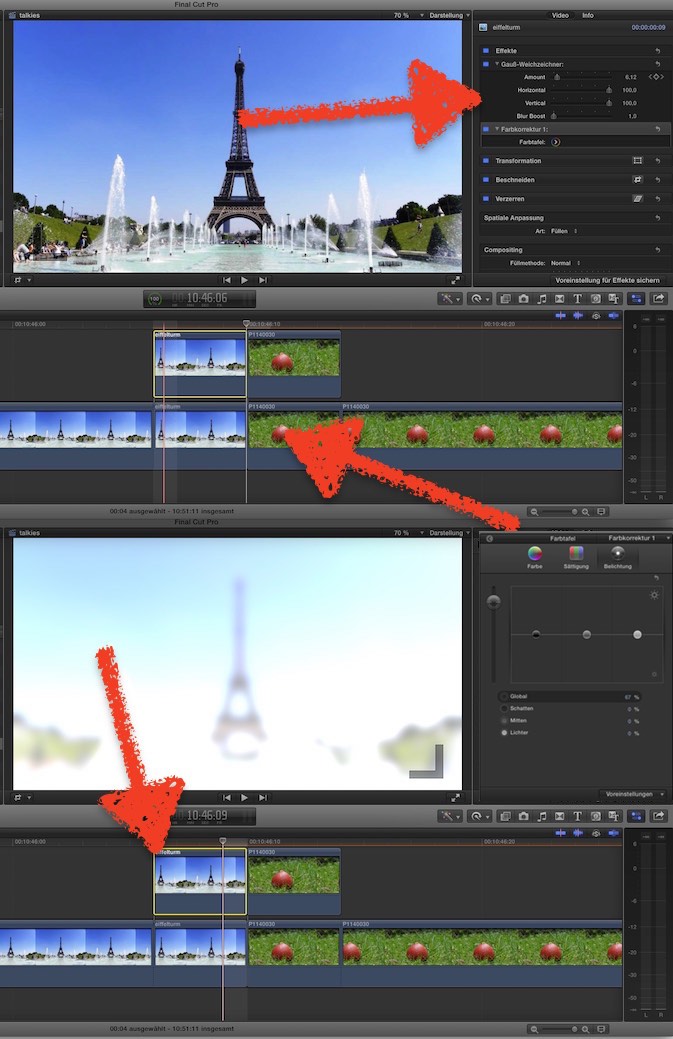
ok, my Bad Boy is a pumpkin ... btw: Happy Halloween! :woohoo:
within the first 4 frames, clip#1 gets blurred and highly over-exposured
clip#2 comes in as a clean cut, no fade, blurred/overexposured and then within 4 frames back to normal
should be manageable to reenact that in Motion5 ......
or, 'manually' in FCPX ... if the color board allows values so high off ......
addendum
works like charme:
animated Gauss blurr, within 4 frames to 50%
drag a copy upon it, exposure 'correction' +70%, animate opacity from 0-100% within 4 frames ....
ok, my Bad Boy is a pumpkin ... btw: Happy Halloween! :woohoo:
Last edit: 31 Oct 2015 07:22 by Karsten Schlüter.
Please Log in to join the conversation.
