


- Posts: 164
- Thank you received: 0
3 Post Moderation Rule for New Boarders (25 Jan 2021)
New boarders will have their posts moderated - Don't worry if you cannot see your post immediately.
LUT Colour
23 Oct 2015 15:22 #69754
by Neil P
LUT Colour was created by Neil P
Hi guys
I've shot with a filmmaker today who used a Sony camera. The Camera guy told me that the files were LUT files and I'd need to download a Plugin to work on them properly, i.e. when adjusting colour.
Is that correct ?
I've dropped the files into FCPX and although the footage looks very flat, doing the usual colour and contrast tweaks seem to correct them quite easily.
Does anybody have any experience of this ?
Neil
I've shot with a filmmaker today who used a Sony camera. The Camera guy told me that the files were LUT files and I'd need to download a Plugin to work on them properly, i.e. when adjusting colour.
Is that correct ?
I've dropped the files into FCPX and although the footage looks very flat, doing the usual colour and contrast tweaks seem to correct them quite easily.
Does anybody have any experience of this ?
Neil
Please Log in to join the conversation.
- Tom Wolsky
-

- Offline
- Moderator
-

23 Oct 2015 15:44 #69757
by Tom Wolsky
Replied by Tom Wolsky on topic LUT Colour
You can either use the appropriate LUT or adjust it yourself.
Please Log in to join the conversation.
23 Oct 2015 16:43 #69759
by Neil P
Replied by Neil P on topic LUT Colour
ok, so there isn't any advantage in using LUT ?
Neil
Neil
Please Log in to join the conversation.
- Tom Wolsky
-
- Offline
- Moderator
-
23 Oct 2015 16:53 #69760
by Tom Wolsky
Replied by Tom Wolsky on topic LUT Colour
The advantage is that if it's been shot with a specific LUT setup, adding the LUT will instantly give you the correct base grade of the shot.
Please Log in to join the conversation.
28 Oct 2015 09:58 #69920
by Neil P
Replied by Neil P on topic LUT Colour
ok, I've installed the Out Utility and it's now sat in my effects browser.
Having watch the tutorial I need then to go into system preferences to apply the LUT Pane, as picture below
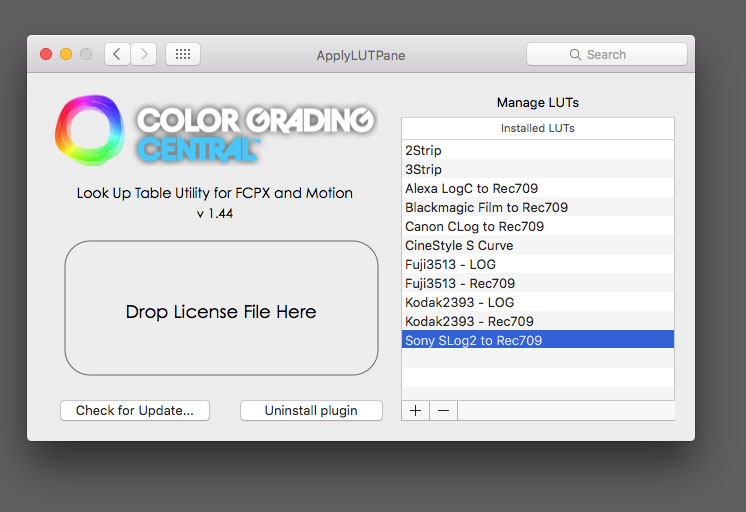
I select the sony lut and click on the plus symbol and panel opens up asking me to open a folder/file. see pic below. What do I need to do now, I'm not sure what it is that I'm supposed to be opening ?
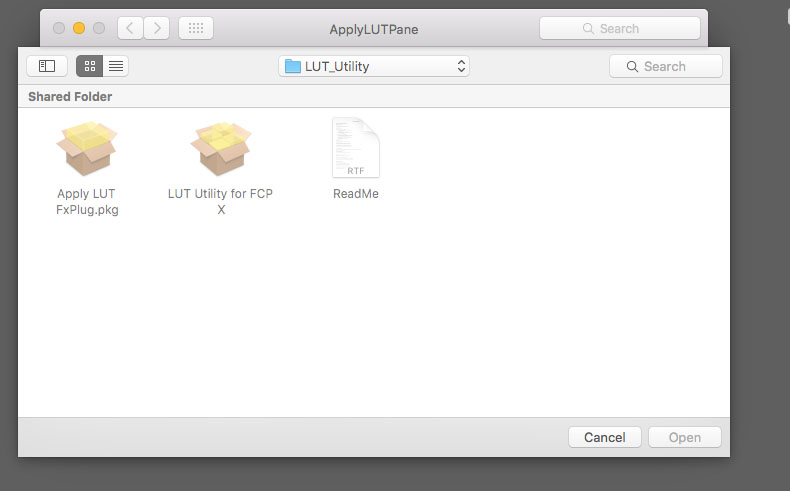
thanks
Neil
Having watch the tutorial I need then to go into system preferences to apply the LUT Pane, as picture below
I select the sony lut and click on the plus symbol and panel opens up asking me to open a folder/file. see pic below. What do I need to do now, I'm not sure what it is that I'm supposed to be opening ?
thanks
Neil
Please Log in to join the conversation.
- Tom Wolsky
-
- Offline
- Moderator
-
28 Oct 2015 10:08 #69922
by Tom Wolsky
Replied by Tom Wolsky on topic LUT Colour
LUT Utility is an effect. You apply it to a clip from the Effects Briwser in FCP. Once applied you can access the LUTs that you've added in system prefs.
Please Log in to join the conversation.
28 Oct 2015 10:24 #69924
by Neil P
Replied by Neil P on topic LUT Colour
Adding the LUTs from System prefs is the bit that I've got stuck on, see screen grab above, where do I put LUT that I'm adding, i.e. what do I open as it's asking me to do above ?
Do that make sense ?
Meo;
Do that make sense ?
Meo;
Please Log in to join the conversation.


28 Oct 2015 10:33 - 28 Oct 2015 10:35 #69925
by zzchu
Replied by zzchu on topic LUT Colour
The control panel allows you to manage (add and remove) LUTs that are available and shown in the LUT utility plugin in Final Cut Pro X.
As Tom said, it is an effect. Drag the effect onto the clip and then choose the LUT you wish from the drop down list in Final Cut Pro X to apply to the clip.
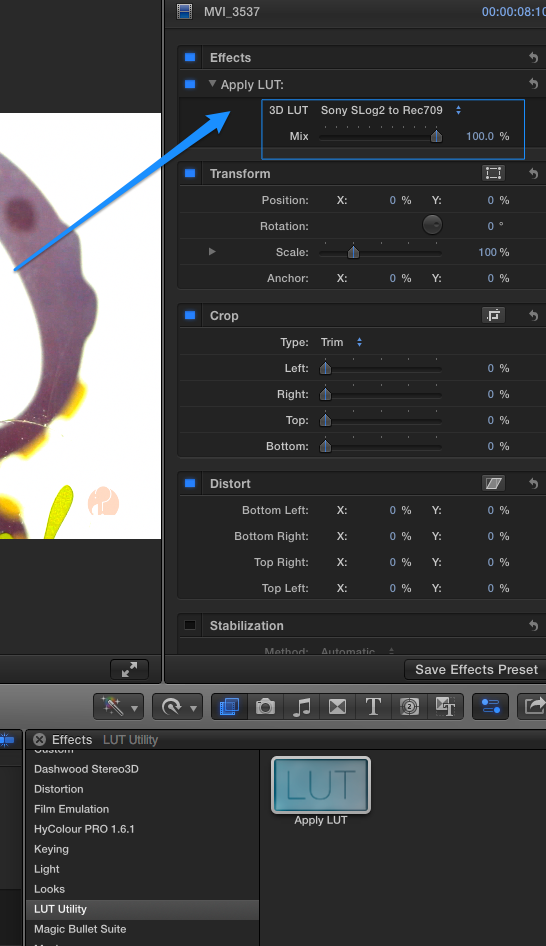
As Tom said, it is an effect. Drag the effect onto the clip and then choose the LUT you wish from the drop down list in Final Cut Pro X to apply to the clip.
Last edit: 28 Oct 2015 10:35 by zzchu.
Please Log in to join the conversation.
- ronny courtens
-

- Offline
- Moderator
-
Less
More
- Posts: 4455
- Thank you received: 962
28 Oct 2015 10:52 #69927
by ronny courtens
Replied by ronny courtens on topic LUT Colour
To anyone who wants to use LUTs in their projects, I can highly recommend this video made by John Chu:
- Ronny
- Ronny
Please Log in to join the conversation.
