


- Posts: 2
- Thank you received: 0
3 Post Moderation Rule for New Boarders (25 Jan 2021)
New boarders will have their posts moderated - Don't worry if you cannot see your post immediately.
Creating and adding to new categories in Effects Window
22 Oct 2015 22:11 #69735
by Austin4
Creating and adding to new categories in Effects Window was created by Austin4
Hey guys! Is there a way to create a new effects category? I'd love to make my own by dragging/dropping frequently used effects to save on time.
Thanks!
Thanks!
Please Log in to join the conversation.

24 Oct 2015 16:54 #69790
by VidGreg
Hi Austin4
Welcome to the forums.
After you create the modified effect you like, just save as preset, name it whatever you want. Then you can drag and drop or double click to apply.
If you have Motion then you can create new effects that will appear in FCPX. You can also right click on any effect in FCPX and choose "Open copy in Motion" where you can modify the effect and "Publish" parameters so you can make changes inside FCPX. When you save the effect in Motion you can name them and create additional categories.
Always helpful to tell us what version of FCPX you use and your OS as things change.
Hope this helps, Greg
Welcome to the forums.
After you create the modified effect you like, just save as preset, name it whatever you want. Then you can drag and drop or double click to apply.
If you have Motion then you can create new effects that will appear in FCPX. You can also right click on any effect in FCPX and choose "Open copy in Motion" where you can modify the effect and "Publish" parameters so you can make changes inside FCPX. When you save the effect in Motion you can name them and create additional categories.
Always helpful to tell us what version of FCPX you use and your OS as things change.
Hope this helps, Greg
Please Log in to join the conversation.
- Karsten Schlüter
-

- Offline
- Moderator
-

Less
More
- Posts: 3790
- Thank you received: 718
25 Oct 2015 05:22 #69797
by Karsten Schlüter
What's handy for me are the Themes....
In Motion you can create your own ones in the Save dialgoue
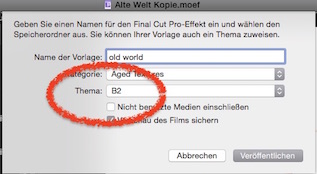
you can do that with your own, new creations but with any out-of-the-box effect too (open copy in motion, go straight to Save again) ...
In result, I have all transitions, effects, titles, whatever in one place:
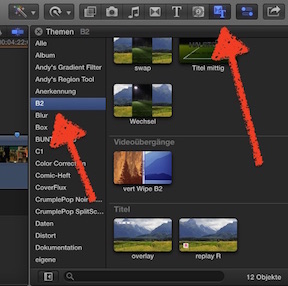
here, my Project has the short name "B2" (catagory in soccer league) and my own screen design elements but also a few other canned effects are at hand ...
Replied by Karsten Schlüter on topic Creating and adding to new categories in Effects Window
Austin4 wrote: Hey guys! Is there a way to create a new effects category? ...
What's handy for me are the Themes....
In Motion you can create your own ones in the Save dialgoue
you can do that with your own, new creations but with any out-of-the-box effect too (open copy in motion, go straight to Save again) ...
In result, I have all transitions, effects, titles, whatever in one place:
here, my Project has the short name "B2" (catagory in soccer league) and my own screen design elements but also a few other canned effects are at hand ...
Please Log in to join the conversation.
05 Nov 2015 18:36 #70260
by Austin4
Replied by Austin4 on topic Creating and adding to new categories in Effects Window
Thank you for the help. I was able to do exactly what I was looking for. :lol:
Please Log in to join the conversation.
