


- Posts: 102
- Thank you received: 4
3 Post Moderation Rule for New Boarders (25 Jan 2021)
New boarders will have their posts moderated - Don't worry if you cannot see your post immediately.
Color correction 10.2.2 in effects panel now?
22 Oct 2015 16:16 #69720
by dfphoto
Color correction 10.2.2 in effects panel now? was created by dfphoto
Hi group, I just updated to 10.2.2 and today I was trying to adjust some color and now the color panel is no longer in the usual spot but in the effects and now I cannot do a selective color. Can anyone elaborate?
Thanks Dave
Thanks Dave
Please Log in to join the conversation.
- Tom Wolsky
-

- Offline
- Moderator
-

22 Oct 2015 16:23 #69721
by Tom Wolsky
Replied by Tom Wolsky on topic Color correction 10.2.2 in effects panel now?
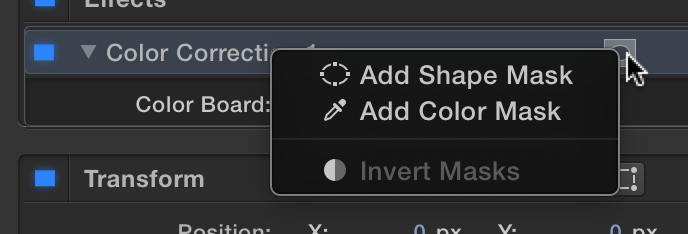
Click the button here
Please Log in to join the conversation.
22 Oct 2015 18:15 #69722
by dfphoto
Replied by dfphoto on topic Color correction 10.2.2 in effects panel now?
Thank you very much, i noticed that later, not sure if that's better or not but thanks again....
Please Log in to join the conversation.
- Jonathan Levin
-

- Offline
- Platinum Member
-

Less
More
- Posts: 786
- Thank you received: 21
22 Oct 2015 19:39 #69723
by Jonathan Levin
Replied by Jonathan Levin on topic Color correction 10.2.2 in effects panel now?
Tom.
Is the "add color mask" the one to choose for over all correction for a clip? I never noticed this short cut.
Is the "add color mask" the one to choose for over all correction for a clip? I never noticed this short cut.
Please Log in to join the conversation.
- Tom Wolsky
-
- Offline
- Moderator
-
22 Oct 2015 19:44 #69724
by Tom Wolsky
Replied by Tom Wolsky on topic Color correction 10.2.2 in effects panel now?
No, that's if you want to select a specific color or color range in the image that you want to adjust, for instance to mute the red in a shot, or punch up the blue in the sky.
Please Log in to join the conversation.
- Jonathan Levin
-
- Offline
- Platinum Member
-
Less
More
- Posts: 786
- Thank you received: 21
22 Oct 2015 19:49 #69725
by Jonathan Levin
Replied by Jonathan Levin on topic Color correction 10.2.2 in effects panel now?
OK, thanks. So you need to go into effects and apply a correction by the old drag and drop method.
Please Log in to join the conversation.
- Tom Wolsky
-
- Offline
- Moderator
-
22 Oct 2015 19:52 - 22 Oct 2015 19:53 #69726
by Tom Wolsky
Replied by Tom Wolsky on topic Color correction 10.2.2 in effects panel now?
Press Cmd-6 and the color board will open for the targeted clip in the timeline. Make a change in the color board and the effect will be applied.
Last edit: 22 Oct 2015 19:53 by Tom Wolsky.
Please Log in to join the conversation.
