


- Posts: 4
- Thank you received: 0
3 Post Moderation Rule for New Boarders (25 Jan 2021)
New boarders will have their posts moderated - Don't worry if you cannot see your post immediately.
Another simple question! Fading in and out titles
21 Oct 2015 13:19 #69646
by CJ
Another simple question! Fading in and out titles was created by CJ
Thank you very much everybody who replied to my last questions, I found your responses really helpful.
I have another one!
So I used to use final cut 7. On there it was really easy to fade in and out titles. Have spent ages trying to work out how to do in on final cut X and tried to find a video on it and nothing! Please could someone help me out, feeling very frustrated as it's so simple! Thank you.
I have another one!
So I used to use final cut 7. On there it was really easy to fade in and out titles. Have spent ages trying to work out how to do in on final cut X and tried to find a video on it and nothing! Please could someone help me out, feeling very frustrated as it's so simple! Thank you.
Please Log in to join the conversation.
- Tom Wolsky
-

- Offline
- Moderator
-

21 Oct 2015 17:02 #69652
by Tom Wolsky
Replied by Tom Wolsky on topic Another simple question! Fading in and out titles
Select the title and press Cmd-T.
Please Log in to join the conversation.
- Karsten Schlüter
-

- Offline
- Moderator
-
Less
More
- Posts: 3790
- Thank you received: 718
22 Oct 2015 05:12 #69685
by Karsten Schlüter
Replied by Karsten Schlüter on topic Another simple question! Fading in and out titles
or, more complicated therfor more versatile: use the published parameters, most titles come with:
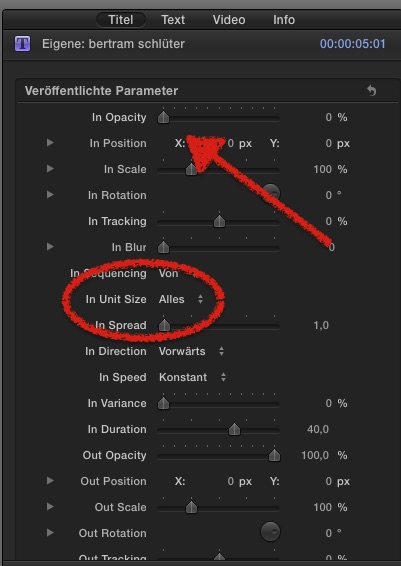
this is the Inspector for the 'Custom' title:
setting the in/out-opacity to 0% and choose Unit Size 'all', gives nice in/out fading
and thats not all, the Unit Size allows e.g. to fade-in 'by character', sort-of write effect... etc etc
that tiny Custom title would be worth a whole tutorial with all its options and effects!
this is the Inspector for the 'Custom' title:
setting the in/out-opacity to 0% and choose Unit Size 'all', gives nice in/out fading
and thats not all, the Unit Size allows e.g. to fade-in 'by character', sort-of write effect... etc etc
that tiny Custom title would be worth a whole tutorial with all its options and effects!
Please Log in to join the conversation.

22 Oct 2015 15:00 #69714
by VidGreg
Hi CJ
Karsten's suggestion about using the "Custom" title is a good starting place. Custom is a basic title with lots and lots of parameters published out of Motion. Gives you lots of control not just fade in and out timeframes. This is something to really play with. The "Custom" is a hidden gem in Titles. Create what you want and then save as preset.
You can add automation points in a lot of titles to control different aspects.
In the inspector pane "Title" tab contains some of the parameters, but which ones is dependent on what was published for that title effect.
You can always create your own "Title" effect in Motion and publish the parameters you want.
Once you create a title you like, you can save it and name it so it will be available again, all within FCPX.
Here is one of many helpful articles, this one by Larry Jordan… larryjordan.com/articles/fcpx-fun-with-titles/
Here is an Apple KB on using keyframes and video automation… support.apple.com/kb/PH12628?locale=en_US
Hope this helps, Greg
Karsten's suggestion about using the "Custom" title is a good starting place. Custom is a basic title with lots and lots of parameters published out of Motion. Gives you lots of control not just fade in and out timeframes. This is something to really play with. The "Custom" is a hidden gem in Titles. Create what you want and then save as preset.
You can add automation points in a lot of titles to control different aspects.
In the inspector pane "Title" tab contains some of the parameters, but which ones is dependent on what was published for that title effect.
You can always create your own "Title" effect in Motion and publish the parameters you want.
Once you create a title you like, you can save it and name it so it will be available again, all within FCPX.
Here is one of many helpful articles, this one by Larry Jordan… larryjordan.com/articles/fcpx-fun-with-titles/
Here is an Apple KB on using keyframes and video automation… support.apple.com/kb/PH12628?locale=en_US
Hope this helps, Greg
Please Log in to join the conversation.
