


- Posts: 3790
- Thank you received: 718
3 Post Moderation Rule for New Boarders (25 Jan 2021)
New boarders will have their posts moderated - Don't worry if you cannot see your post immediately.
noob question: where's brown on the color board??
- Karsten Schlüter
-
 Topic Author
- Offline
- Moderator
-

Less
More
18 Oct 2015 12:30 #69574
by Karsten Schlüter
This guy here is a bit too pale for my taste (was recorded in summer, the other subjects look more.... summerish):
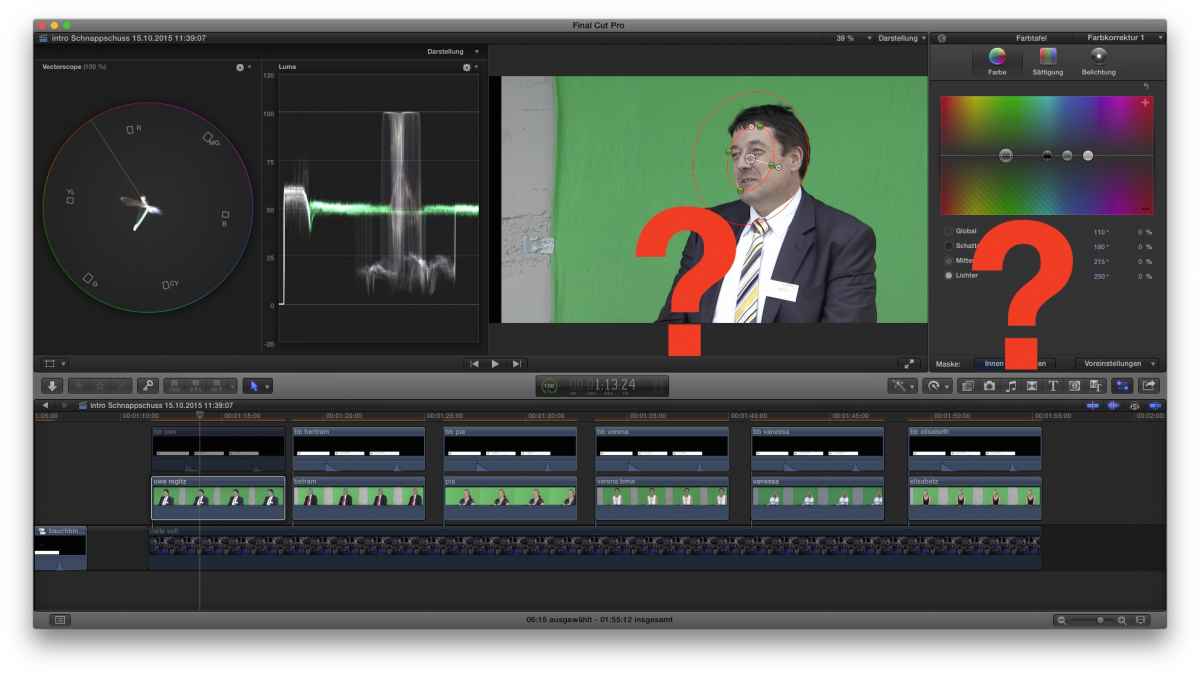
yep, the whites are clipping... to my excuse: the camera operator was 13y ...
I know - on a low beginner level!- about masks, I know about balancing skin tones (but prefer a wb-tool, me lazy), I know about the scopes ... I successfully gave the women some 'sunny' color, a warm reddish/yellowish mishmash...
… but where is brown on the color-board???
I followed Larry Jordans presentation where he mentioned, from a colorist perspective, humans have all the same color, but different brigthness/aperture levels… not exactly what he said, but just beautiful :kiss:
Lowering the overall brigthness makes the face 'dirty'; lowering midtones same.... playing with saturation makes him pinky....
..... any recipe at hand for a beginner?
How to apply a tan.... ??
yep, the whites are clipping... to my excuse: the camera operator was 13y ...
I know - on a low beginner level!- about masks, I know about balancing skin tones (but prefer a wb-tool, me lazy), I know about the scopes ... I successfully gave the women some 'sunny' color, a warm reddish/yellowish mishmash...
… but where is brown on the color-board???
I followed Larry Jordans presentation where he mentioned, from a colorist perspective, humans have all the same color, but different brigthness/aperture levels… not exactly what he said, but just beautiful :kiss:
Lowering the overall brigthness makes the face 'dirty'; lowering midtones same.... playing with saturation makes him pinky....
..... any recipe at hand for a beginner?
How to apply a tan.... ??
Please Log in to join the conversation.


18 Oct 2015 12:42 #69575
by Blackburn
Replied by Blackburn on topic noob question: where's brown on the color board??
^^
I guess you saw in Larry Jordan's presentation, where he temporarily cropped an image before applying changes?
What happens if you crop to the gentleman's head and chest, and then try balance, does it make a difference?
I've used this method a lot since seeing that presentation and it has helped get subtle good improvements in a number of cases.
I guess you saw in Larry Jordan's presentation, where he temporarily cropped an image before applying changes?
What happens if you crop to the gentleman's head and chest, and then try balance, does it make a difference?
I've used this method a lot since seeing that presentation and it has helped get subtle good improvements in a number of cases.
Please Log in to join the conversation.
- Karsten Schlüter
-
Topic Author
- Offline
- Moderator
-
Less
More
- Posts: 3790
- Thank you received: 718
18 Oct 2015 13:51 #69577
by Karsten Schlüter
Replied by Karsten Schlüter on topic noob question: where's brown on the color board??
thanks for chiming in... but:
I don't think I'm looking for a correction (what the Larry workflow is), the guy IS pale, no, I want to ADD a tan. See, with the host of that show it was easy:
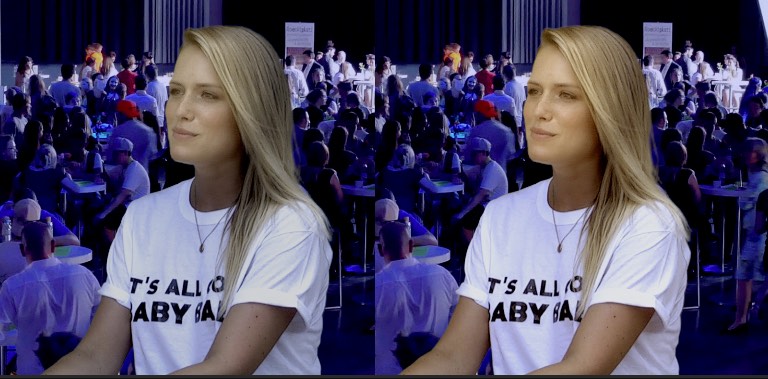
applied a mask (as shown with the man), raised a little the contrasts and lowered the exposure outside the mask, raised midtones inside the mask and 'stapled' some orange over it (as described in my OP).
Idea was, to do same same with the man - but there's no brown in the color board (sounds like a book title "The Autobiography of famous Hollywodd colorist...")... looks like, brown is no color (as b/w aren't either) ...
But I'm pretty sure, I'm not the first who like to give a pale person some healthy tan........................
So, a color-correction routine doesn't help me; … I think........
I don't think I'm looking for a correction (what the Larry workflow is), the guy IS pale, no, I want to ADD a tan. See, with the host of that show it was easy:
applied a mask (as shown with the man), raised a little the contrasts and lowered the exposure outside the mask, raised midtones inside the mask and 'stapled' some orange over it (as described in my OP).
Idea was, to do same same with the man - but there's no brown in the color board (sounds like a book title "The Autobiography of famous Hollywodd colorist...")... looks like, brown is no color (as b/w aren't either) ...
But I'm pretty sure, I'm not the first who like to give a pale person some healthy tan........................
So, a color-correction routine doesn't help me; … I think........
Please Log in to join the conversation.


18 Oct 2015 15:31 - 18 Oct 2015 16:02 #69578
by rjvddoes
Replied by rjvddoes on topic noob question: where's brown on the color board??
Hi Karsten
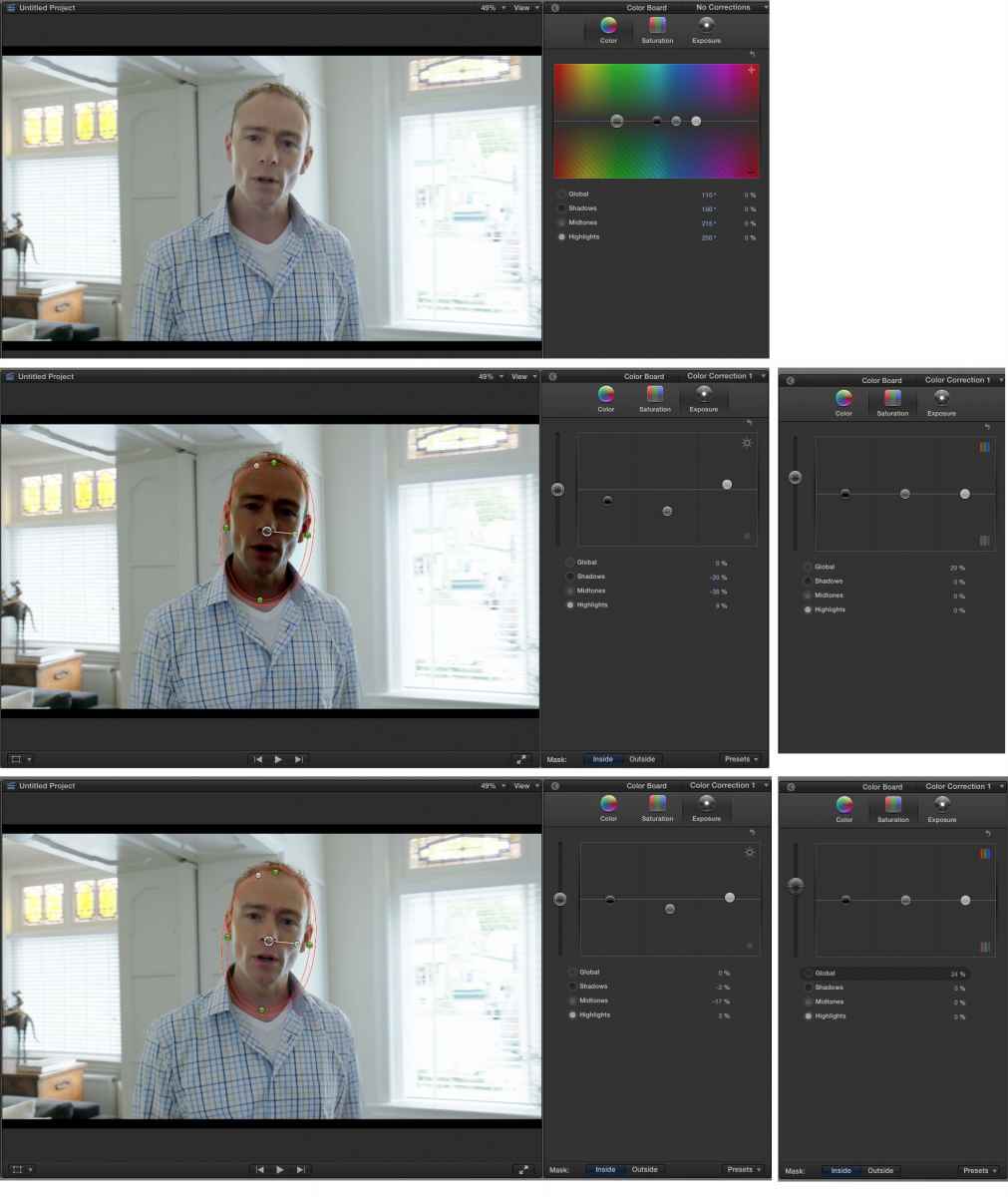
Brown is in fact a different shade of orange. Instead of pushing a color's hue in the Color tab, try to lower the blacks and midtones inside the mask and raise the whites to maintain some contrast and raise the saturation to keep the color vivid.
Sorry Karsten,
I can't get the images I want to show you, inserted in this post.
This is driving me nuts
Brown is in fact a different shade of orange. Instead of pushing a color's hue in the Color tab, try to lower the blacks and midtones inside the mask and raise the whites to maintain some contrast and raise the saturation to keep the color vivid.
Sorry Karsten,
I can't get the images I want to show you, inserted in this post.
This is driving me nuts
Last edit: 18 Oct 2015 16:02 by rjvddoes.
Please Log in to join the conversation.
- Karsten Schlüter
-
Topic Author
- Offline
- Moderator
-
Less
More
- Posts: 3790
- Thank you received: 718
18 Oct 2015 16:16 - 18 Oct 2015 16:18 #69580
by Karsten Schlüter
I would love to see your example - but the forum software ate your examples ....
PS: "brown is a dark orange" - just imagine, I'd told this my father 40 years ago .... :silly: :lol: :silly:
Replied by Karsten Schlüter on topic noob question: where's brown on the color board??
rjvddoes wrote: .....
Here is a quick and dirty example that is giving a super tan (don't pay attention to the sloppy mask, it's just for demonstration purposes)....
I would love to see your example - but the forum software ate your examples ....
PS: "brown is a dark orange" - just imagine, I'd told this my father 40 years ago .... :silly: :lol: :silly:
Last edit: 18 Oct 2015 16:18 by Karsten Schlüter.
Please Log in to join the conversation.
18 Oct 2015 16:38 #69581
by rjvddoes
Replied by rjvddoes on topic noob question: where's brown on the color board??
Hi Karsten,
I hope it shows up now.
If it does, the top image is the original, in the middle is extreme tanned, bottom is moderate tan.
I hope it shows up now.
If it does, the top image is the original, in the middle is extreme tanned, bottom is moderate tan.
Please Log in to join the conversation.
- Karsten Schlüter
-
Topic Author
- Offline
- Moderator
-
Less
More
- Posts: 3790
- Thank you received: 718
18 Oct 2015 17:48 - 18 Oct 2015 17:50 #69586
by Karsten Schlüter
Replied by Karsten Schlüter on topic noob question: where's brown on the color board??
Rjvd, awesome!
I shouldn't have slept, when at school they discussed Goethe's Theory of Colors :lol:
Indeed, brown is a dark orange...
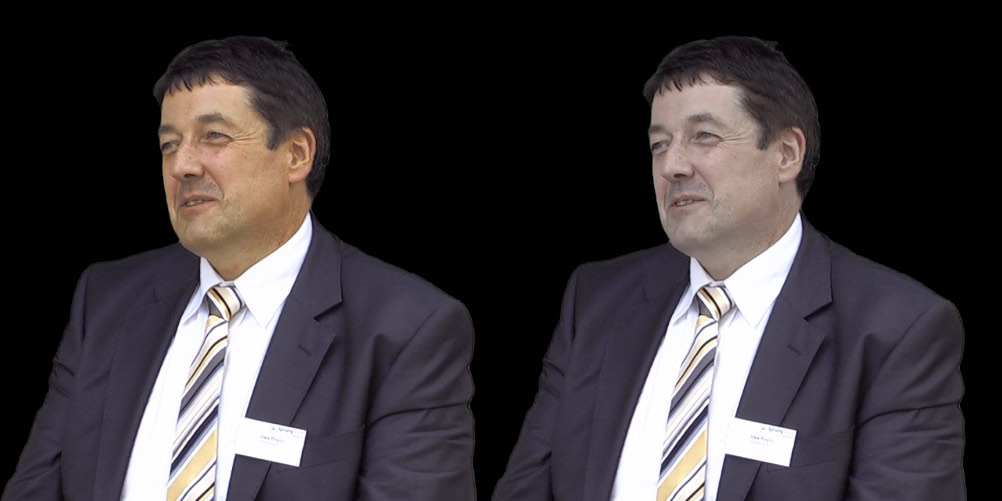
a bit ttoo orange but promising - THANKS for advice!
btw: used a Color mask to select his face ......
I shouldn't have slept, when at school they discussed Goethe's Theory of Colors :lol:
Indeed, brown is a dark orange...
a bit ttoo orange but promising - THANKS for advice!
btw: used a Color mask to select his face ......
Last edit: 18 Oct 2015 17:50 by Karsten Schlüter.
Please Log in to join the conversation.
18 Oct 2015 18:39 #69587
by rjvddoes
Replied by rjvddoes on topic noob question: where's brown on the color board??
Yeah, that'll do.
Alternatively, you could feed the guy a bucket full of carrots.
When you find his face too orange, you can add a new color correction layer, select the face again as a color mask and add a small amount of magenta in the highlights (gain).
This will move the skintone more towards red
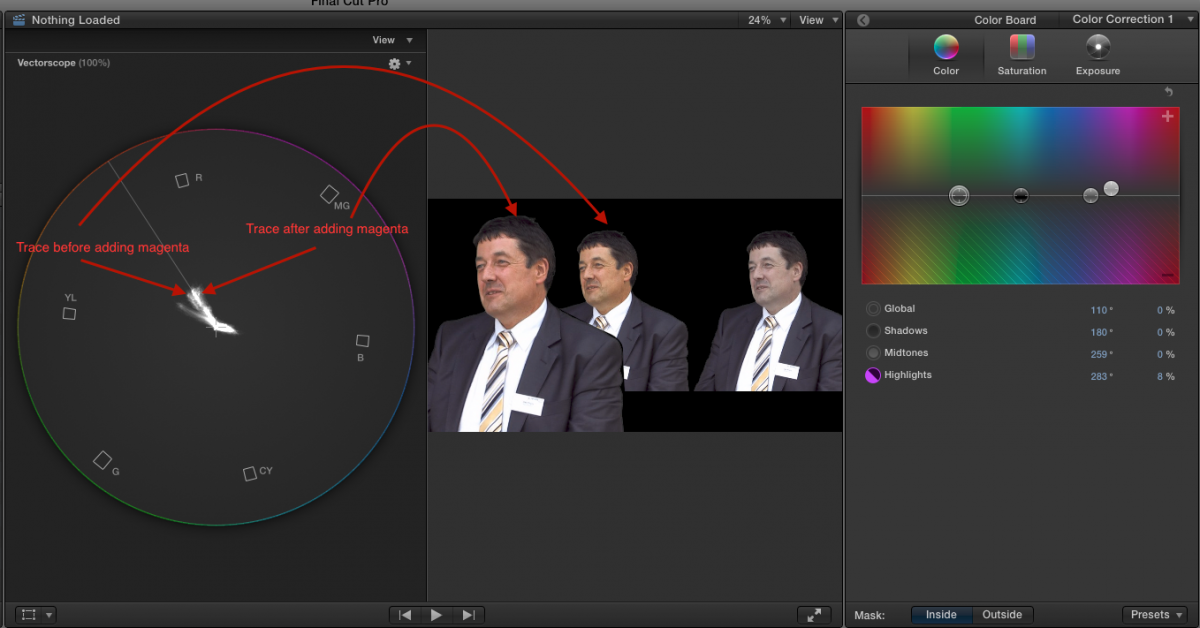
Alternatively, you could feed the guy a bucket full of carrots.
When you find his face too orange, you can add a new color correction layer, select the face again as a color mask and add a small amount of magenta in the highlights (gain).
This will move the skintone more towards red
Please Log in to join the conversation.


18 Oct 2015 23:02 #69589
by Emmanuel
Replied by Emmanuel on topic noob question: where's brown on the color board??
I second the idea of the bucket of carrots.
Here is a tutorial:
- Go to your local organic grocery
- Buy one kilo of carrots
- Peel the carrots and boil them, add a little of salt
- Feed your customer and wait 3 days for the results
Here is a tutorial:
- Go to your local organic grocery
- Buy one kilo of carrots
- Peel the carrots and boil them, add a little of salt
- Feed your customer and wait 3 days for the results
Please Log in to join the conversation.
- Karsten Schlüter
-
Topic Author
- Offline
- Moderator
-
Less
More
- Posts: 3790
- Thank you received: 718
19 Oct 2015 02:50 - 19 Oct 2015 02:51 #69591
by Karsten Schlüter
Replied by Karsten Schlüter on topic noob question: where's brown on the color board??
@rjvd:
... wow, 2nd, 3rd color correction - we're now leaving the level of "a school project" completely behind us .... :lol: Again, thanks for showing me some 'secret sauce' of grading .... a while ago, I studied the tutorial batch at colorgradingcentral.com, very, very interesting, but … video is my hobby, not my profession.
It's finally, again, all about needs, skills and time-budget
@manoucho:
cooking is my other hobby, so, you forgot in your recipe one or two pinches of raw cane sugar (never use white sugar!) ....
When was it, in the 80ies? carrot pills, promising to give you a tan...? Terrible! LOL, maybe Michael Bay ate too much of them, and his excessive Teal'n Orange Look is a sort-of intoxication? .... :silly:
... wow, 2nd, 3rd color correction - we're now leaving the level of "a school project" completely behind us .... :lol: Again, thanks for showing me some 'secret sauce' of grading .... a while ago, I studied the tutorial batch at colorgradingcentral.com, very, very interesting, but … video is my hobby, not my profession.
It's finally, again, all about needs, skills and time-budget
@manoucho:
cooking is my other hobby, so, you forgot in your recipe one or two pinches of raw cane sugar (never use white sugar!) ....
When was it, in the 80ies? carrot pills, promising to give you a tan...? Terrible! LOL, maybe Michael Bay ate too much of them, and his excessive Teal'n Orange Look is a sort-of intoxication? .... :silly:
Last edit: 19 Oct 2015 02:51 by Karsten Schlüter.
Please Log in to join the conversation.
