


- Posts: 164
- Thank you received: 0
3 Post Moderation Rule for New Boarders (25 Jan 2021)
New boarders will have their posts moderated - Don't worry if you cannot see your post immediately.
I want to move a project and related events from mac to another for somebody else to edit but...
14 Oct 2015 19:38 #69486
by Neil P
I want to move a project and related events from mac to another for somebody else to edit but... was created by Neil P
Hi boarders,
I want to move a project and related events from mac to another for somebody else to edit. I've watch a couple of tutorials including reading the apple tutorial and understand that I need to first duplicate my project. But unlike the tutorials, when I click 'duplicate project' the box for me to choose what I want to copy, the box doesn't appear. Please
see the screen grab from the tutorial below. When I click duplicate project, it just immediately copies the project only, without giving me options, Does anybody know what I'm doing wrong ?
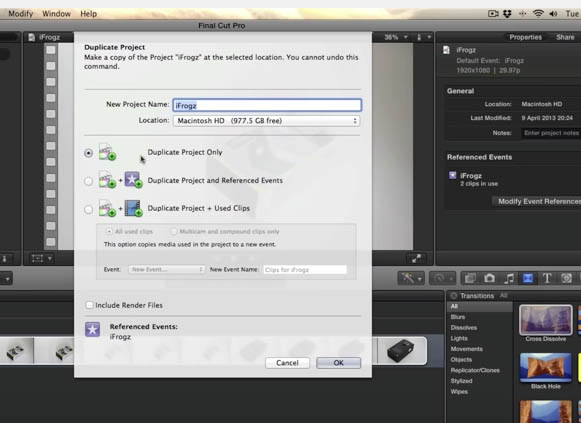
I want to move a project and related events from mac to another for somebody else to edit. I've watch a couple of tutorials including reading the apple tutorial and understand that I need to first duplicate my project. But unlike the tutorials, when I click 'duplicate project' the box for me to choose what I want to copy, the box doesn't appear. Please
see the screen grab from the tutorial below. When I click duplicate project, it just immediately copies the project only, without giving me options, Does anybody know what I'm doing wrong ?
Please Log in to join the conversation.
- Tom Wolsky
-

- Offline
- Moderator
-

14 Oct 2015 19:49 #69488
by Tom Wolsky
Replied by Tom Wolsky on topic I want to move a project and related events from mac to another for somebody else to edit but...
This is an obsolete version. The tutorials are probably for recent versions. In your version projects were completely separate from events that held the media.
Please Log in to join the conversation.
14 Oct 2015 20:03 #69489
by Neil P
Replied by Neil P on topic I want to move a project and related events from mac to another for somebody else to edit but...
Hi
So the tutorial is for an old version ?
Any idea how I move the whole project now (with related events) ?
thanks Neil
So the tutorial is for an old version ?
Any idea how I move the whole project now (with related events) ?
thanks Neil
Please Log in to join the conversation.
- Tom Wolsky
-
- Offline
- Moderator
-
14 Oct 2015 20:20 #69490
by Tom Wolsky
Replied by Tom Wolsky on topic I want to move a project and related events from mac to another for somebody else to edit but...
No, the tutorial isn't old, your version of the software is old. Use the duplicate project with clips function. That will bring all the clips used in the project. If you need all the clips in the event, even the unused, put a gap clip at the end of the project, and append all the media to it. Hopefully it isn't a lot. These old versions were quite clumsy to work with.
Please Log in to join the conversation.
14 Oct 2015 20:52 - 14 Oct 2015 21:03 #69491
by Neil P
Replied by Neil P on topic I want to move a project and related events from mac to another for somebody else to edit but...
Hi Tom
my version is 10.1.4 - Is that old ?
Should I download the latest version ?
thanks
Neil
my version is 10.1.4 - Is that old ?
Should I download the latest version ?
thanks
Neil
Last edit: 14 Oct 2015 21:03 by Neil P.
Please Log in to join the conversation.
- Tom Wolsky
-
- Offline
- Moderator
-
14 Oct 2015 21:07 #69492
by Tom Wolsky
Replied by Tom Wolsky on topic I want to move a project and related events from mac to another for somebody else to edit but...
Are you sure that's not 10.0.4? There is no dialog in 10.1.4 when you duplicate a project.
We're up to 10.2.2. It requires Yosemite or El Capitan and is very different from the version you're using. The events and projects would have to be updated to the new library system.
We're up to 10.2.2. It requires Yosemite or El Capitan and is very different from the version you're using. The events and projects would have to be updated to the new library system.
Please Log in to join the conversation.
14 Oct 2015 21:24 #69493
by Neil P
Replied by Neil P on topic I want to move a project and related events from mac to another for somebody else to edit but...
"Are you sure that's not 10.0.4? There is no dialog in 10.1.4 when you duplicate a project"
I know, the dialog box that I posted in the earlier picture( my first post) is from a youtube tutorial. That is the box that I've been looking for
This is the version that I am using, see below.
My mac is also Yosemite 10.10.1
Is there an easy set of instructions for updating events and projects to the new library system if I go for 10.2.2 ?
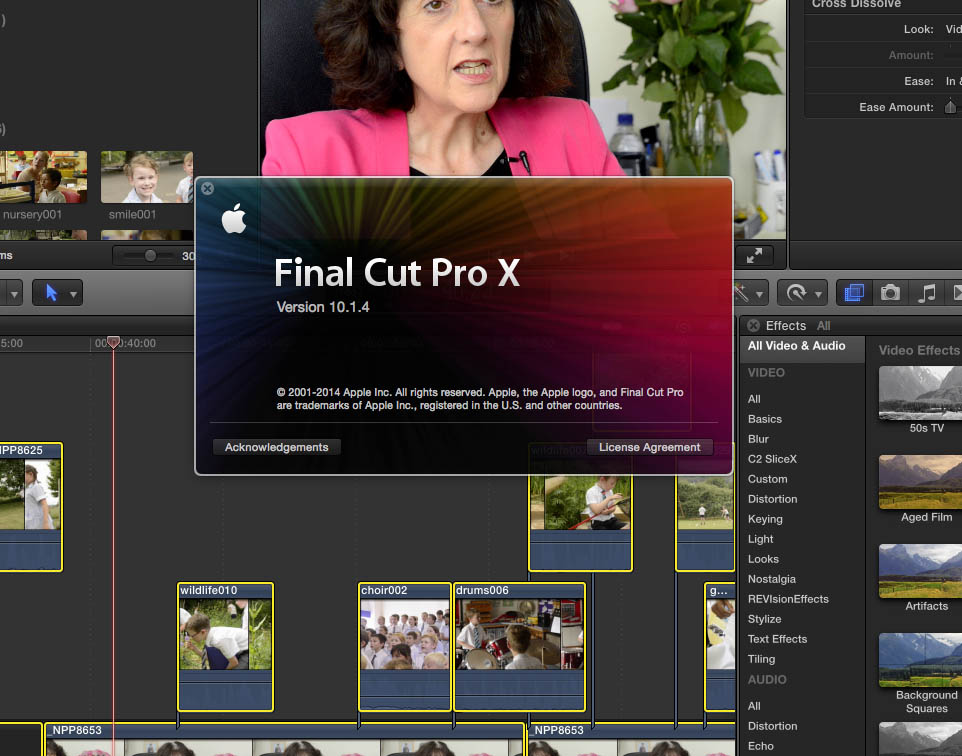
I know, the dialog box that I posted in the earlier picture( my first post) is from a youtube tutorial. That is the box that I've been looking for
This is the version that I am using, see below.
My mac is also Yosemite 10.10.1
Is there an easy set of instructions for updating events and projects to the new library system if I go for 10.2.2 ?
Please Log in to join the conversation.
- Tom Wolsky
-
- Offline
- Moderator
-
14 Oct 2015 21:46 #69494
by Tom Wolsky
Replied by Tom Wolsky on topic I want to move a project and related events from mac to another for somebody else to edit but...
Sorry, yes, the tutorial is old. You don't need to update anything, though there is a newer version.
If you want to copy the project and just the media that's in the project use File>Copy Project to>New library. Make the new library on the drive you want to save it.
If you want to copy the project and just the media that's in the project use File>Copy Project to>New library. Make the new library on the drive you want to save it.
Please Log in to join the conversation.
14 Oct 2015 22:03 #69495
by Neil P
Replied by Neil P on topic I want to move a project and related events from mac to another for somebody else to edit but...
Ok,
It is asking me whether I want to include Optimised/Proxy media (see picture below)
This morning when I tried this I didn't add Optimised media, but when I took the library, on the external hardrive, to the person who is taking over the edit, on their new mac and new FCP, the library wouldn't work.
Any ideas ?
Sorry if I'm making this complicated
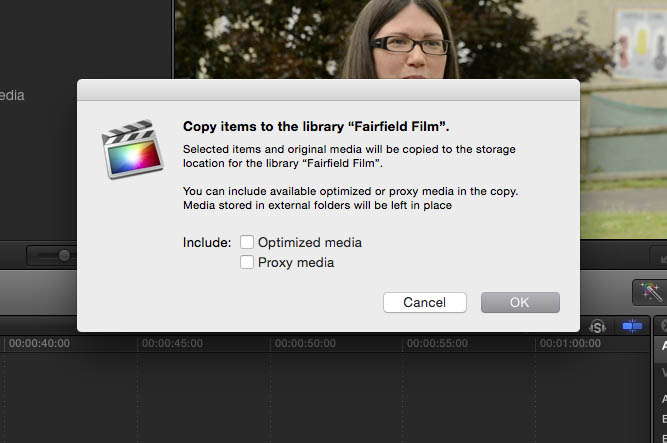
It is asking me whether I want to include Optimised/Proxy media (see picture below)
This morning when I tried this I didn't add Optimised media, but when I took the library, on the external hardrive, to the person who is taking over the edit, on their new mac and new FCP, the library wouldn't work.
Any ideas ?
Sorry if I'm making this complicated
Please Log in to join the conversation.
- Tom Wolsky
-
- Offline
- Moderator
-
14 Oct 2015 22:30 #69496
by Tom Wolsky
Replied by Tom Wolsky on topic I want to move a project and related events from mac to another for somebody else to edit but...
Don't copy the optimized files. If the other editor needs them he can make his own. Do the copy function as I said. Open the new library and confirm the media has been copied to the new library by using the reveal in Finder function. If the media has not been copied, and is still referencing media on the original drive, you need to correct this. You can tell this is happening if the copy process is very fast. If the new library is pointing to the original media, change the location for the media of the new library and use the consolidate function.
Please Log in to join the conversation.

15 Oct 2015 16:50 #69523
by VidGreg
Hi Neil
If you are collaborating with another editor, it is best (very important) if everyone is using the same version of FCPX and even the same OS version.
Older versions of FCPX say 10.1.4 cannot open 10.2.x files as the library structure changed.
Having said this, the latest version of FCPX 10.2.2 is much easier to share editing with others. If you share the same physical space, then you can set up an external media drive and then you only need to send small files.
10.2.x allows much greater control of where files are stored.
If you are editing long distance, then you will each need to have copies of all media files for editing.
Don't forget to back-up everything!
New versions of FCPX have created new features and workflows, so it becomes important to make sure any vids/help you get is for the version you are using.
Hope this helps, Greg
If you are collaborating with another editor, it is best (very important) if everyone is using the same version of FCPX and even the same OS version.
Older versions of FCPX say 10.1.4 cannot open 10.2.x files as the library structure changed.
Having said this, the latest version of FCPX 10.2.2 is much easier to share editing with others. If you share the same physical space, then you can set up an external media drive and then you only need to send small files.
10.2.x allows much greater control of where files are stored.
If you are editing long distance, then you will each need to have copies of all media files for editing.
Don't forget to back-up everything!
New versions of FCPX have created new features and workflows, so it becomes important to make sure any vids/help you get is for the version you are using.
Hope this helps, Greg
Please Log in to join the conversation.
