


- Posts: 39
- Thank you received: 0
3 Post Moderation Rule for New Boarders (25 Jan 2021)
New boarders will have their posts moderated - Don't worry if you cannot see your post immediately.
how to give roles on separate audio channels?
10 Oct 2015 10:52 - 10 Oct 2015 11:02 #69395
by mblazer
how to give roles on separate audio channels? was created by mblazer
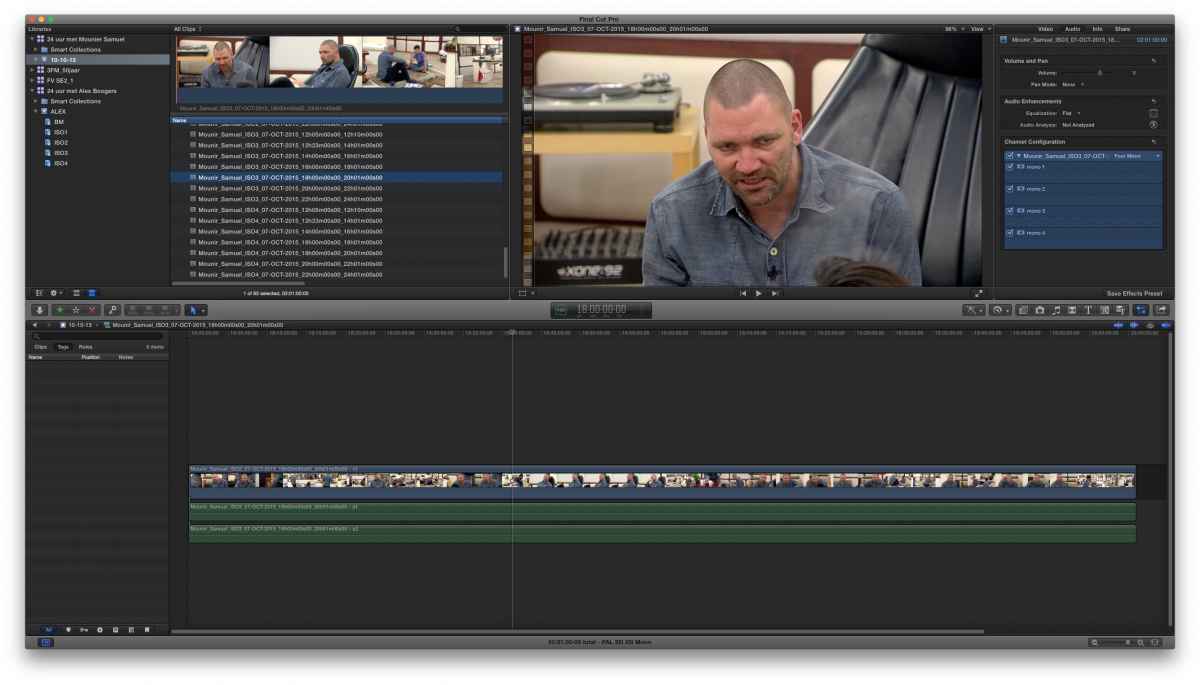
I don't know how to give an Audio Subrole to each mono track as shown in the picture. Each file has 4 mono tracks, but when I open it in their own timeline it shows two tracks. What am I missing? There should be 4 mono tracks?
Last edit: 10 Oct 2015 11:02 by mblazer.
Please Log in to join the conversation.
- ronny courtens
-

- Offline
- Moderator
-

Less
More
- Posts: 4455
- Thank you received: 962
10 Oct 2015 11:56 #69396
by ronny courtens
Replied by ronny courtens on topic how to give roles on separate audio channels?
Hoi Micha,
That is strange indeed. You should see 4 individual channels when you open the clip in its own timeline. Your screenshot is a bit unclear, so I cannot really see what could be wrong with the file, but it should look like this:
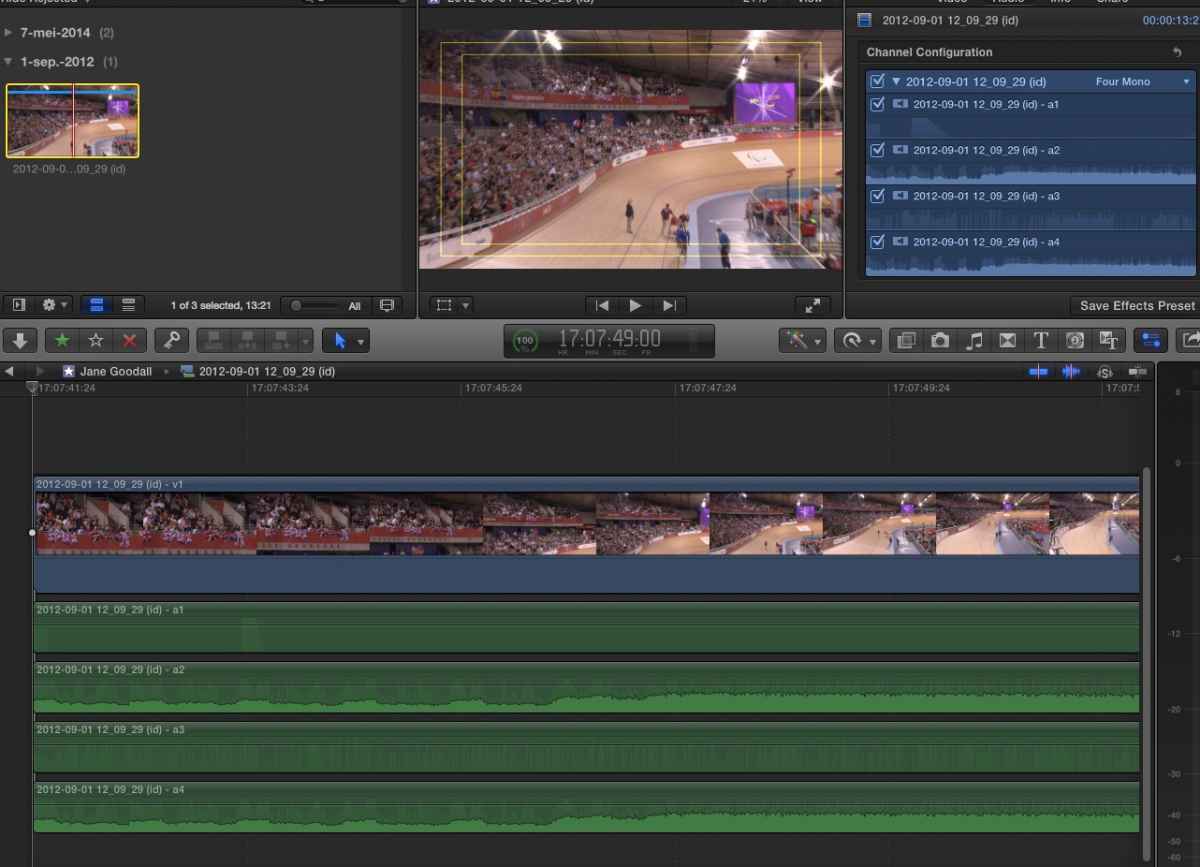
Do you see anything that is different between my screenshot and your Inspector?
If not: what is the source format of this clip?
- Ronny
That is strange indeed. You should see 4 individual channels when you open the clip in its own timeline. Your screenshot is a bit unclear, so I cannot really see what could be wrong with the file, but it should look like this:
Do you see anything that is different between my screenshot and your Inspector?
If not: what is the source format of this clip?
- Ronny
Please Log in to join the conversation.
10 Oct 2015 14:18 #69399
by mblazer
Replied by mblazer on topic how to give roles on separate audio channels?
Hi Ronny,
The material is from an EVS.
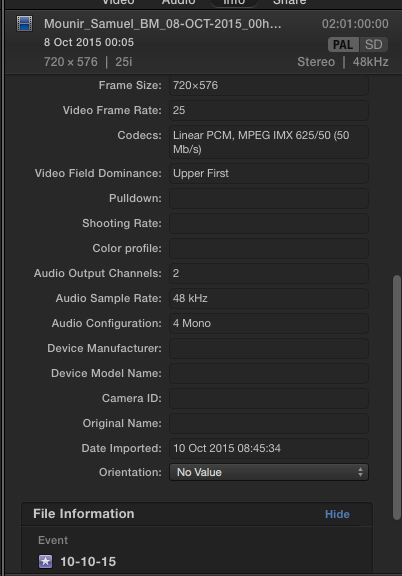
I don't understand why there are only two audio channels in the timeline.
The material is from an EVS.
I don't understand why there are only two audio channels in the timeline.
Please Log in to join the conversation.
- Tom Wolsky
-

- Offline
- Moderator
-
10 Oct 2015 14:44 - 10 Oct 2015 14:48 #69400
by Tom Wolsky
Replied by Tom Wolsky on topic how to give roles on separate audio channels?
Can't read what it says in channel configurations and on the tracks in the timeline.
Last edit: 10 Oct 2015 14:48 by Tom Wolsky.
Please Log in to join the conversation.
- ronny courtens
-
- Offline
- Moderator
-
Less
More
- Posts: 4455
- Thank you received: 962
10 Oct 2015 15:05 - 10 Oct 2015 15:06 #69401
by ronny courtens
Replied by ronny courtens on topic how to give roles on separate audio channels?
The Inspector > Info tab for the clip in the browser shows 4 mono channels, which is the default with IMX (4 or 8 ). The Inspector > Audio tab also shows 4 discrete mono channels. Opening the clip in its own timeline should reveal the 4 discrete channels and not two. From what I can see in your first screenshot only A1 and A2 are revealed on the timeline. Is that correct?
- Do you have this issue with all the EVS IMX50 clips you have imported, or just with this one?
- If it's with all the EVS clips, would you happen to have a short one that you could send me via WeTransfer or Airbridge? The original clip, not a copy of the imported one. I would like to have a look at the original file to see where things go wrong. Probably during the MXF rewrapping, but we would need to check this.
ronnycourtens@mac.com
- Ronny
- Do you have this issue with all the EVS IMX50 clips you have imported, or just with this one?
- If it's with all the EVS clips, would you happen to have a short one that you could send me via WeTransfer or Airbridge? The original clip, not a copy of the imported one. I would like to have a look at the original file to see where things go wrong. Probably during the MXF rewrapping, but we would need to check this.
ronnycourtens@mac.com
- Ronny
Last edit: 10 Oct 2015 15:06 by ronny courtens.
Please Log in to join the conversation.
10 Oct 2015 15:23 #69402
by mblazer
Replied by mblazer on topic how to give roles on separate audio channels?
Hi Ronny,
The problem is with all the clips. I put the smallest one on my ftp server.
ftp.blazhoffski.nl
login: ronny
pass: courters
thanks for your help!
The problem is with all the clips. I put the smallest one on my ftp server.
ftp.blazhoffski.nl
login: ronny
pass: courters
thanks for your help!
Please Log in to join the conversation.
- ronny courtens
-
- Offline
- Moderator
-
Less
More
- Posts: 4455
- Thank you received: 962
10 Oct 2015 16:00 - 10 Oct 2015 21:03 #69405
by ronny courtens
Replied by ronny courtens on topic how to give roles on separate audio channels?
For anyone who is following this thread:
The original clips had their audio recorded with 2 stereo channels. When you open such a clip in its own timeline it will always show 2 stereo channels, even if you have changed the Channel Configuration in the Inspector to Four Mono. That's because Channel Configuration does not modify the original clip, it only determines how the audio channels of the clip will be configured once the clip is on the project timeline.
This means that with a clip that has two stereo channels you will not be able to assign 4 discrete Roles to the audio when you open the clip in its timeline. To make this possible the audio needs to be recorded as discrete channels and not as stereo pairs. However, you will be able to assign the discrete Roles when the clip is on the project timeline and you select Show Audio Components.
- Ronny
The original clips had their audio recorded with 2 stereo channels. When you open such a clip in its own timeline it will always show 2 stereo channels, even if you have changed the Channel Configuration in the Inspector to Four Mono. That's because Channel Configuration does not modify the original clip, it only determines how the audio channels of the clip will be configured once the clip is on the project timeline.
This means that with a clip that has two stereo channels you will not be able to assign 4 discrete Roles to the audio when you open the clip in its timeline. To make this possible the audio needs to be recorded as discrete channels and not as stereo pairs. However, you will be able to assign the discrete Roles when the clip is on the project timeline and you select Show Audio Components.
- Ronny
Last edit: 10 Oct 2015 21:03 by ronny courtens.
Please Log in to join the conversation.
- Tom Wolsky
-
- Offline
- Moderator
-
10 Oct 2015 22:53 #69409
by Tom Wolsky
Replied by Tom Wolsky on topic how to give roles on separate audio channels?
Can you use audio components when you open the clip in the timeline from the browser?
Please Log in to join the conversation.
- Beeldcomponist
-

- Offline
- Junior Member
-

Less
More
- Posts: 33
- Thank you received: 8
11 Oct 2015 10:33 #69415
by Beeldcomponist
Replied by Beeldcomponist on topic how to give roles on separate audio channels?
Hi Micha,
I had the same problem but there is a way to do it.
First open the clip in the timeline, select the audio channels and then brake apart clip items.
Now you have all the audio channels and you apply the roles.
Further say to the EVS operator that he records all mono channels!
Hans
I had the same problem but there is a way to do it.
First open the clip in the timeline, select the audio channels and then brake apart clip items.
Now you have all the audio channels and you apply the roles.
Further say to the EVS operator that he records all mono channels!
Hans
Please Log in to join the conversation.
- ronny courtens
-
- Offline
- Moderator
-
Less
More
- Posts: 4455
- Thank you received: 962
11 Oct 2015 10:52 - 11 Oct 2015 10:52 #69416
by ronny courtens
Replied by ronny courtens on topic how to give roles on separate audio channels?
Hi Hans,
We had continued the conversation by e-mail and we had found different solutions, this is indeed the easiest one. Another option is to just import the clips with "Separate mono and group stereo audio" checked in the import preferences. Then the audio channels appear correctly when you open the clip in its own timeline.
Of course, if the audio is recorded correctly from the start, none of these workarounds are needed.
- Ronny
We had continued the conversation by e-mail and we had found different solutions, this is indeed the easiest one. Another option is to just import the clips with "Separate mono and group stereo audio" checked in the import preferences. Then the audio channels appear correctly when you open the clip in its own timeline.
Of course, if the audio is recorded correctly from the start, none of these workarounds are needed.
- Ronny
Last edit: 11 Oct 2015 10:52 by ronny courtens.
Please Log in to join the conversation.

11 Oct 2015 11:10 - 11 Oct 2015 11:10 #69418
by sidderke
Replied by sidderke on topic how to give roles on separate audio channels?
Wouldn't Role-O-Matic not also help in automating the process of setting the roles itself? (I'm not complete sure how it works, so I could be wrong here)
fcpxpert.net/2015/07/15/geekco-role-o-ma...channel-audio-roles/
(it's a free program made by Charlie Austin)
fcpxpert.net/2015/07/15/geekco-role-o-ma...channel-audio-roles/
(it's a free program made by Charlie Austin)
Last edit: 11 Oct 2015 11:10 by sidderke.
Please Log in to join the conversation.
- ronny courtens
-
- Offline
- Moderator
-
Less
More
- Posts: 4455
- Thank you received: 962
11 Oct 2015 11:21 - 11 Oct 2015 11:33 #69419
by ronny courtens
Replied by ronny courtens on topic how to give roles on separate audio channels?
Hey Mathieu,
Unfortunately not. These EVS clips contain interleaved dual mono channels (a single audio stream with two separate mono audio sources). Role-O-Matic is a brilliant utility, but it cannot separate interleaved audio channels, as Charlie writes in his comments:
If you have files with interleaved stereo channels that are actually dual-mono, such as a lav on the left and a boom on the right, or interleaved surround files etc, Role-O-Matic cannot add separate Roles to each component, only to the “master” component.
Of course, if the EVS audio would be recorded correctly, i.e. as 4 discrete mono channels, then Role-O-Matic would be a great help to batch-assign Roles to all the clips at once.
- Ronny
Unfortunately not. These EVS clips contain interleaved dual mono channels (a single audio stream with two separate mono audio sources). Role-O-Matic is a brilliant utility, but it cannot separate interleaved audio channels, as Charlie writes in his comments:
If you have files with interleaved stereo channels that are actually dual-mono, such as a lav on the left and a boom on the right, or interleaved surround files etc, Role-O-Matic cannot add separate Roles to each component, only to the “master” component.
Of course, if the EVS audio would be recorded correctly, i.e. as 4 discrete mono channels, then Role-O-Matic would be a great help to batch-assign Roles to all the clips at once.
- Ronny
Last edit: 11 Oct 2015 11:33 by ronny courtens.
Please Log in to join the conversation.
11 Oct 2015 11:58 #69422
by sidderke
Replied by sidderke on topic how to give roles on separate audio channels?
Allright, thanks for the information 
Please Log in to join the conversation.
11 Oct 2015 12:43 #69424
by mblazer
Replied by mblazer on topic how to give roles on separate audio channels?
Thank you all.
The best tip I got from Hans Linssen via Ronny:
1. First select the clips in the browser, and put the Channel Configuration on four mono channels
2. Open the clip in its own timeline, then select the audio and press "shift command G"
3. now you have 4 separate clips that you can give roles to.
The best tip I got from Hans Linssen via Ronny:
1. First select the clips in the browser, and put the Channel Configuration on four mono channels
2. Open the clip in its own timeline, then select the audio and press "shift command G"
3. now you have 4 separate clips that you can give roles to.
Please Log in to join the conversation.
- Beeldcomponist
-
- Offline
- Junior Member
-
Less
More
- Posts: 33
- Thank you received: 8
11 Oct 2015 12:56 #69425
by Beeldcomponist
Replied by Beeldcomponist on topic how to give roles on separate audio channels?
Hi Micha,
you can do one step less, only open in timeline and shift command G, then you have already 4 mono tracks.
Hans
you can do one step less, only open in timeline and shift command G, then you have already 4 mono tracks.
Hans
Please Log in to join the conversation.
