


- Posts: 730
- Thank you received: 26
3 Post Moderation Rule for New Boarders (25 Jan 2021)
New boarders will have their posts moderated - Don't worry if you cannot see your post immediately.
Renaming files in Finder & Relink
- DmitriZigany
-
 Topic Author
- Offline
- Platinum Member
-

Less
More
03 Oct 2015 11:36 #69222
by DmitriZigany
Renaming files in Finder & Relink was created by DmitriZigany
Hey!
So, I imported some footage. Renamed them in FCPX, but that didn't change the name in the Finder. As I know that I will have to give the files to someone that doesn't use FCPX I renamed them in the Finder as well. Now FCPX doesn't see the files anymore and want me to re-link them. Problem is, they are in the FCPX library and I cannot navigate to them using the relink files command in FCPX. How are you supposed to deal with this?
So, I imported some footage. Renamed them in FCPX, but that didn't change the name in the Finder. As I know that I will have to give the files to someone that doesn't use FCPX I renamed them in the Finder as well. Now FCPX doesn't see the files anymore and want me to re-link them. Problem is, they are in the FCPX library and I cannot navigate to them using the relink files command in FCPX. How are you supposed to deal with this?
Please Log in to join the conversation.
- ronny courtens
-

- Offline
- Moderator
-

Less
More
- Posts: 4455
- Thank you received: 962
03 Oct 2015 14:05 - 03 Oct 2015 14:06 #69227
by ronny courtens
Replied by ronny courtens on topic Renaming files in Finder & Relink
Hey Dmitri,
There is a trick to relink missing files in the FCP X browser to their original media inside an FCP X Library: open the Library package, select the Original Media folder inside it and drag it to the Finder sidebar. This will create a sidebar link to the folder:
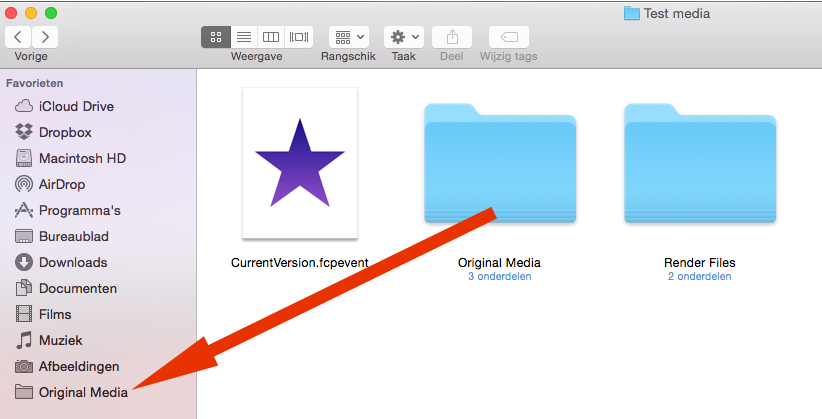
When you want to relink you will be able to point FCP X to the folder in the sidebar.
BUT because you have renamed the files inside the Library package (which you never, ever should do), FCP X has no way of knowing which original file corresponds with the clip you want to relink. So you will have to manually point to the correct files, and you will only be able to relink the files one by one.
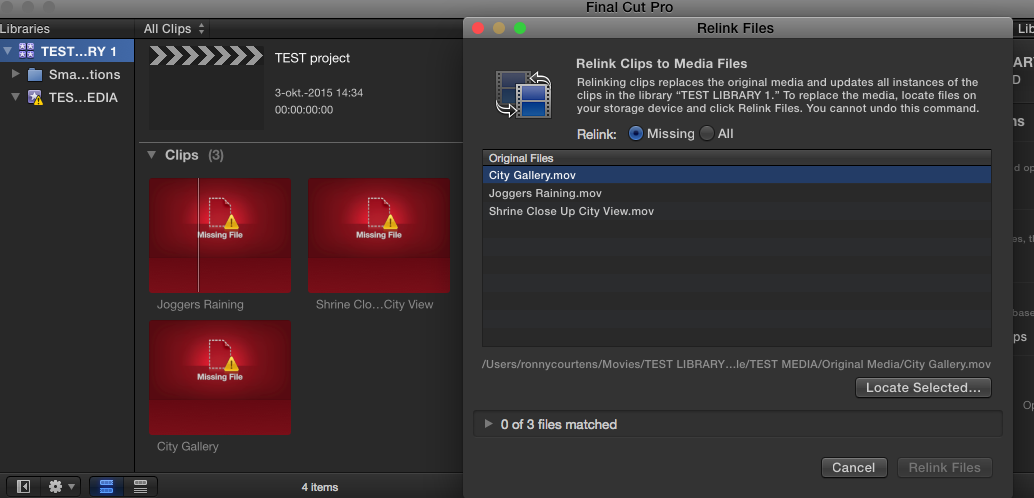
In FCP X, choose File > Relink files and in the Relink Files window select the first missing clip you want to relink (in my example it's the "City Gallery" clip :
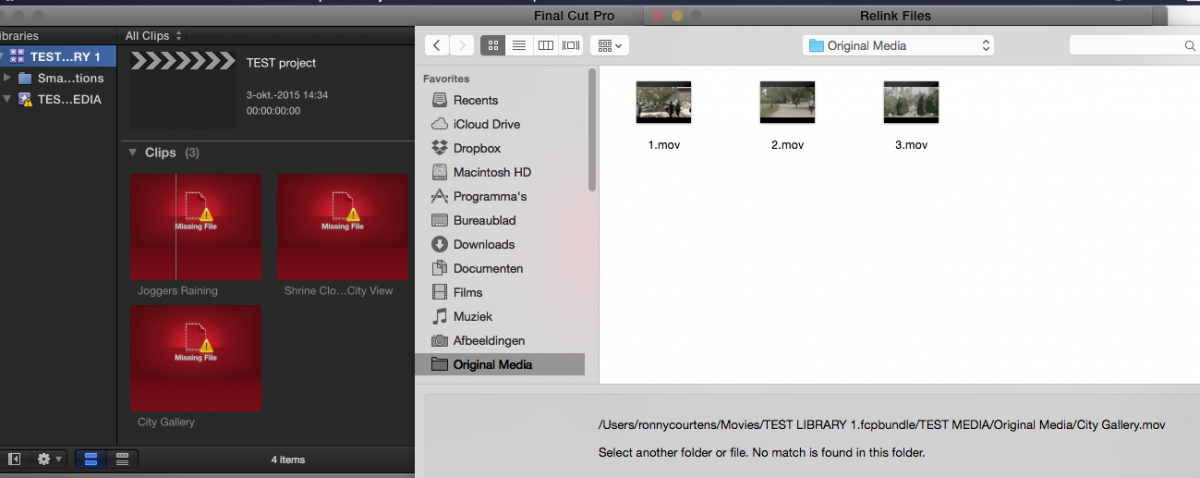
Then press Locate Selected and in the Finder window that opens, select the Original Media folder that you have created in the Finder Sidebar. Your original files will show in the window. But because the names of the files are different from the clips you want to relink, FCP X will say that there are no matching files in the folder:
So you will have to manually select the file that corresponds with the clip you want to relink. In this case I know that the "City Gallery" clip has been renamed to "1", so I select that file and I press Choose to confirm my choice:
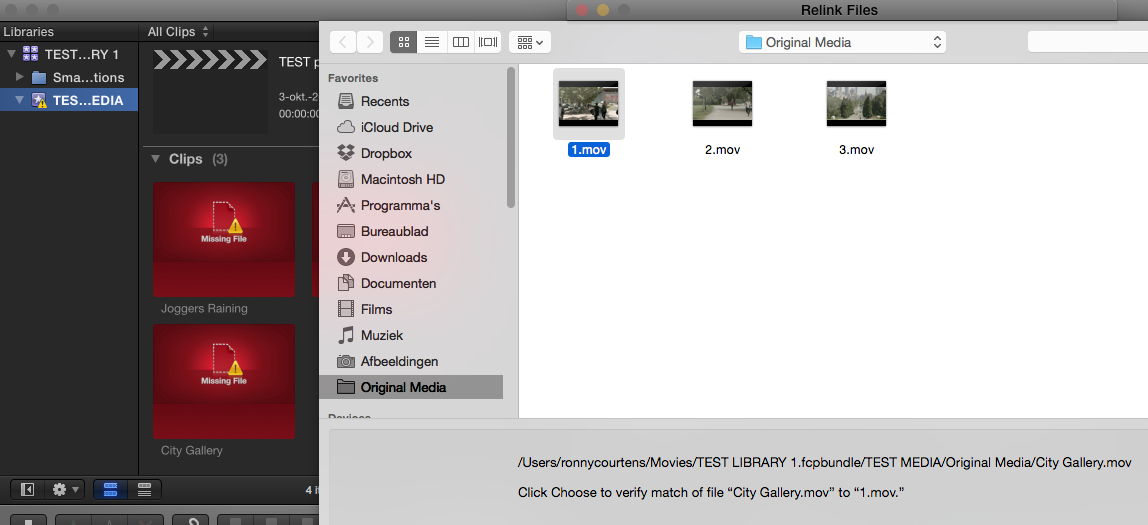
FCP X will verify if the missing clip matches the original file, and will confirm that one file matches:
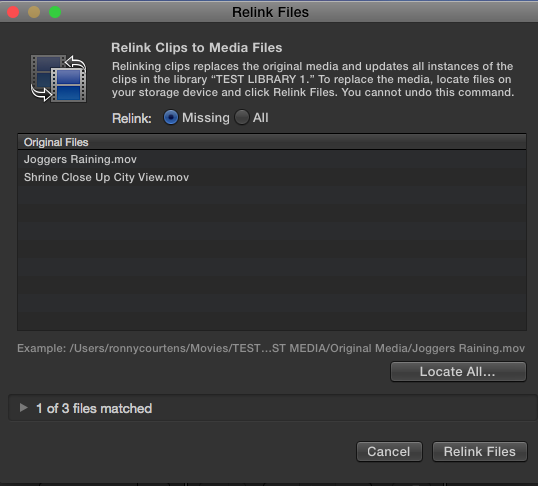
Now all I need to do is to press the Relink Files button and my missing clip will be relinked to the renamed original file:
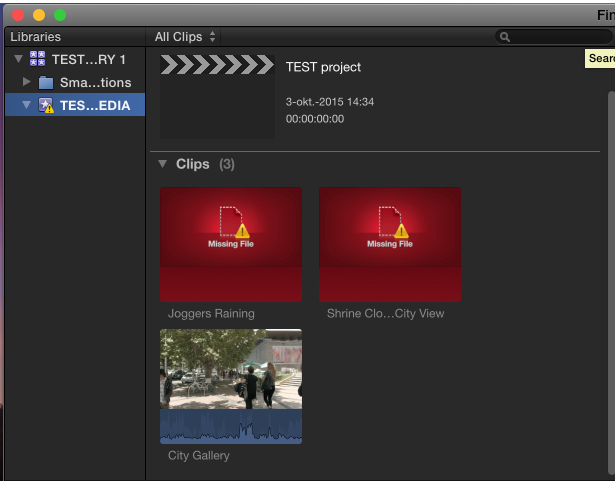
Do the same for every missing clip you have.
Of course, if you have many clips like this it is a whole lot of work. But you have caused this yourself by changing file names inside a Library package. You never should do this.
How can you avoid this in the future?
- Don't rename any original files after they have been imported in FCP X.
- Or import using "Leave Files in Place". When you do this you will be able to change the names of the original files after having imported them in FCP X, without creating any missing media.
If in the future you would like FCP X to be able to rename the original media according to the names you set for the clips in the browser, send feedback to Apple about this.
- Ronny
There is a trick to relink missing files in the FCP X browser to their original media inside an FCP X Library: open the Library package, select the Original Media folder inside it and drag it to the Finder sidebar. This will create a sidebar link to the folder:
When you want to relink you will be able to point FCP X to the folder in the sidebar.
BUT because you have renamed the files inside the Library package (which you never, ever should do), FCP X has no way of knowing which original file corresponds with the clip you want to relink. So you will have to manually point to the correct files, and you will only be able to relink the files one by one.
In FCP X, choose File > Relink files and in the Relink Files window select the first missing clip you want to relink (in my example it's the "City Gallery" clip :
Then press Locate Selected and in the Finder window that opens, select the Original Media folder that you have created in the Finder Sidebar. Your original files will show in the window. But because the names of the files are different from the clips you want to relink, FCP X will say that there are no matching files in the folder:
So you will have to manually select the file that corresponds with the clip you want to relink. In this case I know that the "City Gallery" clip has been renamed to "1", so I select that file and I press Choose to confirm my choice:
FCP X will verify if the missing clip matches the original file, and will confirm that one file matches:
Now all I need to do is to press the Relink Files button and my missing clip will be relinked to the renamed original file:
Do the same for every missing clip you have.
Of course, if you have many clips like this it is a whole lot of work. But you have caused this yourself by changing file names inside a Library package. You never should do this.
How can you avoid this in the future?
- Don't rename any original files after they have been imported in FCP X.
- Or import using "Leave Files in Place". When you do this you will be able to change the names of the original files after having imported them in FCP X, without creating any missing media.
If in the future you would like FCP X to be able to rename the original media according to the names you set for the clips in the browser, send feedback to Apple about this.
- Ronny
Last edit: 03 Oct 2015 14:06 by ronny courtens.
Please Log in to join the conversation.
- DmitriZigany
-
Topic Author
- Offline
- Platinum Member
-
Less
More
- Posts: 730
- Thank you received: 26
03 Oct 2015 14:41 #69228
by DmitriZigany
Replied by DmitriZigany on topic Renaming files in Finder & Relink
Thanks Ronny!
I tried by making an alias to the Original Media folder but that didn't work.
Now I know for next time! (and also learned it's not a good idea, which kinda surprised me as it felt very unmac-like)
Thanks again!
I tried by making an alias to the Original Media folder but that didn't work.
Now I know for next time! (and also learned it's not a good idea, which kinda surprised me as it felt very unmac-like)
Thanks again!
Please Log in to join the conversation.

03 Oct 2015 21:57 - 03 Oct 2015 21:58 #69232
by BenB
Replied by BenB on topic Renaming files in Finder & Relink
Making an "alias" is not the same as adding a folder to the side bar. Athe folder Ronnie mentioned can indeed b added by o the side bar.
This is a function we should have had ages ago. I strongly suggest filling in the feedback page.
This is a function we should have had ages ago. I strongly suggest filling in the feedback page.
Last edit: 03 Oct 2015 21:58 by BenB.
Please Log in to join the conversation.
