


- Posts: 61
- Thank you received: 0
3 Post Moderation Rule for New Boarders (25 Jan 2021)
New boarders will have their posts moderated - Don't worry if you cannot see your post immediately.
Burning Dvd difficulties
25 Sep 2015 00:29 #68933
by iKitty2
Burning Dvd difficulties was created by iKitty2
Hi, I'm having problems burning a DVD. The video project is 90min long and when I try share it to "DVD">"Settings">HL-DT-ST- DVDRW etc - it stops transcoding at 66% and will not go no further. Below attachment
So I made a master file which is 3.9GB .m2v.
Then I found Create Disc but when I open it - there is no "File" scroll down menu to allow me to find the file I want to burn.
I have also tried just the basic thing - insert blank DVD and Right click on File I want to burn - this did not work either.
Should I rather be using programs like "Toast"?
So I made a master file which is 3.9GB .m2v.
Then I found Create Disc but when I open it - there is no "File" scroll down menu to allow me to find the file I want to burn.
I have also tried just the basic thing - insert blank DVD and Right click on File I want to burn - this did not work either.
Should I rather be using programs like "Toast"?
Please Log in to join the conversation.

25 Sep 2015 02:54 #68937
by BenB
Replied by BenB on topic Burning Dvd difficulties
That image is so enlarged and blurry, can't really make out the important info. What is the estimated file size?
Please Log in to join the conversation.
- Karsten Schlüter
-

- Offline
- Moderator
-

Less
More
- Posts: 3790
- Thank you received: 718
25 Sep 2015 06:48 - 25 Sep 2015 06:49 #68940
by Karsten Schlüter
step up, 5meters away from my display I read 3.57GBs :lol:
@iKitty:
if I remember correctly, that not-so-rare 'stuck at 66%' error points to some jam in the working chain of Create Disk, which is an app, well hidden inside FCPX ... two options:
if Create Disk is actual avail in your dock, click it and try to quit older, unlucky attemps to burn a disk
or, try to find Create Disk in your fcpx.app - NO beginners task, you find advice here
www.fcp.co/final-cut-pro/tutorials/1301-...x-without-using-fcpx
or, wait for Ben, he has probably an easier way ......
and, no, in Finder you create dataDVD, not videoDVD, allthough you burn 'video' onto it ....
Replied by Karsten Schlüter on topic Burning Dvd difficulties
BenB wrote: That image is so enlarged and blurry, can't really make out the important info. What is the estimated file size?
step up, 5meters away from my display I read 3.57GBs :lol:
@iKitty:
if I remember correctly, that not-so-rare 'stuck at 66%' error points to some jam in the working chain of Create Disk, which is an app, well hidden inside FCPX ... two options:
if Create Disk is actual avail in your dock, click it and try to quit older, unlucky attemps to burn a disk
or, try to find Create Disk in your fcpx.app - NO beginners task, you find advice here
www.fcp.co/final-cut-pro/tutorials/1301-...x-without-using-fcpx
or, wait for Ben, he has probably an easier way ......
and, no, in Finder you create dataDVD, not videoDVD, allthough you burn 'video' onto it ....
Last edit: 25 Sep 2015 06:49 by Karsten Schlüter.
Please Log in to join the conversation.
25 Sep 2015 08:53 - 25 Sep 2015 10:00 #68942
by iKitty2
Replied by iKitty2 on topic Burning Dvd difficulties
Here is a better res on screen grab - sorry
And a screen grab on Create Disc without the "file " scroll down menu option.
Another issue that I found whilst watching that tutorial on how to make a DVD: I do not seem to have a folder anywhere which shows "Final Cut Projects" or "Shared Items' which show assets.
This makes me think that i have not set up my file construction in Final cut correctly.
Screen grab is example of how I should find my file construction shown here in tutorial..
And a screen grab on Create Disc without the "file " scroll down menu option.
Attachment ScreenShot2015-09-25at01.12.00.pdf not found
Attachment ScreenShot2015-09-25at00.59.10.pdf not found
Another issue that I found whilst watching that tutorial on how to make a DVD: I do not seem to have a folder anywhere which shows "Final Cut Projects" or "Shared Items' which show assets.
This makes me think that i have not set up my file construction in Final cut correctly.
Screen grab is example of how I should find my file construction shown here in tutorial..
Last edit: 25 Sep 2015 10:00 by iKitty2. Reason: Add more screen grabs
Please Log in to join the conversation.
- Karsten Schlüter
-
- Offline
- Moderator
-
Less
More
- Posts: 3790
- Thank you received: 718
25 Sep 2015 09:58 #68944
by Karsten Schlüter
That video is 2y old! FCPX has changed its file-management meanwhile dramatically.
And I didn't linked to it to teach you, how to make copies of successfully burned DVDs (what the video is about), but to give you professional advice how to 'dig out' Create Disk, which could and imho is the culprit of the 66%-error.
Going back to topic: so Create Disc doesn't show any activity… hm, maybe I'm wrong. I do disks once a year, and when creating them, I want nice & individual menu designs etc. So no FCPX, no Toast, on occasion, I fire up an old version of iDVD (from installer disks from one of my previous Macs), which to my surprise is under Yosemite still fully functional. Exporting a Master from FinalCut, drag 'n drop into iDVD, spending hours designing menus - done. No extra fees, no trouble, lots of "aahhhs&ooohhhs"......
Last product, a school play, looks like that in any DVDplayer:
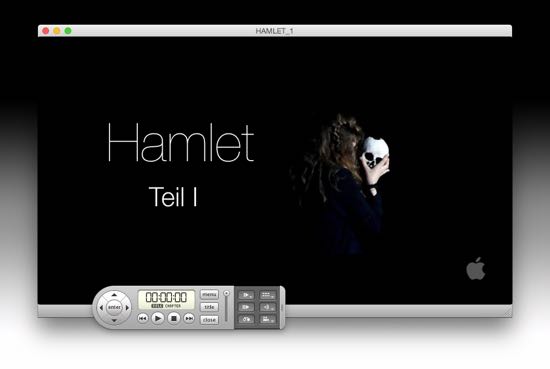
Made with iDVD, bg image (screengrab from video) adjusted in Pixelmator. Rendertime on my tiny MacMini 40min, source 1h35min fullHD from FCPX … part 1 of that theatre play, whole +3h split on two disks ... not my sort of entertainment, LOL!
Replied by Karsten Schlüter on topic Burning Dvd difficulties
iKitty2 wrote: .... I do not seem to have a folder anywhere which shows "Final Cut Projects" or "Shared Items' which show assets.
This makes me think that i have not set up my file construction in Final cut correctly.
That video is 2y old! FCPX has changed its file-management meanwhile dramatically.
And I didn't linked to it to teach you, how to make copies of successfully burned DVDs (what the video is about), but to give you professional advice how to 'dig out' Create Disk, which could and imho is the culprit of the 66%-error.
Going back to topic: so Create Disc doesn't show any activity… hm, maybe I'm wrong. I do disks once a year, and when creating them, I want nice & individual menu designs etc. So no FCPX, no Toast, on occasion, I fire up an old version of iDVD (from installer disks from one of my previous Macs), which to my surprise is under Yosemite still fully functional. Exporting a Master from FinalCut, drag 'n drop into iDVD, spending hours
designing menus - done. No extra fees, no trouble, lots of "aahhhs&ooohhhs"......Last product, a school play, looks like that in any DVDplayer:
Made with iDVD, bg image (screengrab from video) adjusted in Pixelmator. Rendertime on my tiny MacMini 40min, source 1h35min fullHD from FCPX … part 1 of that theatre play, whole +3h split on two disks ... not my sort of entertainment, LOL!
Please Log in to join the conversation.
25 Sep 2015 10:08 #68945
by iKitty2
Replied by iKitty2 on topic Burning Dvd difficulties
I remember that iDVD version and will go to my old MacBook Pro and burn - great idea as I never had problems with burning on that machine.
PS - I just check fcpX > Create disc on my other Apple Air and found the same problem - No Scroll down File menu... I must be doing something wrong.
Thanks for advice so early in the morning for you if you are in the USA...
K
PS - I just check fcpX > Create disc on my other Apple Air and found the same problem - No Scroll down File menu... I must be doing something wrong.
Thanks for advice so early in the morning for you if you are in the USA...
K
Please Log in to join the conversation.
- Karsten Schlüter
-
- Offline
- Moderator
-
Less
More
- Posts: 3790
- Thank you received: 718
25 Sep 2015 10:45 #68947
by Karsten Schlüter
nope, European day shift, time for lunch right know!
yeah, iDVD is a bit under radar for some video makers, a) DVD is obsolete, b) iDVD dev was axed 9y ago, c) DVDSP was pro, and complicated, and expensiv and... iDVD just part of iLife, "for free!" ....
When you stay under 60min content, superb quality (SDef/480, for sure) and incredibly easy to customize ... made a website some hundred years ago ... where is it ... <descending steps on stairway to cellar> ... <alll sorts of clunk> ..."I had it here!" ... <clunk< "oouch" ... "ahh, there we are:"
sites.google.com/site/idvdmodding/
a bit rusty, but still valueable info, maybe inspiring you, try something........
good luck with that!
Replied by Karsten Schlüter on topic Burning Dvd difficulties
iKitty2 wrote: Thanks for advice so early in the morning for you if you are in the USA...
K
nope, European day shift, time for lunch right know!
yeah, iDVD is a bit under radar for some video makers, a) DVD is obsolete, b) iDVD dev was axed 9y ago, c) DVDSP was pro, and complicated, and expensiv and... iDVD just part of iLife, "for free!" ....
When you stay under 60min content, superb quality (SDef/480, for sure) and incredibly easy to customize ... made a website some hundred years ago ... where is it ... <descending steps on stairway to cellar> ... <alll sorts of clunk> ..."I had it here!" ... <clunk< "oouch" ... "ahh, there we are:"
sites.google.com/site/idvdmodding/
a bit rusty, but still valueable info, maybe inspiring you, try something........
good luck with that!
Please Log in to join the conversation.
25 Sep 2015 11:43 #68948
by BenB
Replied by BenB on topic Burning Dvd difficulties
I'm concerned the DVD file size is pushing the limits of what should be burned to a video DVD. You could always use Toast. A bit more options than the built-in DVD menus, and will take a ProRes (Master) file just fine, and transcode it really well.
I have never liked, nor trusted, the built-in DVD and BluRay tools in FCPX/Compressor. Apple publicly stated DVDs are there as an evil necessity, so they're not going to put much effort into fixing or improving that function. So I'd go with Toast. I have a copy on hand just in case, and keep it updated. But I haven't used it, or any other DVD app, in about two years. Save yourself the headache, get Toast.
I have never liked, nor trusted, the built-in DVD and BluRay tools in FCPX/Compressor. Apple publicly stated DVDs are there as an evil necessity, so they're not going to put much effort into fixing or improving that function. So I'd go with Toast. I have a copy on hand just in case, and keep it updated. But I haven't used it, or any other DVD app, in about two years. Save yourself the headache, get Toast.
Please Log in to join the conversation.
25 Sep 2015 13:57 #68951
by iKitty2
Replied by iKitty2 on topic Burning Dvd difficulties
The .m2v file is 3.9GB.
But I've downloaded toast 9 from my old computer and it's burning ok...
One frustrating thing is the frame size is smaller than expected. This smaller frame size can also be seen on my youtube upload.
Attached are screen grabs of:
1. youtube pic of video,
2, Settings in Inspector with info about frame size and
3. Settings > sharing window box with info on how I made master.
I think the camera man used some snazzy settings which I'm not used of, (forced letterbox frame) which I need to learn about where I'm going wrong in sizing. (just realised this could've happened on Import) I'll try match an import and screen grab settings for you to see what I did. They are DV files.
But I've downloaded toast 9 from my old computer and it's burning ok...
One frustrating thing is the frame size is smaller than expected. This smaller frame size can also be seen on my youtube upload.
Attached are screen grabs of:
1. youtube pic of video,
2, Settings in Inspector with info about frame size and
3. Settings > sharing window box with info on how I made master.
I think the camera man used some snazzy settings which I'm not used of, (forced letterbox frame) which I need to learn about where I'm going wrong in sizing. (just realised this could've happened on Import) I'll try match an import and screen grab settings for you to see what I did. They are DV files.
Please Log in to join the conversation.
25 Sep 2015 14:00 #68952
by BenB
Replied by BenB on topic Burning Dvd difficulties
None of those screen shots shows the actual frame size. What is the original frame size? And why are you exporting an H.264?
Please Log in to join the conversation.
- Karsten Schlüter
-
- Offline
- Moderator
-
Less
More
- Posts: 3790
- Thank you received: 718
25 Sep 2015 15:45 #68953
by Karsten Schlüter
No, he did what the cam offered him, look:
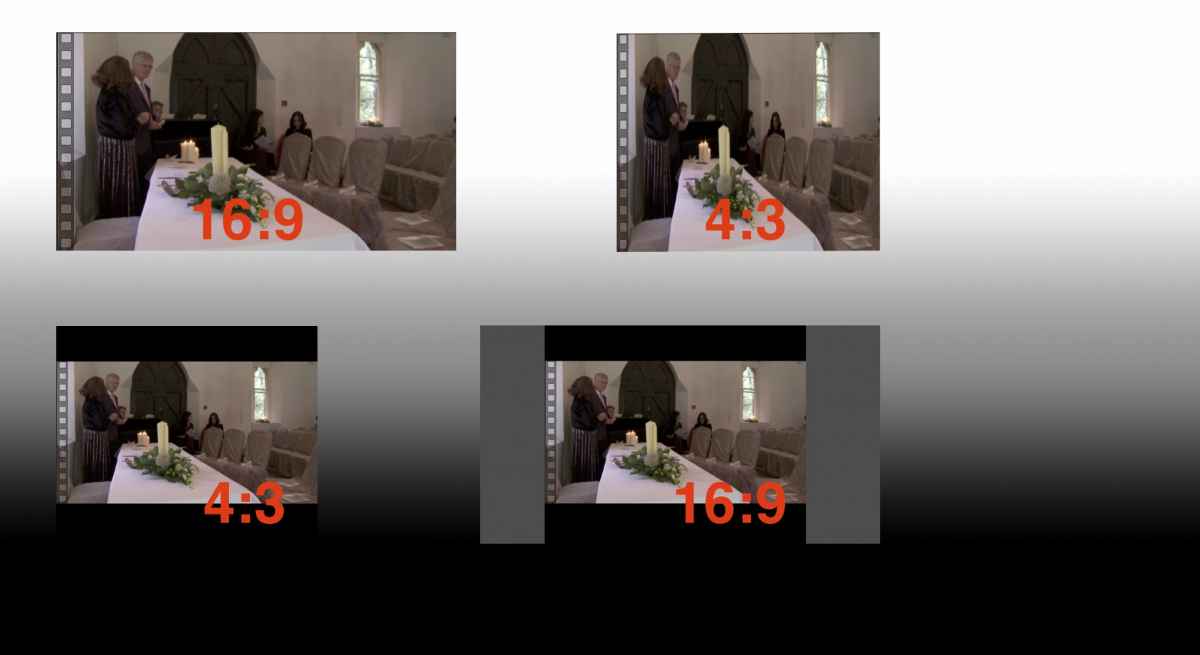
You/he wanted a modern frame-format - 16:9 aka "wide".
But the 20y old DV forrmat supported only 4:3, aspect ratio, from tubeTV history ....
So, technically two options:
squeeze the pic intp frame, and on playback stretch back - anamorprhic recording
or....
on many dv-cams you're offered "cinema mode", it adds two black bars - pic 4:3 again.
Using FCPX in auto-mode detects a 4:3 aspect ratio - should be 16:9 and the imported pic should be zoomed by 133%.... you didn't.
Next, upload to YouTube - detects 4:3 aspect ratio, but only 16:9 is avail => adding another two black bars, now vertially (made it grey for illustration).
solution:
in FCPX create a New Project, set it manually to your TVstandard NTSC and select anamorphic.
switch back to your done project, select the whole timeline, cmd-c, switch to your new empty project, cmd-p.
When you upload this version to YT, all bars should be gone.
Replied by Karsten Schlüter on topic Burning Dvd difficulties
I… think the camera man used some snazzy settings…
No, he did what the cam offered him, look:
You/he wanted a modern frame-format - 16:9 aka "wide".
But the 20y old DV forrmat supported only 4:3, aspect ratio, from tubeTV history ....
So, technically two options:
squeeze the pic intp frame, and on playback stretch back - anamorprhic recording
or....
on many dv-cams you're offered "cinema mode", it adds two black bars - pic 4:3 again.
Using FCPX in auto-mode detects a 4:3 aspect ratio - should be 16:9 and the imported pic should be zoomed by 133%.... you didn't.
Next, upload to YouTube - detects 4:3 aspect ratio, but only 16:9 is avail => adding another two black bars, now vertially (made it grey for illustration).
solution:
in FCPX create a New Project, set it manually to your TVstandard NTSC and select anamorphic.
switch back to your done project, select the whole timeline, cmd-c, switch to your new empty project, cmd-p.
When you upload this version to YT, all bars should be gone.
Please Log in to join the conversation.
25 Sep 2015 16:36 - 25 Sep 2015 16:38 #68954
by BenB
Replied by BenB on topic Burning Dvd difficulties
Actually this was what was often referred to as a "squeeze mode" that offered a true 16:9 standard def format. I used it a lot and DVDSP supported it just fine. No black bars anywhere.
I want to know what camera the original was shot on, cause it does look letterboxed.
I want to know what camera the original was shot on, cause it does look letterboxed.
Last edit: 25 Sep 2015 16:38 by BenB.
Please Log in to join the conversation.
- Karsten Schlüter
-
- Offline
- Moderator
-
Less
More
- Posts: 3790
- Thank you received: 718
25 Sep 2015 16:56 - 25 Sep 2015 17:00 #68955
by Karsten Schlüter
If the anamorphic flag is set inside the file - all fine! Superb wide-screen - I had one of the first Sony TVs in 16:9, weight tons!
There was a tool allowing all kind of nonsense with these flags, wide, and autoplay, and invisible buttons...ahh ...[strike] forgot its name [/strike]... myDVDedit was its name, verry tricky program, never managed it ....
I bet, original was 480/60i.dv
With black bars, "cinema", not anamorphic
... just an educated guess...
Replied by Karsten Schlüter on topic Burning Dvd difficulties
BenB wrote: ... I used it a lot and DVDSP supported it just fine. No black bars anywhere.
I want to know what camera the original was shot on, cause it does look letterboxed.
If the anamorphic flag is set inside the file - all fine! Superb wide-screen - I had one of the first Sony TVs in 16:9, weight tons!
There was a tool allowing all kind of nonsense with these flags, wide, and autoplay, and invisible buttons...ahh ...[strike] forgot its name [/strike]... myDVDedit was its name, verry tricky program, never managed it ....
I bet, original was 480/60i.dv
With black bars, "cinema", not anamorphic
... just an educated guess...
Last edit: 25 Sep 2015 17:00 by Karsten Schlüter.
Please Log in to join the conversation.
26 Sep 2015 10:29 - 26 Sep 2015 10:43 #68969
by iKitty2
Replied by iKitty2 on topic Burning Dvd difficulties
Hi I exported in H.264 because I thought it was better quality... my ignorance...
I cannot find out exactly what camera the footage was shot on - so attached is the only picture I can find of cameraman with camera in his hand - It is a Sony but I can't read the letters - perhaps you might know it and recognise it.
I am familiar with aspect ratio as my background is in film but when 16:9 is within a 4:3 my head spins...
Complication with turing this project into a 16:9 ratio is I have attached stills to film and they are not in 16:9 frame but all sizes that fill the 4:3 frame. So I'm stuck with this 4:3 frame - but still the master export has a black border around this 4:3 frame making it even smaller than it should be - Ben is this something to do with H.264?
Attached is a screen grab of original footage info for a clip
I cannot find out exactly what camera the footage was shot on - so attached is the only picture I can find of cameraman with camera in his hand - It is a Sony but I can't read the letters - perhaps you might know it and recognise it.
I am familiar with aspect ratio as my background is in film but when 16:9 is within a 4:3 my head spins...
Complication with turing this project into a 16:9 ratio is I have attached stills to film and they are not in 16:9 frame but all sizes that fill the 4:3 frame. So I'm stuck with this 4:3 frame - but still the master export has a black border around this 4:3 frame making it even smaller than it should be - Ben is this something to do with H.264?
Attached is a screen grab of original footage info for a clip
Last edit: 26 Sep 2015 10:43 by iKitty2.
Please Log in to join the conversation.
26 Sep 2015 13:45 #68970
by BenB
Replied by BenB on topic Burning Dvd difficulties
What is the "frame size" of the original? How man pixels tall and how many pixels wide? Not the FCPX project, but the original itself. Codec and file size tell us nothing. This information is available in the Inspector > Info section, very top.
Please Log in to join the conversation.
26 Sep 2015 16:06 #68972
by iKitty2
Replied by iKitty2 on topic Burning Dvd difficulties
Frame size 720 X 576 - Attached Inspector with imported clip (Not optimised)
Please Log in to join the conversation.
- Karsten Schlüter
-
- Offline
- Moderator
-
Less
More
- Posts: 3790
- Thank you received: 718
26 Sep 2015 16:22 #68973
by Karsten Schlüter
pfff - c'mon, Kitty! What is the topic of your thread? And now Guess That Name ... great!
You're desperate, understood.
Your wedding video masterpiece doesn't come out as intended, understood.
You're willing to do everything, "management by fire-swatter", understood.
Take a deep breath.
Answer Ben's question, he told you how to identify without producing mile high screengrabs of a cameraman (btw, how do yo umanage to grab as pdf?? Still on MacOS10.3???)
Take a deep breath. Forget my last question, new 'issue' ....
Answer Bens. Q.
Have you noticed my illustration?
No, you were busy installing Toast.
It's easy to put 'bars' into bars.
Have you followed my suggestion using iDVD?
No, you were busy making pdfs.
You're desperate, understood.
Following my advice putting your project into a new one with correct settings will solve you 101st problem with stills.
... if you tell us the format of your source video.- Easy.
@Ben:
Kittys pictures show .dv file suffixes and, now, xlr on cam .... pulling my bet, it's 480/60i, could be ... anything.
Kitty, I'm not kiddin' you, but I'm noticing Aktionismus, we Germans have a single word for everything, it means "doing things for the sake of doing things" ... don't waste your energy, stay focussed. Follow Ben's advice, he's the teacher, I'm the grumpy old clown ... :woohoo:
Replied by Karsten Schlüter on topic Burning Dvd difficulties
I cannot find out exactly what camera the footage was shot on - so attached is the only picture I can find of cameraman with camera in his hand - It is a Sony but I can't read the letters - perhaps you might know it and recognise it.
pfff - c'mon, Kitty! What is the topic of your thread? And now Guess That Name ... great!
You're desperate, understood.
Your wedding video masterpiece doesn't come out as intended, understood.
You're willing to do everything, "management by fire-swatter", understood.
Take a deep breath.
Answer Ben's question, he told you how to identify without producing mile high screengrabs of a cameraman (btw, how do yo umanage to grab as pdf?? Still on MacOS10.3???)
Take a deep breath. Forget my last question, new 'issue' ....
Answer Bens. Q.
I am familiar with aspect ratio as my background is in film but when 16:9 is within a 4:3 my head spins...
Have you noticed my illustration?
No, you were busy installing Toast.
It's easy to put 'bars' into bars.
Have you followed my suggestion using iDVD?
No, you were busy making pdfs.
You're desperate, understood.
Following my advice putting your project into a new one with correct settings will solve you 101st problem with stills.
... if you tell us the format of your source video.- Easy.
@Ben:
Kittys pictures show .dv file suffixes and, now, xlr on cam .... pulling my bet, it's 480/60i, could be ... anything.
Kitty, I'm not kiddin' you, but I'm noticing Aktionismus, we Germans have a single word for everything, it means "doing things for the sake of doing things" ... don't waste your energy, stay focussed. Follow Ben's advice, he's the teacher, I'm the grumpy old clown ... :woohoo:
Please Log in to join the conversation.
27 Sep 2015 03:30 #68976
by BenB
Replied by BenB on topic Burning Dvd difficulties
Standard Def PAL, nothing special, no anamorphic anything.
Please Log in to join the conversation.
27 Sep 2015 06:57 #68985
by iKitty2
Replied by iKitty2 on topic Burning Dvd difficulties
I am so appreciative for all your help - Studying FcpX with on-line tutorials can be so frustrating as one can't ask questions and I feel I have some huge holes in my understanding - this is one. Formats, sizing, stuff under the hood can be real hard to grasp. Actually in this thread I have learnt so much, but still loads more to learn about formats & sizing as I am still very uncertain.
I did try the iDVD and could not get it to work, sorry for not been more explicit.
I also apologize for all the screen grabs - I did not know they were annoying...
Thanks for been grumpy I need a wake up call sometimes as there were some points I missed in the above thread...
I did try the iDVD and could not get it to work, sorry for not been more explicit.
I also apologize for all the screen grabs - I did not know they were annoying...
Thanks for been grumpy I need a wake up call sometimes as there were some points I missed in the above thread...
Please Log in to join the conversation.
- Karsten Schlüter
-
- Offline
- Moderator
-
Less
More
- Posts: 3790
- Thank you received: 718
28 Sep 2015 06:45 - 28 Sep 2015 06:51 #69000
by Karsten Schlüter
Replied by Karsten Schlüter on topic Burning Dvd difficulties
Don't worry about your huge&tilted pdfs , better an odd picure than a thousand words.
I'm an amateur, so I know the feeling of getting lost AND of having lost my work
In your case, it's just a 're-packaging' of your timeline into a new project, just try.
Advice could be a lil' more precice, if you'd gave us some more info .... anyhow.
But I'm pretty sure, advice I gave you here <<click!, under 'solution' will solve your problem.
It's just about 4:3, mimicing 16:9 by added bars, in a 16:9 frame by adding another two bars .... :woohoo:
And look at my profil pic - grumpy is my middle name! :evil:
, better an odd picure than a thousand words.I'm an amateur, so I know the feeling of getting lost AND of having lost my work
In your case, it's just a 're-packaging' of your timeline into a new project, just try.
Advice could be a lil' more precice, if you'd gave us some more info .... anyhow.
But I'm pretty sure, advice I gave you here <<click!, under 'solution' will solve your problem.
It's just about 4:3, mimicing 16:9 by added bars, in a 16:9 frame by adding another two bars .... :woohoo:
And look at my profil pic - grumpy is my middle name! :evil:
Last edit: 28 Sep 2015 06:51 by Karsten Schlüter.
Please Log in to join the conversation.
