


3 Post Moderation Rule for New Boarders (25 Jan 2021)
New boarders will have their posts moderated - Don't worry if you cannot see your post immediately.
How to replicate the curvature of an Anamorphic lens

I was wondering if it was possible in Final Cut Pro x to replicate the curvature of an anamorphic lens? There is an after effects plugin called Vashimorphic40 ( vashivisuals.com/vashimorphic40-free-ana...hic-effects-project/ ) that does it and I LOVE the look it gives, but I dont think I'm able to replicate it with the distort function in FCPX. Anyone have any ideas?
Please Log in to join the conversation.
- MarkNelsonMovies
-

- Offline
- Elite Member
-

- Posts: 256
- Thank you received: 48
Keep in mind this can only be used on a very wide shot (they say between 28mm - 35mm full frame equivalent)
some cheap camcorders don't even go that wide and fixed lens mobile phones may also not be wide enough.
To completely sell the effect make sure you shoot with a low frame-rate (30 or less) a slow shutter speed (1/60)
and make sure to give your footage a film style grade.
Hope this helps
-Mark
Please Log in to join the conversation.
The fisheye plugin gets the curvature to similar point, but the problem is that it has a bulge in the center that the anamorphic curvature does not have. Do you know any way to fix that?
Please Log in to join the conversation.
- MarkNelsonMovies
-
- Offline
- Elite Member
-
- Posts: 256
- Thank you received: 48
that I could get to match AE's bezier distortion, maybe there's a 3rd party plugin somewhere?
Please Log in to join the conversation.
- Karsten Schlüter
-

- Offline
- Moderator
-

- Posts: 3790
- Thank you received: 718
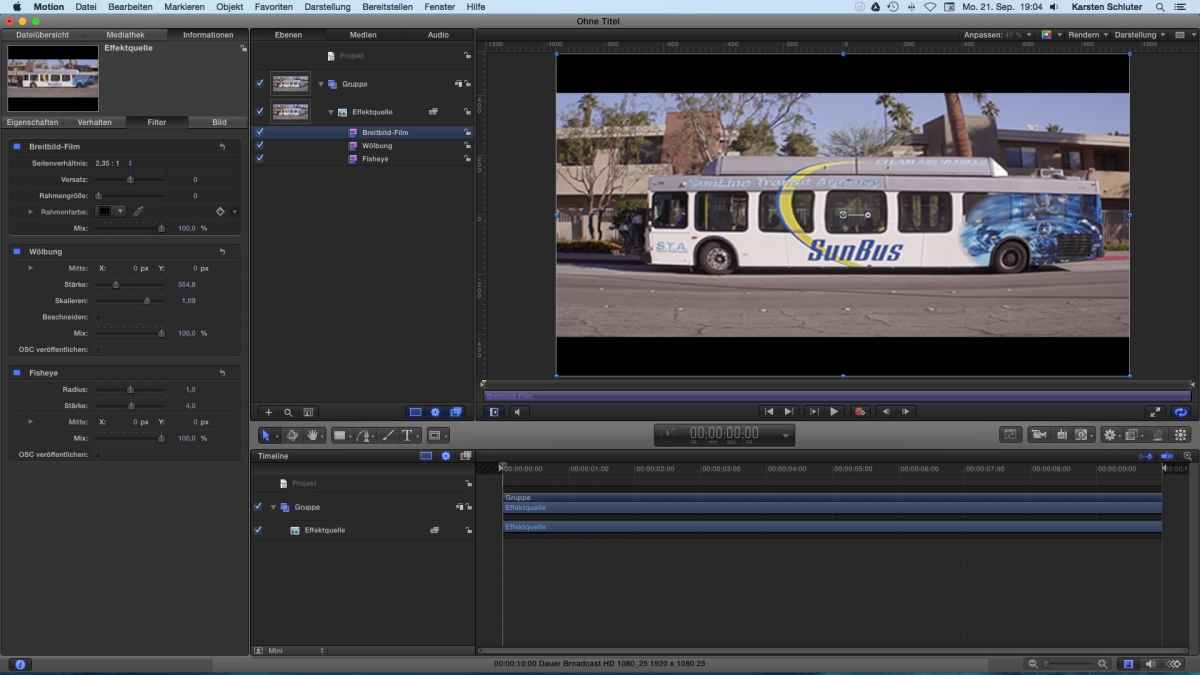
- apply fisheye, as Mark precisely told us
- apply Buldge filter, scale slightly bigger 1.09
- finally apply the cinematic filter forblack bars..
end of frame distorted, middle of frame 'plain' (and what's so special about it??)
done in a few minute so I HAVE to miss something.... :blink:
could be 'published' as an Effect ...
Please Log in to join the conversation.
Please Log in to join the conversation.
- Karsten Schlüter
-
- Offline
- Moderator
-
- Posts: 3790
- Thank you received: 718
eproano wrote: I don't have motion so I don't have access to the bulge filter...Could you share the published effect? That would be amazing.
for sure, love to be called "The Amzing Shluter" ... wait a minute ...no, that's silly for a man of my age.
gimme half an hour, brave MacMini actually renders a 90min fullHD project, burns 2h Hamlet School play (omg factor10!!), exports some 5Mp photos ... ahh, now i learn the sound of the fan ...

in the meantime: What parameters do you need (I have really NO idea!) to play with? Amount of distortion, and, best would be, som eautomatic 'de-distortion in the middle', correct?
Should the bars be part of the effect?
... anything for dessert? 80ies cross-processing look, pushing contrasts and contrasts.....?
(If this works out, you owe me a beer!!) crazzzzy :woohoo:
Please Log in to join the conversation.
I believe whatever gets closest to this: vashivisuals.com/wp-content/uploads/2013/10/flatprimocurve.jpg with as little steps as possible would be best I believe, so automatic de distortion in the middle would be great!. If possible being able to adjust the curve with a slider would be cool too, but not super necessary.
I don't think the black bars need to be a part of it because there's already many options for that.
If you are ever in Los Angeles I will definitely buy you a beer!
Please Log in to join the conversation.
- Karsten Schlüter
-
- Offline
- Moderator
-
- Posts: 3790
- Thank you received: 718
Please Log in to join the conversation.
- Karsten Schlüter
-
- Offline
- Moderator
-
- Posts: 3790
- Thank you received: 718
(guess, you prefer an English interface) ....
Please Log in to join the conversation.
- Karsten Schlüter
-
- Offline
- Moderator
-
- Posts: 3790
- Thank you received: 718
www.fcp.co/forum/film-looks-effects/2415...rphic-speciale#68783
good night (late here) ..........

Please Log in to join the conversation.
The curves aren't working properly for me in FCP - I suspect it is because I do not have Motion and therefore don't have the bulge effect....

Here's how it looks for me

Any ideas?
Please Log in to join the conversation.
- simonpwood
-
- Offline
- Platinum Member
-

- Posts: 654
- Thank you received: 42
Fortunately there are quite a few plug ins that offer anamorphic flares (Red Giant, Coremelt, mvfx, pixelfilms, fcpeffects, fxfactory etc all make them).
Please Log in to join the conversation.
- Karsten Schlüter
-
- Offline
- Moderator
-
- Posts: 3790
- Thank you received: 718
eproano wrote: Thank you very much for your hard work Karsten!..
Good Morning to my timezone ...
naw, plain fun, never made a plug-in 'on order' :LOL:
look into the other thread where I published a NEW, different version, now WITHOUT rigged parameters, all free for your manual adjustments.
And, no, it doesn't matter you own Motion or not = the 'effects' are all built in into FCP, Motion is just a sort of 'highly developed graphical front end' for these effects.
HOpe, version beta2 works out better for you, although, your graphics illustratesme better your goal is; and I think, both, Fisheye and Buldge are based upon 'curves' - even with very fine adjustments yoyu'll never get a straight line.
give it a try anyhow ... <coffee please> ... :lol:
Please Log in to join the conversation.
