


- Posts: 8
- Thank you received: 0
3 Post Moderation Rule for New Boarders (25 Jan 2021)
New boarders will have their posts moderated - Don't worry if you cannot see your post immediately.
MXF FILES DO NOT OPEN WITH FCPX
18 Sep 2015 15:18 #68684
by MXF/fcpx
MXF FILES DO NOT OPEN WITH FCPX was created by MXF/fcpx
Can you open MXF Files from Canon XC10 with Final cut Pro X 10.2.2??? If so, how do you do it???
Mine come out with a green filter and fractioned
Mine come out with a green filter and fractioned
Please Log in to join the conversation.
- Tom Wolsky
-

- Offline
- Moderator
-

20 Sep 2015 08:13 #68721
by Tom Wolsky
Replied by Tom Wolsky on topic MXF FILES DO NOT OPEN WITH FCPX
Give complete system specs.
Please Log in to join the conversation.
20 Sep 2015 09:41 #68722
by MXF/fcpx
Replied by MXF/fcpx on topic MXF FILES DO NOT OPEN WITH FCPX
Dear Tom,
I am the same person that you tried to help via Apple forum. I have found someone in UK with am iMac like mine and he is able to open the files. I have re-installed Yosemite, downloaded Canon plug ins and re-installed Final Cut Pro twice. The computer works fine. I can open the MXF files with Adobe Premier and I can also open them is I convert them to Pro Res 4444. I am sure that there is something in my FCPX settings that is not right but I have no idea how to locate that.
I am the same person that you tried to help via Apple forum. I have found someone in UK with am iMac like mine and he is able to open the files. I have re-installed Yosemite, downloaded Canon plug ins and re-installed Final Cut Pro twice. The computer works fine. I can open the MXF files with Adobe Premier and I can also open them is I convert them to Pro Res 4444. I am sure that there is something in my FCPX settings that is not right but I have no idea how to locate that.
Please Log in to join the conversation.

20 Sep 2015 23:52 - 20 Sep 2015 23:55 #68731
by ddixon
Replied by ddixon on topic MXF FILES DO NOT OPEN WITH FCPX
Well, the latest FCPX update specifically mentioned adding support for the camera, but it still requires a Canon plugin. Go to this:
usa.canon.com/cusa/professional/products...0#DriversAndSoftware
...and make sure you have installed the applicable plugins and drivers on that page. That should take care of it. I think the latest plugin update requires Yosemite, so make sure you have that as well and that it's showing in the popup menu in the Drivers and Software section.
usa.canon.com/cusa/professional/products...0#DriversAndSoftware
...and make sure you have installed the applicable plugins and drivers on that page. That should take care of it. I think the latest plugin update requires Yosemite, so make sure you have that as well and that it's showing in the popup menu in the Drivers and Software section.
Last edit: 20 Sep 2015 23:55 by ddixon.
Please Log in to join the conversation.
21 Sep 2015 07:21 #68734
by MXF/fcpx
Replied by MXF/fcpx on topic MXF FILES DO NOT OPEN WITH FCPX
Thank you. I have installed the plug ins and I have Yosemite. It does not work.
Please Log in to join the conversation.
21 Sep 2015 11:21 - 21 Sep 2015 11:21 #68737
by ddixon
Replied by ddixon on topic MXF FILES DO NOT OPEN WITH FCPX
I'm just guessing here, but as the owner of both the Canon XF100 and the Sony X70 - two cameras whose clips could also not be imported directly into FCPX for several months after their release - I understand the frustration.
Random other thoughts:
1. Has there been a firmware update for the camera that you have not installed? For the X70 the native import requires the latest firmware, the latest FCPX, AND the clips must be shot on a card reformatted in-camera after all these have been applied.
2. Are you importing from a complete, intact card structure, either from the card or a camera archive? My cameras still require that. Is the person you found who could import doing that with their own files, or actually with yours?
3. That's all I've got - if you still can't get it to work, maybe ask in a more camera-specific forum at dvinfo.net or dvxuser.com.
Good luck and I hope you find some answers.
Random other thoughts:
1. Has there been a firmware update for the camera that you have not installed? For the X70 the native import requires the latest firmware, the latest FCPX, AND the clips must be shot on a card reformatted in-camera after all these have been applied.
2. Are you importing from a complete, intact card structure, either from the card or a camera archive? My cameras still require that. Is the person you found who could import doing that with their own files, or actually with yours?
3. That's all I've got - if you still can't get it to work, maybe ask in a more camera-specific forum at dvinfo.net or dvxuser.com.
Good luck and I hope you find some answers.
Last edit: 21 Sep 2015 11:21 by ddixon.
Please Log in to join the conversation.
- ronny courtens
-

- Offline
- Moderator
-
Less
More
- Posts: 4455
- Thank you received: 962
21 Sep 2015 12:14 #68743
by ronny courtens
Replied by ronny courtens on topic MXF FILES DO NOT OPEN WITH FCPX
Hi Eva,
The latest Canon XF plugin only works with FCP X 10.2.2, but I see that's what you are running.
Two thoughts:
1. When you install the plugin you should restart your computer to make the installation effective.
2. If that's not the problem: go to Library > Application Support > ProApps > MIO > RadPlugins folder. Select the folder and press CMD+i to open the Info window for that folder. See if the folder has both Read and Write permissions for your account.
If the folder does not show Read and Write permissions for your account, click on the little lock at the bottom of the Info window and enter your admin password to unlock the Permissions. Set the Permissions for the folder to Read&Write for your account, then click on the little wrench at the bottom of the window and select "Apply to enclosed items".
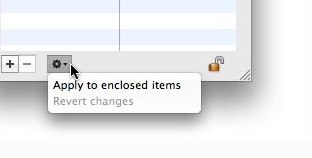
Finally close the lock again and reinstall the Canon XF plugin + restart computer.
- Ronny
The latest Canon XF plugin only works with FCP X 10.2.2, but I see that's what you are running.
Two thoughts:
1. When you install the plugin you should restart your computer to make the installation effective.
2. If that's not the problem: go to Library > Application Support > ProApps > MIO > RadPlugins folder. Select the folder and press CMD+i to open the Info window for that folder. See if the folder has both Read and Write permissions for your account.
If the folder does not show Read and Write permissions for your account, click on the little lock at the bottom of the Info window and enter your admin password to unlock the Permissions. Set the Permissions for the folder to Read&Write for your account, then click on the little wrench at the bottom of the window and select "Apply to enclosed items".
Finally close the lock again and reinstall the Canon XF plugin + restart computer.
- Ronny
Please Log in to join the conversation.
21 Sep 2015 17:16 #68769
by MXF/fcpx
Replied by MXF/fcpx on topic MXF FILES DO NOT OPEN WITH FCPX
1. Has there been a firmware update for the camera that you have not installed? For the X70 the native import requires the latest firmware, the latest FCPX, AND the clips must be shot on a card reformatted in-camera after all these have been applied.
*****I have installed all the updates I know from Canon
2. Are you importing from a complete, intact card structure, either from the card or a camera archive? My cameras still require that. Is the person you found who could import doing that with their own files, or actually with yours?
*****I imported all the files via a card reader into a Samsung Hard Drive. The files are there.
I tried downloading them first on my Desktop, but the problem remained
3. That's all I've got - if you still can't get it to work, maybe ask in a more camera-specific forum at dvinfo.net or dvxuser.com.
***** Thank you very much! I will try it.
*****I have installed all the updates I know from Canon
2. Are you importing from a complete, intact card structure, either from the card or a camera archive? My cameras still require that. Is the person you found who could import doing that with their own files, or actually with yours?
*****I imported all the files via a card reader into a Samsung Hard Drive. The files are there.
I tried downloading them first on my Desktop, but the problem remained
3. That's all I've got - if you still can't get it to work, maybe ask in a more camera-specific forum at dvinfo.net or dvxuser.com.
***** Thank you very much! I will try it.
Please Log in to join the conversation.
21 Sep 2015 17:28 #68771
by MXF/fcpx
Replied by MXF/fcpx on topic MXF FILES DO NOT OPEN WITH FCPX
Thank you for that.
Actually I was asked for a password before installing them. I did restart the computer after installing plug ins.I will however try what you say about the Library > Application Support > ProApps > MIO > RadPlugins folder to check that the read write is enabled.
I do not know if it might be relevant but last time I opened my Samsung external hard drive it was changed to read only instead of read and write...and yet I changed nothing... I wonder if a similar thing is happening with the Canon plug in. Apple products do that, they change things without asking...
I will let you know if I succeed.
Thanks again
Actually I was asked for a password before installing them. I did restart the computer after installing plug ins.I will however try what you say about the Library > Application Support > ProApps > MIO > RadPlugins folder to check that the read write is enabled.
I do not know if it might be relevant but last time I opened my Samsung external hard drive it was changed to read only instead of read and write...and yet I changed nothing... I wonder if a similar thing is happening with the Canon plug in. Apple products do that, they change things without asking...
I will let you know if I succeed.
Thanks again
Please Log in to join the conversation.
- ronny courtens
-
- Offline
- Moderator
-
Less
More
- Posts: 4455
- Thank you received: 962
21 Sep 2015 18:28 #68775
by ronny courtens
Replied by ronny courtens on topic MXF FILES DO NOT OPEN WITH FCPX
That's why it is always a good idea to regularly do a "Repair Permissions" on your system drive. This prevents permissions from being changed.
- Ronny
- Ronny
Please Log in to join the conversation.
28 Sep 2015 08:31 #69009
by MXF/fcpx
Replied by MXF/fcpx on topic MXF FILES DO NOT OPEN WITH FCPX
I have just sent a note of thank you to all of you but I am not sure if it has gone through. PB from Apple Ireland solved my problem by deleting 3 files from my system Now MXF files can be opened perfectly well. If anyone needs to know which I can let you know within a week. I am not at the location of my iMac.
Thank you again!
Thank you again!
Please Log in to join the conversation.

28 Sep 2015 11:27 #69014
by BenB
Replied by BenB on topic MXF FILES DO NOT OPEN WITH FCPX
I can probably guess, but please tell us what three files you deleted, to solve your issue?
Please Log in to join the conversation.
01 Oct 2015 15:51 #69157
by MXF/fcpx
Replied by MXF/fcpx on topic MXF FILES DO NOT OPEN WITH FCPX
Well, if you can probably guess, it would have been nice if you had told me earlier. I have waisted many hours and those of other people to solve this problem. If anyone need the names of the files please contact me.
Please Log in to join the conversation.
01 Oct 2015 19:54 #69170
by BenB
Replied by BenB on topic MXF FILES DO NOT OPEN WITH FCPX
I don't know, and I wouldn't have guess you were deleting files to fix this issue. Not sharing a solution is pretty rude. No reason to withhold information from those who've tried to sincerely help you out.
Please Log in to join the conversation.
02 Oct 2015 09:30 #69175
by MXF/fcpx
Replied by MXF/fcpx on topic MXF FILES DO NOT OPEN WITH FCPX
I am sure that you understand that after 4 weeks looking for a solution it is irritating to hear that you could have guesses what the solution was. I have placed the deleted files in dropbox and this is the link.
www.dropbox.com/sh/yjh54pikko79wlj/AAD3T...RK59RdXT1aLRkSa?dl=0
Thank you Tom and thank you Ronny for all your help!
www.dropbox.com/sh/yjh54pikko79wlj/AAD3T...RK59RdXT1aLRkSa?dl=0
Thank you Tom and thank you Ronny for all your help!
Please Log in to join the conversation.
- simonpwood
-

- Offline
- Platinum Member
-

Less
More
- Posts: 654
- Thank you received: 42
02 Oct 2015 09:40 - 02 Oct 2015 09:42 #69176
by simonpwood
Replied by simonpwood on topic MXF FILES DO NOT OPEN WITH FCPX
Self deleted message...
Last edit: 02 Oct 2015 09:42 by simonpwood.
Please Log in to join the conversation.
02 Oct 2015 12:51 #69184
by BenB
Replied by BenB on topic MXF FILES DO NOT OPEN WITH FCPX
"...it is irritating to hear that you could have guesses what the solution was."
No, I did not have guesses for a solution before hand. I never said I did. I could have guessed, and been right or wrong, but more info would have helped. Please don't twist what I said or knew. If I had a reasonable idea of a solution, I'd have posted it. Best of luck.
No, I did not have guesses for a solution before hand. I never said I did. I could have guessed, and been right or wrong, but more info would have helped. Please don't twist what I said or knew. If I had a reasonable idea of a solution, I'd have posted it. Best of luck.
Please Log in to join the conversation.
-

- New Member
-

Less
More
- Thank you received: 0
04 Nov 2015 12:54 #70218
by
Replied by on topic MXF FILES DO NOT OPEN WITH FCPX
Have you tried to import MXF file via Log and Transfer in FCP 7. Try this.
Hope this may help you.
Hope this may help you.
Please Log in to join the conversation.
