


- Posts: 78
- Thank you received: 6
3 Post Moderation Rule for New Boarders (25 Jan 2021)
New boarders will have their posts moderated - Don't worry if you cannot see your post immediately.
FCPX and SONY XAVC-L issues
- desilva_oz
-
 Topic Author
- Offline
- Senior Member
-

Less
More
15 Sep 2015 23:44 - 16 Sep 2015 03:16 #68555
by desilva_oz
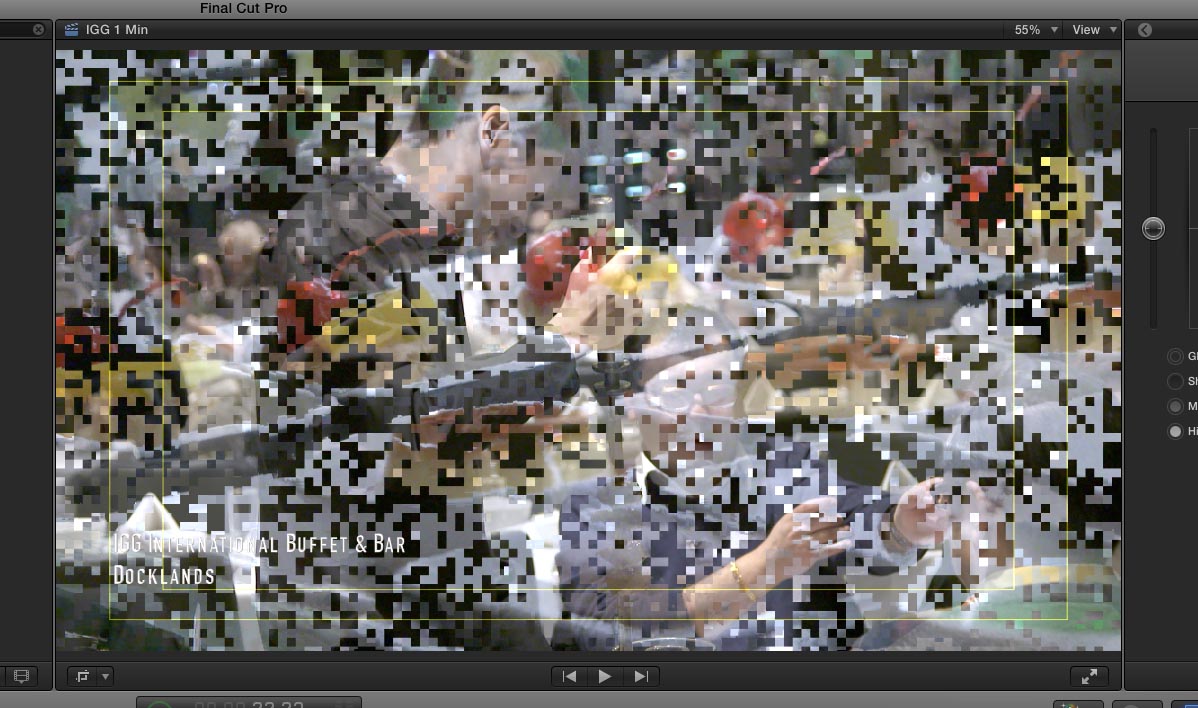
Need some help with XAVC-L movies from FS7 in FCPX. I am getting consistent mosaic frame blending on random clips as they overlap each other. I have updated FCPX to latest as of this post, tried import utility from camera via FCPX, and dropping the files into FCPX directly from card. Any suggestions?
FCPX and SONY XAVC-L issues was created by desilva_oz
Need some help with XAVC-L movies from FS7 in FCPX. I am getting consistent mosaic frame blending on random clips as they overlap each other. I have updated FCPX to latest as of this post, tried import utility from camera via FCPX, and dropping the files into FCPX directly from card. Any suggestions?
Last edit: 16 Sep 2015 03:16 by desilva_oz. Reason: added image
Please Log in to join the conversation.
- MarkNelsonMovies
-
- Offline
- Elite Member
-

Less
More
- Posts: 256
- Thank you received: 48
15 Sep 2015 23:51 #68558
by MarkNelsonMovies
Replied by MarkNelsonMovies on topic FCPX and SONY XAVC-L issues
Did you try creating optimized media files? When some 60i AVCHD files I had weren't displaying properly and showing blocky artifacts the solution i found was to select the clips 'file>transcode media>create optimized media. this completely fixed my issue.
hope this can help,
-Mark
hope this can help,
-Mark
Please Log in to join the conversation.
- Tom Wolsky
-

- Offline
- Moderator
-

16 Sep 2015 00:10 #68560
by Tom Wolsky
Replied by Tom Wolsky on topic FCPX and SONY XAVC-L issues
Do you mean during transitions? Please give your complete system specs, OS, and software version.
Please Log in to join the conversation.
- desilva_oz
-
Topic Author
- Offline
- Senior Member
-
Less
More
- Posts: 78
- Thank you received: 6
16 Sep 2015 00:12 #68561
by desilva_oz
Replied by desilva_oz on topic FCPX and SONY XAVC-L issues
Yes I have and the optimized media files have the issue on export - not during playback in FCPX
Please Log in to join the conversation.
- desilva_oz
-
Topic Author
- Offline
- Senior Member
-
Less
More
- Posts: 78
- Thank you received: 6
16 Sep 2015 00:18 #68562
by desilva_oz
Replied by desilva_oz on topic FCPX and SONY XAVC-L issues
not during transitions. on overlapping clips.
Mac (27-inch, Late 2013)
3.5 GHz Intel Core i7
24 GB 1600 MHz DDR3
NVIDIA GeForce GTX 780M 4096 MB
FCPX / Motion / Compressor / Apple pro formats are all up to date
Mac (27-inch, Late 2013)
3.5 GHz Intel Core i7
24 GB 1600 MHz DDR3
NVIDIA GeForce GTX 780M 4096 MB
FCPX / Motion / Compressor / Apple pro formats are all up to date
Please Log in to join the conversation.
- Tom Wolsky
-
- Offline
- Moderator
-
16 Sep 2015 00:28 #68563
by Tom Wolsky
Replied by Tom Wolsky on topic FCPX and SONY XAVC-L issues
Can you post a screenshot of what you're seeing? Would it be possible to get a sample of the media, maybe uploaded to Dropbox.
Thanks.
Thanks.
Please Log in to join the conversation.
- desilva_oz
-
Topic Author
- Offline
- Senior Member
-
Less
More
- Posts: 78
- Thank you received: 6
16 Sep 2015 00:31 #68564
by desilva_oz
Replied by desilva_oz on topic FCPX and SONY XAVC-L issues
Hopefully this attachment works
Please Log in to join the conversation.
- desilva_oz
-
Topic Author
- Offline
- Senior Member
-
Less
More
- Posts: 78
- Thank you received: 6
16 Sep 2015 00:31 #68565
by desilva_oz
Replied by desilva_oz on topic FCPX and SONY XAVC-L issues
attachments are not working - JPEG small 100K file size
Please Log in to join the conversation.

16 Sep 2015 02:58 #68567
by BenB
Replied by BenB on topic FCPX and SONY XAVC-L issues
Don't forget to click the "Insert" button.
Please Log in to join the conversation.
- desilva_oz
-
Topic Author
- Offline
- Senior Member
-
Less
More
- Posts: 78
- Thank you received: 6
16 Sep 2015 03:16 #68571
by desilva_oz
Replied by desilva_oz on topic FCPX and SONY XAVC-L issues
Please Log in to join the conversation.
16 Sep 2015 03:26 #68572
by ddixon
Replied by ddixon on topic FCPX and SONY XAVC-L issues
I have seen this once or twice with the XAVC-L footage from my Sony X70. It's not in the original footage and usually crops up on one frame a few frames prior to a third party transition that's been added. In the few cases I've seen, I was able to fix it by (as mentioned above) optimizing just the clips on either side of the transition or by just using a different transition. The transitions in question were high quality commercial ones.
I've only seen the issue once since the latest FCPX update.
I've only seen the issue once since the latest FCPX update.
Please Log in to join the conversation.
- Tom Wolsky
-
- Offline
- Moderator
-
16 Sep 2015 08:12 #68574
by Tom Wolsky
Replied by Tom Wolsky on topic FCPX and SONY XAVC-L issues
It's happening to the actual media not to FCP's render of the frame. Interesting that the title renders cleanly on top of the video.
Please Log in to join the conversation.


16 Sep 2015 13:15 #68582
by dgwvideo
Creating history....one edit at a time !
Replied by dgwvideo on topic FCPX and SONY XAVC-L issues
If you have Sony's plugin for XAVC installed, try uninstalling it. I believe it may conflict now that FCPX provides support for XAVC-L.
Creating history....one edit at a time !
Please Log in to join the conversation.
- desilva_oz
-
Topic Author
- Offline
- Senior Member
-
Less
More
- Posts: 78
- Thank you received: 6
16 Sep 2015 23:00 #68616
by desilva_oz
Replied by desilva_oz on topic FCPX and SONY XAVC-L issues
Good tip, any chance you know how to uninstall it?
Please Log in to join the conversation.
17 Sep 2015 03:53 #68619
by dgwvideo
From the Sony website:
To uninstall the PDZK-LT2, delete the "XDCAMFormat.RADPlug" in the "/Library/Application Support/ProApps/MIO/RADPlugins".
Creating history....one edit at a time !
Replied by dgwvideo on topic FCPX and SONY XAVC-L issues
desilva_oz wrote: Good tip, any chance you know how to uninstall it?
From the Sony website:
To uninstall the PDZK-LT2, delete the "XDCAMFormat.RADPlug" in the "/Library/Application Support/ProApps/MIO/RADPlugins".
Creating history....one edit at a time !
Please Log in to join the conversation.
