


- Posts: 730
- Thank you received: 26
3 Post Moderation Rule for New Boarders (25 Jan 2021)
New boarders will have their posts moderated - Don't worry if you cannot see your post immediately.
Audio Buzz removal?
- DmitriZigany
-
 Topic Author
- Offline
- Platinum Member
-

Less
More
14 Sep 2015 12:59 #68452
by DmitriZigany
Audio Buzz removal? was created by DmitriZigany
The horror, the horror!
I filmed a corporate event the other day. Did soundcheck etc., sounded good!
When the event start, there's a horrible audio buzz, really loud. Now I'm looking for some way to remove/reduce it and hope I can achieve a passable audio if blended with the room mic audio.
It's quite severe so don't have very high hopes.
See Attached file for example. If you know what tool/setting etc would be best for this please let me know!
- - - - - - - - - -
Furthermore, I am not sure how to approach this from a business point.
I was hired to film the conference and gave them a price they agreed on.
I asked if it was possible to get audio from the sound board and they had contact with the sound guy at the venue.
Once there, I wanted to take the cable I brought and run it across the floor (gaffer taped of course). Sound guy insisted it should go along the wall over the door way etc. So he did that using his cable.
It sounded good at sound check. But once the conference started I noticed the buzz and informed him. He had no clue what to do. In the break, we told him to try to turn off the house lighting and also reconnected using my cable along the floor, which resulted in good audio. (his cable passed close to power cables for light)
I feel it's my responsibility to deliver a good product and it was maybe my mistake of assuming the sound guy knew what he was doing as he was the house technician and had been informed we needed audio from the board. I thought the lights that were during soundcheck would be the final lighting as well. Which I obviously should have asked and tried out.
Not sure how to approach the client about this. Suggestions?
I filmed a corporate event the other day. Did soundcheck etc., sounded good!
When the event start, there's a horrible audio buzz, really loud. Now I'm looking for some way to remove/reduce it and hope I can achieve a passable audio if blended with the room mic audio.
It's quite severe so don't have very high hopes.
See Attached file for example. If you know what tool/setting etc would be best for this please let me know!
- - - - - - - - - -
Furthermore, I am not sure how to approach this from a business point.
I was hired to film the conference and gave them a price they agreed on.
I asked if it was possible to get audio from the sound board and they had contact with the sound guy at the venue.
Once there, I wanted to take the cable I brought and run it across the floor (gaffer taped of course). Sound guy insisted it should go along the wall over the door way etc. So he did that using his cable.
It sounded good at sound check. But once the conference started I noticed the buzz and informed him. He had no clue what to do. In the break, we told him to try to turn off the house lighting and also reconnected using my cable along the floor, which resulted in good audio. (his cable passed close to power cables for light)
I feel it's my responsibility to deliver a good product and it was maybe my mistake of assuming the sound guy knew what he was doing as he was the house technician and had been informed we needed audio from the board. I thought the lights that were during soundcheck would be the final lighting as well. Which I obviously should have asked and tried out.
Not sure how to approach the client about this. Suggestions?
Please Log in to join the conversation.
- DmitriZigany
-
Topic Author
- Offline
- Platinum Member
-
Less
More
- Posts: 730
- Thank you received: 26
14 Sep 2015 13:02 #68453
by DmitriZigany
Replied by DmitriZigany on topic Audio Buzz removal?
Not sure if the audio got attached here it is:
www.futurelegends.net/audiobuzz/AudioBuzz.aiff
www.futurelegends.net/audiobuzz/AudioBuzz.aiff
Please Log in to join the conversation.
- simonpwood
-
- Offline
- Platinum Member
-
Less
More
- Posts: 654
- Thank you received: 42
14 Sep 2015 13:25 #68457
by simonpwood
Replied by simonpwood on topic Audio Buzz removal?
An audio guy is never as good as a video audio guy...
I have had success with free software called Audacity. Basically you import and the audio and get a clean example of the buzz, and the software uses this as a base to remove it. It's not perfect, and if you push it too far people end up sounding like robots. But it does improve the problem usually. Otherwise you'll have to spend big bucks for more advanced software.
I have had success with free software called Audacity. Basically you import and the audio and get a clean example of the buzz, and the software uses this as a base to remove it. It's not perfect, and if you push it too far people end up sounding like robots. But it does improve the problem usually. Otherwise you'll have to spend big bucks for more advanced software.
Please Log in to join the conversation.
- simonpwood
-
- Offline
- Platinum Member
-
Less
More
- Posts: 654
- Thank you received: 42
14 Sep 2015 13:27 #68459
by simonpwood
Replied by simonpwood on topic Audio Buzz removal?
Please Log in to join the conversation.

14 Sep 2015 16:49 - 14 Sep 2015 16:53 #68480
by Emmanuel
Replied by Emmanuel on topic Audio Buzz removal?
Dmitri, you don't have to notify the client. You can process this noise easily.
It's just a nasty sound around 10Khz.
This is what I got in 2 minutes using a Channel EQ, and I'm no audio engineer at all so it can probably get even better than that.
See attached.
Try an EQ around those frequencies, and then work it around to leave the voice intact as much as possible.
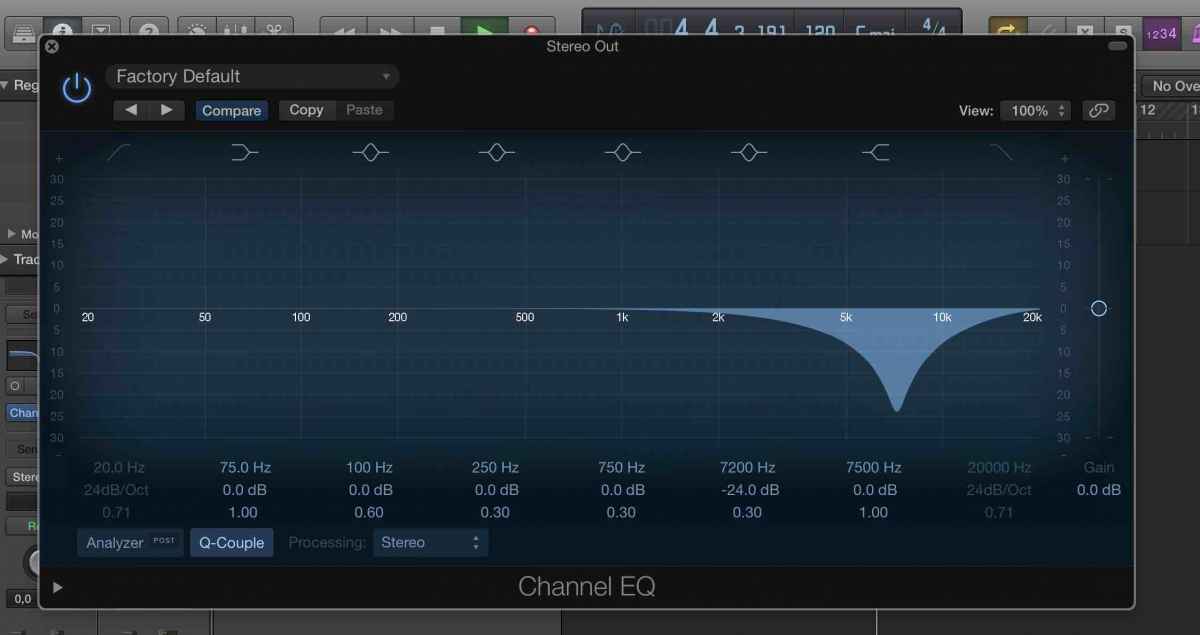
I think you will reach excellent results, but if really not, contact a local audio engineer. I hear some Dutch accent in your client, so if you need I can give you the name of somebody.
It's just a nasty sound around 10Khz.
This is what I got in 2 minutes using a Channel EQ, and I'm no audio engineer at all so it can probably get even better than that.
See attached.
Try an EQ around those frequencies, and then work it around to leave the voice intact as much as possible.
I think you will reach excellent results, but if really not, contact a local audio engineer. I hear some Dutch accent in your client, so if you need I can give you the name of somebody.
Last edit: 14 Sep 2015 16:53 by Emmanuel.
Please Log in to join the conversation.
14 Sep 2015 16:55 - 14 Sep 2015 17:02 #68481
by Emmanuel
Replied by Emmanuel on topic Audio Buzz removal?
Now the file
we.tl/bnUdTzpCnn
It's not perfect but again, I only spent 2 minutes on it. There's still a bit of noise left and the voice is affected a bit. But already there, I doubt the client will notice.
You'll make it
By the way I recommend this method more than the noise reduction from Audacity or Izotope. They will probably affect more frequencies, I think you only need one or two surgical touches here.
PS2: I did this in Logic but you have the same Equalizer in FCPX. Channel EQ.
It's not perfect but again, I only spent 2 minutes on it. There's still a bit of noise left and the voice is affected a bit. But already there, I doubt the client will notice.
You'll make it
By the way I recommend this method more than the noise reduction from Audacity or Izotope. They will probably affect more frequencies, I think you only need one or two surgical touches here.
PS2: I did this in Logic but you have the same Equalizer in FCPX. Channel EQ.
Last edit: 14 Sep 2015 17:02 by Emmanuel.
Please Log in to join the conversation.
- DmitriZigany
-
Topic Author
- Offline
- Platinum Member
-
Less
More
- Posts: 730
- Thank you received: 26
15 Sep 2015 10:42 #68516
by DmitriZigany
Replied by DmitriZigany on topic Audio Buzz removal?
Thanks!
I've had luck with the RX4 demo as well, now just need to finish delivery before 10-day demo runs out
But will look into EQing a bit as well!
I've had luck with the RX4 demo as well, now just need to finish delivery before 10-day demo runs out
But will look into EQing a bit as well!
Please Log in to join the conversation.

15 Sep 2015 11:45 #68521
by BenB
Replied by BenB on topic Audio Buzz removal?
Dmitri, what results have you gotten using FCPX's built-in Hum Remover? Just curious.
Buzz/hum is caused by electrical/magnetic interference with the signal, either at 60kHz or 50kHz, depending on what area of the world you live in.
If you have the RX4 demo, run everything through it, save out as AIFF files, then it's baked in and the demo can safely expire.
Buzz/hum is caused by electrical/magnetic interference with the signal, either at 60kHz or 50kHz, depending on what area of the world you live in.
If you have the RX4 demo, run everything through it, save out as AIFF files, then it's baked in and the demo can safely expire.
Please Log in to join the conversation.
- DmitriZigany
-
Topic Author
- Offline
- Platinum Member
-
Less
More
- Posts: 730
- Thank you received: 26
15 Sep 2015 12:41 #68528
by DmitriZigany
Replied by DmitriZigany on topic Audio Buzz removal?
Ben, It's mostly higher frequency buzz (in lack of better word).
The RX4 module Dialogue Denoiser did a pretty good job even in 'auto' mode.
Might actually end up buying RX4 from the profits of this job, they have it for $299 currently.
The RX4 module Dialogue Denoiser did a pretty good job even in 'auto' mode.
Might actually end up buying RX4 from the profits of this job, they have it for $299 currently.
Please Log in to join the conversation.
15 Sep 2015 15:43 #68533
by VidGreg
Dmitri,
You can also use the Channel EQ to help analyze the actual frequencies.
Manoucho is on the right track, but I would suggest that after bringing up the Channel EQ, you switch to the 30 channel version, then click on the Analyzer button. This will show you waveforms in real time. Works great to find trouble frequencies.
Find a section of the clip/sound file with only the buzz or at least where it is very noticeable, use a narrow "Q" setting on a filter and sweep to eliminate the buzz waveform. Expand the "Q" width to cover the buzz waveform range and add extra filters if more than one frequency range. Attenuate just till the noise is reduced to acceptable levels, no more. Then play through the clip(s) to make sure you aren't creating weird audio artifacts.
Sorry I don't have time right now to play with this technique for you.
You could also try the hum and background noise removal tools inside FCPX as Ben suggested, but I suspect you'll get better results with selective frequency removal or a 3rd party audio plug-in.
Hope this helps, Greg
You can also use the Channel EQ to help analyze the actual frequencies.
Manoucho is on the right track, but I would suggest that after bringing up the Channel EQ, you switch to the 30 channel version, then click on the Analyzer button. This will show you waveforms in real time. Works great to find trouble frequencies.
Find a section of the clip/sound file with only the buzz or at least where it is very noticeable, use a narrow "Q" setting on a filter and sweep to eliminate the buzz waveform. Expand the "Q" width to cover the buzz waveform range and add extra filters if more than one frequency range. Attenuate just till the noise is reduced to acceptable levels, no more. Then play through the clip(s) to make sure you aren't creating weird audio artifacts.
Sorry I don't have time right now to play with this technique for you.
You could also try the hum and background noise removal tools inside FCPX as Ben suggested, but I suspect you'll get better results with selective frequency removal or a 3rd party audio plug-in.
Hope this helps, Greg
Please Log in to join the conversation.
- DmitriZigany
-
Topic Author
- Offline
- Platinum Member
-
Less
More
- Posts: 730
- Thank you received: 26
15 Sep 2015 18:58 #68547
by DmitriZigany
Replied by DmitriZigany on topic Audio Buzz removal?
Greg,
When Manoucho posted the EQ, I had a bit of a "Doh!" moment and did a test, doing just that in Logic. I've just recently switched to Logic from Digital Performer and keep forgetting the analyse function is now available in Logic's EQ as well.
Combined with the RX4 demo and some EQing I think I can get it into the realm of the acceptable
When Manoucho posted the EQ, I had a bit of a "Doh!" moment and did a test, doing just that in Logic. I've just recently switched to Logic from Digital Performer and keep forgetting the analyse function is now available in Logic's EQ as well.
Combined with the RX4 demo and some EQing I think I can get it into the realm of the acceptable
Please Log in to join the conversation.
15 Sep 2015 20:35 #68548
by BenB
Replied by BenB on topic Audio Buzz removal?
RX4 will take care of thing for you. Worth the investment. Faster and easier than messing with an EQ, in my experience.
Please Log in to join the conversation.
