


- Posts: 60
- Thank you received: 1
3 Post Moderation Rule for New Boarders (25 Jan 2021)
New boarders will have their posts moderated - Don't worry if you cannot see your post immediately.
Importing!
13 Sep 2015 22:06 #68419
by RickLFoy
Importing! was created by RickLFoy
Hi guys & ladies. I am experiencing an issue with importing from a folder on my desktop into FCPX. First let me explain that I am use to ending with avid so I am still learning FCPX. I am up-to-date on the latest software for FCPX and running it on Yosemite. Here is my issue:
I can not locate the folder that is created on my desktop with all of my media from the SDCH card inside. Instead when I select the (import) button or select from the drop down list it bring up ALL media. This makes me have to go thru all the content to find what it is I am looking for to import. Too much time.
Anyway my question is how do I find the specific folder created on my desktop with all the content inside. Before you answer that... I did select my desktop on the far left side of the import page but it does not show the individual folder. Instead it shows EVERYTHING. Is there a faster way of doing this?
I appreciate any information given to help me become an FCPX editor. Thank you for your time.
I can not locate the folder that is created on my desktop with all of my media from the SDCH card inside. Instead when I select the (import) button or select from the drop down list it bring up ALL media. This makes me have to go thru all the content to find what it is I am looking for to import. Too much time.
Anyway my question is how do I find the specific folder created on my desktop with all the content inside. Before you answer that... I did select my desktop on the far left side of the import page but it does not show the individual folder. Instead it shows EVERYTHING. Is there a faster way of doing this?
I appreciate any information given to help me become an FCPX editor. Thank you for your time.
Please Log in to join the conversation.
- Tom Wolsky
-

- Offline
- Moderator
-

13 Sep 2015 22:21 #68420
by Tom Wolsky
Replied by Tom Wolsky on topic Importing!
This is a common problem when there is a folder or bundle on the desktop that the application reads as a camera. The then thinks it's looking at a camera drive and reads all the media it can see. It's usually something called Private or AVCHD or some other name used in camera cards. Just put them in a folder with some other name.
Please Log in to join the conversation.
14 Sep 2015 13:22 - 14 Sep 2015 13:24 #68456
by RickLFoy
Replied by RickLFoy on topic Importing!
I created a folder on my desktop and still it does not read it. Is there some detail left out that I am not getting? This is frustrating, not ready to fully move over the fcpx yet. The only way I can get folder content into my FCPX is by uploading into my dropbox, this takes too much time. Something like this should not be so complicated.
Last edit: 14 Sep 2015 13:24 by RickLFoy.
Please Log in to join the conversation.
- Tom Wolsky
-
- Offline
- Moderator
-
14 Sep 2015 13:27 #68458
by Tom Wolsky
Replied by Tom Wolsky on topic Importing!
Would it be possessed NLE to see a screen shot of the desktop list?
Please Log in to join the conversation.
14 Sep 2015 13:40 #68460
by RickLFoy
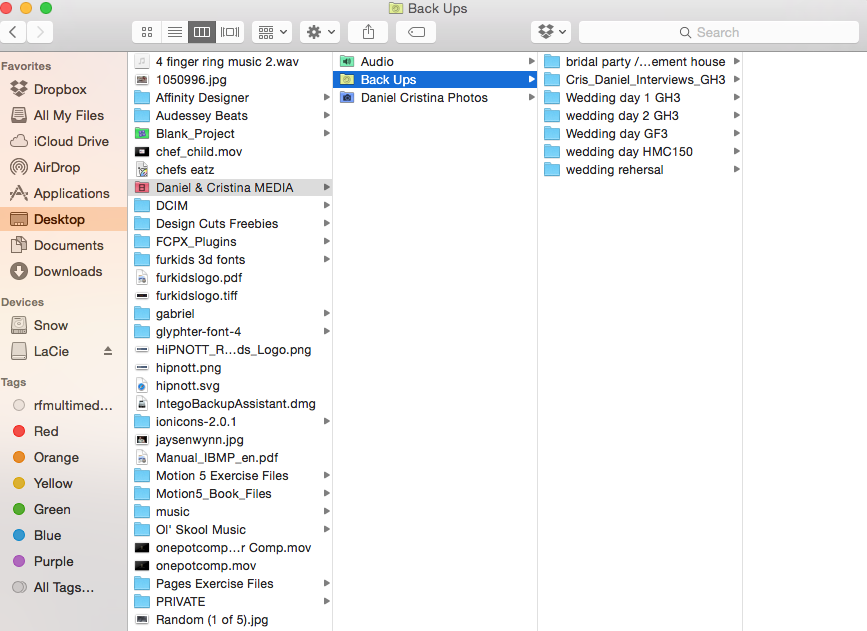
Replied by RickLFoy on topic Importing!
Please Log in to join the conversation.
14 Sep 2015 13:43 #68461
by RickLFoy
Replied by RickLFoy on topic Importing!
FCPX will not look at my desktop for the folder [Daniel & Cristina MEDIA] - Back Ups - and all the contents inside. Instead it lumps everything on my desktop without showing the folders. It shows all audio & video files. then I have to search for it. Too much time.
Please Log in to join the conversation.
14 Sep 2015 14:07 #68463
by RickLFoy
Replied by RickLFoy on topic Importing!
I just copied the media content onto a thumb drive and it recognize the drive but this is not a good look for FCPX.
Please Log in to join the conversation.
- Tom Wolsky
-
- Offline
- Moderator
-
14 Sep 2015 14:14 #68467
by Tom Wolsky
Replied by Tom Wolsky on topic Importing!
The folders DCIM and PRIVATE need to be hidden inside another folder. FCP is reading the desktop as a camera drive because of them.
Please Log in to join the conversation.

14 Sep 2015 17:27 #68482
by VidGreg
Hi Rick, Welcome to the forums.
If the first column of your screen shot is indeed what is on your desktop, Clean House. Using your desktop as filing system is asking for troubles. It will drastically slow down your system, hog resources, cause ram/page swaps and makes finding anything problematic. My wife does this with photos all the time and then wants to know why her side of the computer runs so slow especially loading/starting up. Same with her Mail program.
Clean your desktop!
Don't use your boot drive for a media drive! This will slow down your system. Get fast external drives for media and separate drives for back-ups.
Don't work off camera cards, camera archive files, or back-up files. Work off imported media.
First create a camera archive on ext. drive.
Then import media into FCPX but I recommend storing media files on another external drive. Different from your archive drive and not your boot drive. Media typically goes into or links to your FCPX bundle. No need for dropbox.
Store your FCPX library and FCPX back-up files on separate drives.
All of this can be done inside FCPX in either "Preferences" or the "Inspector Pane".
Use the system wide folders such as "Pictures" "Movies" "Music" for organizing your files. You can also create separate folders if you want, but don't put them on the desktop!
Create good meta data system for both inside and outside FCPX. (keywords and tags)
Use "Spotlight" and "Quicklook" to find files while in Finder.
Use Search box inside FCPX to find folders, files, clips, keywords. Meta data rules here!
Be very careful with 3rd party plug-ins and fonts. Can cause lots of issues, spinning beach balls, failure to render.
Hope this helps, Greg
Happy Editing!
If the first column of your screen shot is indeed what is on your desktop, Clean House. Using your desktop as filing system is asking for troubles. It will drastically slow down your system, hog resources, cause ram/page swaps and makes finding anything problematic. My wife does this with photos all the time and then wants to know why her side of the computer runs so slow especially loading/starting up. Same with her Mail program.
Clean your desktop!
Don't use your boot drive for a media drive! This will slow down your system. Get fast external drives for media and separate drives for back-ups.
Don't work off camera cards, camera archive files, or back-up files. Work off imported media.
First create a camera archive on ext. drive.
Then import media into FCPX but I recommend storing media files on another external drive. Different from your archive drive and not your boot drive. Media typically goes into or links to your FCPX bundle. No need for dropbox.
Store your FCPX library and FCPX back-up files on separate drives.
All of this can be done inside FCPX in either "Preferences" or the "Inspector Pane".
Use the system wide folders such as "Pictures" "Movies" "Music" for organizing your files. You can also create separate folders if you want, but don't put them on the desktop!
Create good meta data system for both inside and outside FCPX. (keywords and tags)
Use "Spotlight" and "Quicklook" to find files while in Finder.
Use Search box inside FCPX to find folders, files, clips, keywords. Meta data rules here!
Be very careful with 3rd party plug-ins and fonts. Can cause lots of issues, spinning beach balls, failure to render.
Hope this helps, Greg
Happy Editing!
Please Log in to join the conversation.
15 Sep 2015 14:02 #68530
by RickLFoy
Thank you both Tom & VidGreg, I do have a lot of things on my desktop. I do have faster drives I just keep backups to backups and have not removed the folders from my desktop as of yet. That is a good idea and I will do that to see if this improves my importing. Thanks a bunch guys I really appreciate the advice. I would like to send you both a friend request should I have any more questions in the future.
Please Log in to join the conversation.
