


- Posts: 384
- Thank you received: 23
3 Post Moderation Rule for New Boarders (25 Jan 2021)
New boarders will have their posts moderated - Don't worry if you cannot see your post immediately.
Delete clip from primary storyline
07 Sep 2015 12:42 #68121
by Makki
Delete clip from primary storyline was created by Makki
I have a clip on primary storyline and above I have 7 clips (overlays). How can I delete only that clip and not the other above it. I have been told to use "tilde" but there is no such on my Icelandic keyboard, have tried the key left to Z, switched to English key board and holding down shift and the key left to Z. whilw clicking on delete button. Nothing works. Is there somone who has a solution to this ?
Please Log in to join the conversation.

07 Sep 2015 13:50 #68125
by dgwvideo
Creating history....one edit at a time !
Replied by dgwvideo on topic Delete clip from primary storyline
To delete a clip, you select it in the timeline and press the delete key. However, If I understand your question correctly you want to delete the primary clip and keep the stacked clips. If the overlay clips are attached (connected) to the clip in the primary storyline, then deleting that primary clip will also delete any clips connected to it. Consider making a compound clip out of the 7 overlay clips by selecting those clips and pressing Opt-G. That will consolidate them into a single clip that you can move somewhere on the timeline so they are not connected to the primary clip you want to delete. You could also just replace the primary clip with another clip by dropping another clip onto it and choosing replace from start. This would keep your stacked clips intact and put a new clip in place of the primary clip for the same duration.
Creating history....one edit at a time !
Please Log in to join the conversation.
07 Sep 2015 14:09 #68128
by Makki
Replied by Makki on topic Delete clip from primary storyline
Thank you for the answer. Compound is an option later in the process but not while I am working ith those overlay clips, which can be about 10. I want to completely delete the primary clip, but it seems that is not for some strange reason, possible. But thanks again for response.
Makki
Makki
Please Log in to join the conversation.
07 Sep 2015 14:19 #68129
by dgwvideo
Creating history....one edit at a time !
Replied by dgwvideo on topic Delete clip from primary storyline
You can still edit the stacked layers after making a compound clip by double clicking the compound. It opens in it's own timeline and gives you access to all the clips. But maybe you should just move the connection point of the stacked clips to free them from the clip you want to delete. There should be no reason a clip can't be deleted from a timeline. A screenshot of those clips in the timeline might provide more insight to what is going on.
Creating history....one edit at a time !
Please Log in to join the conversation.
07 Sep 2015 14:31 #68132
by Makki
Replied by Makki on topic Delete clip from primary storyline
Hi
You say "But maybe you should just move the connection point of the stacked clips to free them from the clip you want to delete " I am a bit confused how to do this. I will see if I succeeed in sending a clip.
You say "But maybe you should just move the connection point of the stacked clips to free them from the clip you want to delete " I am a bit confused how to do this. I will see if I succeeed in sending a clip.
Please Log in to join the conversation.
07 Sep 2015 14:35 #68135
by Makki
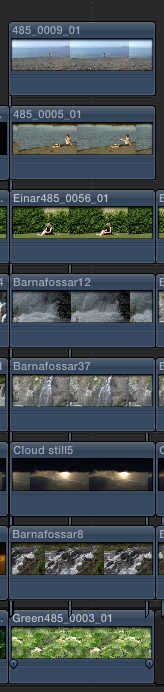
Replied by Makki on topic Delete clip from primary storyline
Please Log in to join the conversation.

07 Sep 2015 14:41 #68136
by alex4D
Replied by alex4D on topic Delete clip from primary storyline
To delete just "Green485_0003_01" select it and press Shift-delete.
Alex
Alex
Please Log in to join the conversation.

07 Sep 2015 14:45 - 07 Sep 2015 14:50 #68137
by Emmanuel
Replied by Emmanuel on topic Delete clip from primary storyline
EDIT: I remove everything I said and bow in front of Alex's answer. Why I didn't know that command, I don't know. Now I know.
PS: do not fear Compound Clips. You can create them, do a certain manipulation, and then break them apart immediatly after.
PS: do not fear Compound Clips. You can create them, do a certain manipulation, and then break them apart immediatly after.
Last edit: 07 Sep 2015 14:50 by Emmanuel.
Please Log in to join the conversation.
07 Sep 2015 14:56 - 07 Sep 2015 15:06 #68139
by Makki
Replied by Makki on topic Delete clip from primary storyline
Yes Alex it moves the clip but gives me a black gap instead which I ca not delete. The compound method gives exactly the same result, shift delete and I get the gap instead.
Last edit: 07 Sep 2015 15:06 by Makki.
Please Log in to join the conversation.
07 Sep 2015 15:06 #68140
by alex4D
Replied by alex4D on topic Delete clip from primary storyline
Makki,
Given the screenshot, what would you like to happen?
If you want 'barnafossar8' to be the new clip in the primary storyline, select it and press ⌥-Command down arrow.
Alex
Given the screenshot, what would you like to happen?
If you want 'barnafossar8' to be the new clip in the primary storyline, select it and press ⌥-Command down arrow.
Alex
Please Log in to join the conversation.
07 Sep 2015 15:12 #68142
by alex4D
Replied by alex4D on topic Delete clip from primary storyline
When "Green485_0003_01" is 'got rid of', what do you want to happen? Where do you want its attached clips to go? What do you want to replace "Green485_0003_01" with? Do you want the gap clip to its right to move over and replace it?
Alex
Alex
Please Log in to join the conversation.
07 Sep 2015 15:14 #68143
by alex4D
Replied by alex4D on topic Delete clip from primary storyline
If you want all its clips kept, and the clip to its left kept with all its connected clips, press ⌥-Command-delete,
Alex
Alex
Please Log in to join the conversation.
07 Sep 2015 15:19 - 07 Sep 2015 15:20 #68144
by Makki
Replied by Makki on topic Delete clip from primary storyline
Oug, I am beginning to think that the problem is myself. The next clip above should be the primary clip. I am trying to lower the tower. But the basic question was how to remove the primary clip withou affecting other clips.
Last edit: 07 Sep 2015 15:20 by Makki.
Please Log in to join the conversation.
07 Sep 2015 15:24 #68145
by Makki
Replied by Makki on topic Delete clip from primary storyline
Yes Alex, you nailed it with those combination I got what I want. Thank you so much Alex and thank guys for your help. 
Please Log in to join the conversation.
- Karsten Schlüter
-

- Offline
- Moderator
-

Less
More
- Posts: 3790
- Thank you received: 718
07 Sep 2015 15:49 - 07 Sep 2015 15:50 #68148
by Karsten Schlüter
I do.
Compound Clips are the Source of All Evil ... :evil:
Just for 50% meant funny:
When FCPX comes to the point in the timeline where 10 (!) clips are stacked, it tries to playback them.... all 10. Allthough just the top one is shown, And when those files are not proxies, FCPX instantly, even on a beast of a Mac, starts to hobble - it's as a 10sources Multicam ... you'd need :silly: a superfast drive(ssd/raid to deliver that ...
And: if the same CC is in diff. projects, and you change it in one ... ok, you know what to do ...
If you use CCs to imitate bins&sub-compos, you're in trouble ...
@Makki
Would you feed my curiosity, why to staple ten clips over each other??
OK, the Brady Bunch was a 9ner split .......
// don't take my 'opinion' about CCs too serious!! :whistle: //
Replied by Karsten Schlüter on topic Delete clip from primary storyline
manoucho wrote: .... do not fear Compound Clips.….
I do.
Compound Clips are the Source of All Evil ... :evil:
Just for 50% meant funny:
When FCPX comes to the point in the timeline where 10 (!) clips are stacked, it tries to playback them.... all 10. Allthough just the top one is shown, And when those files are not proxies, FCPX instantly, even on a beast of a Mac, starts to hobble - it's as a 10sources Multicam ... you'd need :silly: a superfast drive(ssd/raid to deliver that ...
And: if the same CC is in diff. projects, and you change it in one ... ok, you know what to do ...
If you use CCs to imitate bins&sub-compos, you're in trouble ...
@Makki
Would you feed my curiosity, why to staple ten clips over each other??
OK, the Brady Bunch was a 9ner split .......
// don't take my 'opinion' about CCs too serious!! :whistle: //
Last edit: 07 Sep 2015 15:50 by Karsten Schlüter.
Please Log in to join the conversation.
07 Sep 2015 16:45 - 07 Sep 2015 16:53 #68154
by Makki

Hi Karsten
Nice to hear from you. My gears are super powerful, new Mac Pro, 1tb ssd RAID 0 thunderbolt 2. Believe it or not, I always use high quality playback, no stuttering so, Pro Res 422. Everything plays smoothly like knife in melted butter, never need to render. About the tower. Just think about canvas and oil colors. First to ad different subjects, create effects and atmosphere and the final result is a clip with a story. I can post the result of the tower. This example is not finished not nearly.
Replied by Makki on topic Delete clip from primary storyline
Hi Karsten
Nice to hear from you. My gears are super powerful, new Mac Pro, 1tb ssd RAID 0 thunderbolt 2. Believe it or not, I always use high quality playback, no stuttering so, Pro Res 422. Everything plays smoothly like knife in melted butter, never need to render. About the tower. Just think about canvas and oil colors. First to ad different subjects, create effects and atmosphere and the final result is a clip with a story. I can post the result of the tower. This example is not finished not nearly.
Last edit: 07 Sep 2015 16:53 by Makki.
Please Log in to join the conversation.

