


- Posts: 51
- Thank you received: 1
3 Post Moderation Rule for New Boarders (25 Jan 2021)
New boarders will have their posts moderated - Don't worry if you cannot see your post immediately.
Edge of video sometimes transparent
07 Sep 2015 09:25 #68118
by DFPete
Edge of video sometimes transparent was created by DFPete
Hello, maybe someone knows the problem in FCPX: I have a video in the secondary storyline and underneath is nothing. Seems to look good when watching it but then another video underneath my top one is coming and I can see it clearly appearing in the edges of my top video.
Do you know what I mean? Does anybody knows that and how to get rid of it EXCEPT masking the whole film with a thin black line around it?
Thank you
Do you know what I mean? Does anybody knows that and how to get rid of it EXCEPT masking the whole film with a thin black line around it?
Thank you
Please Log in to join the conversation.

07 Sep 2015 10:35 #68119
by Aar0n
Replied by Aar0n on topic Edge of video sometimes transparent
Sounds like my issue. To solve it I just scale the footage to 103-105% to remove the transparent moving edges. Hope this helps.
Please Log in to join the conversation.


07 Sep 2015 13:35 #68122
by dgwvideo
Creating history....one edit at a time !
Replied by dgwvideo on topic Edge of video sometimes transparent
It sounds like your video on top is a different frame size than your project and so any content beneath that matches the project frame size shows thru. Select your video on the top and check the spatial conform setting in the inspector. If that parameter is set to FIT or NONE, change it to FILL and the top video should expand to fill the project frame.
Creating history....one edit at a time !
Please Log in to join the conversation.
07 Sep 2015 13:47 #68124
by DFPete
Replied by DFPete on topic Edge of video sometimes transparent
No the video is the same size (in this case 1920x1080) and the spatial conform is set to fill. Still this thin lines...
Please Log in to join the conversation.
07 Sep 2015 13:56 #68126
by dgwvideo
Creating history....one edit at a time !
Replied by dgwvideo on topic Edge of video sometimes transparent
Maybe a screenshot would help. Also, if you check the transform in the inspector, is it possible some adjustment was made to the crop or trim of the top video?
Creating history....one edit at a time !
Please Log in to join the conversation.
08 Dec 2015 19:46 - 08 Dec 2015 19:48 #71257
by DFPete
Replied by DFPete on topic Edge of video sometimes transparent
SORRY for my late answer.
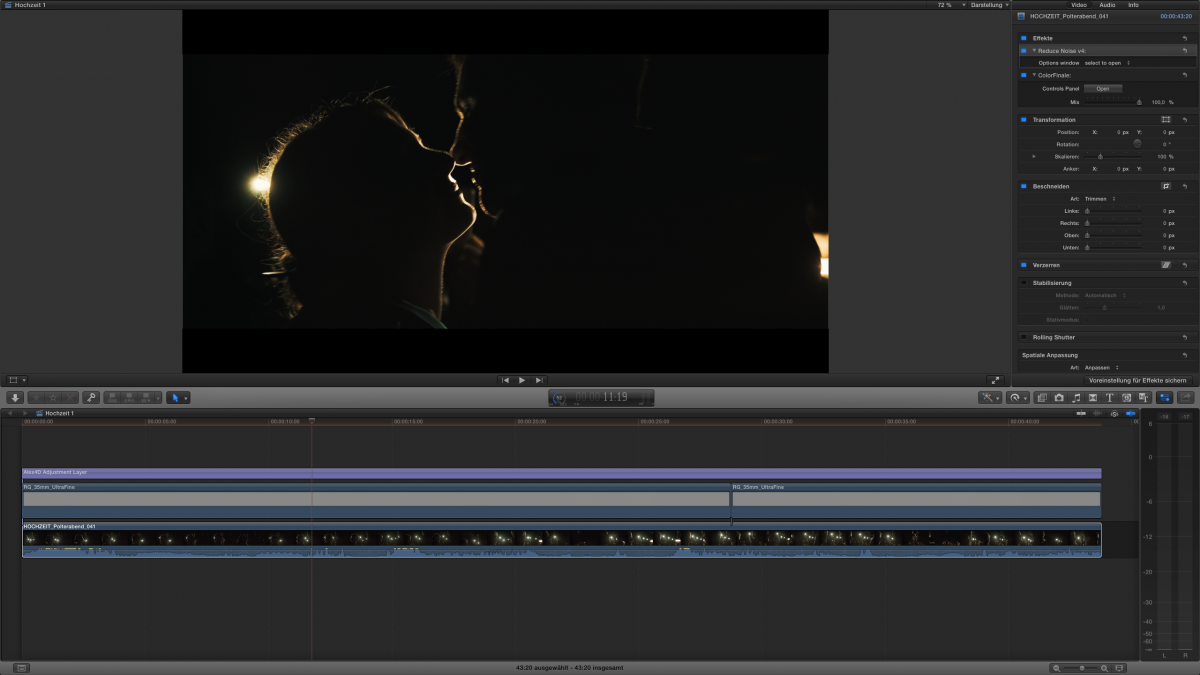
Here is a screenshot of what I meant. Look closely to the edges of the video, there is a thin line of transparency where the overlay clip (grain) cannot provide any blending.
The project size is exactly the same size of the clip (1920x1080).
Any ideas?
Here is a screenshot of what I meant. Look closely to the edges of the video, there is a thin line of transparency where the overlay clip (grain) cannot provide any blending.
The project size is exactly the same size of the clip (1920x1080).
Any ideas?
Last edit: 08 Dec 2015 19:48 by DFPete.
Please Log in to join the conversation.
- nate.haustein
-

- Offline
- Junior Member
-

Less
More
- Posts: 23
- Thank you received: 1
08 Dec 2015 23:14 #71272
by nate.haustein
Replied by nate.haustein on topic Edge of video sometimes transparent
Happens to me sometimes as well. Usually when a particular effect is placed on the top layer, or the video is of mixed formats or codecs. It's almost like the layer is shifted a pixel or two when the effect is applied. 101% scale of the top layer usually takes care of the problem.
Please Log in to join the conversation.
09 Dec 2015 06:24 #71284
by DFPete
I've got a response from a plugin developer, that "changing the Resolution and Pixel Aspect Ratio of the Motion Template of the plugin can solve the issue".
Odd but ok for now.
Replied by DFPete on topic Edge of video sometimes transparent
nate.haustein wrote: Happens to me sometimes as well. Usually when a particular effect is placed on the top layer, or the video is of mixed formats or codecs. It's almost like the layer is shifted a pixel or two when the effect is applied. 101% scale of the top layer usually takes care of the problem.
I've got a response from a plugin developer, that "changing the Resolution and Pixel Aspect Ratio of the Motion Template of the plugin can solve the issue".
Odd but ok for now.
Please Log in to join the conversation.

09 Dec 2015 06:47 #71285
by canelson
--
Matias Canelson
www.canelson.us
Replied by canelson on topic Edge of video sometimes transparent
I was building an effect in Apple Motion yesterday and I had a problem like this one. I fixed it by setting the project background to solid in Apple Motion. Select the effect in FCPX, right click it and select "Open in Motion", press CMD+J, go to Background and change it to "Solid" (probably you have it set to "Transparent" by the developer) and save. Apply the saved effect to your video and let me know if its fixed.
Hope it helps.
Hope it helps.
--
Matias Canelson
www.canelson.us
Please Log in to join the conversation.
09 Dec 2015 06:54 #71286
by DFPete
This helped a lot! Thank you. I wrote to the developer (Color Finale). Hopefully this will change in future releases.
Replied by DFPete on topic Edge of video sometimes transparent
canelson wrote: I was building an effect in Apple Motion yesterday and I had a problem like this one. I fixed it by setting the project background to solid in Apple Motion. Select the effect in FCPX, right click it and select "Open in Motion", press CMD+J, go to Background and change it to "Solid" (probably you have it set to "Transparent" by the developer) and save. Apply the saved effect to your video and let me know if its fixed.
Hope it helps.
This helped a lot! Thank you. I wrote to the developer (Color Finale). Hopefully this will change in future releases.
Please Log in to join the conversation.
09 Dec 2015 10:05 #71296
by Overturf
Replied by Overturf on topic Edge of video sometimes transparent
This happens to me quite frequently and I hate it because you usually notice it just after exporting the whole thing. It happens with footage that has the same size and codec on primary and secondary. Not depending on a certain plug-in. So I end up putting my whole project into a compound clip and scaling it to 101%. This works but it is still annoying 
Please Log in to join the conversation.
09 Dec 2015 10:18 #71297
by DFPete
Maybe it's better to put a little border around the whole Video when exporting.
Replied by DFPete on topic Edge of video sometimes transparent
Overturf wrote: This happens to me quite frequently and I hate it because you usually notice it just after exporting the whole thing. It happens with footage that has the same size and codec on primary and secondary. Not depending on a certain plug-in. So I end up putting my whole project into a compound clip and scaling it to 101%. This works but it is still annoying
Maybe it's better to put a little border around the whole Video when exporting.
Please Log in to join the conversation.
09 Dec 2015 15:53 #71301
by Julian
Replied by Julian on topic Edge of video sometimes transparent
I've had this same issue too, usually it has to do with plugins and the order in which they are placed in the effects browser. This happens frequently with the CrumplePop grain35 plugin the most.
Like everyone else said, you can scale in to fix it, or sometimes I'll just add a black generator under the entire timeline if it's happening on the A-Roll clips too. This happens just as frequently on A-Roll, you just don't notice it as much because there's no clip under it with motion, so you typically just see weirdness at the edges.
This just goes hand in hand with my thoughts that FCPX is a great program to start your edit with, but when it comes time to polish a final cut there are just too many little issues like this that really add up to make the final 10% really annoying to finish.
Like everyone else said, you can scale in to fix it, or sometimes I'll just add a black generator under the entire timeline if it's happening on the A-Roll clips too. This happens just as frequently on A-Roll, you just don't notice it as much because there's no clip under it with motion, so you typically just see weirdness at the edges.
This just goes hand in hand with my thoughts that FCPX is a great program to start your edit with, but when it comes time to polish a final cut there are just too many little issues like this that really add up to make the final 10% really annoying to finish.
Please Log in to join the conversation.
09 Dec 2015 15:59 #71303
by Julian
When FCPX updated with the mask effect, I started using that to create a really nice soft border around the edge of the video just to solve this problem, but it created new issues. In the timeline the framing looked really nice and subtle, once it was exported the effect would crop in to cover 50% of the frame. I would have to delete the effect and blank adjustment layer, start over applying the effect and export multiple times until it stopped screwing up.
It took about five exports to get this border to render properly.
Replied by Julian on topic Edge of video sometimes transparent
DFPete wrote:
Maybe it's better to put a little border around the whole Video when exporting.
When FCPX updated with the mask effect, I started using that to create a really nice soft border around the edge of the video just to solve this problem, but it created new issues. In the timeline the framing looked really nice and subtle, once it was exported the effect would crop in to cover 50% of the frame. I would have to delete the effect and blank adjustment layer, start over applying the effect and export multiple times until it stopped screwing up.
It took about five exports to get this border to render properly.
Please Log in to join the conversation.
