


- Posts: 479
- Thank you received: 5
3 Post Moderation Rule for New Boarders (25 Jan 2021)
New boarders will have their posts moderated - Don't worry if you cannot see your post immediately.
xml import problems
05 Sep 2015 15:24 #68058
by parkerhqj
xml import problems was created by parkerhqj
I have an editor who has sent me an xml file and half of the files are listed as missing when I open the project. It comes in as it's own new event. We have identical footage and half of the files on the timeline are fine. She didn't apply any filters or alter the files in any way. I have the original files in a different event in the same library but I can't figure out how to link them to the xml event created with the new xml project. All the original files are in the original files folder on the original event, but the new events created with the xml project file are empty. I'm pretty sure we're doing this wrong. Suggestions?
thx
thx
Please Log in to join the conversation.

05 Sep 2015 15:42 #68060
by Emmanuel
Replied by Emmanuel on topic xml import problems
Sorry my answer is probably not gonna help, but first things first: did you try to reconnect the files using Files -> Relink files ?
Please Log in to join the conversation.
05 Sep 2015 16:04 #68061
by Emmanuel
Replied by Emmanuel on topic xml import problems
Sorry didn't see you had 390 posts here. Of course you've tried.
Please Log in to join the conversation.
05 Sep 2015 17:51 #68067
by parkerhqj
Replied by parkerhqj on topic xml import problems
Yeah - I should have mentioned that. I was told the files were incompatible, but they're identical.
Please Log in to join the conversation.
05 Sep 2015 17:52 #68068
by Emmanuel
Replied by Emmanuel on topic xml import problems
I've had this once with MTS files. Can it be the case ?
Please Log in to join the conversation.
05 Sep 2015 18:02 #68069
by Emmanuel
Replied by Emmanuel on topic xml import problems
I think if you want some help people will need much more details. You might even want to upload the XML here, so we see how it opens.
Please Log in to join the conversation.
05 Sep 2015 20:39 #68075
by parkerhqj
Replied by parkerhqj on topic xml import problems
OK, here's the screen shot. I shot with a Canon C100 and imported all the files from my shoot into a fcpx library. I then handed that library off to another editor on a portable Lacie hard drive after copying that same library onto my own edit drive. She edited a timeline of b-roll for me and sent me the xml file which I imported into my library. As you can see, some of my clips are fine and some are called missing.
When I try to relink them, I am told they are incompatible. Those events with the yellow exclamation points represent the repeated attempts to reimport the xml file. She sent it to me twice in case one was corrupted. All the original media is in the original 7-13-15 event. I copied that footage to one of the new events and I still can't get those files to relink. I'll also upload the xml file if that would help. Thanks!
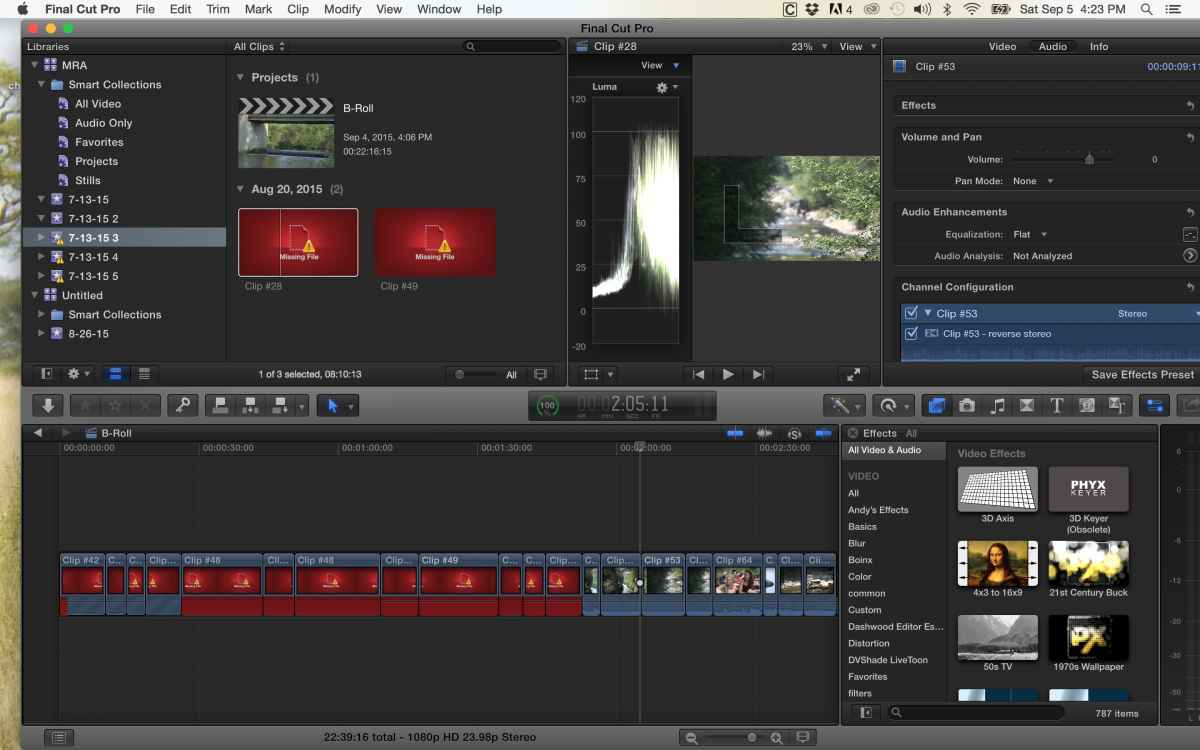
When I try to relink them, I am told they are incompatible. Those events with the yellow exclamation points represent the repeated attempts to reimport the xml file. She sent it to me twice in case one was corrupted. All the original media is in the original 7-13-15 event. I copied that footage to one of the new events and I still can't get those files to relink. I'll also upload the xml file if that would help. Thanks!
Please Log in to join the conversation.
05 Sep 2015 20:51 #68077
by Emmanuel
Replied by Emmanuel on topic xml import problems
Did you use managed media (copied into the library) or external ?
Do you use unique file names ? I know that this can happen when several files have the same name. FCPX gets lost.
(still can't access the XML)
Do you use unique file names ? I know that this can happen when several files have the same name. FCPX gets lost.
(still can't access the XML)
Please Log in to join the conversation.
05 Sep 2015 20:58 #68078
by Emmanuel
Replied by Emmanuel on topic xml import problems
In the meantime, if you are able to meet your co-editor physically, she could create a new library with just her project, and you move that project into your library.
But I suppose you can't.
But I suppose you can't.
Please Log in to join the conversation.
05 Sep 2015 20:58 #68079
by Emmanuel
Replied by Emmanuel on topic xml import problems
Anyway I'm saying stuff you already know. Let's wait for Ben or Ronny...
Please Log in to join the conversation.
05 Sep 2015 21:27 #68080
by parkerhqj
Replied by parkerhqj on topic xml import problems
Thanks. You'd be surprised at the amount of stuff I don't know - and usually just when I think I know it!
It's managed media, but now that you mention it, the files are a little confusing. They're labeled 1-85, but for 9-49, they're broken into Clip#9 (fcp1).mov followed by Clip #9 even though they are different clips. Not sure why that would happen.
I think I've stumbled on to the problem. I added some footage to the same library from yesterday's shoot and they were numbers from 1 to whatever. So I lied when I said both libraries had the same footage because my library had the new clips from the second shoot and probably confused fcpx when I opened the xml file. I have a back-up without the new footage and when I get time, I'll try opening the xml file there.
Thanks for indulging me!
It's managed media, but now that you mention it, the files are a little confusing. They're labeled 1-85, but for 9-49, they're broken into Clip#9 (fcp1).mov followed by Clip #9 even though they are different clips. Not sure why that would happen.
I think I've stumbled on to the problem. I added some footage to the same library from yesterday's shoot and they were numbers from 1 to whatever. So I lied when I said both libraries had the same footage because my library had the new clips from the second shoot and probably confused fcpx when I opened the xml file. I have a back-up without the new footage and when I get time, I'll try opening the xml file there.
Thanks for indulging me!
Please Log in to join the conversation.
05 Sep 2015 22:54 #68081
by Emmanuel
Replied by Emmanuel on topic xml import problems
Yeah that might be it.
Does the C100 have an option to generate unique file names ? If so, it might be good to enable.
Good luck !
Does the C100 have an option to generate unique file names ? If so, it might be good to enable.
Good luck !
Please Log in to join the conversation.
06 Sep 2015 16:17 #68095
by parkerhqj
Replied by parkerhqj on topic xml import problems
So I imported the xml file into a library that had the original footage and it worked no problem. I then imported the new footage and it's fine. It was only when I added footage to my library and then imported the xml file that the problem arose. If there is different clip naming protocol for the C100, I'm unaware of it. It would be nice not to run into this problem.
Thanks for your help.
Thanks for your help.
Please Log in to join the conversation.
06 Sep 2015 17:59 #68097
by Emmanuel
Replied by Emmanuel on topic xml import problems
Good to know it worked out !
I've just checked and I see that the C100 works with AVCHD, and .MTS files inside.
So actually I've had the same problem as you some time ago, and it was indeed a naming problem.
I don't know why FCPX is not able to differentiate them better though. People working with Premiere are complaining too, that being said.
I've just checked and I see that the C100 works with AVCHD, and .MTS files inside.
So actually I've had the same problem as you some time ago, and it was indeed a naming problem.
I don't know why FCPX is not able to differentiate them better though. People working with Premiere are complaining too, that being said.
Please Log in to join the conversation.
