


- Posts: 31
- Thank you received: 3
3 Post Moderation Rule for New Boarders (25 Jan 2021)
New boarders will have their posts moderated - Don't worry if you cannot see your post immediately.
Clips going blank on timeline, reappearing when I roll over them
01 Sep 2015 19:14 #67886
by Arsecati
Anyone else know why this is happening? It's since the last update, and looks like a new 'feature', but for the life of me cannot figure out what the advantage is of it, and it's actually really annoying!
Clips going blank on the timeline, like they are hidden, but spring in to view once you roll over them.
Anyone any ideas of how to stop this?
Cheers!
Clips going blank on the timeline, like they are hidden, but spring in to view once you roll over them.
Anyone any ideas of how to stop this?
Cheers!
Please Log in to join the conversation.

02 Sep 2015 01:39 #67898
by BenB
Replied by BenB on topic Clips going blank on timeline, reappearing when I roll over them
What does "hidden" mean, exactly? You mean no thumbnails in the film strip views? Just black clips? Or they disappear?
Please Log in to join the conversation.
02 Sep 2015 04:46 - 02 Sep 2015 04:49 #67899
by Arsecati
Replied by Arsecati on topic Clips going blank on timeline, reappearing when I roll over them
Bugger. If you don't know what I mean, then it's yet another bug that I have, as if you had experienced the same thing, you'd know what I was talking about!
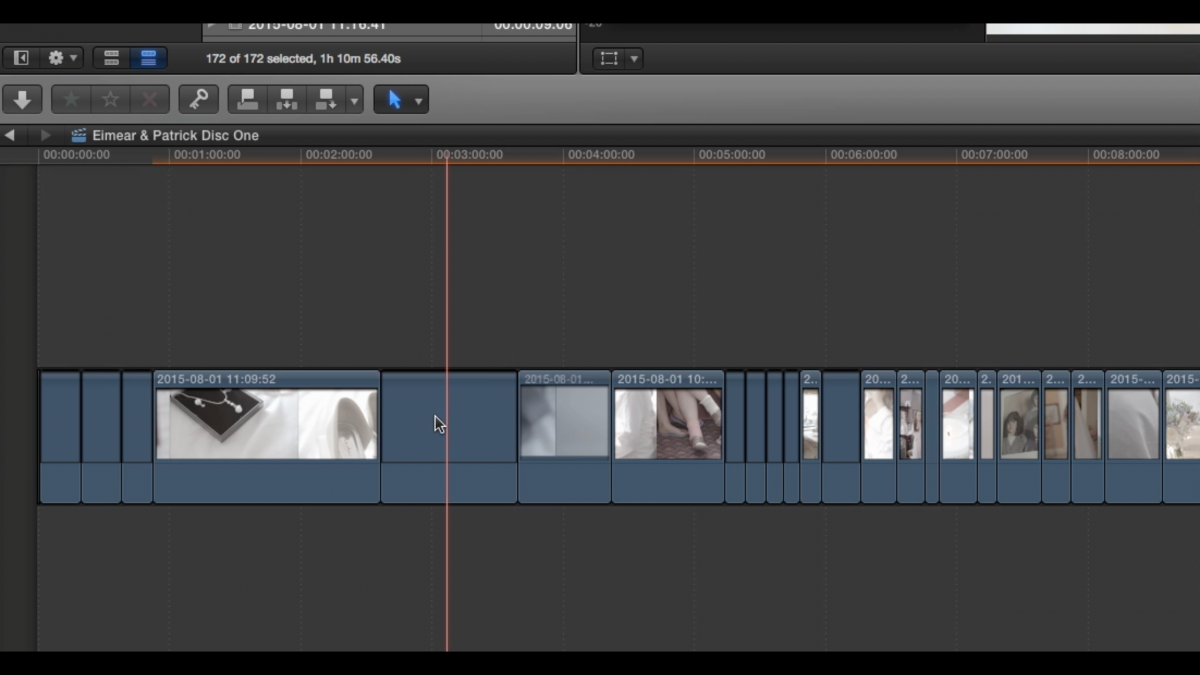
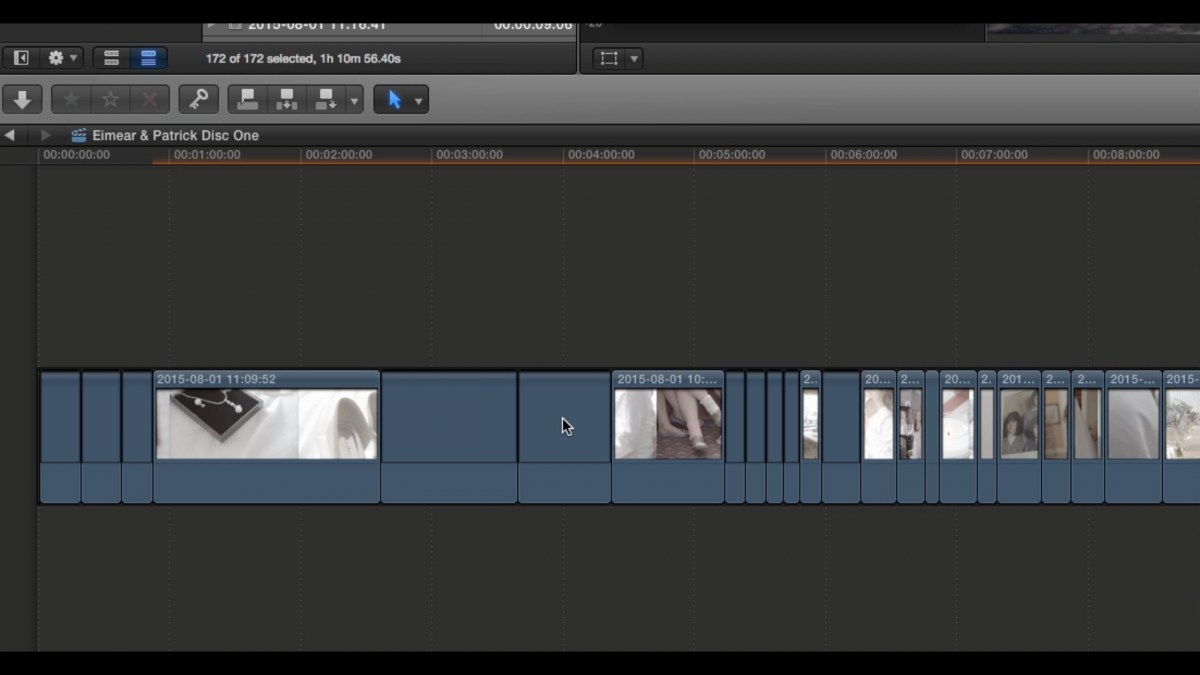
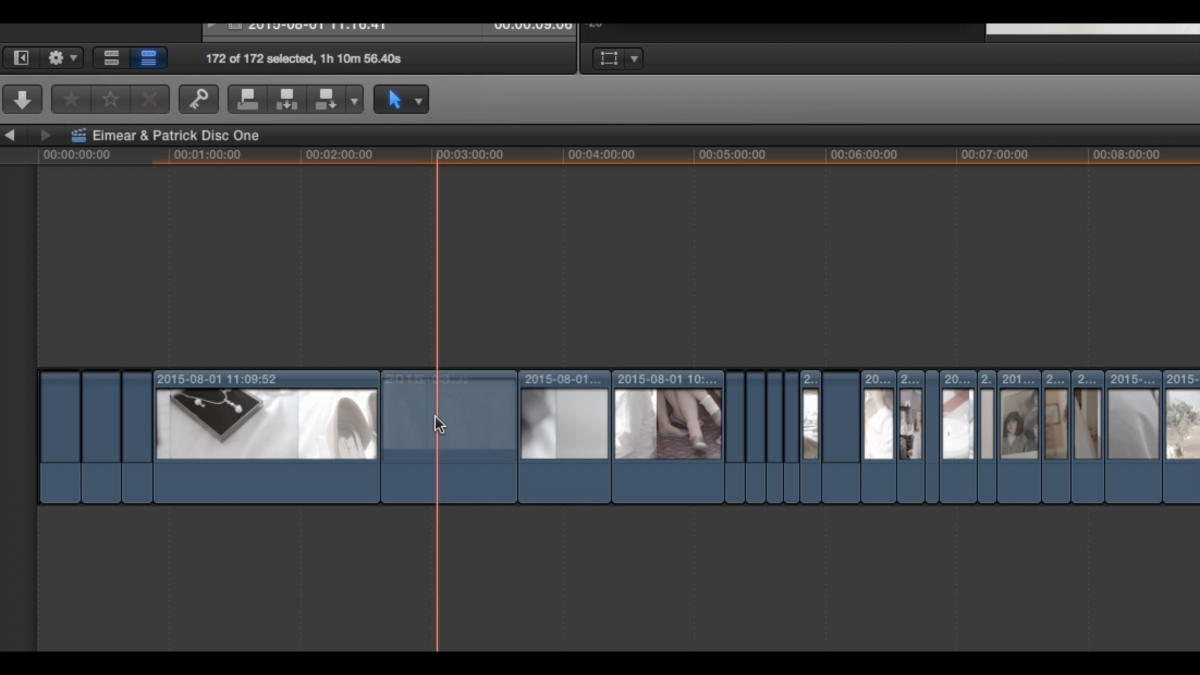
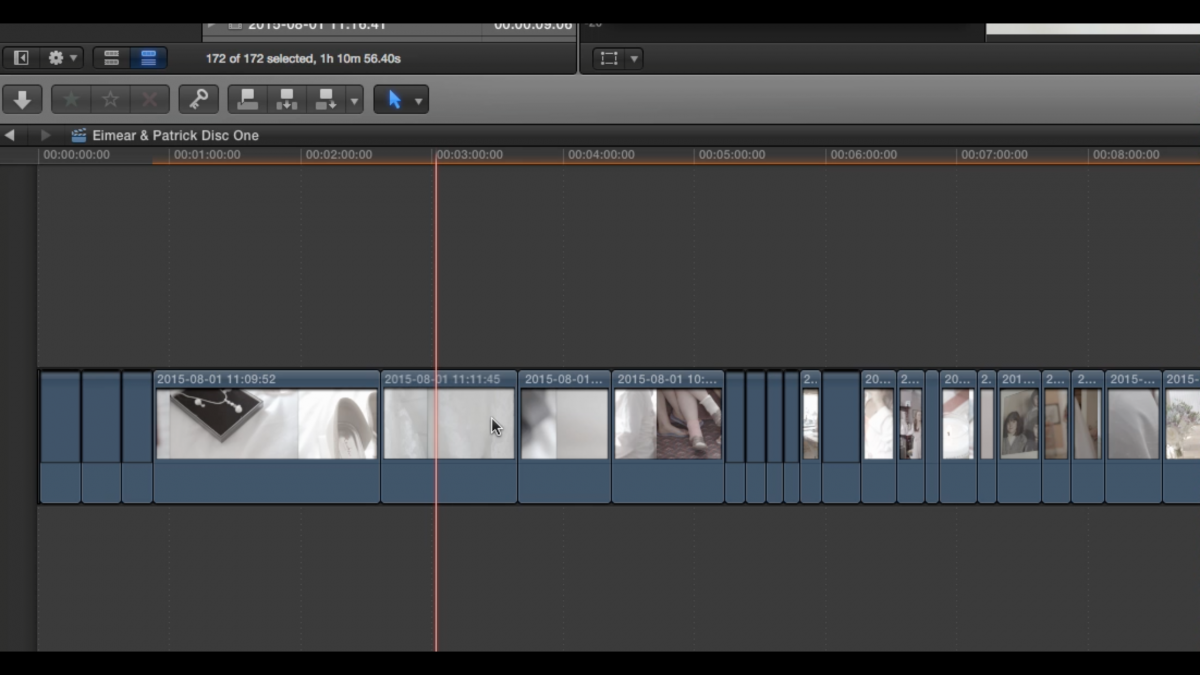
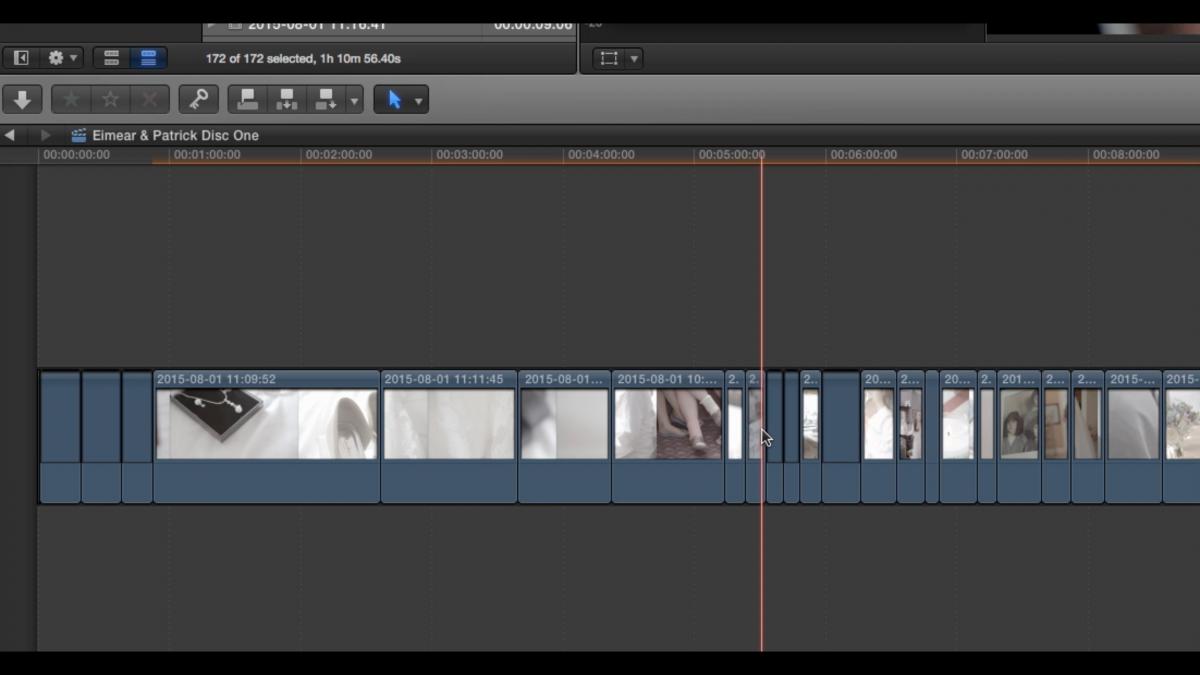
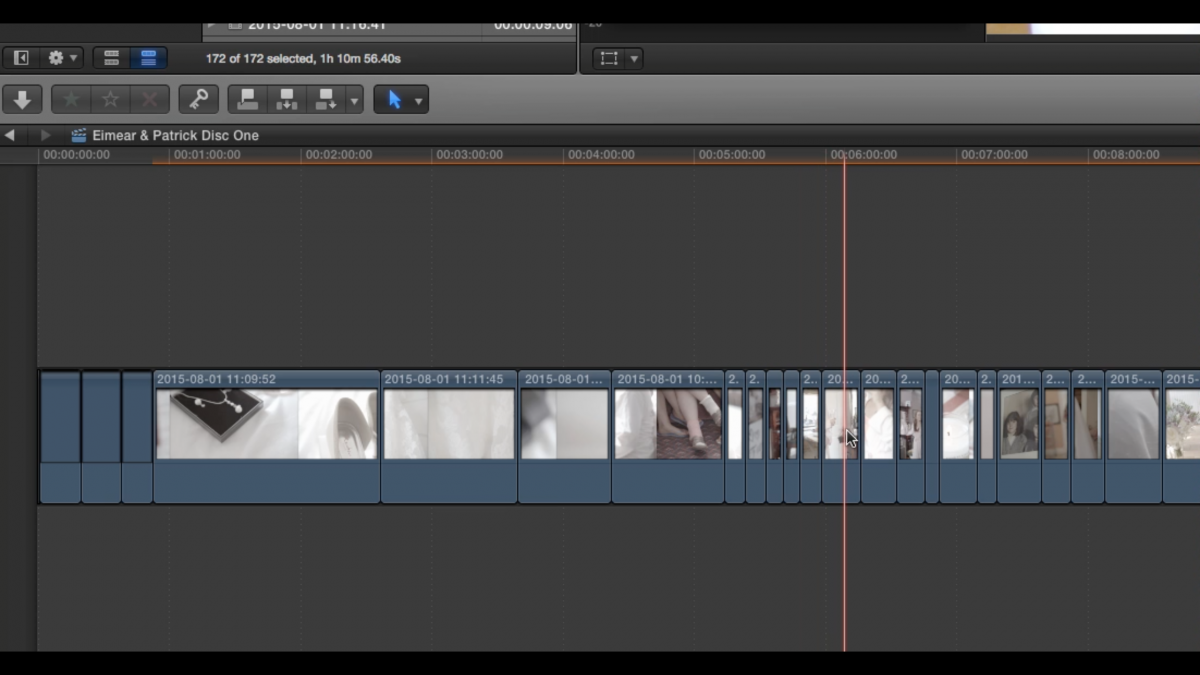
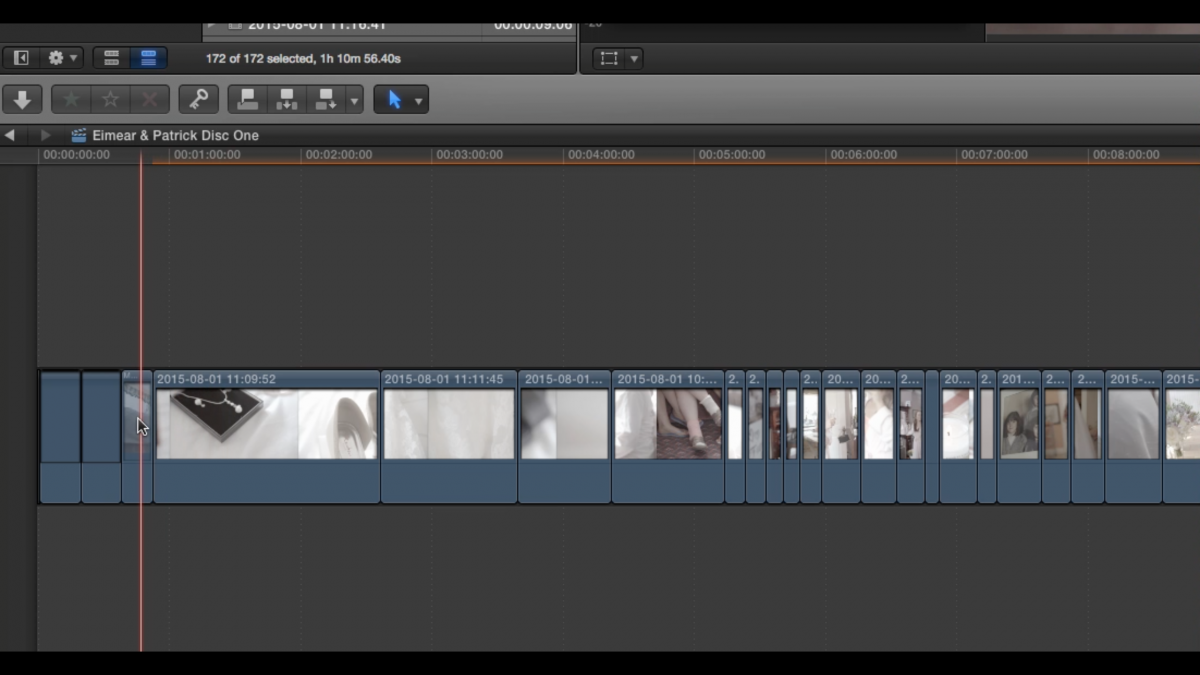
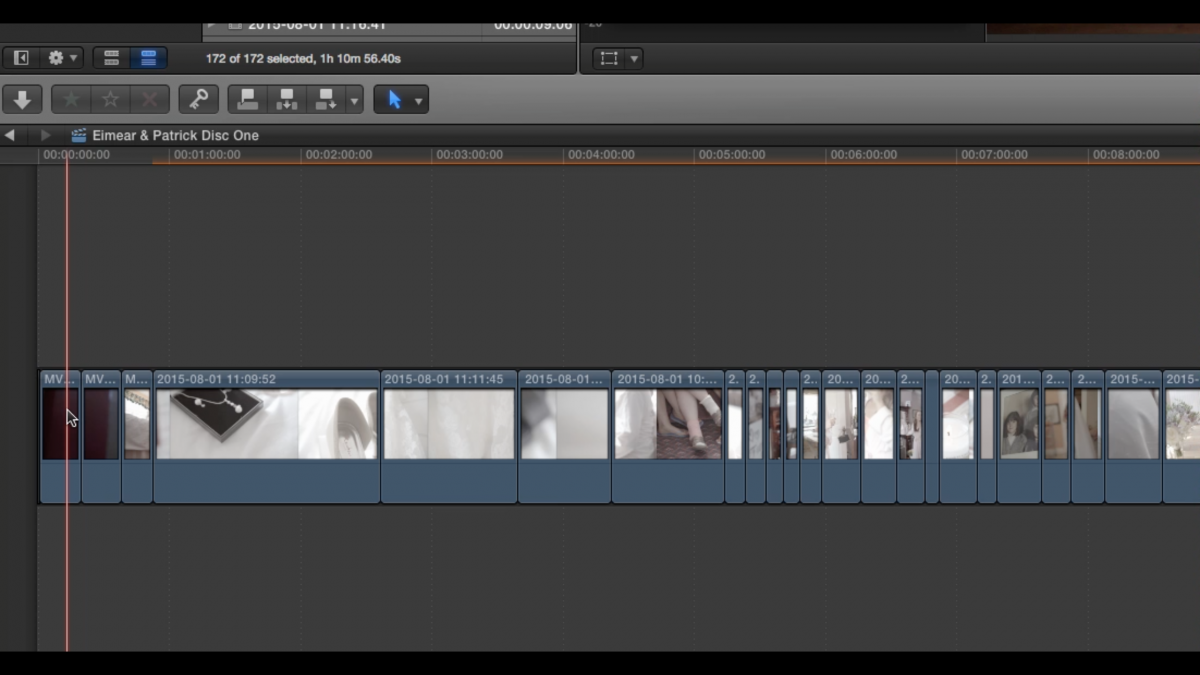
There could be 50 clips on the timeline. Every now and again, maybe after zooming in and out of the timeline as I cut along it, the actual 'thumbnail' of 'still' of a clip will disappear - the clip will still be in place, but it will just be blank - the 'content' won't be visible. But when you roll the mouse/pointer over the clip, the 'thumbnail' kind of 'springs' back in to view again.
It's quite hard to explain, but obvious to anyone who has seen it, and it looks like your lucky that you don't have this issue. I have searched everywhere and can't see any mention of it, so I don't have much confidence this is going to get resolved. I thought it 'may' have been a feature of some sort, but can see now it's just another bug I have.
There could be 50 clips on the timeline. Every now and again, maybe after zooming in and out of the timeline as I cut along it, the actual 'thumbnail' of 'still' of a clip will disappear - the clip will still be in place, but it will just be blank - the 'content' won't be visible. But when you roll the mouse/pointer over the clip, the 'thumbnail' kind of 'springs' back in to view again.
It's quite hard to explain, but obvious to anyone who has seen it, and it looks like your lucky that you don't have this issue. I have searched everywhere and can't see any mention of it, so I don't have much confidence this is going to get resolved. I thought it 'may' have been a feature of some sort, but can see now it's just another bug I have.
Last edit: 02 Sep 2015 04:49 by Arsecati.
Please Log in to join the conversation.
02 Sep 2015 13:39 #67914
by Arsecati
Replied by Arsecati on topic Clips going blank on timeline, reappearing when I roll over them
Here is a series of pics to show exactly what I mean (I can't attach the video). The clips go 'blank' randomly (maybe after zooming in or out, or scrolling the timeline back and forth).
Cheers!
Cheers!
Please Log in to join the conversation.


02 Sep 2015 14:03 - 02 Sep 2015 14:04 #67915
by dgwvideo
Creating history....one edit at a time !
Replied by dgwvideo on topic Clips going blank on timeline, reappearing when I roll over them
I have actually seen this before but not often enough to pinpoint a specific cause. I'm guessing that it may be related to some corruption in render files and affects the screen redraw of thumbnails. This may be due to frequent resizing the clip height, zooming the timeline frequently and/or applying then deleting effects multiple times but I can't be certain of that. I have also noticed this periodically can occur when skimming a clip in the browser.
Try selecting the library in FCPX and deleting all generated library files (choosing all render files) from within FCPX. If you only see this in one specific project or event then you can try deleting the render files for that specific event rather than the library. Close FCPX and relaunch it. When your project reloads, give it some time to redraw the clip thumbnails before you begin editing. Also make sure you turn off background rendering in FCPX preferences as this constant rendering when editing may contribute to render files becoming corrupt. If doing this doesn't fix the issue, close FCPX and relaunch it holding down the Command and Option keys to trash the preference files. Post back and let us know if any of that helps.
Try selecting the library in FCPX and deleting all generated library files (choosing all render files) from within FCPX. If you only see this in one specific project or event then you can try deleting the render files for that specific event rather than the library. Close FCPX and relaunch it. When your project reloads, give it some time to redraw the clip thumbnails before you begin editing. Also make sure you turn off background rendering in FCPX preferences as this constant rendering when editing may contribute to render files becoming corrupt. If doing this doesn't fix the issue, close FCPX and relaunch it holding down the Command and Option keys to trash the preference files. Post back and let us know if any of that helps.
Creating history....one edit at a time !
Last edit: 02 Sep 2015 14:04 by dgwvideo. Reason: Typo
Please Log in to join the conversation.
02 Sep 2015 14:18 #67918
by Arsecati
Replied by Arsecati on topic Clips going blank on timeline, reappearing when I roll over them
Many, many thanks for the reply DGW!
The thing is, this is a brand new project - literally just imported the clips and put them on the timeline, so no rendering done I'm afraid. This has been happening with every project ever since the update was released, and has been there since day 1. I originally thought it was a new 'feature', but didn't see the point of it and was too busy to investigate (it is just an irritation at the end of the day, it doesn't affect the output). Due to other re-occurring bugs with FCPX (mainly crashing), the preferences have been trashed numerous times unfortunately, but this 'anomaly' remains. They will just revert back to their 'blank' status over time, the more I zoom in or out, or move along the timeline - I just have to keep rolling over them to make them reappear again: but still annoying!
Anyway, many thanks again for the swift reply - I guess it isn't a feature after all!
The thing is, this is a brand new project - literally just imported the clips and put them on the timeline, so no rendering done I'm afraid. This has been happening with every project ever since the update was released, and has been there since day 1. I originally thought it was a new 'feature', but didn't see the point of it and was too busy to investigate (it is just an irritation at the end of the day, it doesn't affect the output). Due to other re-occurring bugs with FCPX (mainly crashing), the preferences have been trashed numerous times unfortunately, but this 'anomaly' remains. They will just revert back to their 'blank' status over time, the more I zoom in or out, or move along the timeline - I just have to keep rolling over them to make them reappear again: but still annoying!
Anyway, many thanks again for the swift reply - I guess it isn't a feature after all!
Please Log in to join the conversation.
02 Sep 2015 15:29 #67922
by VidGreg
Arsecati,
AFAIK this is typical behavior.
FCPX and the OS create priority tasks for resources. Thumbnails get pushed down the list unless the curser is over the position in the timeline where the priority will go up and the thumbnail will get redrawn. Also if you move to a section of the timeline without pics in timeline but then pause in activities, then FCPX will start to redraw the thumbnails for that section of the timeline in the viewer especially true if you click on the timeline.
Thumbnails have to be redrawn as you zoom in and out. Typically, if you are not changing the zoom, then the entire timeline will eventually be put into RAM/cache and then you can go back and forth and the thumbnails will be there.
This is simply resource priority. How fast it gets redrawn is a function of RAM, drive speed and connection, CPU/GPU loads…
In all your pics I see unrendered clips so this is another factor.
At least on my system, I see this all the time. rMBP/16GB ram/256ssd/media on USB3 external hdds with mostly multi-cam 1080 projects/2 monitors.
Hope this helps, Greg
AFAIK this is typical behavior.
FCPX and the OS create priority tasks for resources. Thumbnails get pushed down the list unless the curser is over the position in the timeline where the priority will go up and the thumbnail will get redrawn. Also if you move to a section of the timeline without pics in timeline but then pause in activities, then FCPX will start to redraw the thumbnails for that section of the timeline in the viewer especially true if you click on the timeline.
Thumbnails have to be redrawn as you zoom in and out. Typically, if you are not changing the zoom, then the entire timeline will eventually be put into RAM/cache and then you can go back and forth and the thumbnails will be there.
This is simply resource priority. How fast it gets redrawn is a function of RAM, drive speed and connection, CPU/GPU loads…
In all your pics I see unrendered clips so this is another factor.
At least on my system, I see this all the time. rMBP/16GB ram/256ssd/media on USB3 external hdds with mostly multi-cam 1080 projects/2 monitors.
Hope this helps, Greg
Please Log in to join the conversation.
02 Sep 2015 15:50 #67926
by Arsecati
Many thanks Greg,
There is definitely total logic to what you are saying, but this has only just started happening with the last update of FCPX 10.2.1 - and I've had FCPX since its original launch (though admittedly, didn't fully cross over till about 1.4!). It makes no difference if my clips are rendered or not either: if I zoom in and out a few times and/or scroll off screen left or right, I can make them 'disappear' again, no matter if they are rendered or not (and thus 'reappear' by rolling over them again!)
The first 3 clips on the timeline were from a 5D MKII and the remainder were from an FS700 (I had only just put a blanket saturation adjustment on the FS700 clips, hence they show as 'unrendered'), but all was transcoded on import that needed to be transcoded, so there was literally nothing happening in the background when I put the clips on the timeline, as I had already done the import (and transcoding) last night.
I'm also running this on a 27' iMac with 32GB, 2GB 6970M graphics card and a 1TB external SSD via TB, so it's not (or shouldn't be!!) short on resources!
I think I'm just going to have to live with it - well, until I learn how to use PP that is!!!
There is definitely total logic to what you are saying, but this has only just started happening with the last update of FCPX 10.2.1 - and I've had FCPX since its original launch (though admittedly, didn't fully cross over till about 1.4!). It makes no difference if my clips are rendered or not either: if I zoom in and out a few times and/or scroll off screen left or right, I can make them 'disappear' again, no matter if they are rendered or not (and thus 'reappear' by rolling over them again!)
The first 3 clips on the timeline were from a 5D MKII and the remainder were from an FS700 (I had only just put a blanket saturation adjustment on the FS700 clips, hence they show as 'unrendered'), but all was transcoded on import that needed to be transcoded, so there was literally nothing happening in the background when I put the clips on the timeline, as I had already done the import (and transcoding) last night.
I'm also running this on a 27' iMac with 32GB, 2GB 6970M graphics card and a 1TB external SSD via TB, so it's not (or shouldn't be!!) short on resources!
I think I'm just going to have to live with it - well, until I learn how to use PP that is!!!
Please Log in to join the conversation.
02 Sep 2015 17:28 #67931
by VidGreg
How long does it take for your system to draw the thumbnails? Should be pretty fast.
My current project is 1.5 hours long with lots of multi-cam, my system takes a couple of seconds to redraw the clip the curser is on and 10-15 seconds to fill in the timeline thumbnails. However, when I scroll the timeline, it has the missing clip thumbnails. Remember, FCPX has to recreate these all the time, meaning finding and resizing each corresponding frame graphic.
Where are you storing your cache files for the thumbnails? How much free space is available?
You could try deleting these files and have FCPX recreate them. Possible you have corrupted files.
Also how did you update your OS from Mavericks to Yosemite? If you didn't do a fresh install MA may have created a problem. However, I did a clean install and see this.
Can't be sure, but I think this was standard behavior previous versions. Guess I just except/expect this behavior as part of redrawing the screen.
Finally you can monitor some system resources via Activity Monitor, but you seem to have a fine system.
Hope this helps, Greg
My current project is 1.5 hours long with lots of multi-cam, my system takes a couple of seconds to redraw the clip the curser is on and 10-15 seconds to fill in the timeline thumbnails. However, when I scroll the timeline, it has the missing clip thumbnails. Remember, FCPX has to recreate these all the time, meaning finding and resizing each corresponding frame graphic.
Where are you storing your cache files for the thumbnails? How much free space is available?
You could try deleting these files and have FCPX recreate them. Possible you have corrupted files.
Also how did you update your OS from Mavericks to Yosemite? If you didn't do a fresh install MA may have created a problem. However, I did a clean install and see this.
Can't be sure, but I think this was standard behavior previous versions. Guess I just except/expect this behavior as part of redrawing the screen.
Finally you can monitor some system resources via Activity Monitor, but you seem to have a fine system.
Hope this helps, Greg
Please Log in to join the conversation.
- Tom Wolsky
-

- Offline
- Moderator
-

02 Sep 2015 17:41 #67933
by Tom Wolsky
Replied by Tom Wolsky on topic VidGreg
The problem usually is if you take your clips, throw them in the timeline, start cutting them up, and then the thumbnails never get processed properly. Usually with this kind of thing, I close the app, dump the library cache bundle, open the app, and wait for it to reprocess the thumbnails.
Please Log in to join the conversation.
02 Sep 2015 17:57 #67935
by Arsecati
Oh wow, waiting that long would kill me! For comparison, that timeline before I start cutting is over THREE HOURS LONG! It will still end up being a good 1.5 to 2 hours long when it's finished!
The thumbnails appear instantly when I roll over them. But I've been using FCPX exclusively now for 3 years with every update, and this has only started happening with the latest update - the moment it was installed.
I've uploaded a video clip to show what happens (though funnily enough, the first clip does take a second!)and as you can see from the video clip, the nature of their 'appearance' actually made me think it was a feature. This HAS been going on since the moment 10.2.1 came out, and I've put up with it all this time, it's just now it's getting annoying that I'm trying to investigate why.
I can fly from beginning to end of footage - double clip to fit whole timeline in and/or zoom in or out instantly. This DOESN'T always happen, but it just happens enough to make me wonder why!
And as I said Tom, I've had FCPX since it's release and exclusively for 3 years, and this is how I've always done it. The thumbnails are processed pretty much immediately, but the constant 'disappearing' and 'reappearing' will and can occur hours later - it is not an issue of not waiting for them to get processed properly.
Here is the youtube clip anyway guys, see if it makes any more sense to you!
The thumbnails appear instantly when I roll over them. But I've been using FCPX exclusively now for 3 years with every update, and this has only started happening with the latest update - the moment it was installed.
I've uploaded a video clip to show what happens (though funnily enough, the first clip does take a second!)and as you can see from the video clip, the nature of their 'appearance' actually made me think it was a feature. This HAS been going on since the moment 10.2.1 came out, and I've put up with it all this time, it's just now it's getting annoying that I'm trying to investigate why.
I can fly from beginning to end of footage - double clip to fit whole timeline in and/or zoom in or out instantly. This DOESN'T always happen, but it just happens enough to make me wonder why!
And as I said Tom, I've had FCPX since it's release and exclusively for 3 years, and this is how I've always done it. The thumbnails are processed pretty much immediately, but the constant 'disappearing' and 'reappearing' will and can occur hours later - it is not an issue of not waiting for them to get processed properly.
Here is the youtube clip anyway guys, see if it makes any more sense to you!
Please Log in to join the conversation.
- MarkNelsonMovies
-

- Offline
- Elite Member
-

Less
More
- Posts: 256
- Thank you received: 48
05 Sep 2015 18:41 #68073
by MarkNelsonMovies
Replied by MarkNelsonMovies on topic Clips going blank on timeline, reappearing when I roll over them
I've had had this issue since 10.2.0 or 10.2.1 (not sure which) and still have it off and on on 10.2.2. I just ignored it as a bug since it didn't effect my workflow at all, but since this post I took a closer look at my current project, and so far it only happens on still photos which makes me wonder if it has something to do with the source frame size not matching the project size.
Please Log in to join the conversation.
