


3 Post Moderation Rule for New Boarders (25 Jan 2021)
New boarders will have their posts moderated - Don't worry if you cannot see your post immediately.
Clip plays slightly faster when put in the timeline
- sonictimbo
-
 Topic Author
- Offline
- Senior Member
-

Less
More
29 Aug 2015 11:48 #67780
by sonictimbo
Clip plays slightly faster when put in the timeline was created by sonictimbo
I am just starting a new project in FCPX (10.1.4)
When I drag a clip from the clips panel into the timeline, they run slightly faster. I have never had this before!
The clips are from all different types of sources (go pros / iPhones / DSLRs etc) but I just finished a large project of the same type and didn't have this problem.
Have I accidentally done something wrong?
When I drag a clip from the clips panel into the timeline, they run slightly faster. I have never had this before!
The clips are from all different types of sources (go pros / iPhones / DSLRs etc) but I just finished a large project of the same type and didn't have this problem.
Have I accidentally done something wrong?
Please Log in to join the conversation.


29 Aug 2015 16:40 #67793
by dgwvideo
Creating history....one edit at a time !
Replied by dgwvideo on topic Clip plays slightly faster when put in the timeline
When you drop a clip into a timeline it will conform it's playback speed to the project frame rate even if it is recorded at a higher or lower fps. When you select a clip and set it for automatic speed, then it plays back at the recorded frame rate which may be different than the project frame rate. A clip at 24fps, for example, would play slightly faster if dropped in a 30p timeline and set for automatic speed. Conversely, a 60 fps clip would play slower in that same 30p timeline. Perhaps this is your issue.
Creating history....one edit at a time !
Please Log in to join the conversation.

29 Aug 2015 20:22 #67801
by BenB
Replied by BenB on topic Clip plays slightly faster when put in the timeline
Exactly. That's why if you want really good quality slow motion, shoot at 60p, edit in 24p. When the clip is conformed to the Timeline, it will play all the original frames (no generated "fake" frames) at around 40% slow motion. Then slow it down more if desired with Optical Flow, and you can get some amazing results.
So, in your Timeline, select a clip that seems to be playing at an incorrect speed. Cmd-R to show the Retiming Header. Is it set to 100%, or something else?
So, in your Timeline, select a clip that seems to be playing at an incorrect speed. Cmd-R to show the Retiming Header. Is it set to 100%, or something else?
Please Log in to join the conversation.
- sonictimbo
-
Topic Author
- Offline
- Senior Member
-
31 Aug 2015 13:33 #67843
by sonictimbo
Replied by sonictimbo on topic Clip plays slightly faster when put in the timeline
Thanks both!
dgwvideo - How do I set it for 'Automatic Speed'
dgwvideo - How do I set it for 'Automatic Speed'
Please Log in to join the conversation.
31 Aug 2015 14:02 - 31 Aug 2015 14:06 #67847
by dgwvideo
The option is found in the Retime Editor. Second button from left on right side menu bar under the viewer. Or use Command-R. Actually I think it's called the timing menu or something similar. You'll see many options for speed changes as well as optical flow, frame blending, etc.
Creating history....one edit at a time !
Replied by dgwvideo on topic Clip plays slightly faster when put in the timeline
sonictimbo wrote: Thanks both!
dgwvideo - How do I set it for 'Automatic Speed'
The option is found in the Retime Editor. Second button from left on right side menu bar under the viewer. Or use Command-R. Actually I think it's called the timing menu or something similar. You'll see many options for speed changes as well as optical flow, frame blending, etc.
Creating history....one edit at a time !
Last edit: 31 Aug 2015 14:06 by dgwvideo.
Please Log in to join the conversation.
- howard.ritchie
-
- Offline
- New Member
-

Less
More
- Posts: 19
- Thank you received: 0
03 Jul 2016 17:47 #78343
by howard.ritchie
Replied by howard.ritchie on topic Clip plays slightly faster when put in the timeline
Exactly same problem here. Clip plays fine in the finder, then when dragged into the project I sound like a chip monk.
Is there a quick trick? Re timing does not work because it has raised the pitch half a semi tone on my voice which wont be affected ....
Maybe I need to fix this by creating new project but I have some ideas all saved in this timeline... any help?
H
Is there a quick trick? Re timing does not work because it has raised the pitch half a semi tone on my voice which wont be affected ....
Maybe I need to fix this by creating new project but I have some ideas all saved in this timeline... any help?
H
Please Log in to join the conversation.
- howard.ritchie
-
- Offline
- New Member
-
Less
More
- Posts: 19
- Thank you received: 0
03 Jul 2016 18:03 #78344
by howard.ritchie
Replied by howard.ritchie on topic Clip plays slightly faster when put in the timeline
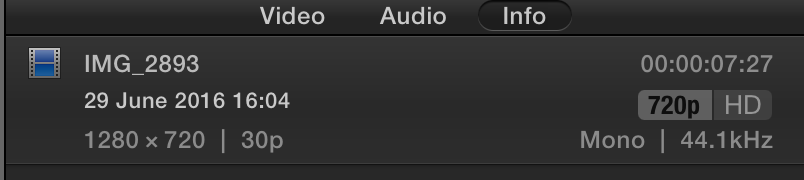
ah ha... the two screen shots... show part of the problem
the 30fps was the orignal iphone photage and the 24 is the iphone footage that I first dragged into fcpx and re bounced out as a keepable file.
So I assume the fix would be to find the original clip, import that and add that to the project not the cleansed and re saved version maybe?
But like the OP i have footage from go pro dslr and iphone all different rates
the 30fps was the orignal iphone photage and the 24 is the iphone footage that I first dragged into fcpx and re bounced out as a keepable file.
So I assume the fix would be to find the original clip, import that and add that to the project not the cleansed and re saved version maybe?
But like the OP i have footage from go pro dslr and iphone all different rates

Please Log in to join the conversation.
- howard.ritchie
-
- Offline
- New Member
-
Less
More
- Posts: 19
- Thank you received: 0
03 Jul 2016 18:32 #78346
by howard.ritchie
Replied by howard.ritchie on topic Clip plays slightly faster when put in the timeline
So
1. 30fps works fine on speech
2. 24fps does not work
3. 2ffps works fine
I had to convert each source file using software to get round it but an ideal fix would be really appreciated inside of the project.
1. 30fps works fine on speech
2. 24fps does not work
3. 2ffps works fine
I had to convert each source file using software to get round it but an ideal fix would be really appreciated inside of the project.
Please Log in to join the conversation.
