


- Posts: 25
- Thank you received: 3
3 Post Moderation Rule for New Boarders (25 Jan 2021)
New boarders will have their posts moderated - Don't worry if you cannot see your post immediately.
Color correcting over time
23 Aug 2015 18:46 #67673
by Wilfried
Color correcting over time was created by Wilfried
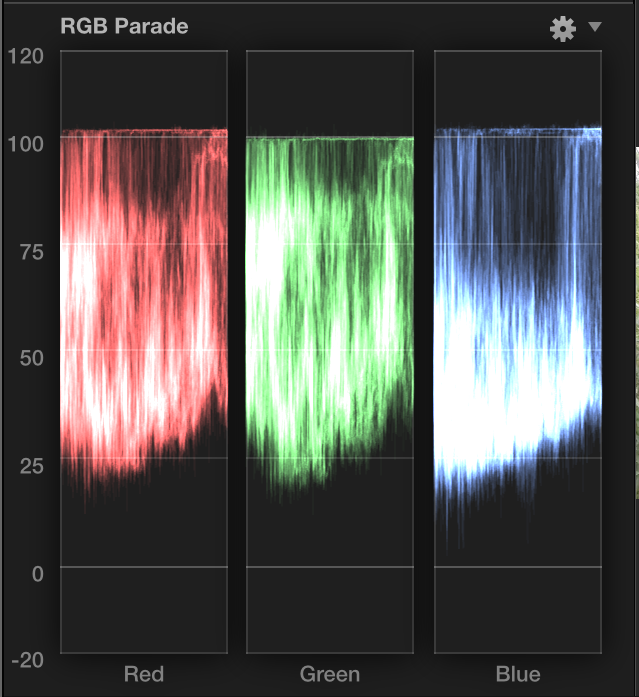
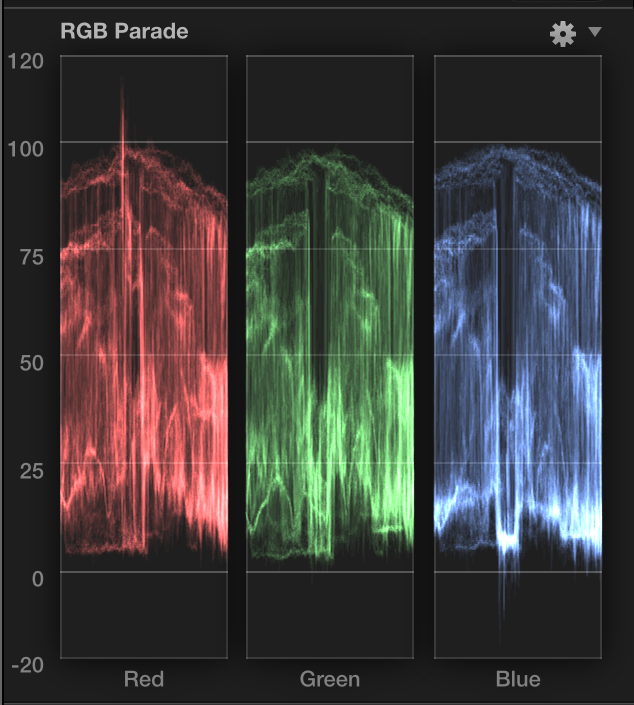
This new project contains clips that are 20 seconds in length. When doing color correction the first part of the clip has for example too many red, and at the end there's less red, see attached RGB parades from the beginning and end of the clip.
How do you solve this to get the same look over the full clip length?
How do you solve this to get the same look over the full clip length?
Please Log in to join the conversation.


23 Aug 2015 19:10 #67674
by dgwvideo
Creating history....one edit at a time !
Replied by dgwvideo on topic Color correcting over time
This can be tricky, especially when dealing with exposure shifts and coloring changes due to lighting or other circumstances. One way to help blend it all would be to blade the clip into sections where the differences occur and then regrade those portions to match. Applying a dissolve between segments of the clip may help to avoid any noticeable change in exposure or color saturation. If you are using a color plugin of some sort, you may be able to key frame some parameters across the clip to reduce the noticeability of the color shifts.
Creating history....one edit at a time !
Please Log in to join the conversation.
24 Aug 2015 16:41 #67691
by Wilfried
Replied by Wilfried on topic Color correcting over time
Bladed clip into two sections, then altered the exposure of first clip -15% of the original, and applied a dissolve between the two clips. The results looks fine to me.
The best part is that you can change the exposure of one clip so it matches the proper or good part of the other clip. After that you can apply another color correction or video effects like nothing happened.
Anyways, thats wat I learned today:)
The best part is that you can change the exposure of one clip so it matches the proper or good part of the other clip. After that you can apply another color correction or video effects like nothing happened.
Anyways, thats wat I learned today:)
Please Log in to join the conversation.

26 Aug 2015 22:38 #67738
by Emmanuel
Replied by Emmanuel on topic Color correcting over time
You can also use a color grading plugin such as HyColour Pro and keyframe it over time.
Please Log in to join the conversation.
- simon.a.billington
-

- Offline
- Elite Member
-

Less
More
- Posts: 179
- Thank you received: 10
04 Sep 2015 10:23 #68008
by simon.a.billington
Replied by simon.a.billington on topic Color correcting over time
Of course you can keyframe FCPX's filters, but they're not as flexible as others.
Please Log in to join the conversation.

04 Sep 2015 11:10 #68012
by BenB
Replied by BenB on topic Color correcting over time
Can't keyframe the Color Correction filter.
Please Log in to join the conversation.
- simon.a.billington
-
- Offline
- Elite Member
-
Less
More
- Posts: 179
- Thank you received: 10
04 Sep 2015 13:17 #68014
by simon.a.billington
Replied by simon.a.billington on topic Color correcting over time
Well there you go then.
I've never actually tried and obviously. I must recall that information incorrectly.
I've never actually tried and obviously. I must recall that information incorrectly.
Please Log in to join the conversation.
- MarkNelsonMovies
-
- Offline
- Elite Member
-
Less
More
- Posts: 256
- Thank you received: 48
05 Sep 2015 18:23 #68072
by MarkNelsonMovies
Replied by MarkNelsonMovies on topic Color correcting over time
If you own motion 5, you can publish the Color Balance, Levels, and/or Channel Mixer filters as a FCPX effect. these filters are keyframe-able and wont cost you anything extra if you already have apple Motion.
Please Log in to join the conversation.
06 Sep 2015 21:52 #68110
by Emmanuel
Replied by Emmanuel on topic Color correcting over time
Never thought of that....... It's so simple though. Not sure why Apple doesn't include it straight into FCPX.
Please Log in to join the conversation.
