


- Posts: 4
- Thank you received: 0
3 Post Moderation Rule for New Boarders (25 Jan 2021)
New boarders will have their posts moderated - Don't worry if you cannot see your post immediately.
FCPX to Logic X XML
- Nicholas Langley
-
 Topic Author
- Offline
- New Member
-

Less
More
12 Aug 2015 18:00 #67379
by Nicholas Langley
FCPX to Logic X XML was created by Nicholas Langley
Hello,
I am having trouble using a FCPXML file to migrate my project into Logic X for sound editing. The issue I am having is that when I open the XML in Logic the timeline are a total mess. All of the audio files are the full length of the media (none of the ins/outs from FCP have been retained) and none of the files are in the correct place on the timeline. It seems to me that none of the meta data is being retained but that is just my guess. I have watched several tutorials online and no one else appears to be having this issue. These videos discuss roles a lot and I feel that I understand how they work but fail to see how they could help with this issue. I'm posting here and in the Logic X forum because I honestly do not know if this is an issue inside FCP or Logic. Does anyone out there have any ideas about this problem?
Thank you!
I am having trouble using a FCPXML file to migrate my project into Logic X for sound editing. The issue I am having is that when I open the XML in Logic the timeline are a total mess. All of the audio files are the full length of the media (none of the ins/outs from FCP have been retained) and none of the files are in the correct place on the timeline. It seems to me that none of the meta data is being retained but that is just my guess. I have watched several tutorials online and no one else appears to be having this issue. These videos discuss roles a lot and I feel that I understand how they work but fail to see how they could help with this issue. I'm posting here and in the Logic X forum because I honestly do not know if this is an issue inside FCP or Logic. Does anyone out there have any ideas about this problem?
Thank you!
Please Log in to join the conversation.

13 Aug 2015 11:46 #67396
by BenB
Replied by BenB on topic FCPX to Logic X XML
Currently, the latest versions of FCPX and LPX are buggy with the XML roundtrip. Maybe one day Apple will decide make it work properly.
Please Log in to join the conversation.
13 Aug 2015 11:55 #67397
by Wildgiles
Replied by Wildgiles on topic FCPX to Logic X XML
"X2Pro Audio Convert" is the only reliable way, the program converts the xml to an AAF file format, which logic loves. I think it costs $150.
Please Log in to join the conversation.
- ronny courtens
-

- Offline
- Moderator
-

Less
More
- Posts: 4455
- Thank you received: 962
13 Aug 2015 15:54 #67402
by ronny courtens
Replied by ronny courtens on topic FCPX to Logic X XML
While I agree with Ben and Wildlgiles, the new FCPX XML actually works pretty well for moving average FCP X projects to Logic Pro X.
There are 2 key factors in this workflow:
1. Roles are imperative. You absolutely need to assign specific Roles to all your different audio sources. If you don't do this, your audio will be spread all over the place.
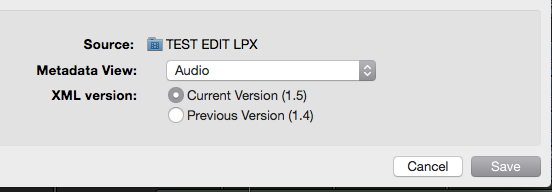
2. It is also very important that when you export the XML, you choose Audio in the Metadata view. This will preserve all audio metadata and all the changes in audio levels you made will be preserved.
As an example, here's a little project in FCP X:
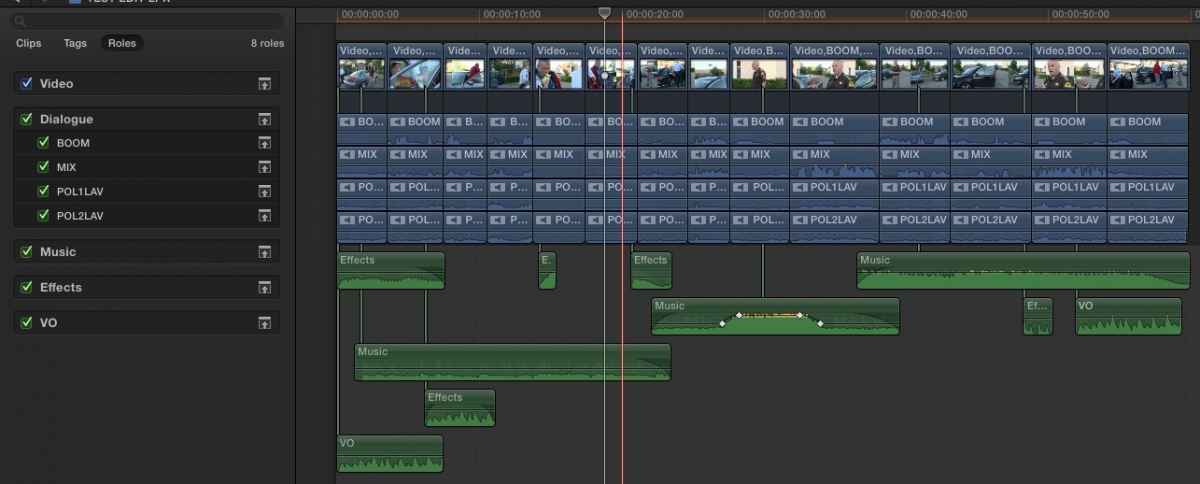
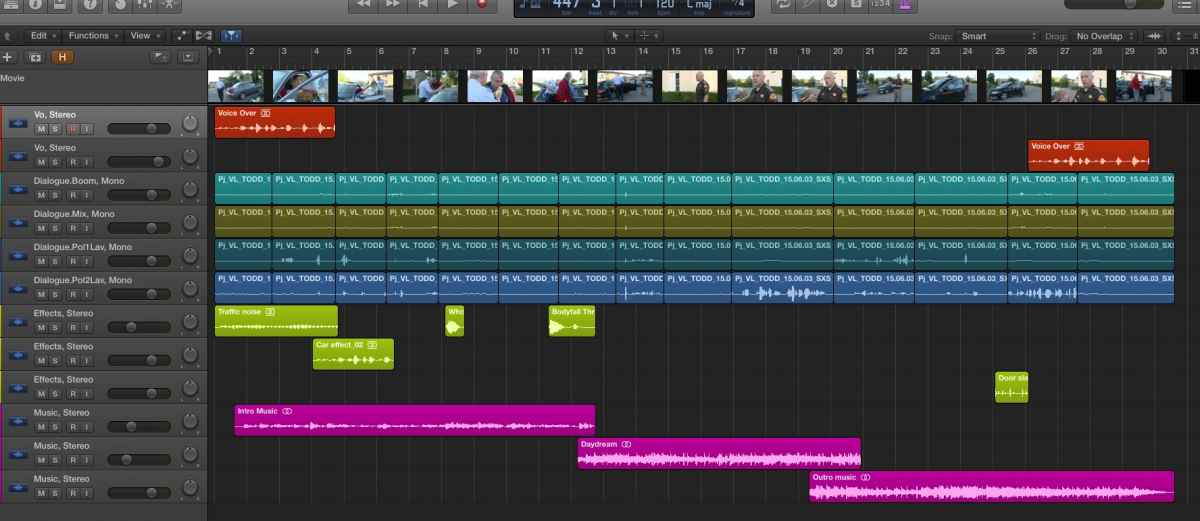
Dialogue audio was recorded via a professional audio mixer into 4 inputs of the camera: 2 lav mics, one boom mic and a premixed signal from the mixer. So I have created 4 Dialogue subroles: POL1 LAV, POL2 LAV, BOOM and MIX.
3 pieces of music were added (Music role), a few audio effects (Effects role) and a voice over (VO role). A very basic audio mix was also done. Now we want to take this project into LPX for further sweetening.
I export an XML, making sure Metadata View is set to Audio:
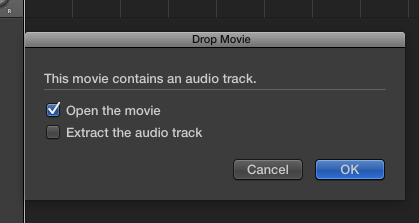
Then I export a reference movie (H.264) and I open the reference movie in LPX without extracting the embedded audio (you also can extract the audio if you want, to check for synch):
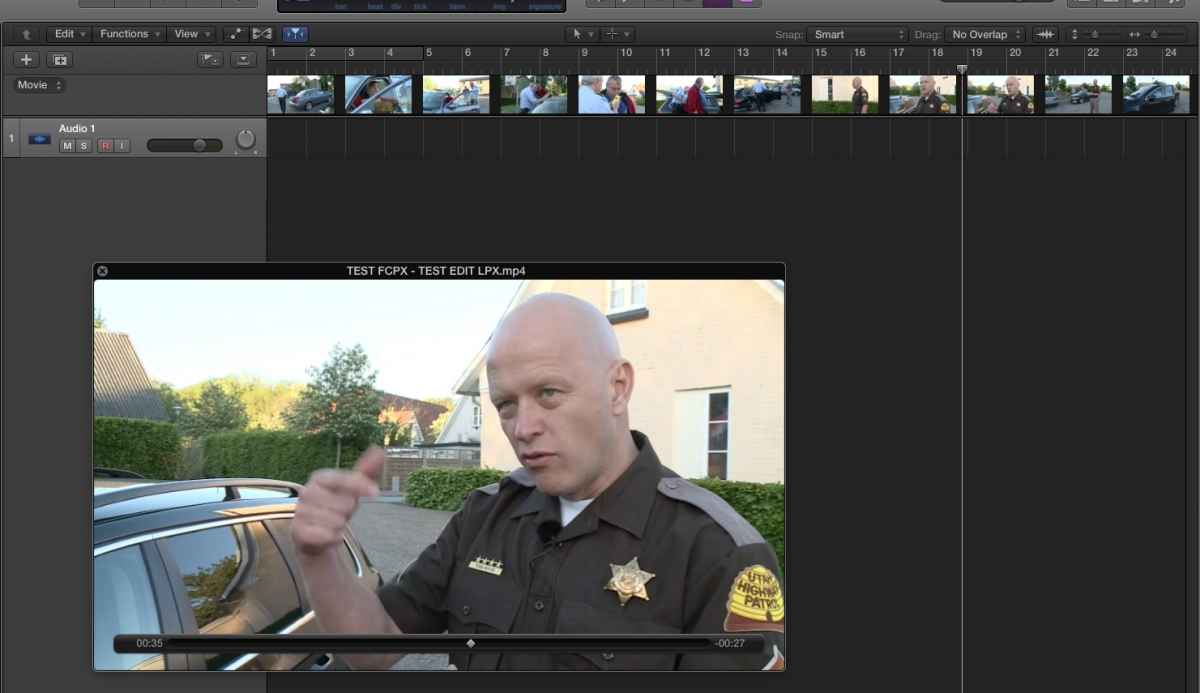
The reference video is opened in Logic Pro X:
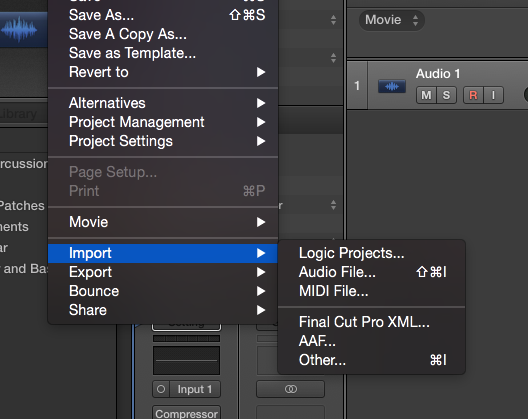
Then I import the Final Cut Pro XML in Logic Pro X:
All my audio is perfectly ordered in LPX, according to the Roles and Subroles I have created, and everything is in synch with the reference video:
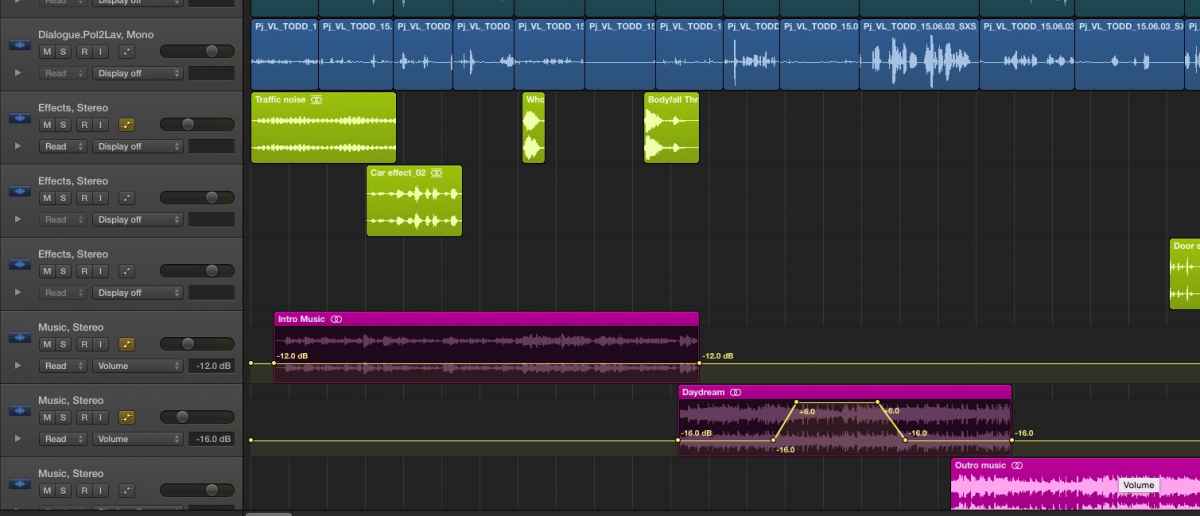
When I show Automation I can see that the audio levels and keyframes I have set in FCP X are also preserved in LPX:
So yes, you can send regular and even fairly complex projects from FCP X to LPX using FCP XML. But I agree that sending an AAF via X2Pro works better, especially for complex audio projects. But you always need to organize your audio with Roles prior to sending it to any DAW, no matter if you are using XML or AAF.
- Ronny
There are 2 key factors in this workflow:
1. Roles are imperative. You absolutely need to assign specific Roles to all your different audio sources. If you don't do this, your audio will be spread all over the place.
2. It is also very important that when you export the XML, you choose Audio in the Metadata view. This will preserve all audio metadata and all the changes in audio levels you made will be preserved.
As an example, here's a little project in FCP X:
Dialogue audio was recorded via a professional audio mixer into 4 inputs of the camera: 2 lav mics, one boom mic and a premixed signal from the mixer. So I have created 4 Dialogue subroles: POL1 LAV, POL2 LAV, BOOM and MIX.
3 pieces of music were added (Music role), a few audio effects (Effects role) and a voice over (VO role). A very basic audio mix was also done. Now we want to take this project into LPX for further sweetening.
I export an XML, making sure Metadata View is set to Audio:
Then I export a reference movie (H.264) and I open the reference movie in LPX without extracting the embedded audio (you also can extract the audio if you want, to check for synch):
The reference video is opened in Logic Pro X:
Then I import the Final Cut Pro XML in Logic Pro X:
All my audio is perfectly ordered in LPX, according to the Roles and Subroles I have created, and everything is in synch with the reference video:
When I show Automation I can see that the audio levels and keyframes I have set in FCP X are also preserved in LPX:
So yes, you can send regular and even fairly complex projects from FCP X to LPX using FCP XML. But I agree that sending an AAF via X2Pro works better, especially for complex audio projects. But you always need to organize your audio with Roles prior to sending it to any DAW, no matter if you are using XML or AAF.
- Ronny
Please Log in to join the conversation.
- DmitriZigany
-
- Offline
- Platinum Member
-

Less
More
- Posts: 730
- Thank you received: 26
14 Aug 2015 00:40 #67412
by DmitriZigany
Replied by DmitriZigany on topic FCPX to Logic X XML
And how do you get it back into FCPX? How's the workflow for that?
(I know nothing about sending audio out to external apps and have never worked with XML. But I had a music studio for 10+ years so I know a thing or two about audio editing/mixing)
(I know nothing about sending audio out to external apps and have never worked with XML. But I had a music studio for 10+ years so I know a thing or two about audio editing/mixing)
Please Log in to join the conversation.
- haysoos123
-
- Offline
- Platinum Member
-
Less
More
- Posts: 402
- Thank you received: 72
14 Aug 2015 01:01 #67413
by haysoos123
Replied by haysoos123 on topic FCPX to Logic X XML
When you're doing with a mix, typically you will get a flattened output of your mix which you would marry to the final picture. This is pretty much your only option if the mixer is using Pro Tools. But, Logic X can export FCPXML to re-import into FCPX, so you also have that option.
Please Log in to join the conversation.
14 Aug 2015 01:05 #67415
by BenB
Replied by BenB on topic FCPX to Logic X XML
And pray it goes back to FCPX correctly. We've had major problems quite often with the XML from FCPX to LPX and back. There are bugs in that system.
Please Log in to join the conversation.
- ronny courtens
-
- Offline
- Moderator
-
Less
More
- Posts: 4455
- Thank you received: 962
14 Aug 2015 04:32 #67416
by ronny courtens
Replied by ronny courtens on topic FCPX to Logic X XML
There are several ways you can get back from LPX to FCP X.
1. Bounce project.
This will export your LPX project to a single mixed down audio file that you can import in FCP X to replace the existing audio. Just drop the file at the start of the timeline and everything will be in synch with your existing video and audio edit. This is the most common option for bringing sweetened audio back into your NLE.
2. Export All Tracks as Audio Files.
This will export each track of the LPX project as a separate audio file (stem). You can import these stems in FCP X and drop them under your existing video and audio edit. All stems start at zero, so they automatically synch up with the existing audio and video. The names of the LPX tracks are preserved. Using this method gives you more flexibility should you need to do last minute changes to your edit.
3. Export FCP XML.
This will export each track of the LPX project as a separate audio file (stem), and it will create an XML file that links to the exported stems. When you import the XML in FCP X, this will create a new Event with all the individual audio stems and a Project. When you open the Project you will see all LPX tracks correctly synched up. You can choose to also export the video (for reference) and to create a compound clip for the audio. It is my experience that, using the latest FCP XML version, this works without any issues for regular projects. Haven't tried this on complex projects yet.
- Ronny
1. Bounce project.
This will export your LPX project to a single mixed down audio file that you can import in FCP X to replace the existing audio. Just drop the file at the start of the timeline and everything will be in synch with your existing video and audio edit. This is the most common option for bringing sweetened audio back into your NLE.
2. Export All Tracks as Audio Files.
This will export each track of the LPX project as a separate audio file (stem). You can import these stems in FCP X and drop them under your existing video and audio edit. All stems start at zero, so they automatically synch up with the existing audio and video. The names of the LPX tracks are preserved. Using this method gives you more flexibility should you need to do last minute changes to your edit.
3. Export FCP XML.
This will export each track of the LPX project as a separate audio file (stem), and it will create an XML file that links to the exported stems. When you import the XML in FCP X, this will create a new Event with all the individual audio stems and a Project. When you open the Project you will see all LPX tracks correctly synched up. You can choose to also export the video (for reference) and to create a compound clip for the audio. It is my experience that, using the latest FCP XML version, this works without any issues for regular projects. Haven't tried this on complex projects yet.
- Ronny
Please Log in to join the conversation.
14 Aug 2015 11:05 - 14 Aug 2015 11:06 #67430
by BenB
Replied by BenB on topic FCPX to Logic X XML
Latest versions? We have issues daily, Ronney. As a composer I'm doing complex stuff, and no, it doesn't go back to FCPX easily, or correctly, on many occasions. Bounce it out and take that AIFF into FCPX, save yourself the headaches.
Last edit: 14 Aug 2015 11:06 by BenB.
Please Log in to join the conversation.

14 Aug 2015 18:53 #67449
by tangierc
Replied by tangierc on topic FCPX to Logic X XML
I have issues hearing my tracks (roles) when importing the FCP X XML into LPX. here's what I posted (and the feedback so far) on Apple forums:
discussions.apple.com/message/28720818?ac_cid=op123456#28720818
I exported an XML from Final Cut Pro X (10.2.1) into Logic Pro X (10.1.1). I properly assigned my roles in FCP X and the XML view (set to audio). All of the tracks show up in LPX just fine and the waveforms are showing. The order is is correct as well. However my dialogue tracks which are different channels in a multichannel audio track in FCP X don't play. Each channel is on a separate track in LPX and that's fine. the data seems to be there, but I hear nothing - only my music track and effects track.
Any ideas.? At first I thought the problem was that the source track is multichannel audio. However when i did another test XML from FCP X to LPX, the first two channels played just fine after import, but the others channels didn't. A third test was using the same audio from a multicam clip but on import to LPX, those same two first channels were greyed out.
discussions.apple.com/message/28720818?ac_cid=op123456#28720818
I exported an XML from Final Cut Pro X (10.2.1) into Logic Pro X (10.1.1). I properly assigned my roles in FCP X and the XML view (set to audio). All of the tracks show up in LPX just fine and the waveforms are showing. The order is is correct as well. However my dialogue tracks which are different channels in a multichannel audio track in FCP X don't play. Each channel is on a separate track in LPX and that's fine. the data seems to be there, but I hear nothing - only my music track and effects track.
Any ideas.? At first I thought the problem was that the source track is multichannel audio. However when i did another test XML from FCP X to LPX, the first two channels played just fine after import, but the others channels didn't. A third test was using the same audio from a multicam clip but on import to LPX, those same two first channels were greyed out.
Please Log in to join the conversation.
21 Aug 2015 15:28 #67641
by VidGreg
Replied by VidGreg on topic FCPX to Logic X XML
Thanks for the write up Ronny.
Like many others I have had issues with FCPX>LPX but was using XML1.4. I also can't say I followed all your advice, so will be interested to see how it works out.
Still, the interaction needs improvement. I hope El Capitan and new versions of FCPX, Motion, Compressor and LPX will provide better workflows. Like the possibilities I think I see in the new APIs, library structure, AV assets management that is coming soon.
Finishing work on a family film with musical base that would have benefitted from smooth integration with LPX. 8 original tunes, instrumentals, old time bluegrass tunes recorded and some scoring work. Recorded mostly in LPX, then exported individual songs, import to FCPX, find needed changes, back to LPX, make changes, re-export/import replace, rinse and repeat as needed.
Would really like an easy roundtrip. Not to mention ability to apply some of LPX inside of FCPX, like mixer, submixes and master channel. A editor can dream, right?
Thanks, Happy Editing
Greg
Like many others I have had issues with FCPX>LPX but was using XML1.4. I also can't say I followed all your advice, so will be interested to see how it works out.
Still, the interaction needs improvement. I hope El Capitan and new versions of FCPX, Motion, Compressor and LPX will provide better workflows. Like the possibilities I think I see in the new APIs, library structure, AV assets management that is coming soon.
Finishing work on a family film with musical base that would have benefitted from smooth integration with LPX. 8 original tunes, instrumentals, old time bluegrass tunes recorded and some scoring work. Recorded mostly in LPX, then exported individual songs, import to FCPX, find needed changes, back to LPX, make changes, re-export/import replace, rinse and repeat as needed.
Would really like an easy roundtrip. Not to mention ability to apply some of LPX inside of FCPX, like mixer, submixes and master channel. A editor can dream, right?
Thanks, Happy Editing
Greg
Please Log in to join the conversation.
21 Aug 2015 19:10 #67643
by BenB
Replied by BenB on topic FCPX to Logic X XML
tangierc, verify what the outputs are assigned to in LPX. I've found anything not stereo going from FCPX to LPX can seriously mess up. I'm a composer who came to video, I was doing the sound side of things before I did the video side. This is back in the 80s and before, but yeah, it can be very buggy when doing serious commercial weight film work. I fight it daily.
Please Log in to join the conversation.
22 Aug 2015 13:39 #67651
by tangierc
Replied by tangierc on topic FCPX to Logic X XML
I tired that, and started another projects as well using XML. Logic crashed and same thing - no audio coming from the dialogue tracks no matter what I do. Even a full reinstall. I don't know what's going on, but I have yet had a chance to fully exploit Logic Pro X because of bugs and issues. I seem to have a better experience when using X2Pro and going to Logic Pro X, but due to deadline constraints I wasn't able to finish in LPX.
My experience so far is that Apple still has a lot of fixing and reliability issues to deal with with LPX.
It's not that I don't want to use ProTools, but I have LPX and my understanding (from others) is that it's perfectly suitable to handle post audio better than FCP X for larger projects.
My experience so far is that Apple still has a lot of fixing and reliability issues to deal with with LPX.
It's not that I don't want to use ProTools, but I have LPX and my understanding (from others) is that it's perfectly suitable to handle post audio better than FCP X for larger projects.
Please Log in to join the conversation.
22 Aug 2015 15:27 #67655
by BenB
Replied by BenB on topic FCPX to Logic X XML
Unfortunately, for heavy lifting X2Pro is the best roundtrip from FCPX to LPX and back. But LPX is capable of doing very serious audio editing and mixing.
I'd like to know what specific track outputs the dialog roles you're not hearing are assigned to in LPX.
I'd like to know what specific track outputs the dialog roles you're not hearing are assigned to in LPX.
Please Log in to join the conversation.
22 Aug 2015 16:04 #67658
by tangierc
Replied by tangierc on topic FCPX to Logic X XML
It's a little disconcerting that X2Pro works and so many have had problems with Apple's implementation of XML between FCP X and LPX; not to say that Apple necessarily always has the best minds at work.
It seem this time it was cause by a crash, but it's happened before right after an import of an XML where certain tracks won't play. And it's always dialogue. It's not consistent that this happens though. I have meticulously checked my roles in FCP X and I am usually very thorough with managing/assigning my roles while working in FCP X.
I've checked whether the tracks are surround or stereo (making them stereo output), they're stereo out, disabled plugins on the tracks in LPX, restarted, reinstalled, etc. The file is there and I can see the wave form in the Track/File viewers below the main work area.
I don't know how dialogue is isolated though. Perhaps it's because the project I have been working on for dialogue is using multichannel interleaved audio. That hasn't been an issue before though since LPX handily just separates the channels to individual tracks and initially plays fine.
Hopefully they'll be an update soon.
It seem this time it was cause by a crash, but it's happened before right after an import of an XML where certain tracks won't play. And it's always dialogue. It's not consistent that this happens though. I have meticulously checked my roles in FCP X and I am usually very thorough with managing/assigning my roles while working in FCP X.
I've checked whether the tracks are surround or stereo (making them stereo output), they're stereo out, disabled plugins on the tracks in LPX, restarted, reinstalled, etc. The file is there and I can see the wave form in the Track/File viewers below the main work area.
I don't know how dialogue is isolated though. Perhaps it's because the project I have been working on for dialogue is using multichannel interleaved audio. That hasn't been an issue before though since LPX handily just separates the channels to individual tracks and initially plays fine.
Hopefully they'll be an update soon.
Please Log in to join the conversation.

22 Aug 2015 17:44 #67659
by freeform
Replied by freeform on topic FCPX to Logic X XML
Without going through your post issues 1 by 1... here's a few things I'd check IN LPX.
+ IF you have tracks that play and others that don't..
try moving the region to a working track to verify that the audio region settings are fine.
+ If the audio file is in a track, you see the waveform but it's grayed out, and you don't hear it...
- make sure the audio region is not muted, select the gray region(s), type'M' and they will un-mute.
- also look at the little 'region' inspector that is in the upper left corner in LPX.
+ make sure the track is not muted or others are not soloed. (check in mixer).
+ Make sure the track Automation is not set to '0 db'. You can turn off track automation in the mixer with the automation popup menu, select 'disable(?)' rather then 'read' etc. Also, select track and type 'A' to view automation envelopes.
+ In the mixer make sure the track is assigned to your main mix 'outputs' ( the same ones that are assigned to tracks that are working).
+ note that I believe all surround and stereo file types will downmix and play out a track that is set to stereo...
R
+ IF you have tracks that play and others that don't..
try moving the region to a working track to verify that the audio region settings are fine.
+ If the audio file is in a track, you see the waveform but it's grayed out, and you don't hear it...
- make sure the audio region is not muted, select the gray region(s), type'M' and they will un-mute.
- also look at the little 'region' inspector that is in the upper left corner in LPX.
+ make sure the track is not muted or others are not soloed. (check in mixer).
+ Make sure the track Automation is not set to '0 db'. You can turn off track automation in the mixer with the automation popup menu, select 'disable(?)' rather then 'read' etc. Also, select track and type 'A' to view automation envelopes.
+ In the mixer make sure the track is assigned to your main mix 'outputs' ( the same ones that are assigned to tracks that are working).
+ note that I believe all surround and stereo file types will downmix and play out a track that is set to stereo...
R
Please Log in to join the conversation.
- valderama85
-
- Offline
- New Member
-
Less
More
- Posts: 2
- Thank you received: 0
01 Jan 2016 22:40 #71880
by valderama85
Replied by valderama85 on topic FCPX to Logic X XML
Hello,
I am having some issues with fcpxml /Logic Pro too.
My clips containing several audio tracks (camera audio + lav mic + directional mic + 1 stereo mic), which are in sync in FCP, display very oddly in Logic after the export->import procedure. The tracks are not synchronized anymore, and some are full-length instead of keeping the region for the clip.
I can't afford to buy X2Pro Audio right now, and wanted to ask the community if there was any other solution to get a proper workflow for audio mixing outside FCP.
Thanks,
Simon.
I am having some issues with fcpxml /Logic Pro too.
My clips containing several audio tracks (camera audio + lav mic + directional mic + 1 stereo mic), which are in sync in FCP, display very oddly in Logic after the export->import procedure. The tracks are not synchronized anymore, and some are full-length instead of keeping the region for the clip.
I can't afford to buy X2Pro Audio right now, and wanted to ask the community if there was any other solution to get a proper workflow for audio mixing outside FCP.
Thanks,
Simon.
Please Log in to join the conversation.
04 Jan 2016 15:23 #71926
by VidGreg
Replied by VidGreg on topic FCPX to Logic X XML
Hi Simon
Just curious if you followed all of the step by step instructions provided by Ronny above.
Did you check the "Metadata View" to "Audio"?
Using Roles is key. Are all the clips properly assigned?
Did you create a reference movie?
Would like to hear from others if this works. Sure hope so.
Would you please provide a screen shot of LPX project?
If timing is the biggest issue, you can always manually sync using time code. PITA I know.
Hope this works out for you (and me)
Hope 2016 sees these issues fixed (improved).
Greg
Just curious if you followed all of the step by step instructions provided by Ronny above.
Did you check the "Metadata View" to "Audio"?
Using Roles is key. Are all the clips properly assigned?
Did you create a reference movie?
Would like to hear from others if this works. Sure hope so.
Would you please provide a screen shot of LPX project?
If timing is the biggest issue, you can always manually sync using time code. PITA I know.
Hope this works out for you (and me)
Hope 2016 sees these issues fixed (improved).
Greg
Please Log in to join the conversation.
- DSvoboda356
-
- Offline
- Premium Member
-

Less
More
- Posts: 109
- Thank you received: 5
04 Jan 2016 23:11 #71936
by DSvoboda356
Replied by DSvoboda356 on topic FCPX to Logic X XML
I have seen this too Simon. A synchronized clip that has camera audio as well as a audio from a separate recorder. When i sue and XML to go to logic the separate audio always plays from the beginning, while camera audio stays in sync. I have both camera audio and synced tagged as dialogue. I have used X2Pro and this issue doesn't occur.
Please Log in to join the conversation.
- valderama85
-
- Offline
- New Member
-
Less
More
- Posts: 2
- Thank you received: 0
05 Jan 2016 21:55 #71977
by valderama85
Replied by valderama85 on topic FCPX to Logic X XML
Thank you for your answers.
Greg, here is a snapshot of my LPX project. It comes from a clip containing only the camera sound and the stereo mic (STE-014).
As you can see, the stereo track starts from its beginning and not from the beginning of the clip.
I did check the metadata to audio when exporting in FCPX, and also tried different role assignation.
The only thing that seems to work, is break apart the clip's components in FCPX (cmd+shif+G) before exporting to xml. That keeps the synchronization in LPX :
Hope it helps, and hope Apple will fix this in future releases.
Cheers
Simon.
Greg, here is a snapshot of my LPX project. It comes from a clip containing only the camera sound and the stereo mic (STE-014).
As you can see, the stereo track starts from its beginning and not from the beginning of the clip.
I did check the metadata to audio when exporting in FCPX, and also tried different role assignation.
The only thing that seems to work, is break apart the clip's components in FCPX (cmd+shif+G) before exporting to xml. That keeps the synchronization in LPX :
Hope it helps, and hope Apple will fix this in future releases.
Cheers
Simon.
Please Log in to join the conversation.
