


- Posts: 2
- Thank you received: 0
3 Post Moderation Rule for New Boarders (25 Jan 2021)
New boarders will have their posts moderated - Don't worry if you cannot see your post immediately.
help with file format
12 Aug 2015 06:57 #67354
by Calaitzis

I have been given some older footage to edit, FCPX isn't liking the format. it shows video but no sound. Quicktime plays both but square not wide screen. vlc plays in the correct aspect.
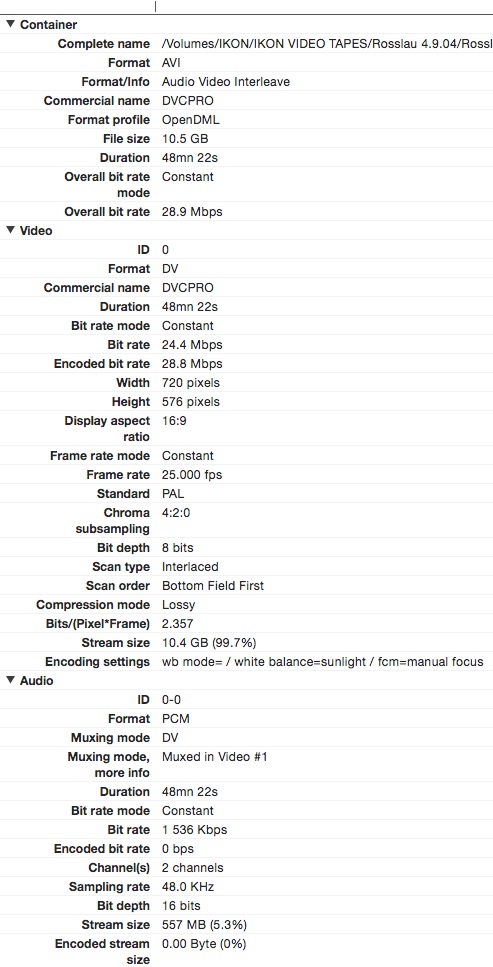
I have attached the readout from Invisor to help id the format.
Any ideas on how to make FCPX play nice with this file?
help with file format was created by Calaitzis
I have been given some older footage to edit, FCPX isn't liking the format. it shows video but no sound. Quicktime plays both but square not wide screen. vlc plays in the correct aspect.
I have attached the readout from Invisor to help id the format.
Any ideas on how to make FCPX play nice with this file?
Please Log in to join the conversation.
- ronny courtens
-

- Offline
- Moderator
-

Less
More
- Posts: 4455
- Thank you received: 962
12 Aug 2015 08:03 - 12 Aug 2015 08:04 #67356
by ronny courtens
Replied by ronny courtens on topic help with file format
Hi Adam, welcome to the forum.
It's DVCPRO wrapped in AVI. It's an outdated combination that FCP X probably won't like.
With QT7Pro or Mpeg Streamclip you should be able to convert the file to ProRes.
- Ronny
It's DVCPRO wrapped in AVI. It's an outdated combination that FCP X probably won't like.
With QT7Pro or Mpeg Streamclip you should be able to convert the file to ProRes.
- Ronny
Last edit: 12 Aug 2015 08:04 by ronny courtens.
Please Log in to join the conversation.

14 Aug 2015 08:42 #67424
by whitemax
Replied by whitemax on topic help with file format
Yup you might need to convert it into ProRes MOV. For converting apps, I don't really like handbrake for quality issues, Streamclip, ffmpeg or imedia converter are recommended.
Please Log in to join the conversation.
15 Aug 2015 04:36 #67454
by Calaitzis
Replied by Calaitzis on topic help with file format
I made a conversion to ProRes with Compressor and made the audio uncompressed, seems to look and work fine, any reason I should not continue on. BTW it turns out there are in fact 3 one hour concerts, with 7 cameras each, so it takes my computer about one hour to convert all 7 cameras for a single concert.
Please Log in to join the conversation.
