


- Posts: 2
- Thank you received: 0
3 Post Moderation Rule for New Boarders (25 Jan 2021)
New boarders will have their posts moderated - Don't worry if you cannot see your post immediately.
how to create spacer or separator in timeline?
11 Aug 2015 11:06 #67313
by Kobe
how to create spacer or separator in timeline? was created by Kobe
Hi
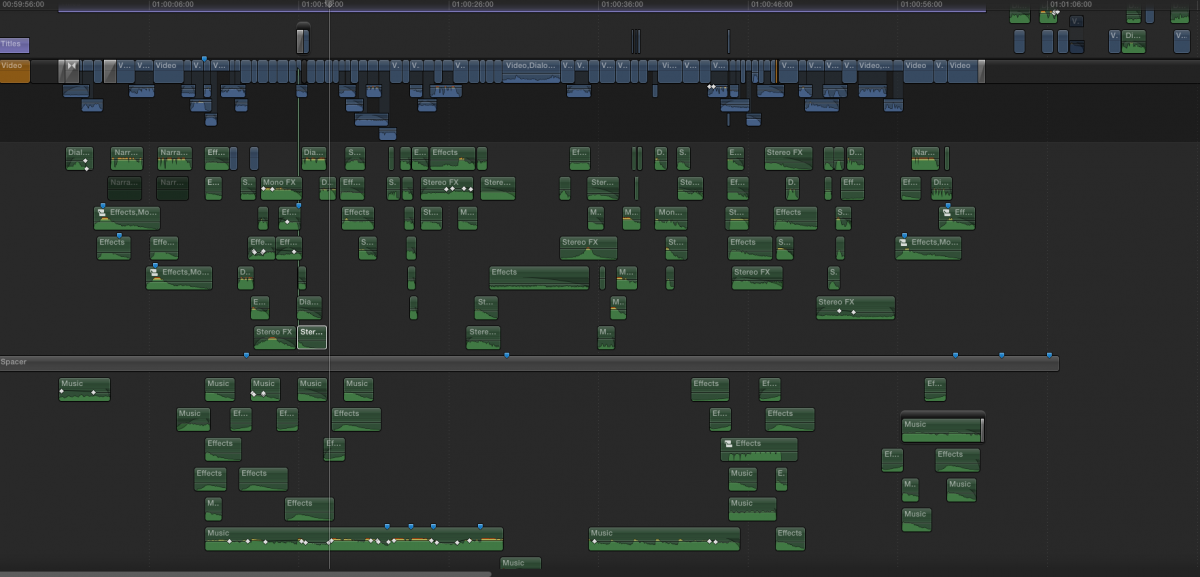
i just read the article "Don't fight with the magnetic Timeline" and I ask myself how to create spacer or separator in the timeline. Like in this picture.
Thank you
i just read the article "Don't fight with the magnetic Timeline" and I ask myself how to create spacer or separator in the timeline. Like in this picture.
Thank you
Please Log in to join the conversation.
- Tom Wolsky
-

- Offline
- Moderator
-

11 Aug 2015 17:46 #67334
by Tom Wolsky
Replied by Tom Wolsky on topic how to create spacer or separator in timeline?
Basically this technique is to completely ignore the capabilities of the application. If you really prefer to use only half the application then begin editing by inserting a gap clip Opt-W on the storyline and dragging it out for as long as you need
Please Log in to join the conversation.
12 Aug 2015 10:53 #67357
by Kobe
Replied by Kobe on topic how to create spacer or separator in timeline?
Thank you for the advice, but how you create the separators or spacers?
Please Log in to join the conversation.
- Tom Wolsky
-
- Offline
- Moderator
-
12 Aug 2015 12:46 #67362
by Tom Wolsky
Replied by Tom Wolsky on topic how to create spacer or separator in timeline?
I told you, use Opt-W to create a gap clip in the primary storyline. Or use the Edit menu.
Please Log in to join the conversation.

12 Aug 2015 14:25 #67365
by Overturf
Replied by Overturf on topic how to create spacer or separator in timeline?
I guess Tom got you wrong here and you mean the horizontal spacers? That's just empty clips, reallly. For example you drag and drop a generator (from the generators tab) below or above your primary storyline. Adjust the lengths and bring the opacity down to 0 and you're done.
Please Log in to join the conversation.

12 Aug 2015 15:03 #67367
by BenB
Replied by BenB on topic how to create spacer or separator in timeline?
Nope, that's a gap clip, just like Tom said. It is just done as a connected clip and made the duration of the Timeline. Tom was right. Gap clips don't need opacity adjusted for this type of work.
Please Log in to join the conversation.
12 Aug 2015 16:06 #67369
by Overturf
Replied by Overturf on topic how to create spacer or separator in timeline?
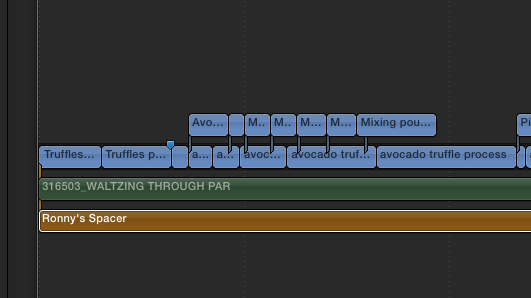
Yes, you're right, it's a gap clip. Pulled below the primary, though, Opt-W won't do that. It says "Spacer" in the clip - how did that word get there?
Please Log in to join the conversation.
- ronny courtens
-

- Offline
- Moderator
-
Less
More
- Posts: 4455
- Thank you received: 962
12 Aug 2015 17:17 #67374
by ronny courtens
Replied by ronny courtens on topic how to create spacer or separator in timeline?
Hey Sebastian,
You can rename any clip or generator in the Inspector > Info tab, and the name will reflect on the clip in the timeline.
- Ronny
You can rename any clip or generator in the Inspector > Info tab, and the name will reflect on the clip in the timeline.
- Ronny
Please Log in to join the conversation.
- Tom Wolsky
-
- Offline
- Moderator
-
12 Aug 2015 17:51 #67377
by Tom Wolsky
Replied by Tom Wolsky on topic how to create spacer or separator in timeline?
You can't rename a gap unfortunately. The other odd thing about the image is the shaded gray color of the spacer. The only way to create that I think of is to put a video clip on the primary and use roles to switch it off, which is a pretty weird way to make a gap, but then the whole technique is pretty weird to me.
Please Log in to join the conversation.
- ronny courtens
-
- Offline
- Moderator
-
Less
More
- Posts: 4455
- Thank you received: 962
12 Aug 2015 18:10 #67381
by ronny courtens
Replied by ronny courtens on topic how to create spacer or separator in timeline?
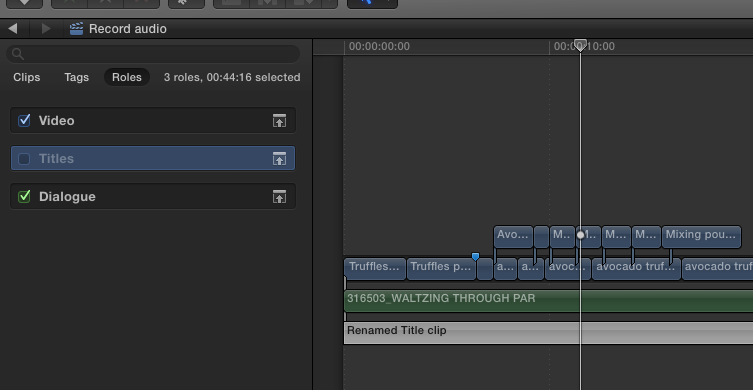
The separator is a title clip that has been renamed in the Inspector, and then the Title role has been disabled in the Timeline Index.
- Ronny
- Ronny
Please Log in to join the conversation.
- Tom Wolsky
-
- Offline
- Moderator
-
12 Aug 2015 18:20 #67382
by Tom Wolsky
Replied by Tom Wolsky on topic how to create spacer or separator in timeline?
Maybe it's just the screen shot, but his spacer looks much darker than than. Doesn't matter. There's something on the primary storyline that's been disabled probably just for demo.
Please Log in to join the conversation.

13 Aug 2015 03:05 #67386
by Wildgiles
Replied by Wildgiles on topic how to create spacer or separator in timeline?
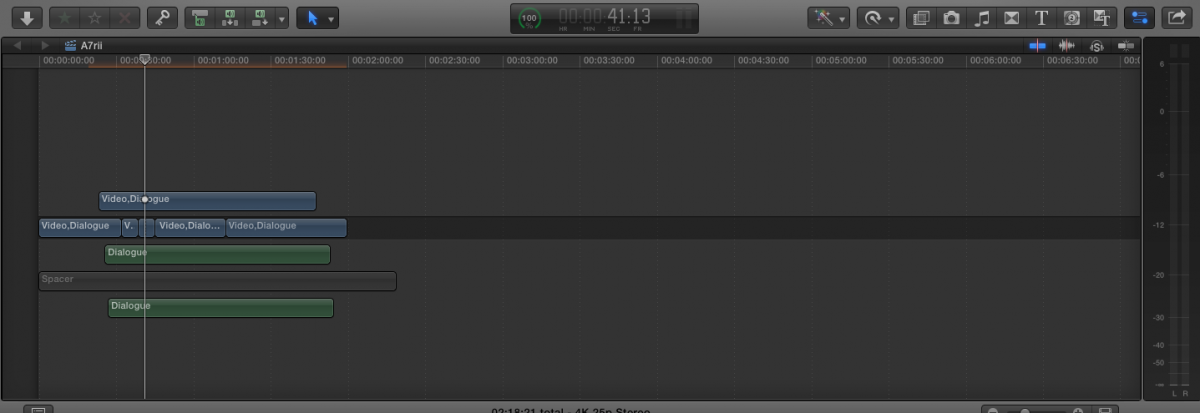
I'm thinking that the spacer is a new role category that was created and the spacer clip could be created from a generator or a title, as it looks like the timeline is only showing the roles name of each clip.
Please Log in to join the conversation.
13 Aug 2015 03:16 #67387
by Wildgiles
Replied by Wildgiles on topic how to create spacer or separator in timeline?
Well it it most likely a Generator(round edges on clip) with the a role category named spacer and the clip has been disabled
Please Log in to join the conversation.

13 Aug 2015 04:08 #67388
by canelson
--
Matias Canelson
www.canelson.us
Replied by canelson on topic how to create spacer or separator in timeline?
Kudos for Wildgiles. It's just that.
--
Matias Canelson
www.canelson.us
Please Log in to join the conversation.
