


- Posts: 102
- Thank you received: 4
3 Post Moderation Rule for New Boarders (25 Jan 2021)
New boarders will have their posts moderated - Don't worry if you cannot see your post immediately.
4k and Canon files can't make multicam????
10 Aug 2015 04:31 #67228
by dfphoto
4k and Canon files can't make multicam???? was created by dfphoto
Hi group, I just bought a Panasonic hc-x1000 4k camera and did a shoot with a 5dmk3 and 70d and now trying to create a multicam clip and my fcpx 10.1 is not making it. Wondering if anyone can explain what is happening. I am also trying a 444 1080 file from the 4k but that's not working either. I'm hoping I'm being dumb here but have had a lot of stress and other issues not been editing in a few months.
Hope one of you can help me. Thanks Dave
Hope one of you can help me. Thanks Dave
Please Log in to join the conversation.
- ronny courtens
-

- Offline
- Moderator
-

Less
More
- Posts: 4455
- Thank you received: 962
10 Aug 2015 07:13 #67229
by ronny courtens
Replied by ronny courtens on topic 4k and Canon files can't make multicam????
Hi Dave,
Let's see if i understand this correctly.
1. You have been shooting video with a hc-1000, a 5dmk3 and a 70d.
2. You have imported all that footage in FCP X.
3. Now you want to create a multicam from the imported clips.
Is that correct?
If so, what exactly does not work when you create the multicam clip?
- Ronny
Let's see if i understand this correctly.
1. You have been shooting video with a hc-1000, a 5dmk3 and a 70d.
2. You have imported all that footage in FCP X.
3. Now you want to create a multicam from the imported clips.
Is that correct?
If so, what exactly does not work when you create the multicam clip?
- Ronny
Please Log in to join the conversation.
10 Aug 2015 15:29 #67262
by dfphoto
Replied by dfphoto on topic 4k and Canon files can't make multicam????
Hi that's it exactly, what happens thus far is when I initially create the multicam I the angle viewer will either show the 2 Canon clips and the hc-x will be black or you will see all three then if you try to play the multicam clip the hc-x will go black.
I am going to try the 444 or a 1080 output. The HC-x creates an MP4.mov file in camera. The file in general plays and edits as normal on the timeline.
Thank you DF
I am going to try the 444 or a 1080 output. The HC-x creates an MP4.mov file in camera. The file in general plays and edits as normal on the timeline.
Thank you DF
Please Log in to join the conversation.
- ronny courtens
-
- Offline
- Moderator
-
Less
More
- Posts: 4455
- Thank you received: 962
10 Aug 2015 15:34 #67263
by ronny courtens
Replied by ronny courtens on topic 4k and Canon files can't make multicam????
What you describe is a playback issue.
Where are the media for the multicam stored? On your system drive or on an external drive?
If it's on an external drive, which brand and model and how it is connected to your Mac?
- Ronny
Where are the media for the multicam stored? On your system drive or on an external drive?
If it's on an external drive, which brand and model and how it is connected to your Mac?
- Ronny
Please Log in to join the conversation.
10 Aug 2015 15:45 #67264
by dfphoto
Replied by dfphoto on topic 4k and Canon files can't make multicam????
I created a 1920 export and imported that file and the muticam worked, I would love to know if anyone is able to mix 4k and HD together as a multicam.
Please Log in to join the conversation.
10 Aug 2015 15:45 #67265
by dfphoto
Replied by dfphoto on topic 4k and Canon files can't make multicam????
I use 2 2 drive raids at 230 mb/s as the project and storage drives
Please Log in to join the conversation.
10 Aug 2015 15:46 #67266
by dfphoto
Replied by dfphoto on topic 4k and Canon files can't make multicam????
Thanks for asking Ronnie
Please Log in to join the conversation.
- ronny courtens
-
- Offline
- Moderator
-
Less
More
- Posts: 4455
- Thank you received: 962
10 Aug 2015 16:58 #67271
by ronny courtens
Replied by ronny courtens on topic 4k and Canon files can't make multicam????
Here's a multicam I have created with a a combination of very different formats and frame rates, including 4K, and there is no problem with it:
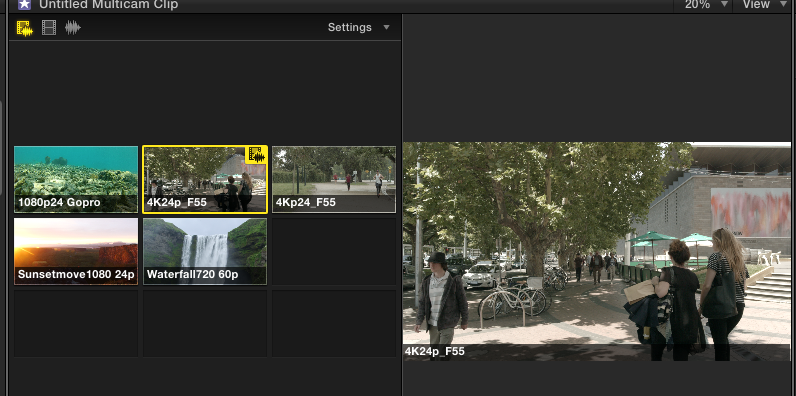
If you get black angles when playing a multicam clip, this usually means that your drive cannot provide sufficient throughput to handle the multicam streams. When this happens, FCP X will show one or more angles as black during playback to enable the other angles to play correctly. The fact that your multicam does seem to work when you convert the 4K clips to 1080HD seems to confirm this. Of course, another factor could be RAM.
You could leave your multicam as it is, combining 4K and 1080p, and create Proxy Media of all your clips so you can edit the multicam in proxy mode. This will put much less strain on your drives. Then you only need to switch back to original mode for export.
- Ronny
If you get black angles when playing a multicam clip, this usually means that your drive cannot provide sufficient throughput to handle the multicam streams. When this happens, FCP X will show one or more angles as black during playback to enable the other angles to play correctly. The fact that your multicam does seem to work when you convert the 4K clips to 1080HD seems to confirm this. Of course, another factor could be RAM.
You could leave your multicam as it is, combining 4K and 1080p, and create Proxy Media of all your clips so you can edit the multicam in proxy mode. This will put much less strain on your drives. Then you only need to switch back to original mode for export.
- Ronny
Please Log in to join the conversation.
10 Aug 2015 17:15 #67274
by dfphoto
Replied by dfphoto on topic 4k and Canon files can't make multicam????
Ok that makes sense as well, I will test this out again but I did try duplicating a 4k clip and making a multicam clip with the 2 4k files and that was no problem.
I'm going to try that with 4 copies and see if I can get a black frame. I just tried another multicam with the starting setting but I made the timeline 4k not HD to see what would happen and I did see all three, once I played the multicam clip I saw an alternating black frame on the 5d and then the 4k maybe your idea is correct. Unfortunately, I'm doing some construction for my GF at the same time it's screwing my thought process on this fcp problem.
I'm going to try that with 4 copies and see if I can get a black frame. I just tried another multicam with the starting setting but I made the timeline 4k not HD to see what would happen and I did see all three, once I played the multicam clip I saw an alternating black frame on the 5d and then the 4k maybe your idea is correct. Unfortunately, I'm doing some construction for my GF at the same time it's screwing my thought process on this fcp problem.
Please Log in to join the conversation.
10 Aug 2015 17:45 #67278
by dfphoto
Replied by dfphoto on topic 4k and Canon files can't make multicam????
RESOLVED!!
I ran a maintenance app I have cleared all the cache restarted created a new library/project/event imported the files (sample of 3) made a 1920 multicam and it worked!
Ronny, can't thank you enough, have to say you're the most generous person on this forum...
Thank you for being a cool guy!
I ran a maintenance app I have cleared all the cache restarted created a new library/project/event imported the files (sample of 3) made a 1920 multicam and it worked!
Ronny, can't thank you enough, have to say you're the most generous person on this forum...
Thank you for being a cool guy!
Please Log in to join the conversation.
