


- Posts: 7
- Thank you received: 0
3 Post Moderation Rule for New Boarders (25 Jan 2021)
New boarders will have their posts moderated - Don't worry if you cannot see your post immediately.
Help with FCPX and DaVinci Resolve Lite roundtrip--getting back into FCPX
05 Aug 2015 15:53 #67152
by Curly
Hello,
Newbie here needing some help with round-tripping from DaVinci back into FCPX, any advice would be wonderful!
Edited project, got into DaVinci pretty much no problem. There were two transitions from FCPX in the footage that didn't read the same in DaVinci, but I figured it would go back to norm when I transitioned back. Graded project, now to put it back into FCPX for some other things.
Exported and saved FCPX xml out of DaVinci as well as rendered clips and projects from DaVinci timeline. Ended up with fcpx.xml and every individual clip from the project in a quicktime folder on my hard drive, pretty much just as every youtube tutorial says.
Upon attempt to import back to FCPX, here is the problem. When I import the xml from DaVinci, the project comes back into the timeline in original color, not one clip is graded. All transitions and setup intact though. I could import every single quicktime clip from DaVinci and rebuild the project (those kept the grading), however there are some formatting quirks with some clips. For example, if I had cropped a clip it shows up as still "cropped", but same size as original with black trim around it representing stuff I had cropped out. Plus, the rendering to import those clips was taking about forever and a half.
What are my options? Where did I go wrong? Any tips or advice would be wonderful, thank you so much!
Newbie here needing some help with round-tripping from DaVinci back into FCPX, any advice would be wonderful!
Edited project, got into DaVinci pretty much no problem. There were two transitions from FCPX in the footage that didn't read the same in DaVinci, but I figured it would go back to norm when I transitioned back. Graded project, now to put it back into FCPX for some other things.
Exported and saved FCPX xml out of DaVinci as well as rendered clips and projects from DaVinci timeline. Ended up with fcpx.xml and every individual clip from the project in a quicktime folder on my hard drive, pretty much just as every youtube tutorial says.
Upon attempt to import back to FCPX, here is the problem. When I import the xml from DaVinci, the project comes back into the timeline in original color, not one clip is graded. All transitions and setup intact though. I could import every single quicktime clip from DaVinci and rebuild the project (those kept the grading), however there are some formatting quirks with some clips. For example, if I had cropped a clip it shows up as still "cropped", but same size as original with black trim around it representing stuff I had cropped out. Plus, the rendering to import those clips was taking about forever and a half.
What are my options? Where did I go wrong? Any tips or advice would be wonderful, thank you so much!
Please Log in to join the conversation.
- ronny courtens
-

- Offline
- Moderator
-

Less
More
- Posts: 4455
- Thank you received: 962
05 Aug 2015 17:50 - 05 Aug 2015 17:51 #67153
by ronny courtens
Replied by ronny courtens on topic Help with FCPX and DaVinci Resolve Lite roundtrip--getting back into FCPX
Hi Aleisha,
In Resolve, did you select the Final Cut Pro XML Round-trip preset to create the XML?
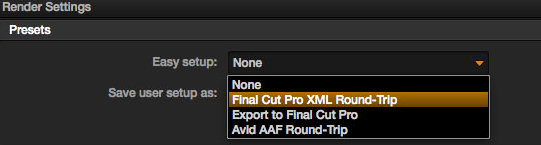
When you do this, Resolve automatically selects or deselects your export options:
- "Render timeline as" is set to ‘Individual Source Clips’.
- "Preserve" is locked to ‘Source Directory Levels’.
- Under ‘Output Settings’, "Render each clip with a unique filename" is checked.
Then you select the entire timeline, you select an output folder, you click "Add Job" and you click "Start Render".
- Resolve will create new clips with the color grades baked in. Each clip is rendered individually to the output folder.
- Resolve also creates a new XML which gets saved in the same folder. It's this XML (inside the output folder) that you need to open in FCP X, so FCP X can use the graded files from Resolve to recreate the timeline.
Please check if al these steps have been followed.
- Ronny
In Resolve, did you select the Final Cut Pro XML Round-trip preset to create the XML?
When you do this, Resolve automatically selects or deselects your export options:
- "Render timeline as" is set to ‘Individual Source Clips’.
- "Preserve" is locked to ‘Source Directory Levels’.
- Under ‘Output Settings’, "Render each clip with a unique filename" is checked.
Then you select the entire timeline, you select an output folder, you click "Add Job" and you click "Start Render".
- Resolve will create new clips with the color grades baked in. Each clip is rendered individually to the output folder.
- Resolve also creates a new XML which gets saved in the same folder. It's this XML (inside the output folder) that you need to open in FCP X, so FCP X can use the graded files from Resolve to recreate the timeline.
Please check if al these steps have been followed.
- Ronny
Last edit: 05 Aug 2015 17:51 by ronny courtens.
Please Log in to join the conversation.
