


- Posts: 190
- Thank you received: 0
3 Post Moderation Rule for New Boarders (25 Jan 2021)
New boarders will have their posts moderated - Don't worry if you cannot see your post immediately.
Change speed of animation?
05 Aug 2015 13:49 #67148
by Seany
Change speed of animation? was created by Seany
How do I vary the speed at which a word moves across a scene?
Please Log in to join the conversation.
- ronny courtens
-

- Offline
- Moderator
-

Less
More
- Posts: 4455
- Thank you received: 962
05 Aug 2015 14:37 - 05 Aug 2015 14:40 #67149
by ronny courtens
Replied by ronny courtens on topic Change speed of animation?
Select the title clip to which you have applied the animation and press CTR+V. This will show the Video Animation for that clip. Inside it you will see the keyframes you have set to make the word move across the scene.
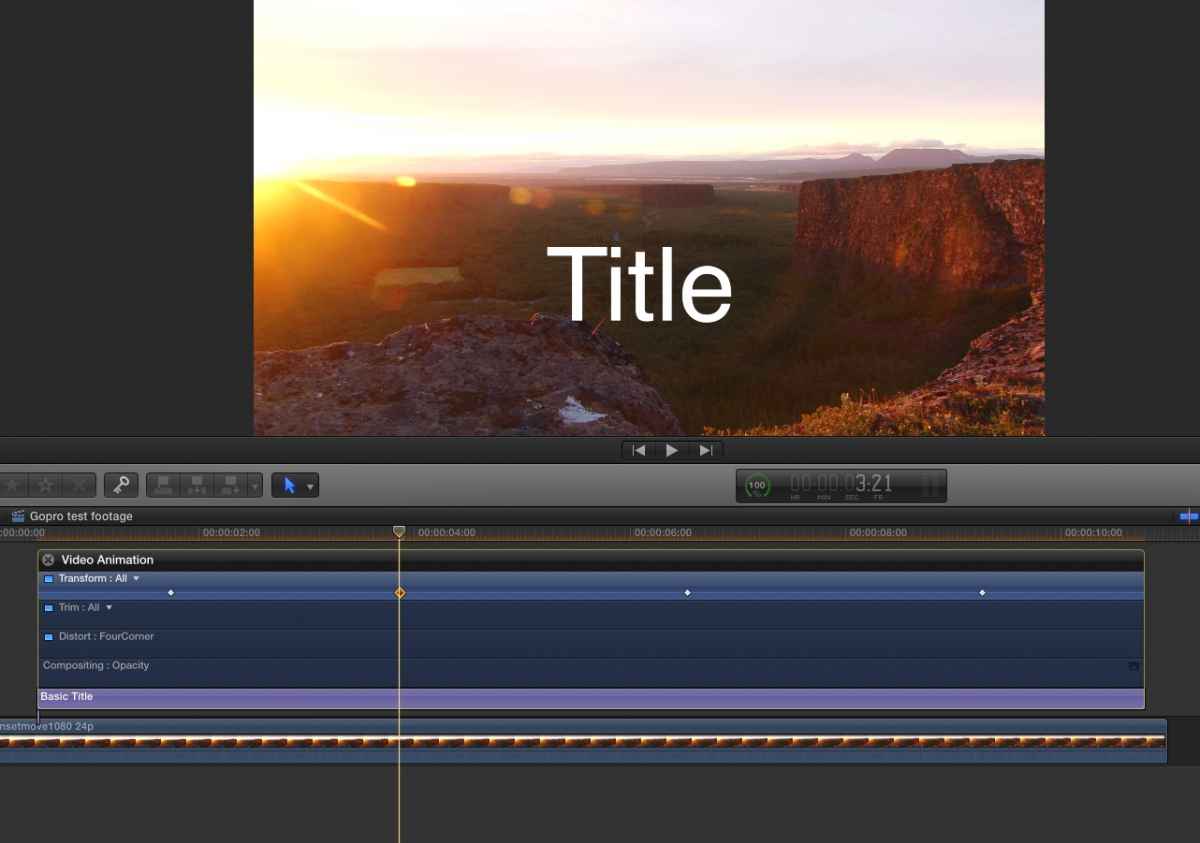
The screenshot shows a title that starts off-screen to the left (1st keyframe), then moves into the center of the frame (second keyframe), stays at the same place for a few seconds (third keyframe) and moves out of the screen to the right (fourth keyframe).
If I want the title to come into the scene slower, I drag the second keyframe to the right.
If I want the title to move out of the screen faster, I drage the fourth keyframe to the left. And so on...
If you want to make your total animation longer, you can make your title clip longer and adjust the keyframes so the animation lasts longer.
- Ronny
The screenshot shows a title that starts off-screen to the left (1st keyframe), then moves into the center of the frame (second keyframe), stays at the same place for a few seconds (third keyframe) and moves out of the screen to the right (fourth keyframe).
If I want the title to come into the scene slower, I drag the second keyframe to the right.
If I want the title to move out of the screen faster, I drage the fourth keyframe to the left. And so on...
If you want to make your total animation longer, you can make your title clip longer and adjust the keyframes so the animation lasts longer.
- Ronny
Last edit: 05 Aug 2015 14:40 by ronny courtens.
Please Log in to join the conversation.
